
1. Product Overview
The Fablestoryem F999L Underground Water Leak Detector is a high-precision instrument designed for locating leaks in various pipeline systems, including outdoor water supply networks, fire pipe systems, indoor hidden water pipes, and underground heating pipes. It utilizes a high-sensitivity sensor to collect sound-wave signals from leaks, which are then analyzed by an intelligent algorithm to pinpoint the leakage source. This device is suitable for different pipe diameters and materials, offering an efficient solution for detecting hidden leaks in pipes and wall seepage without requiring extensive demolition.
Key features of the F999L model include:
- Professional Leak Detection: Suitable for a wide range of scenarios, from municipal water supply inspection to household and factory pipeline maintenance.
- 4-Speed Frequency Adjustment: Offers a continuous frequency adjustment range of 200-3000Hz, allowing users to select the optimal frequency based on environmental conditions and pipe materials for balanced sensitivity and anti-interference.
- High Adaptability: Operates effectively in temperatures ranging from -10℃ to 50℃, accommodating both hot and cold water pipe detection. It features an anti-interference design and a maximum detection depth of 2 meters.
- High Sensitivity with Noise Reduction: Equipped with professional noise reduction headphones that shield environmental interference, providing clear sound quality. Intelligent audio amplification technology filters background noise to capture weak leakage sound-waves for millimeter-level positioning.
- Durable & Portable Design: The main unit weighs approximately 900 grams and is constructed from high-strength aluminum alloy and ABS for durability. It comes with a portable case and backpack for easy transport and outdoor operation.
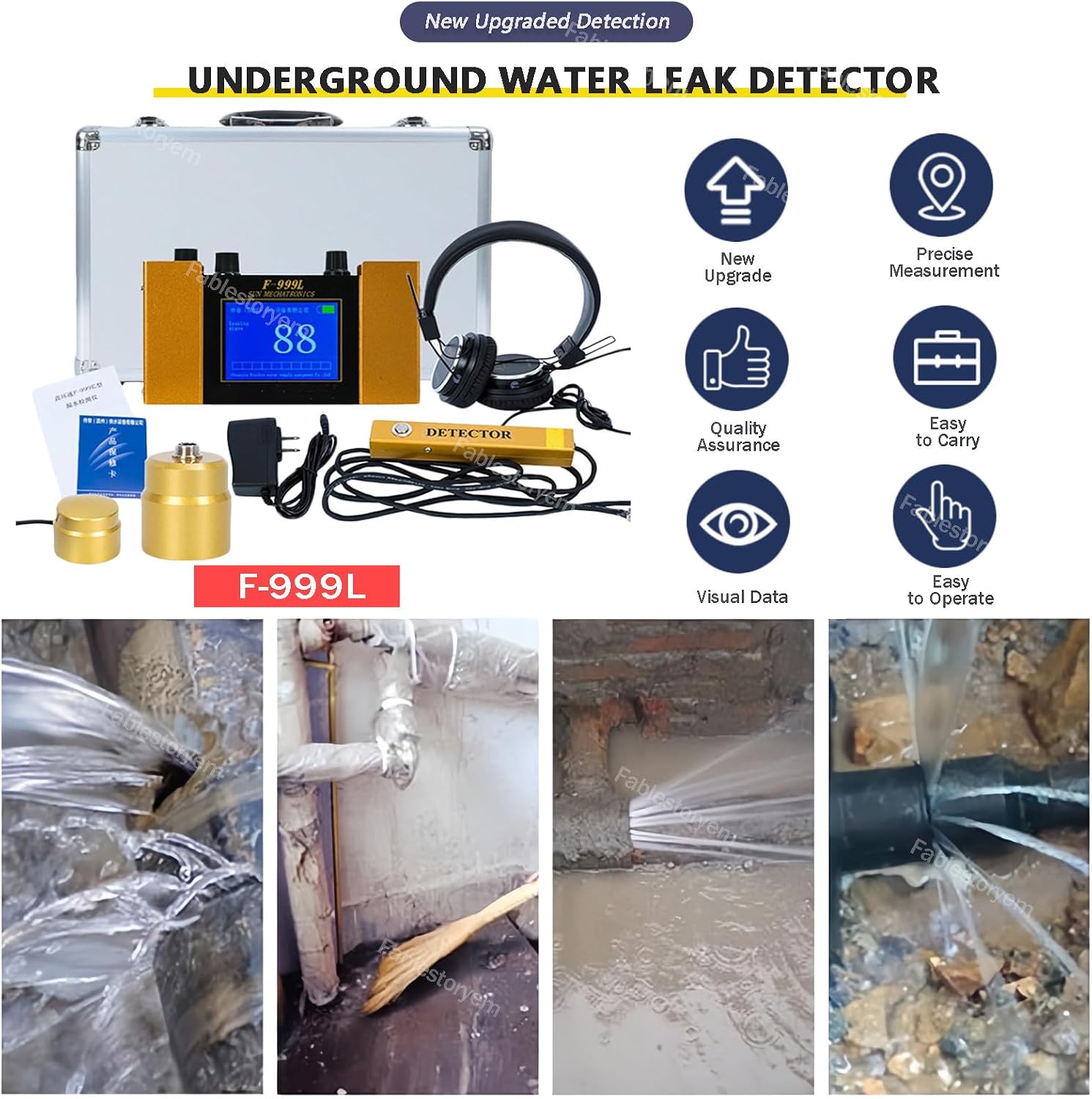
Figure 1: Fablestoryem F999L Underground Water Leak Detector and its key features.
2. Product Components
The F999L detector kit includes the following components:

Figure 2: Packing list for the F999L Underground Water Leak Detector.
- Detection host (main unit)
- Headphones
- Indoor sensor
- Indoor sensor (second unit)
- Sensor handle
- Charger
- Manual
- Warranty card
- Suitcase
2.1 Host Display and Controls
Familiarize yourself with the main unit's display and control knobs:

Figure 3: F-999L Host Display and Control Panel.
- LCD screen: Displays detection data and settings.
- Volume knob and power switch: Turn clockwise to power on and increase volume; turn counter-clockwise to reduce volume and power off.
- Frequency selection knob: Selects the appropriate frequency (1-4 gears) based on the specific detection environment.
- Sensor jack: Connects the detection sensor.
- Headphone jack: Connects the noise reduction headphones.
- Noise reduction switch: Position B activates the noise reduction function; position F turns off noise reduction.
- Screen display sensitivity adjustment knob: Turn clockwise to increase sensitivity; turn counter-clockwise to reduce sensitivity.
- Charging jack: Connects the charger for battery replenishment.
3. Setup Instructions
Follow these steps to prepare your F999L detector for use:
- Unpack Components: Carefully remove all items from the suitcase and verify that all components listed in Section 2 are present.
- Charge the Main Unit: Connect the charger to the charging jack (8) on the main unit and plug it into a power outlet. The charging time is approximately 4 hours. Ensure the device is fully charged before initial use for optimal performance.
- Connect Headphones: Plug the noise reduction headphones into the headphone jack (5) on the main unit.
- Connect Sensor: Attach the desired sensor (indoor sensor or sensor handle) to the sensor jack (4) on the main unit. Ensure a secure connection.
4. Operating Instructions
This section details the steps for operating the F999L leak detector.
4.1 Power On and Volume Adjustment
- To power on the device, turn the Volume knob (2) clockwise. The LCD screen (1) will illuminate.
- Continue turning the Volume knob clockwise to increase the audio output volume in the headphones. Turn counter-clockwise to decrease volume.
4.2 Frequency Selection
- Use the Frequency selection knob (3) to choose one of the 4 available gears. Each gear corresponds to a specific frequency range (200Hz-3000Hz for F999L).
- Experiment with different frequency settings to find the optimal range that best highlights the leak sound while minimizing background noise for your specific detection environment (e.g., pipe material, depth, ambient noise).
4.3 Noise Reduction Function
- To activate the noise reduction feature, slide the Noise reduction switch (6) to position B. This helps filter out ambient sounds and focus on leak-related frequencies.
- To deactivate noise reduction, slide the switch to position F.
4.4 Sensitivity Adjustment
- Adjust the Screen display sensitivity adjustment knob (7) to fine-tune the device's responsiveness to sound signals.
- Turn clockwise to increase sensitivity, allowing the detection of weaker sounds. Turn counter-clockwise to decrease sensitivity, which can be useful in very noisy environments to reduce false positives.
4.5 Using the Sensor Handle (Silencer Switch)

Figure 4: Sensor Handle with Silencer Switch.
- The sensor handle is equipped with a silencer switch. When moving the sensor across a surface, press and hold this button to temporarily mute the sound in the headphones. This prevents loud impact noises from damaging your hearing or causing discomfort.
- Release the button to restore the sound and continue listening for leaks.
4.6 Detection Procedure

Figure 5: Application of the water leak detection instrument in an outdoor setting.
- Place the sensor directly on the surface above the suspected pipeline.
- Listen carefully through the headphones for characteristic leak sounds (e.g., hissing, bubbling, rushing water).
- Move the sensor systematically across the area. The leak sound will typically be loudest directly above the leak point.
- Observe the LCD screen for visual data that may correlate with sound intensity.
- Adjust frequency and sensitivity as needed to isolate the leak sound from background noise.
- Mark the location where the leak sound is strongest for further investigation.
5. Maintenance
Proper maintenance ensures the longevity and reliable performance of your F999L detector.
- Cleaning: Wipe the main unit, sensors, and headphones with a soft, dry cloth after each use. Do not use abrasive cleaners or solvents. Ensure no moisture enters the device's openings.
- Storage: Store the device and all components in the provided suitcase in a cool, dry place, away from direct sunlight and extreme temperatures.
- Battery Care: Recharge the built-in lithium battery regularly, even if the device is not in frequent use, to maintain battery health. Avoid fully discharging the battery for extended periods.
- Sensor Protection: Handle sensors with care to prevent damage. Avoid dropping or subjecting them to strong impacts.
6. Troubleshooting
If you encounter issues with your F999L detector, refer to the following common problems and solutions:
| Problem | Possible Cause | Solution |
|---|---|---|
| No sound or very weak sound in headphones. |
|
|
| Inaccurate or inconsistent detection. |
|
|
| Device fails to power on. |
|
|
7. Specifications (F-999L Model)
The following are the technical specifications for the Fablestoryem F999L Underground Water Leak Detector:

Figure 6: F-999L Product Parameters.
- Product Name: Water Leak Detector
- Product Model: F-999L
- Material: Aluminum alloy / ABS
- Gear: 1-4 Gear (Frequency adjustment)
- Voltage: 9V
- Amplification: 0-100dB adjustable
- Current: 60mA
- Frequency Analysis Width: 200Hz-3000Hz
- Anti-interference Level: 3
- Charging Time: ≤4 hours
- Standby Time: ≥30 hours
- Working Temperature: -10°C ~ +50°C
- Power Supply: Built-in 1000mAh lithium battery
- Kit Size: 40 x 33 x 18cm
- Weight: 4.5kg
- Manufacturer: Fablestoryem
- Part Number: 84888861
8. Warranty and Support
8.1 Warranty Information
This product comes with a standard manufacturer's warranty. Please refer to the warranty card included in your product packaging for specific terms, conditions, and duration of coverage. The warranty typically covers defects in materials and workmanship under normal use.
8.2 Customer Support
For technical assistance, troubleshooting beyond this manual, or warranty claims, please contact Fablestoryem customer support. Contact details can typically be found on the warranty card, product packaging, or the official Fablestoryem website. When contacting support, please have your product model (F999L) and purchase information readily available.