
1. Introduction
Thank you for choosing the Sellrich 8 Core 4G+64G Android Car Stereo. This manual provides essential information for the proper installation, operation, and maintenance of your new car stereo system. Please read this manual thoroughly before use to ensure optimal performance and to prevent damage.
2. Vehicle Compatibility
This Android Car Stereo is designed for specific vehicle models and years. Ensure your vehicle matches the compatibility requirements before installation.
- Compatible Car Models: Chevy Colorado, GMC Canyon (2015, 2016, 2017)
- Note: This unit is compatible with vehicles that originally came with a large screen or Bose Audio system. It is not suitable for vehicles equipped with a small original screen.
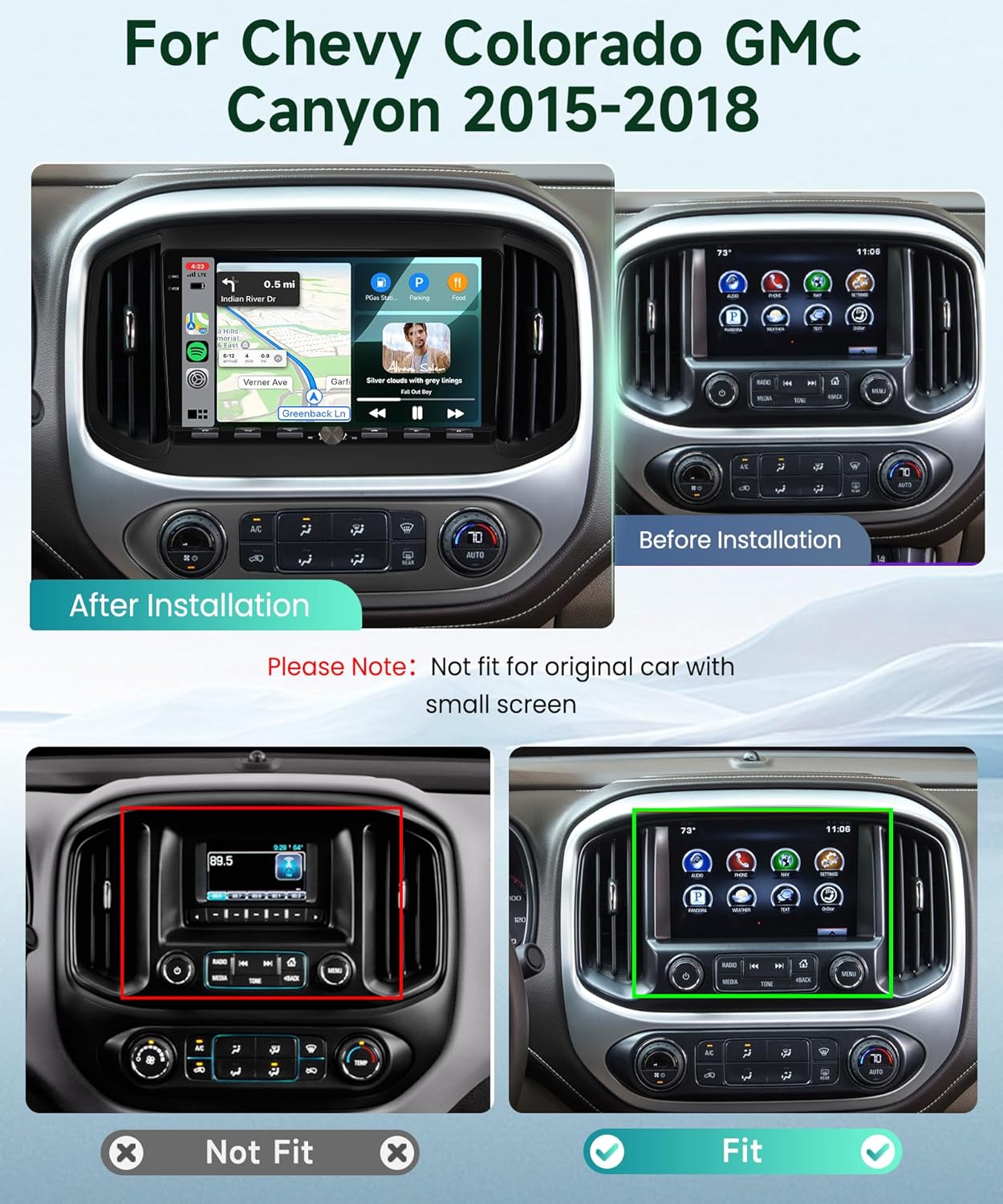
Image: Vehicle compatibility overview. This image illustrates the car stereo installed in a compatible dashboard (After Installation) and shows an incompatible dashboard with a small screen (Not Fit).
3. Package Contents
Verify that all items listed below are included in your package:
- 1 x Android Car Stereo (with frame)
- 1 x AHD Backup Camera
- 1 x Power Cable
- 1 x Canbus Decoder
- 1 x GPS Antenna
- 1 x Rear Camera Input Cable
- 1 x RCA Cable
- 1 x USB Cable
- 1 x Radio Antenna
- 1 x External Microphone
- 1 x Instruction Manual
- Accessories and Installation Tools
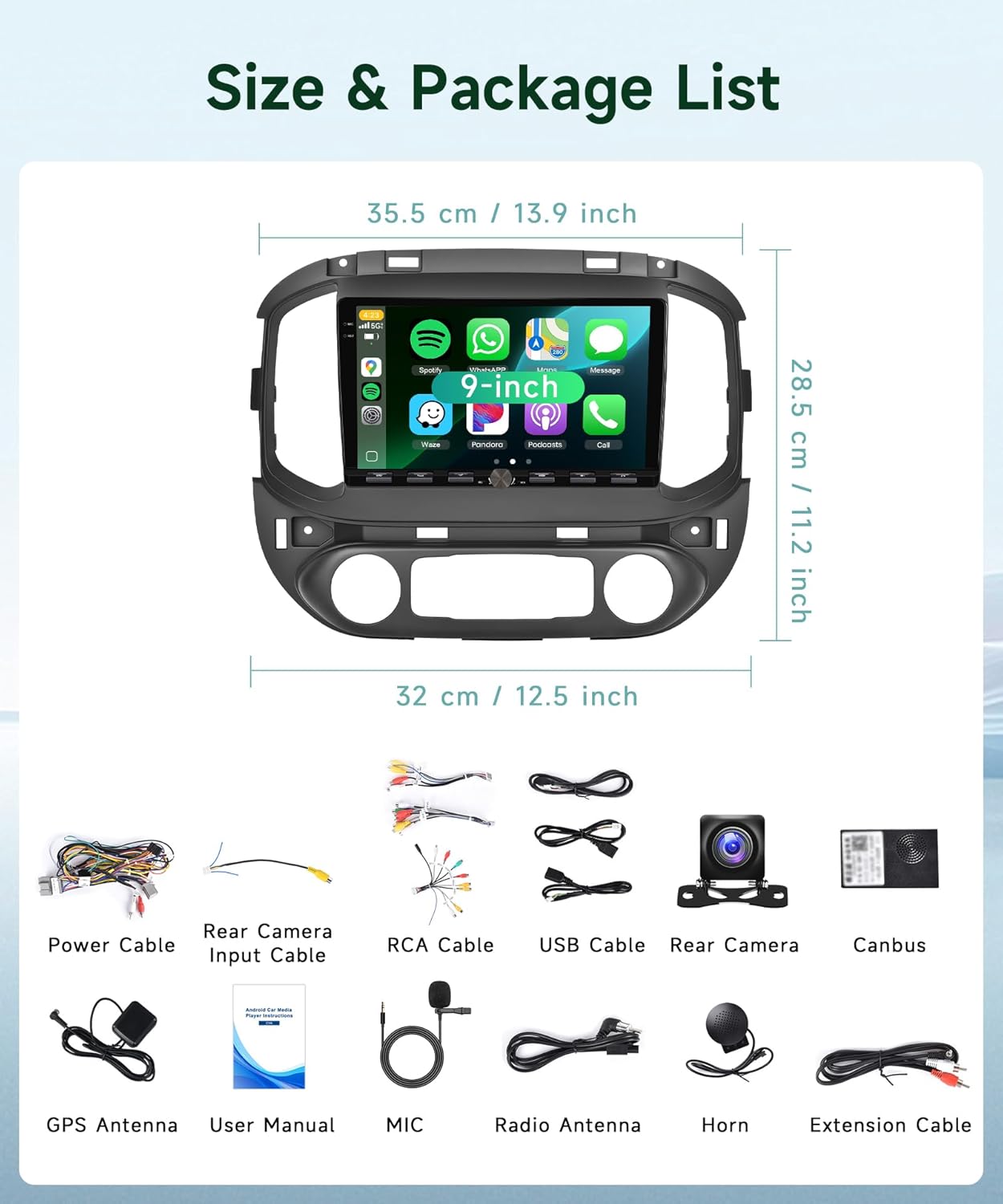
Image: Contents of the package, including the car stereo unit, cables, antennas, microphone, and backup camera.
4. Technical Specifications
| Feature | Specification |
|---|---|
| System | Android 13 |
| CPU | 8-Core Processor |
| Memory (RAM) | 4GB |
| Storage (ROM) | 64GB |
| Screen Size | 9 inches |
| Screen Resolution | 1280*720 IPS |
| Power Output | 4*45W |
| Bluetooth Version | 5.0 |
| Operating Temperature | -20℃ to 75℃ (-4°F to 167°F) |
| Radio Band | FM/RDS |
| Reversing Input | AHD/CVBS |
| Connectivity | 5G WiFi, Bluetooth, USB |
| Maps | Built-in offline maps (requires internet for data download) |
| Audio Formats | APE/FLAC/WAV/MP3/WMA etc. |
| Video Formats | MKV/RMVB/AVI/MP4/MDV etc. |
| Picture Formats | PNG/JPEG/JPG/GIF/WBMP/BNP etc. |
| Factory Setting Keyword | 1234 |
| Item Weight | 4.4 pounds |
| Package Dimensions | 14.57 x 11.02 x 3.54 inches |
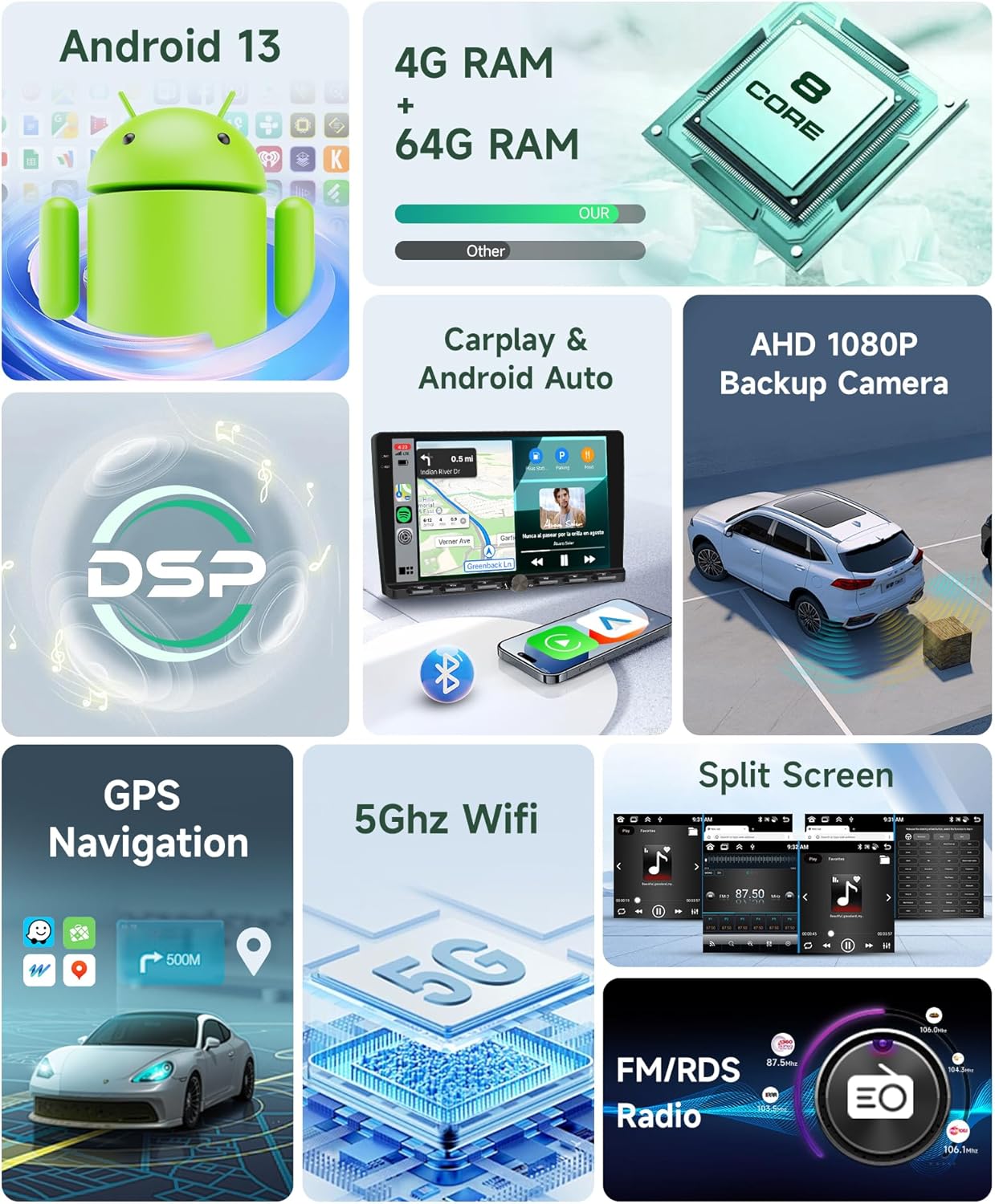
Image: Overview of the Android 13 operating system, memory (RAM/ROM), and 8-core processor.
5. Setup and Installation
The Sellrich Android Car Stereo is designed for plug-and-play installation in compatible vehicles. However, professional installation is recommended to ensure correct wiring and functionality, especially if you are unfamiliar with car audio systems.
5.1 Pre-Installation Checklist
- Ensure the vehicle's ignition is off and the battery is disconnected before starting installation.
- Confirm all package contents are present.
- Review your vehicle's specific dashboard removal and wiring diagrams.
5.2 General Installation Steps
- Carefully remove the original car stereo and dashboard trim.
- Connect the provided Power Cable to the vehicle's wiring harness. The Canbus decoder should be integrated if your vehicle requires it for steering wheel controls or other factory features.
- Connect the GPS Antenna and position it in a location with a clear view of the sky (e.g., on the dashboard).
- Connect the Radio Antenna.
- If installing the AHD Backup Camera, route the Rear Camera Input Cable and power wires to the rear of the vehicle and connect the camera.
- Connect the External Microphone for hands-free calling. Position it near the driver for optimal voice pickup.
- Connect any additional accessories such as USB cables or RCA cables as needed.
- Carefully mount the new Android Car Stereo into the dashboard opening.
- Reconnect the vehicle's battery and test all functions before fully reassembling the dashboard trim.
6. Operating Instructions
This section details the primary functions and features of your Sellrich Android Car Stereo.
6.1 Basic Operation
- Power On/Off: The unit typically powers on with the vehicle's ignition. Long-press the power button (if available) for manual control.
- Touchscreen Interface: Navigate through menus and applications using the 9-inch IPS touchscreen. The 1280*720 resolution provides clear visuals.
- Volume Control: Adjust audio volume using the physical knob or on-screen controls.
- UI Themes: The system offers 63 UI desktop themes. Long-press on a blank space of the homepage to access and change themes.

Image: The 9-inch Full HD Touch Screen with 1280*720 pixel resolution, emphasizing color accuracy, brightness, and contrast.
6.2 Connectivity Features
- Wireless Carplay & Android Auto: Connect your compatible smartphone wirelessly or via USB to access navigation, make calls, send messages, and play music through the car stereo interface. Supports Siri or Google Assistant voice commands.

Image: Display of Wireless Carplay and Android Auto interfaces on the car stereo screen, showing navigation, music, and communication apps.
- Bluetooth 5.0: Pair your mobile phone for hands-free calling and audio streaming. Access your phonebook directly from the stereo.
- Wi-Fi: Connect to a Wi-Fi hotspot (e.g., from your phone) to download apps, stream online content, and update maps.
- Mirror Link: Project your smartphone screen onto the car stereo display for viewing content. Supports both wireless and wired connections.
6.3 Navigation and Multimedia
- GPS Navigation: Utilize the built-in GPS module for navigation. The system comes with pre-installed offline maps, but an internet connection is required to download map data or use online navigation services like Google Maps or Waze.
- FM/RDS Radio: Tune into FM radio stations. The RDS (Radio Data System) feature displays station information, song titles, and traffic updates where available. The unit supports 18 preset radio stations.

Image: User interface for FM/RDS Radio, displaying road conditions, weather, and music. Also shows Bluetooth 5.0 connectivity for stable and rapid response, including hands-free call and music playback.
- DSP (Digital Sound Processor) & EQ: The integrated DSP with 32-band EQ allows for extensive audio customization. Adjust sound fields, balance, fader, and specific frequency bands to optimize your listening experience.

Image: Screenshots of the built-in DSP and 48-band Equalizer interface, showing sound field adjustments and detailed frequency controls for audio customization.
- Split Screen: Run two applications simultaneously on the screen, such as navigation and music playback.
- AHD Backup Camera: When the vehicle is in reverse gear, the display automatically switches to the view from the connected AHD backup camera, providing a clear image for safer parking and maneuvering.
- Steering Wheel Control (SWC): If properly connected via Canbus, you can control basic functions of the stereo (e.g., volume, track skip) directly from your vehicle's steering wheel buttons.
7. Maintenance
Proper care ensures the longevity and optimal performance of your car stereo.
- Cleaning the Screen: Use a soft, lint-free cloth, slightly dampened with water or a screen cleaner, to gently wipe the touchscreen. Avoid abrasive materials or harsh chemicals.
- Software Updates: Periodically check for available software updates through the system settings (requires Wi-Fi connection) to ensure you have the latest features and bug fixes.
- Environmental Conditions: Avoid exposing the unit to extreme temperatures, direct sunlight for prolonged periods, or excessive moisture.
8. Troubleshooting
If you encounter issues with your car stereo, refer to the following common problems and solutions:
| Problem | Possible Solution |
|---|---|
| Unit does not power on. | Check power cable connections and vehicle's fuse. Ensure the battery is properly connected. |
| No sound from speakers. | Verify speaker wiring connections. Check volume levels and mute settings. Ensure the correct audio source is selected. |
| GPS signal is weak or inaccurate. | Ensure the GPS antenna is properly installed and has a clear view of the sky. Check map data download status. |
| Bluetooth connection issues. | Ensure Bluetooth is enabled on both the stereo and your phone. Delete previous pairings and try re-pairing. Restart both devices. |
| Backup camera not displaying. | Check the camera's power and video input cable connections. Ensure the vehicle is in reverse gear. |
| Steering wheel controls not working. | Verify Canbus decoder connection and configuration. Some vehicles may require manual programming of SWC. |
| System is slow or unresponsive. | Close unnecessary background applications. Perform a system restart. If issues persist, a factory reset may be necessary (Factory Setting Keyword: 1234). |
If the problem persists after attempting these solutions, please contact customer support.
9. Warranty and Support
9.1 Product Warranty
This Sellrich Android Car Stereo comes with a 2-year warranty from the date of purchase. This warranty covers manufacturing defects and malfunctions under normal use. It does not cover damage caused by improper installation, misuse, accidents, or unauthorized modifications.
9.2 Customer Support
For technical assistance, warranty claims, or any questions regarding your Sellrich product, please refer to the contact information provided with your purchase documentation or visit the official Sellrich support website. When contacting support, please have your product model and purchase details ready.