
1. Introduction
Welcome to the Alphawolf LPad3A Android 15 Tablet user manual. This guide provides essential information for setting up, operating, maintaining, and troubleshooting your device. Please read it thoroughly to ensure optimal performance and longevity of your tablet.

Image: Alphawolf LPad3A Tablet highlighting its 11-inch display, Android 15 OS, 20GB RAM, 128GB storage, UNISOC T615 CPU, 8000mAh battery, 5MP+13MP cameras, 2.4G/5G WiFi, Widevine L1, Face Recognition, and GPS support.

Image: Visual representation of Android 15 features including enhanced privacy, optimized performance, upgraded user interface, improved multitasking, AI enhancements, and optimized battery life.
2. Package Contents
Upon opening the package, please verify that all items listed below are present and in good condition.
- Alphawolf LPad3A Tablet (x1)
- Type-C USB Cable (x1)
- Charging Adapter (x1)
- User Manual (x1)

Image: Diagram showing the Alphawolf LPad3A tablet, Type-C cable, charging adapter, and user manual included in the package.
3. Device Layout
Familiarize yourself with the physical components and ports of your Alphawolf LPad3A tablet.
- Display: 11-inch FHD IPS screen.
- Rear Camera: Located on the back panel.
- Front Camera: Located on the front bezel above the display.
- Power Button: Used to turn the device on/off or wake/sleep the screen.
- Volume Buttons: Adjust the device's volume.
- Type-C Charging Port: For charging the tablet and data transfer.
- 3.5mm Headphone Jack: For connecting wired headphones.
- Card Slot: For inserting a MicroSD card to expand storage.
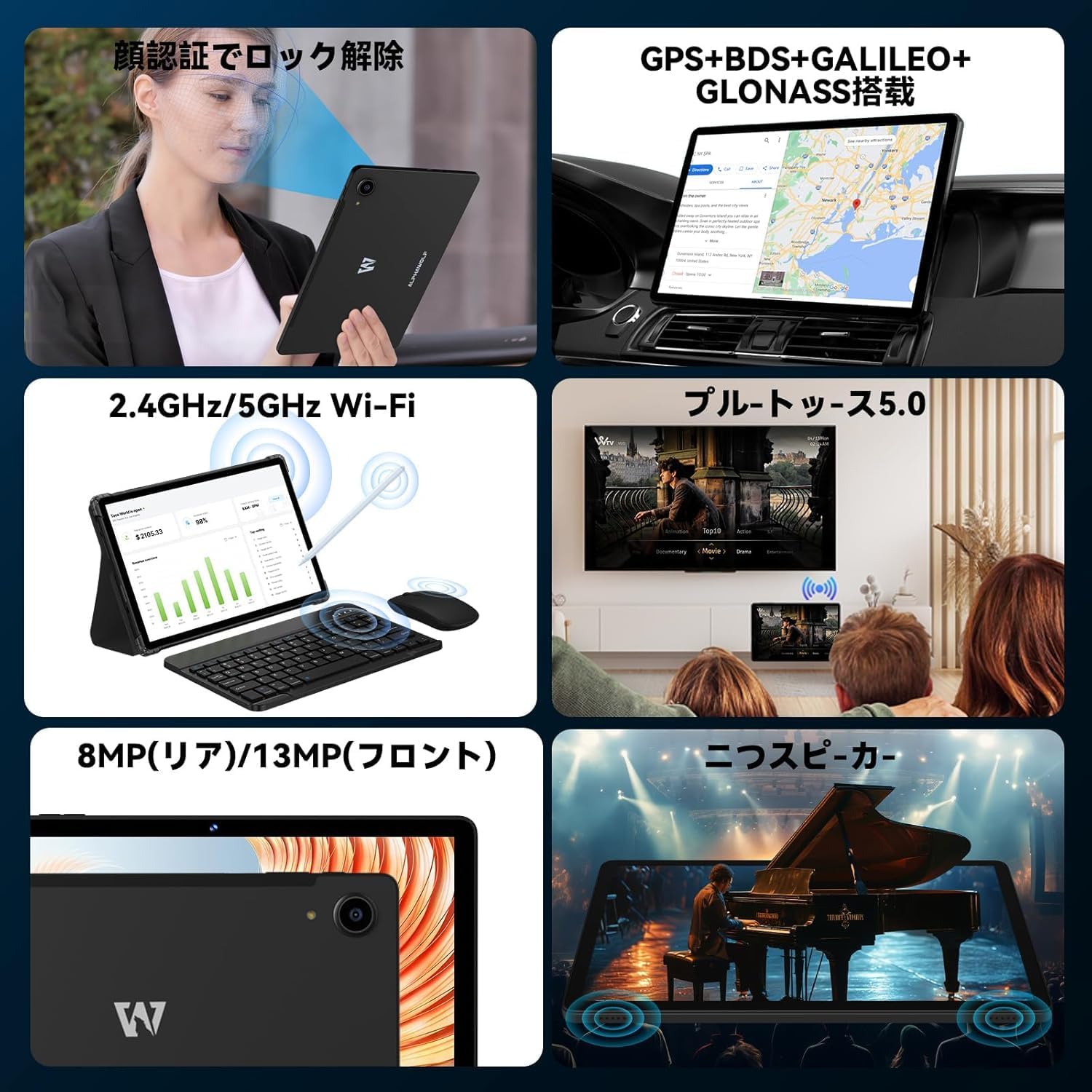
Image: A collage showing the tablet's features including face recognition, GPS, 2.4G/5G WiFi, Bluetooth 5.0, 8MP rear/13MP front cameras, and dual speakers.
4. Setup
4.1 Initial System Update
Upon receiving your LPad3A tablet, it is highly recommended to perform a system update. This ensures you have the latest software and optimal performance.
- Current Build Number: L3A_V1.0_20250612
- Update Procedure: Go to Settings → About tablet → System update → Check for update.
Important Note: Performing this update will automatically restore factory settings. If you do not manually update, the tablet may automatically update when connected to the internet, leading to initialization. This automatic initialization occurs only once after the first update.

Image: A notice in Japanese regarding the recommended system update upon product arrival, specifying the build number and update steps.
4.2 Power On/Off
- To Power On: Press and hold the Power button until the Alphawolf logo appears.
- To Power Off: Press and hold the Power button, then select 'Power off' from the options.
- To Restart: Press and hold the Power button, then select 'Restart' from the options.
4.3 Network Connection (Wi-Fi)
Connect your tablet to a Wi-Fi network for internet access.
- Go to Settings → Network & internet → Wi-Fi.
- Toggle Wi-Fi On.
- Select your desired network from the list.
- Enter the password if prompted, then tap Connect.
4.4 Face Recognition Setup
Set up face recognition for convenient and secure unlocking.
- Go to Settings → Security & privacy → Face unlock.
- Follow the on-screen instructions to register your face.
5. Operating Instructions
5.1 Display Features
The LPad3A features an 11-inch FHD incell display with a resolution of 1920x1200 pixels, offering a wide viewing angle and vibrant colors. It supports Widevine L1 for high-definition streaming on platforms like Netflix, Amazon Prime Video, Disney+, and Hulu.

Image: The tablet display showing vibrant colors and high resolution, emphasizing its 10.95-inch FHD incell screen, 300+ Nits brightness, 1920x1200 resolution, and 16:10 aspect ratio.

Image: A visual demonstrating the 11-inch IPS wide viewing angle, 16:10 aspect ratio, and 1920x1200 high resolution of the tablet's display.
5.2 Performance and Storage
The LPad3A is equipped with a high-performance UNISOC T615 octa-core processor, featuring two A75 cores and six A55 cores for efficient multitasking. It comes with 8GB of physical RAM, expandable virtually by an additional 12GB, totaling 20GB for smooth operation. Internal storage is 128GB, which can be expanded up to 2TB using a MicroSD card (sold separately).

Image: A graphic illustrating the UNISOC T615 octa-core processor, highlighting its A75 and A55 cores, 12nm process, and suitability for gaming.

Image: A visual showing the 20GB (8GB + 12GB virtual) RAM and 128GB internal storage, with an arrow indicating 2TB expandable storage via MicroSD card.

Image: A graphic demonstrating the storage capacity, indicating approximately 249,300 photos, 29,700 short videos, and 450,000 music files can be stored with 128GB ROM and 2TB expansion.
5.3 Camera Usage
The tablet features a 13MP rear camera and a 5MP front camera, suitable for capturing moments and video calls.
- Rear Camera: 13 Megapixels for general photography.
- Front Camera: 5 Megapixels for selfies and video conferencing.

Image: A close-up of the tablet's rear camera and examples of photos taken with the front camera, indicating 13MP back camera and 5MP front camera.
5.4 Battery Management
The LPad3A is equipped with an 8000mAh large-capacity battery, providing extended usage time. It supports Type-C charging.
- Charging: Use the provided Type-C cable and charging adapter.
- Battery Life: Offers up to 700-800 hours of standby time.

Image: A visual emphasizing the 8000mAh battery capacity and Type-C charging port, with a tablet displaying a charging animation.

Image: A graphic detailing the 8000mAh large capacity battery, Type-C charging, 5V/2A power, and 3.5mm audio jack.
5.5 Connectivity
The tablet supports various connectivity options for versatile use.
- Wi-Fi: Supports 2.4G and 5G Wi-Fi for fast and stable internet connections.
- Bluetooth 5.0: For connecting wireless accessories like headphones and keyboards.
- GPS: Integrated GPS, BDS, GALILEO, and GLONASS for accurate navigation.
- Wireless Projection: Allows mirroring your tablet screen to compatible displays.
- OTG (On-The-Go): Supports connecting USB devices such as flash drives or external keyboards.

Image: A collage illustrating split-screen functionality, 2.4G/5G WiFi connectivity, face recognition, and wireless projection to a TV.
5.6 Parental Controls (Google Kids Space)
The tablet is compatible with Google Kids Space, allowing parents to manage screen time, monitor app usage, remotely lock the device, and track its location for a safe digital environment for children.

Image: A child using the tablet with Google Kids Space interface, demonstrating parental control features for healthy child development.
6. Maintenance
6.1 Cleaning
To keep your tablet clean and functional:
- Use a soft, lint-free cloth to wipe the screen and body.
- Avoid using harsh chemicals, abrasive cleaners, or aerosol sprays.
- Ensure the device is powered off and unplugged before cleaning.
6.2 Storage
When not in use, store your tablet in a cool, dry place away from direct sunlight and extreme temperatures. Avoid placing heavy objects on the tablet.
7. Troubleshooting
7.1 Common Issues
- Tablet not turning on: Ensure the battery is charged. Connect the charger and wait a few minutes before attempting to power on again.
- Screen unresponsive: Try restarting the tablet. If the issue persists, perform a factory reset (note: this will erase all data).
- Wi-Fi connection issues: Check if other devices can connect to the Wi-Fi network. Restart your router and the tablet. Ensure the Wi-Fi password is correct.
- Slow performance: Close unnecessary background applications. Clear cache and temporary files. Consider uninstalling unused apps.
7.2 Contact Support
If you encounter issues that cannot be resolved with the troubleshooting steps, please contact Alphawolf customer support.
- Contact Method: Via your Amazon account.
- Steps: Go to "Your Amazon Account" → "Your Orders" → "Select the relevant order" → "Order Details" → "Seller" → "Ask a question".
8. Specifications
| Brand | Alphawolf |
| Model Name | LPad3A |
| Operating System | Android 15 |
| Display Size | 11 inches |
| Display Resolution | 1920 x 1200 pixels (FHD IPS) |
| Processor | UNISOC T615 Octa-core |
| RAM | 20GB (8GB physical + 12GB virtual) |
| Internal Storage | 128GB |
| Expandable Storage | Up to 2TB via MicroSD card (sold separately) |
| Battery Capacity | 8000mAh |
| Front Camera | 5MP |
| Rear Camera | 13MP |
| Connectivity | Wi-Fi (2.4G/5G), Bluetooth 5.0, GPS (GPS+BDS+GALILEO+GLONASS) |
| Ports | Type-C, 3.5mm Headphone Jack |
| Dimensions | 29.3 x 20 x 5.3 cm |
| Weight | 950 g |
9. Warranty and Support
Your Alphawolf LPad3A tablet comes with a 1-year quality warranty from the date of purchase. In case of initial defects or any issues during use, please contact our customer support.
- Warranty Coverage: Free repair or exchange for product defects within one year.
- Repair Center: A dedicated repair center is available in Tokyo for prompt after-sales service.


Image: Icons representing 24-hour support, Amazon FBA shipping, Japanese repair center with free repair, and 365-day free warranty.