
1. Introduction
Thank you for choosing the Olgeo M5 Portable Tire Inflator. This compact and powerful device is designed for convenient and efficient inflation of various items, including car tires, motorcycle tires, bicycle tires, and sports balls. Featuring a digital pressure gauge, multiple inflation modes, and an integrated LED light, the M5 ensures accurate and safe inflation wherever you go. Please read this manual thoroughly before use to ensure proper operation and to maximize the lifespan of your device.
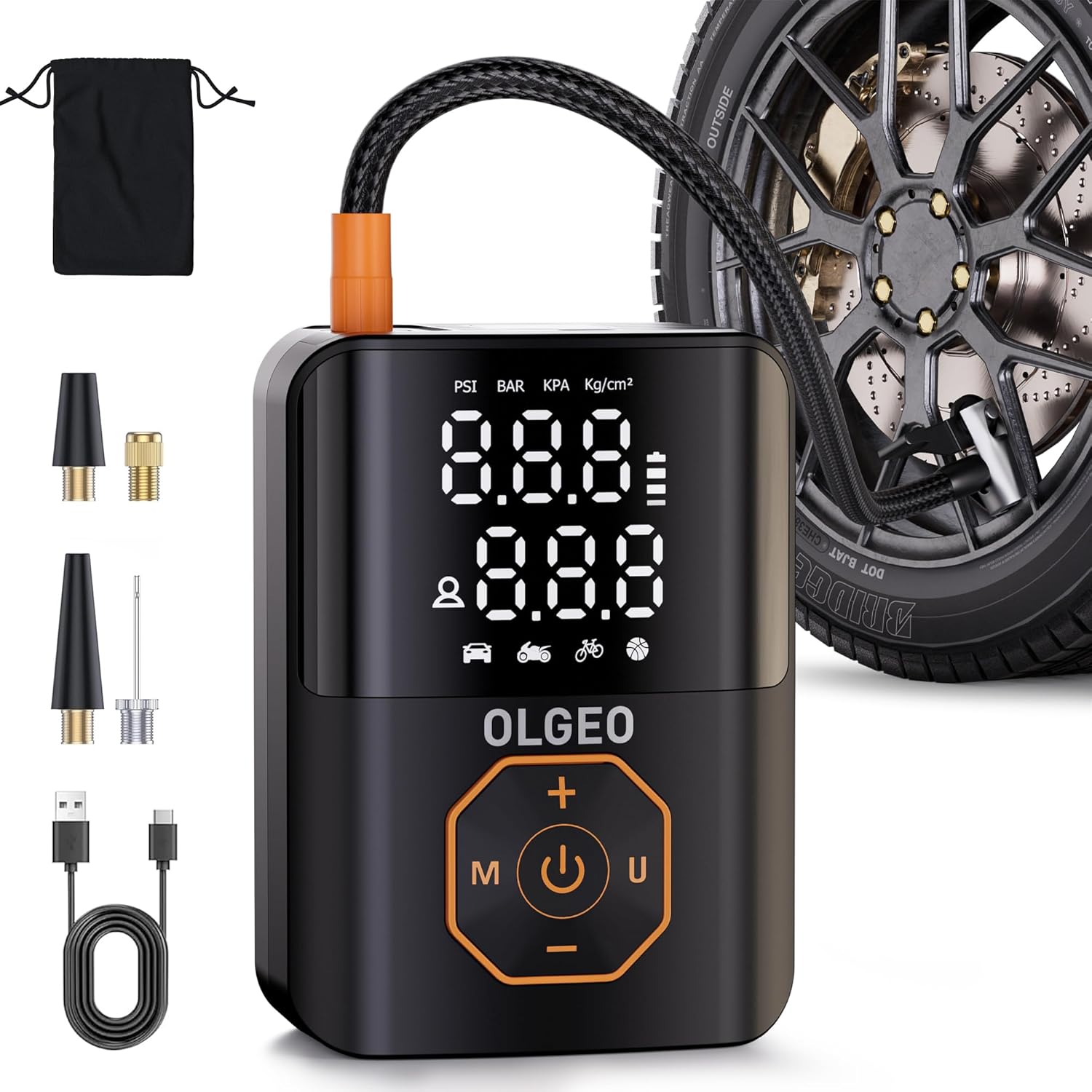
Image 1.1: Olgeo M5 Portable Tire Inflator and included accessories.
2. Package Contents
Verify that all items are present in the package:

Image 2.1: Visual representation of package contents.
- Olgeo M5 Portable Tire Inflator x1
- Air Hose x1
- Atmospheric Nozzle (Long Tapered Nozzle) x1
- Stingy Mouthpiece (Short Tapered Nozzle) x1
- French Adapter (Presta Valve Adapter) x1
- Ball Needle x1
- USB-C Charging Cable x1
- Storage Bag x1
- User Manual x1
3. Product Overview
The Olgeo M5 is engineered for performance and portability. It features a high-efficiency motor for rapid inflation, a clear digital display for real-time pressure monitoring, and a robust battery for extended use.

Image 3.1: Key features of the Olgeo M5 Tire Inflator.
Key Features:
- High-Efficiency Inflation: Inflates a standard car tire (195/65/R15 from 28 PSI to 35 PSI) in less than 1 minute.
- Digital Pressure Gauge: Advanced smart chip with a 3.4-inch LCD screen displays real-time and preset pressure values with an accuracy of ±1%.
- 5+N Inflation Modes: Preset modes for Car, Motorcycle, Bicycle, and Ball, plus a manual mode (3-160 PSI) for custom pressure settings.
- Automatic Shut-off: Automatically stops inflation once the preset pressure is reached, preventing over-inflation.
- Large Battery Capacity: Provides continuous operation for up to 1 hour on a full charge.
- Portable & Compact: Designed for easy carrying and storage, similar in size to a soda can.
- Emergency LED Light: Built-in light for visibility during nighttime use or emergencies, with normal and SOS modes.

Image 3.2: The compact and portable design of the Olgeo M5.
4. Specifications
| Model Name | M5 |
| Brand | Olgeo |
| Maximum Pressure | 160 PSI |
| Air Flow Capacity | 36 Liters Per Minute |
| Power Source | Battery Powered (Lithium Polymer) |
| Battery Type | Lithium Polymer |
| Charging Time | 3-4 hours (approx.) |
| Continuous Use Time | Up to 1 hour |
| Item Weight | 410 g |
| Dimensions | 16.1 x 13.3 x 6.2 cm (Parcel Dimensions) |
| Special Features | Digital Pressure Gauge, LED Light, 5+N Inflation Modes, Dual Display Screen, Automatic Shut-off |
5. Setup
5.1 Initial Charging
Before first use, fully charge the Olgeo M5. Connect the provided USB-C charging cable to the charging port on the device and plug the other end into a compatible USB power adapter (5V 2A recommended, not included). The battery indicator on the display will show charging status. A full charge typically takes 3 to 4 hours.
5.2 Attaching the Air Hose
Screw the air hose securely into the inflation port at the top of the device. Ensure it is tightened to prevent air leakage during operation.
6. Operating Instructions
Follow these steps for safe and effective inflation:

Image 6.1: Easy-to-use steps for inflation.
- Power On: Press and hold the power button (U) for 3 seconds to turn on the device. The LCD screen will illuminate.
- Connect to Item: Attach the appropriate nozzle to the air hose, then securely connect the nozzle to the valve stem of the item you wish to inflate. The display will show the current pressure.
- Select Inflation Mode: Press the 'M' button to cycle through the preset modes: Car, Motorcycle, Bicycle, Ball, and Manual. Each mode has a default pressure range.
- Adjust Pressure (Optional): Use the '+' and '-' buttons to increase or decrease the target pressure. The device supports a range of 3-160 PSI.
- Select Pressure Unit: Press the 'U' button briefly to switch between pressure units: PSI, KPa, BAR, and KG/CM².
- Start Inflation: Press the power button (U) to begin inflation. The device will automatically stop when the preset pressure is reached.
- Stop Inflation: To manually stop inflation, press the power button (U) again.
- Disconnect: Carefully disconnect the nozzle from the valve stem. A small amount of air may escape, which is normal.
- Power Off: Press and hold the power button (U) for 3 seconds to turn off the device. It will also automatically power off after a period of inactivity.
6.1 Preset Inflation Modes and Recommended Ranges

Image 6.2: Recommended pressure ranges for various inflation modes.
- Car Mode: Recommended range 26-42 PSI.
- Motorcycle Mode: Recommended range 26-43 PSI.
- Bicycle Mode: Recommended range 30-145 PSI.
- Ball Mode: Recommended range 7-14 PSI.
- Manual Mode: Allows setting pressure from 3-160 PSI.
6.2 LED Light Function
The Olgeo M5 includes an integrated LED light for use in low-light conditions or emergencies.

Image 6.3: The Olgeo M5's LED light in use.
- To turn on the LED light, press the light button (usually a dedicated button or a long press of a specific button, refer to device markings if different from power button).
- Cycle through modes (Normal, SOS, Off) by pressing the light button repeatedly.
7. Charging
When the battery level is low, the battery indicator on the display will show a low charge warning. To charge the device:
- Connect the USB-C charging cable to the charging port on the inflator.
- Plug the other end of the USB-C cable into a standard USB power adapter (e.g., phone charger, car USB port, power bank).
- The battery icon on the display will animate to indicate charging.
- Once fully charged, the battery icon will show a full charge, and the animation will stop. Disconnect the charger.
It is recommended to fully charge the device every 3-6 months if not in regular use to maintain battery health.
8. Safety Precautions
- Do not leave the inflator unattended while operating.
- Keep out of reach of children.
- Do not overinflate items. Always refer to the manufacturer's recommended pressure.
- Avoid prolonged continuous operation. Allow the device to cool down after 10-15 minutes of continuous use to prevent overheating.
- Do not operate the inflator near flammable liquids or gases.
- Store the device in a dry, cool place away from direct sunlight and extreme temperatures.
- Do not disassemble or attempt to repair the device yourself. Contact customer support for assistance.
- Ensure the air hose connection is secure before starting inflation to prevent accidental detachment.
9. Maintenance
- Cleaning: Wipe the exterior of the inflator with a soft, damp cloth. Do not use harsh chemicals or abrasive cleaners.
- Storage: Store the inflator and its accessories in the provided storage bag to protect them from dust and damage. Ensure the device is fully charged before long-term storage.
- Battery Care: To prolong battery life, avoid completely draining the battery frequently. Recharge when the low battery indicator appears.
10. Troubleshooting
| Problem | Possible Cause | Solution |
|---|---|---|
| Device does not turn on. | Low battery. | Charge the device fully. |
| Inflator not inflating. | Air hose not securely connected. Nozzle not properly attached to valve. Target pressure already reached. | Ensure all connections are tight. Check the current pressure reading. Increase target pressure if needed. |
| Inaccurate pressure reading. | Loose connection. Sensor malfunction. | Ensure connections are secure. If problem persists, contact customer support. |
| Device overheats and shuts off. | Prolonged continuous use. | Allow the device to cool down for at least 15-20 minutes before resuming use. |
11. Warranty and Support
Olgeo provides 2 years of product quality maintenance and technical support for the M5 Portable Tire Inflator. If you encounter any issues or have questions regarding your product, please contact our customer support team. Please retain your proof of purchase for warranty claims.