
1. Introduction
This manual provides detailed instructions for the safe and effective use of your Huepar Laser Rangefinder S100G-BT. Please read this manual thoroughly before operating the device and keep it for future reference. The Huepar S100G-BT is a precision laser distance meter designed for accurate measurements in various applications.
2. Safety Information
WARNING: LASER RADIATION
This product is a Class 2 laser product. Do not stare into the laser beam. Do not intentionally direct the laser beam at other people or reflective surfaces. Avoid direct eye exposure. Use of controls or adjustments or performance of procedures other than those specified herein may result in hazardous radiation exposure.
- Always operate the device in a safe manner.
- Keep the device out of reach of children.
- Do not attempt to modify or disassemble the device.
- Use only specified batteries and power sources.
3. Package Contents
Verify that all items are present in your package:
- Huepar Laser Rangefinder S100G-BT
- Rechargeable Ni-Mh Battery (Included)
- USB Type-C Charging Cable
- User Manual
- Protective Pouch
4. Product Overview
Familiarize yourself with the display and keyboard functions of your Huepar S100G-BT.
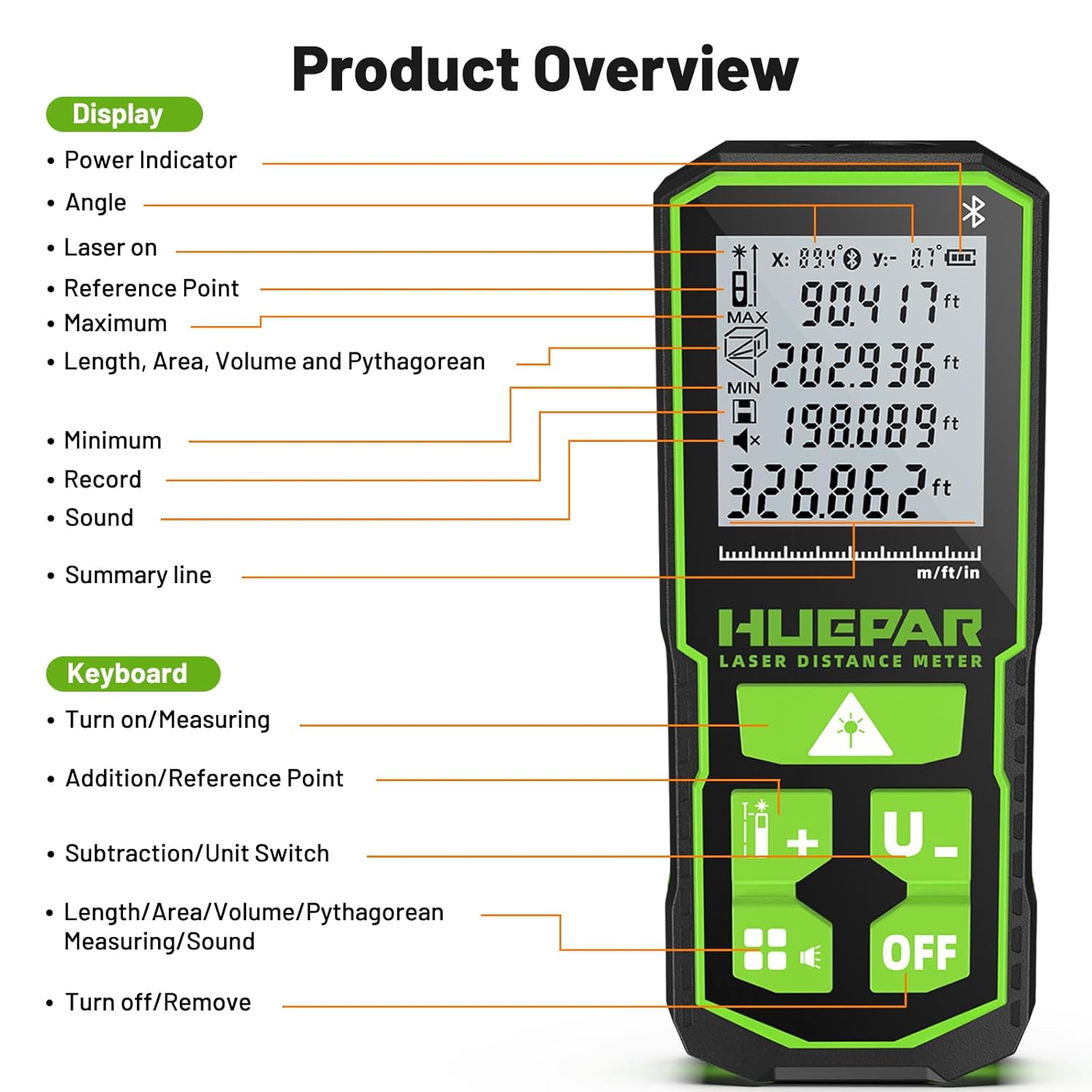
Image: Detailed view of the Huepar S100G-BT, highlighting its display elements and keyboard buttons.
Display Elements:
- Power Indicator: Shows battery level.
- Angle: Displays vertical and horizontal angles.
- Laser On: Indicates when the laser is active.
- Reference Point: Shows the measurement origin (front, rear, or tripod).
- Maximum/Minimum: Displays maximum and minimum measurements in continuous mode.
- Length, Area, Volume, Pythagorean: Icons for different measurement modes.
- Record: Indicates measurement history.
- Sound: Indicates sound status (on/off).
- Summary Line: Displays current measurement results.
Keyboard Functions:
- Turn on/Measuring Button: Powers on the device and initiates measurements.
- Addition/Reference Point Button: Adds measurements or changes the reference point.
- Subtraction/Unit Switch Button: Subtracts measurements or changes measurement units.
- Length/Area/Volume/Pythagorean Measuring/Sound Button: Cycles through measurement modes and controls sound.
- Turn off/Remove Button: Powers off the device or clears the last measurement.
5. Setup
5.1 Power Methods
The Huepar S100G-BT offers flexible power options:

Image: Illustration of the three power methods: rechargeable Ni-Mh battery compartment, Type-C charging port, and AA battery slot.
- Rechargeable Ni-Mh Battery: The device comes with an included rechargeable Ni-Mh battery. Insert it into the battery compartment as indicated.
- Type-C Port: You can directly charge the device using the Type-C port. This allows for direct input charging even without the Ni-Mh batteries installed.
- AA Battery: For additional power flexibility, the device can also be powered by AA batteries (not included).
A charging indicator on the display will show the charging status.
5.2 Connecting to Your Phone (Bluetooth)
The Huepar S100G-BT features Smart Bluetooth Connect, allowing you to measure data with your phone.

Image: A hand holding a smartphone showing the Huepar app interface, connected to the laser rangefinder via Bluetooth, displaying measurement data.
Follow these steps to connect your device:

Image: A visual guide illustrating six steps to connect the Huepar laser measuring tool to a smartphone application.
- Download Huepar App: Search for and download the "Huepar" application from your phone's app store.
- Turn on Bluetooth: Enable Bluetooth on your smartphone.
- Turn on the Laser Measuring Tool: Power on your Huepar S100G-BT.
- Open Huepar App and Allow Permissions: Launch the Huepar app and grant any necessary permissions, such as location access.
- Click Add Device: Within the app, navigate to the device connection section and select "Add Device."
- Measure: Once connected, you can use the app to view measurements and control certain functions of the laser measuring tool.
6. Operating Instructions
6.1 Basic Measurement
To perform a basic distance measurement:
- Turn on the device by pressing the power button.
- Ensure the correct reference point is selected (front, rear, or tripod).
- Aim the laser at the target point.
- Press the measuring button to take a single measurement. The result will be displayed on the screen.
6.2 Multiple Measuring Modes
The Huepar S100G-BT supports various measurement modes for different applications:

Image: A grid of nine diagrams demonstrating different measurement modes such as distance, addition/subtraction, area, volume, and various Pythagorean height calculations.
- Distance Measuring: Measures the linear distance between two points.
- Addition and Subtraction: Allows adding or subtracting multiple distance measurements.
- Area Measuring: Calculates the area of a rectangular space by measuring two sides.
- Volume Measuring: Calculates the volume of a space by measuring length, width, and height.
- Measuring Height with Pythagorean (1, 2, 3, 4): Utilizes the Pythagorean theorem to calculate inaccessible heights or distances.
- Continuous Measurement: Provides real-time distance updates as you move the device, useful for finding maximum and minimum distances.
Press the mode button to cycle through these measurement functions.
6.3 Real-time Electronic Angle Sensor
The device features a real-time electronic angle sensor, displaying both vertical (X) and horizontal (Y) angles.

Image: The Huepar S100G-BT in use, showing its display with real-time electronic angle sensor readings for both X (vertical) and Y (horizontal) angles.
This feature is useful for leveling, determining slopes, and performing indirect measurements.
6.4 High Accuracy
The Huepar S100G-BT provides high measurement accuracy.

Image: An illustration highlighting the ±1/16 inch accuracy of the Huepar S100G-BT and demonstrating the use of three different reference points for measurement.
- Accuracy: The device offers an accuracy of ±1/16 inch.
- Reference Points: Measurements can be taken from three different reference points: the front edge, the rear edge, or from a tripod mount, ensuring versatility for various tasks.
7. Maintenance
Proper maintenance ensures the longevity and accuracy of your device:
- Cleaning: Use a soft, damp cloth to clean the device. Do not use abrasive cleaners or solvents. Clean the laser lens gently with a soft cloth, similar to cleaning camera lenses.
- Storage: Store the device in its protective pouch in a dry, cool place when not in use. Avoid extreme temperatures and direct sunlight.
- Battery Care: If the device will not be used for an extended period, remove the AA batteries (if used) to prevent leakage. Recharge the Ni-Mh battery periodically to maintain its health.
- Avoid Impact: Protect the device from drops and impacts, which can affect its calibration and functionality.
8. Troubleshooting
If you encounter issues with your Huepar S100G-BT, refer to the following common problems and solutions:
| Problem | Possible Cause | Solution |
|---|---|---|
| Device does not turn on | Low or depleted battery; Incorrect battery insertion | Charge the Ni-Mh battery or replace AA batteries. Ensure batteries are inserted with correct polarity. |
| Inaccurate measurements | Unstable surface; Obstruction in laser path; Incorrect reference point | Ensure a stable measurement surface. Clear any obstructions. Verify the correct reference point is selected. |
| Bluetooth connection fails | Bluetooth off on phone/device; App not updated; Device out of range | Ensure Bluetooth is enabled on both devices. Update the Huepar app. Bring the device closer to your phone. Restart both devices. |
| Display not working | Extreme temperature; Device malfunction | Move the device to a suitable operating temperature. If the problem persists, contact customer support. |
If these solutions do not resolve the issue, please contact Huepar customer support for further assistance.
9. Specifications
| Feature | Specification |
|---|---|
| Brand | Huepar |
| Model | S100G-BT |
| Accuracy | ±1/16 inch |
| Color | Black |
| Material | Polycarbonate (PC) |
| Power Methods | Rechargeable Ni-Mh Battery (Included), Type-C Port, AA Battery (Not Included) |
| Connectivity | Bluetooth |
| Laser Class | Class 2 |
10. Multiple Applications
The Huepar S100G-BT is a versatile tool suitable for a wide range of applications:

Image: A collage of nine scenarios demonstrating the practical applications of the Huepar laser rangefinder, including construction, home renovation, and DIY tasks.
- Distance Measuring: For quick and accurate linear measurements.
- Home Renovation: Ideal for planning and executing home improvement projects.
- Furniture Installation: Ensures precise placement and fitting of furniture.
- House Inspection: Useful for assessing dimensions and structural elements.
- Warehouse Management: For measuring storage spaces and inventory.
- Engineering Surveying: Assists in preliminary site measurements.
- Construction: Essential for various measurement tasks on construction sites.
- DIY Projects: Simplifies measurements for personal projects.
- Real Estate: For quick and accurate property measurements.
11. Warranty and Support
Huepar products are manufactured to high-quality standards. For warranty information, please refer to the warranty card included with your product or visit the official Huepar website. If you require technical support or have any questions regarding the operation or maintenance of your Huepar Laser Rangefinder S100G-BT, please contact Huepar customer service. Contact details can typically be found on the product packaging or the official Huepar website.


