1. Product Overview
The LAOA 8-in-1 Rechargeable Wire Stripper with Voltage Tester is a versatile tool designed for various electrical tasks. It combines multiple functions into a single, ergonomic device, enhancing efficiency and safety for both professionals and DIY enthusiasts.
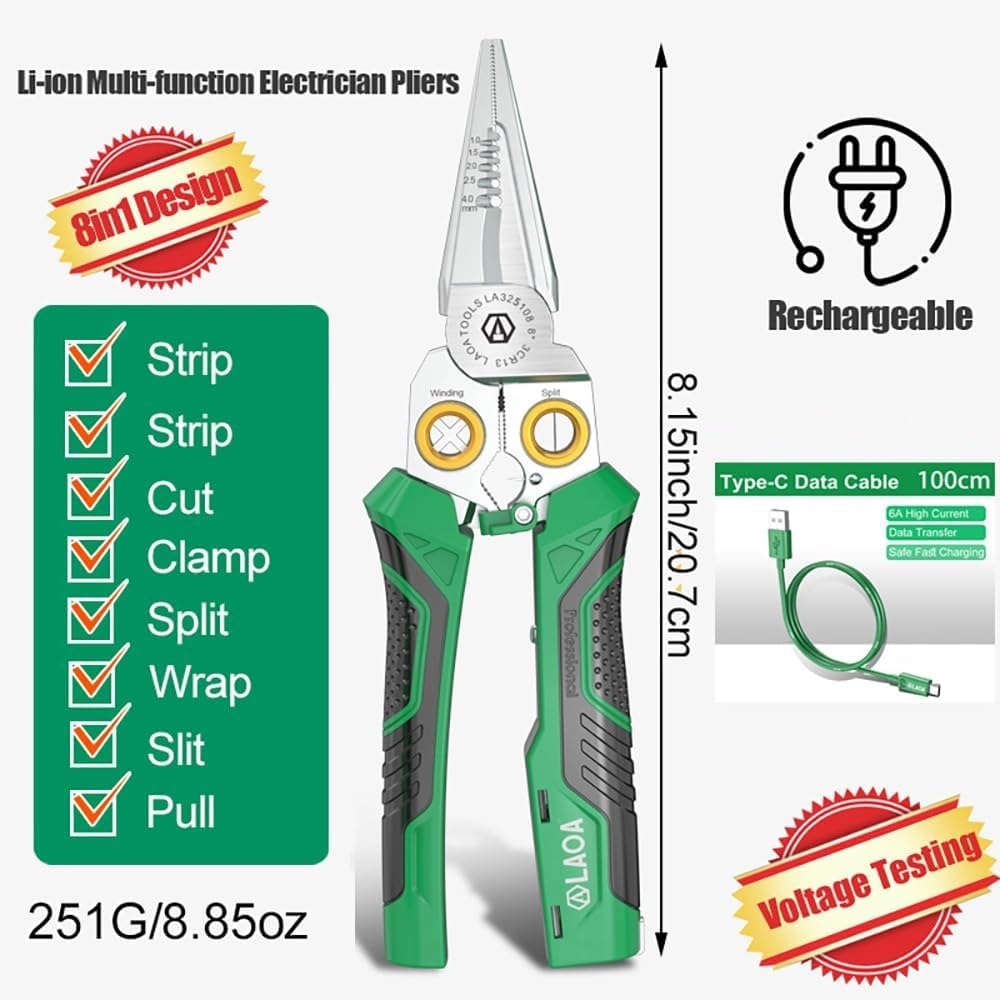
Image 1: Overview of the LAOA 8-in-1 Rechargeable Wire Stripper, highlighting its eight core functions and compact design. The tool measures 8.15 inches (20.7 cm) in length and weighs 8.85 ounces (251g).
Key Features:
- 8 Functions: Stripping, Cutting, Crimping, Splitting, Wrapping, Slitting, Pulling, and Voltage Testing.
- Integrated Voltage Tester: Detects 12V-250V AC/DC with visual (LED) and audible (buzzer) alerts.
- Rechargeable Battery: Built-in 3.7V 60mAh Li-ion battery with a Type-C charging port for convenience.
- Durable Construction: Made from premium 3CR13 stainless steel with HRC58±2 hardness and a rust-resistant finish.
- Ergonomic Design: Dual-color TPR handle with anti-slip texture and an effort-saving spring for comfortable use.
2. Setup
Charging the Voltage Tester:
The integrated voltage tester is powered by a built-in rechargeable 3.7V 60mAh Li-ion battery. Before initial use, or if the tester's indicator lights are dim/non-responsive, charge the tool.
- Locate the Type-C charging port on the handle of the tool.
- Connect the provided USB-C charging cable to the port and a suitable USB power source (e.g., computer, wall adapter).
- A light indicator on the tool's handle will illuminate during charging.
- Once fully charged, the light indicator may change color or turn off, depending on the model.

Image 2: Detailed view of the tool's internal 3.7V 60mAh Lithium battery and the Type-C charging port, illustrating the fast charging capability.
Safety Check:
Always perform a quick check of the voltage tester before use to ensure it is functioning correctly.
- Hold the tool firmly, ensuring your palm contacts the sensor pad on the handle.
- Touch the metal tip of the pliers to a known live circuit (e.g., a working outlet's hot slot). The red light should illuminate, and a buzzer should sound.
- Touch the metal tip to a known neutral circuit. The green light should illuminate without a buzzer.
WARNING: This is a non-insulated tool. Do not contact live circuits during use with the pliers themselves, only use the voltage tester function for detection.
3. Operating Instructions
3.1 Wire Stripping
Use the designated stripping holes on the pliers for precise insulation removal without damaging conductors. The tool supports wire sizes from 1.0mm² to 4.0mm².
- Identify the correct stripping hole for your wire gauge (1.0, 1.5, 2.5, 4.0 mm²).
- Insert the wire into the corresponding hole.
- Squeeze the handles firmly and pull the wire to remove the insulation.

Image 3: Close-up view of the wire stripping function, showing various wire gauges (1.0-4.0mm²) and how to cleanly remove insulation.
3.2 Wire Cutting
The sharp SK5-steel blades allow for clean cuts of wires and cables.
- Position the wire or cable between the cutting blades.
- Squeeze the handles to cut. The tool can cut up to 10mm cable or 25mm² wire.
3.3 Wire Crimping
The tool includes crimping features for securing terminals.
- Place the terminal in the appropriate crimping section.
- Insert the stripped wire into the terminal.
- Squeeze the handles to crimp the terminal onto the wire.
3.4 Wire Splitting
The specialized splitting feature is designed for twin-core sheathed wires (e.g., 2x1.5mm²).
- Insert the twin-core wire into the splitting hole.
- Gently pull the wire through to separate the sheathing without damaging the inner conductors.

Image 4: Illustration of the wire splitting function, showing how to quickly and safely split twin-core wires using the SK5-steel blade.
3.5 Wire Wrapping
The brass wire-wrapping hole assists in creating neat loops for multi-strand wires.
- Insert the stripped end of the wire into the brass wrapping hole.
- Rotate the pliers or the wire to form a clean loop.

Image 5: Demonstration of the brass wire-wrapping hole, designed to facilitate easy and precise wrapping of multi-strand wires.
3.6 Wire Slitting
The tool can slit cables up to 12mm in diameter.
- Position the cable in the slitting groove.
- Apply gentle pressure and pull the cable to slit the outer jacket.
3.7 Wire Pulling
The pliers feature a cable-pull groove for gripping and pulling wires.
- Securely grip the wire using the cable-pull groove.
- Apply steady force to pull the wire.
3.8 Voltage Testing
The integrated voltage tester detects AC/DC voltage from 12V to 250V.
- Ensure your palm is in contact with the sensor pad on the handle.
- Carefully touch the metal tip of the pliers to the wire or terminal you wish to test.
- Red Light & Buzzer: Indicates a live wire (12V-250V AC/DC).
- Green Light (no buzzer): Indicates a neutral wire or continuity in a closed circuit.
- No Light: Indicates an open circuit or no voltage detected.

Image 6: Visual guide to the voltage testing feature, explaining the red light/buzzer for live wires and green light for neutral wires or circuit continuity.

Image 7: The voltage testing function in action, showing the tool's tip near electrical components to detect live voltage.
Video 1: This video demonstrates the LAOA 8-in-1 electric wire stripper, showcasing its various functions including wire stripping, cutting, and the integrated voltage tester. It highlights the tool's versatility and ease of use for different electrical tasks.
4. Maintenance
Cleaning:
After each use, wipe the tool clean with a dry cloth to remove any debris or residue. Avoid using abrasive cleaners or solvents that could damage the handle or metal components.
Lubrication:
Periodically apply a small amount of light machine oil to the pivot points to ensure smooth operation and prevent rust.
Blade Care:
The SK5-steel blades are designed for durability. If the cutting or stripping performance degrades over time, the blades may need sharpening or replacement. Refer to the manufacturer's guidelines for blade replacement procedures. The product includes a small wrench and a replaceable blade for maintenance.

Image 8: The LAOA 8-in-1 tool shown with its included accessories: a USB-C charging cable, a small wrench, and a replaceable blade, facilitating easy maintenance.
Storage:
Store the tool in a dry, clean environment. Utilize the locking mechanism to keep the pliers closed when not in use, preventing accidental injury and protecting the blades.
5. Troubleshooting
Voltage Tester Not Responding:
- Check Battery: Ensure the internal Li-ion battery is charged. Recharge if necessary.
- Sensor Contact: Verify that your palm is making firm contact with the sensor pad on the handle. The tester requires this contact to complete the circuit for accurate readings.
- Circuit Status: Confirm the circuit you are testing is indeed live or has continuity.
Inaccurate Voltage Readings:
- Environmental Factors: High humidity or static electricity can sometimes affect non-contact voltage testers.
- Interference: Other electrical fields nearby might cause false positives. Test in a clear area if possible.
Difficulty Stripping/Cutting Wires:
- Correct Gauge: Ensure you are using the correct stripping hole for the wire's gauge.
- Blade Sharpness: Check if the blades are dull or damaged. Replace if needed (refer to Maintenance section).
6. Specifications
| Feature | Detail |
|---|---|
| Brand | LAOA |
| Model Number | 8-in-1-Rechargeable |
| Material | 3CR13 Stainless Steel (HRC58±2 hardness) |
| Handle Material | Plastic/Rubber (TPR) |
| Product Dimensions | 8.6"L x 3.2"W (20.7cm length) |
| Item Weight | 9.6 ounces (251g) |
| Color | Green |
| Voltage Test Range | 12V-250V AC/DC |
| Battery Type | 3.7V 60mAh Li-ion (Rechargeable) |
| Charging Port | Type-C |
| Wire Stripping Range | 1.0-4.0mm² |
| Cable Cutting Capacity | 10mm cable / 25mm² wire |
| Cable Slitting Capacity | 12mm cable |
| Twin-Core Splitting | 2x1.5mm² |
| Specific Uses | Wire Stripping, Cutting, Scraping, Voltage Testing, Hydropower Installation, Power Grid Maintenance, Car Wiring |
7. Warranty and Support
For warranty information, product support, or to inquire about replacement parts, please refer to the official LAOA website or contact their customer service directly. Keep your purchase receipt as proof of purchase.