
1. Introduction
This manual provides essential information for the safe and correct installation, operation, and maintenance of the DFHYTHU Compatible Hisense Refrigerator Computer Board, model HG1637069 BCD-535WPZR HC Part. This component is designed as a replacement part for compatible Hisense refrigerators to manage and control various refrigeration functions. Please read this manual thoroughly before attempting any installation or service.
2. Safety Information
WARNING: Risk of Electric Shock. Always disconnect power to the refrigerator before servicing.
- Power Disconnection: Before beginning any work, ensure the refrigerator is unplugged from the electrical outlet. Failure to do so can result in serious injury or death.
- Professional Installation: Installation of this component should ideally be performed by a qualified technician. If you are not experienced with appliance repair, seek professional assistance.
- Static Electricity: Electronic components are sensitive to static electricity. Handle the board by its edges and avoid touching the circuit paths or components directly. Consider using an anti-static wrist strap.
- Component Handling: Do not bend, drop, or apply excessive force to the circuit board.
- Compatibility: Verify that this computer board (model HG1637069 BCD-535WPZR HC Part) is compatible with your specific Hisense refrigerator model before installation.
3. Product Overview
The DFHYTHU Compatible Hisense Refrigerator Computer Board is a critical electronic control unit responsible for managing the refrigerator's operational parameters. It is constructed using industrial-grade materials and advanced circuit boards, designed for stable operation within the refrigerator's internal environment. This board features built-in protection mechanisms against overvoltage, overheating, and short circuits to ensure durability and reliability.
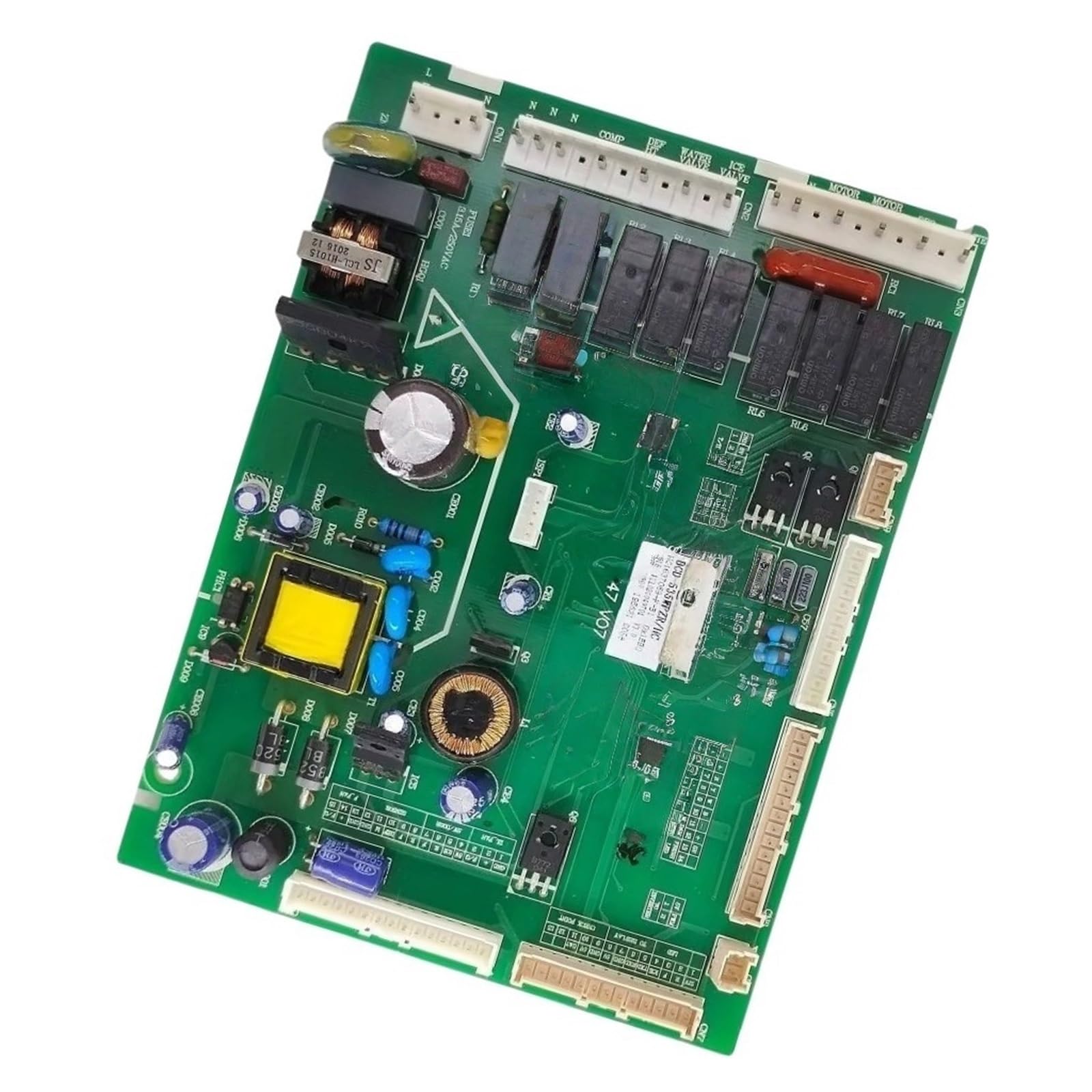
Figure 3.1: Overall view of the refrigerator computer board. This image displays the green circuit board populated with various capacitors, resistors, relays, and connectors.
Key functions include accurate temperature adjustment for food preservation and optimization of refrigeration efficiency.
4. Specifications
| Specification | Detail |
|---|---|
| Model Number | HG1637069 BCD-535WPZR HC Part |
| Brand | DFHYTHU |
| Compatible With | Hisense Refrigerators (specific models may vary, verify compatibility) |
| Material Construction | Industrial grade materials, advanced circuit boards |
| Protection Mechanisms | Overvoltage, overheating, short circuit |
| Item Weight | 1.76 ounces (approximately 50 grams) |
| Package Dimensions | 0.39 x 0.39 x 0.39 inches (approximately 1 x 1 x 1 cm) |
5. Installation
Before proceeding, review the Safety Information section (Section 2).
- Disconnect Power: Unplug the refrigerator from the wall outlet. This is a critical safety step.
- Access the Control Board: Locate the existing computer board within your refrigerator. This typically involves removing a rear access panel or an internal cover, depending on your refrigerator model. Refer to your refrigerator's service manual for exact location and access procedures.
- Document Connections: Before disconnecting any wires, take clear photos or make a diagram of all wire connections to the old board. This will serve as a reference for connecting the new board.
- Disconnect Wires: Carefully disconnect all wire harnesses and connectors from the old computer board. Note that some connectors may have locking tabs that need to be pressed or lifted.
- Remove Old Board: Unscrew or unclip the old computer board from its mounting location.
- Install New Board: Position the new DFHYTHU computer board in the same location as the old one. Secure it with the original screws or clips.
- Connect Wires: Using your photos or diagram as a guide, carefully reconnect all wire harnesses and connectors to the new board. Ensure each connection is firm and correctly seated.

Figure 5.1: Angled view of the computer board, showing multiple white connectors for wiring harnesses.

Figure 5.2: Close-up of the board's identification label, showing model BCD-535WPZR HC and other serial information. This label is crucial for verifying compatibility.
- Reassemble: Replace any covers or panels that were removed to access the board.
- Restore Power: Plug the refrigerator back into the electrical outlet.
- Test Operation: Monitor the refrigerator's operation to ensure it is cooling correctly and all functions are working as expected.
6. Operation
Once correctly installed, the DFHYTHU Compatible Hisense Refrigerator Computer Board operates automatically. It continuously monitors and controls the refrigerator's internal temperature, compressor cycles, fan operation, and defrost cycles to maintain optimal food preservation conditions. No direct user interaction with the board is required after installation.
7. Maintenance
The computer board itself requires no routine maintenance. To ensure its longevity and proper function:
- Keep the area around the refrigerator's control board clean and free of dust and debris.
- Ensure proper ventilation around the refrigerator to prevent overheating of internal components.
- Avoid exposing the refrigerator to extreme humidity or moisture, which can damage electronic components.
8. Troubleshooting
If your refrigerator experiences issues after installing the new computer board, consider the following troubleshooting steps:
- No Power: Ensure the refrigerator is securely plugged into a working electrical outlet. Check the circuit breaker.
- Incorrect Cooling: Verify all wire connections to the board are secure and correctly matched according to your documentation. Ensure the refrigerator's temperature settings are correct.
- Error Codes: If the refrigerator display shows an error code, consult your refrigerator's user manual or service manual for the meaning of the code and recommended actions.
- Component Damage: Visually inspect the new board for any signs of damage (e.g., burnt components, loose connections) that may have occurred during installation or shipping.
- Re-check Compatibility: Double-check that the installed board model (HG1637069 BCD-535WPZR HC Part) is indeed the correct replacement for your specific Hisense refrigerator model.
If problems persist after performing these checks, it is recommended to contact a qualified appliance repair technician or the seller for further assistance.
9. Warranty and Support
For information regarding warranty coverage for the DFHYTHU Compatible Hisense Refrigerator Computer Board, please refer to the purchase documentation or contact the seller directly. The manufacturer of this component is gvrgv444.
For technical support or assistance with installation and troubleshooting beyond the scope of this manual, please contact the seller through your purchase platform.