
1. Introduction
This manual provides detailed instructions for the operation, calibration, and maintenance of your Homcoice 7-in-1 Water Quality Tester. This device is designed for precise measurement of pH, Chlorine (FAC), Salinity, ORP, TDS, EC, and Temperature in various water sources, including swimming pools, drinking water, aquariums, and hydroponic systems. Please read this manual thoroughly before use to ensure accurate results and proper device longevity.
2. Product Overview
The Homcoice 7-in-1 Water Quality Tester is a portable, high-precision instrument featuring an IP67 waterproof rating and a backlit LCD for clear data display. It includes a replaceable high-precision probe and operates on button cell batteries.

Figure 2.1: Homcoice 7-in-1 Water Quality Tester and included calibration powders.
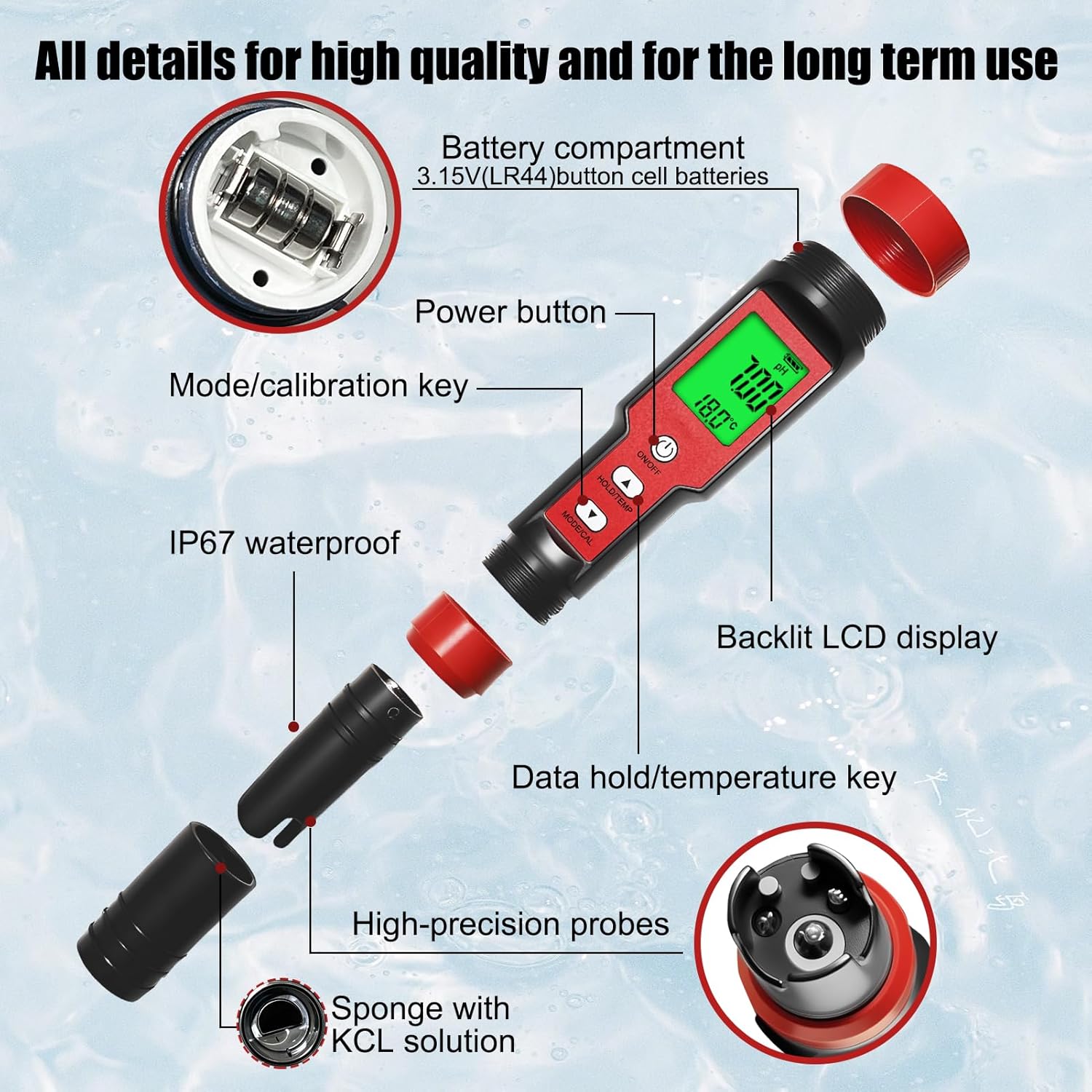
Figure 2.2: Exploded view illustrating key components: battery compartment, power button, mode/calibration key, data hold/temperature key, backlit LCD display, high-precision probes, and sponge with KCL solution.

Figure 2.3: The tester features a high-resolution backlit LCD display for clear visibility of readings.
3. Specifications
| Parameter | Range | Resolution | Accuracy |
|---|---|---|---|
| pH | 0-14 pH | 0.01 pH | ±0.05 pH |
| EC | 0-9990 µS/cm; 10.01-19.99 mS/cm; 20.1-200.0 mS/cm | 1 µS/cm; 0.01 mS/cm; 0.1 mS/cm | ±2% F.S |
| TDS | 0-9990 ppm; 10.01-200.0 ppt | 1 ppm; 0.1 ppt | ±2% F.S |
| Salinity | 0.01-25.00 %; 0-9990 ppm; 10.01-200.0 ppt | 0.01 %; 1 ppm; 0.1 ppt | ±2% F.S |
| Chlorine (FAC) | 0.00-4.00 ppm | 0.01 ppm | N/A |
| ORP | ±999 mV | 1 mV | ±15 mV |
| Temperature | 0-60°C / 32-140°F | 0.1°C / 0.1°F | ±0.5°C |
Additional Specifications:
- Brand: Homcoice
- Model Number: EU-PH METER 7 IN1-CL-100
- Material: ABS
- Waterproof Rating: IP67
- Package Contents: 1 x pH Tester, 1 x Calibration Kit, 1 x User Manual
- Package Dimensions: 19.2 x 5.2 x 4.7 cm
- Weight: 150 grams

Figure 3.1: Detailed table of measurement parameters and their specifications.
4. Setup
- Unpacking: Carefully remove the tester and all accessories from the packaging. Verify that all items listed in the 'Package Contents' are present.
- Battery Installation: The device uses 3.15V (LR44) button cell batteries. If not pre-installed, open the battery compartment (refer to Figure 2.2) and insert the batteries with the correct polarity.
- Initial Rinse: Before first use, gently rinse the probe with distilled water. Do not touch the probe's sensitive glass bulb.
- Power On: Press the 'ON/OFF' button to power on the device.
5. Calibration
The Homcoice 7-in-1 Water Quality Tester is pre-calibrated by the manufacturer. However, regular calibration is recommended to maintain accuracy, especially for pH and ORP measurements. The device supports 3-point automatic calibration for pH.
5.1 pH Calibration Procedure
- Prepare three buffer solutions: pH 4.00, pH 7.00, and pH 10.01. These are typically provided as powder packets to be mixed with distilled water.
- Power on the meter.
- Rinse the electrode with distilled water and blot dry with a clean tissue.
- Immerse the electrode into the pH 7.00 buffer solution.
- Press and hold the 'MODE/CAL' button for approximately 6 seconds until the display shows 'CAL' and then '7.00' blinking. Release the button.
- The meter will automatically recognize the buffer solution and calibrate. Wait for the '7.00' to stop blinking and display 'END' before returning to measurement mode.
- Rinse the electrode with distilled water.
- Repeat steps 4-6 for pH 4.00 and pH 10.01 buffer solutions. Always calibrate in ascending or descending order (e.g., 7.00 -> 4.00 -> 10.01 or 7.00 -> 10.01 -> 4.00).
- After successful 3-point calibration, the meter is ready for pH measurements.
5.2 ORP Calibration Procedure
Refer to the specific instructions provided with your ORP calibration powder (e.g., 256mV solution) for detailed steps. The general process involves immersing the probe in the ORP standard solution and following the device's calibration mode for ORP.

Figure 5.1: Visual guide for the pH calibration process using buffer powders.

Figure 5.2: Step-by-step illustration of the pH calibration procedure.
6. Operating Instructions
Before taking any measurement, ensure the probe is clean and the device is calibrated if necessary. Always rinse the probe with distilled water before and after each measurement.
- Power On: Press the 'ON/OFF' button.
- Select Mode: Press the 'MODE/CAL' button repeatedly to cycle through the different measurement parameters (pH, EC, TDS, SALT, CL, ORP, TEMP). The selected parameter will be displayed on the screen.
- Immerse Probe: Dip the electrode into the water sample up to the immersion line. Gently shake the meter to remove any air bubbles attached to the probe.
- Stabilize Reading: Allow the reading to stabilize. The values may fluctuate initially; wait until the numbers settle before recording.
- Hold Reading: Press the 'HOLD/TEMP' button to freeze the current reading on the display. Press again to release.
- Record Data: Note down the stable measurement.
- Power Off: Press the 'ON/OFF' button to turn off the meter after use.
6.1 Specific Measurement Notes
- Chlorine (FAC) Measurement: For accurate Free Available Chlorine (FAC) readings, ensure the water's pH is between 6.5 and 8.0 and the ORP is between 487 and 840 mV. Readings outside this range may not be accurate.
- Salinity Measurement: The device offers three display modes for salinity: PPM, PPT, and %. It automatically switches to PPT when PPM exceeds 9999.
- Temperature Measurement: The device features Automatic Temperature Compensation (ATC) for accurate readings across varying temperatures. Temperature is always displayed on the screen.

Figure 6.1: The tester measuring Free Available Chlorine (FAC) in a water sample.

Figure 6.2: The digital salt meter displaying salinity in percentage (%), parts per thousand (ppt), and parts per million (ppm).

Figure 6.3: The digital ORP tester, indicating its use for drinking water treatment, swimming pool water treatment, aquaculture, and wastewater treatment.
7. Understanding Readings and Ideal Ranges
Understanding the measured values is crucial for maintaining optimal water quality. Below are general guidelines for various applications.
7.1 Chlorine (FAC)
Free Available Chlorine (FAC) is essential for water purification, inactivating microbes, and preventing waterborne diseases. It is widely used in swimming pool disinfection, drinking water treatment, industrial cooling water systems, and wastewater reuse.
- Ideal Pool Chlorine Range: 1.0-3.0 ppm
- Important Note: Ensure pH is between 6.5 and 8.0 for accurate chlorine readings.

Figure 7.1: Ideal ranges for pH, chlorine, and ORP in chlorinated pools.

Figure 7.2: Various applications where free available chlorine is crucial for water quality.
7.2 Salinity
- Ideal Freshwater Salinity: 0.00-0.900 %
- Ideal Seawater Salinity: 30-35 ppt
- Ideal Salt Water Pool Salinity: 2700-3400 ppm

Figure 7.3: Ideal salinity ranges for spas, hot springs, and pools.
7.3 EC (Electrical Conductivity)
EC measurement is vital for hydroponics to ensure plants have an optimal growth environment.
- Ideal Hydroponic pH Range: 5.5-6.5 pH
- Ideal Hydroponic EC Range: < 0.8 mS/cm

Figure 7.4: Ideal EC ranges for various hydroponic systems like NFT, Drip Irrigation, and DWC.
7.4 TDS (Total Dissolved Solids)
TDS indicates the total concentration of dissolved substances in water, which is important for drinking water quality.
- Ideal Drinking Water pH Range: 6.5-8.5 pH
- Ideal Drinking Water TDS Range: 0-50 ppm

Figure 7.5: TDS chart indicating water quality from ideal drinking water to unsuitable levels.
8. Maintenance
- Probe Cleaning: Always rinse the electrode with distilled water before and after each use. If the probe becomes dirty, gently clean it with a soft brush and a mild detergent solution, then rinse thoroughly with distilled water.
- Probe Storage: Keep the probe cap on when not in use. The sponge inside the cap should be kept moist with KCL solution (potassium chloride) to prevent the electrode from drying out. If KCL solution is unavailable, use pH 7.00 buffer solution. Never store the probe in distilled water.
- Battery Replacement: When the battery indicator on the LCD shows low power, replace the LR44 button cell batteries. Ensure correct polarity during installation.
- Storage: Store the meter in a cool, dry place away from direct sunlight and extreme temperatures.

Figure 8.1: The tester features a replaceable button cell battery and a high-sensitivity probe.
9. Troubleshooting
- Inaccurate or Fluctuating Readings:
- Cause: Uncalibrated meter, dirty electrode, air bubbles on the probe, or dried-out probe.
- Solution: Calibrate the meter (especially pH and ORP), clean the electrode, gently shake the meter during measurement to dislodge air bubbles, and ensure the probe is stored correctly in KCL solution.
- Chlorine Reading Always Zero or Incorrect:
- Cause: Water pH or ORP levels are outside the optimal range for chlorine detection.
- Solution: Verify that the water's pH is between 6.5 and 8.0 and ORP is between 487 and 840 mV. Adjust these parameters if necessary before re-measuring chlorine.
- Meter Does Not Power On:
- Cause: Dead or incorrectly installed batteries.
- Solution: Replace batteries with new LR44 button cells, ensuring correct polarity.
- Slow Response Time:
- Cause: Electrode is dry or contaminated.
- Solution: Re-hydrate the electrode by soaking it in KCL solution for several hours. Clean the electrode if contamination is suspected.
10. Safety Information
- Do not disassemble or modify the device.
- Keep the device out of reach of children.
- Avoid dropping or subjecting the device to severe impact.
- Do not immerse the entire device in water; only the probe is waterproof (IP67).
- Handle calibration solutions with care and follow their safety instructions.
11. Warranty and Support
Information regarding product warranty and customer support is not available in the provided product details. Please refer to the packaging or contact the retailer for specific warranty terms and support options.

