
Introduction
The Plant Petz Large Robotic Planter transforms your plant into an interactive companion. This smart planter is designed to respond to human interaction with movements and sounds, creating a unique connection with your plant. It features patented sensory technology that allows your plant to react to touch, voice, and music. Additionally, it simplifies plant care with a moisture sensor and includes a built-in Bluetooth speaker for audio playback and voice message recording.
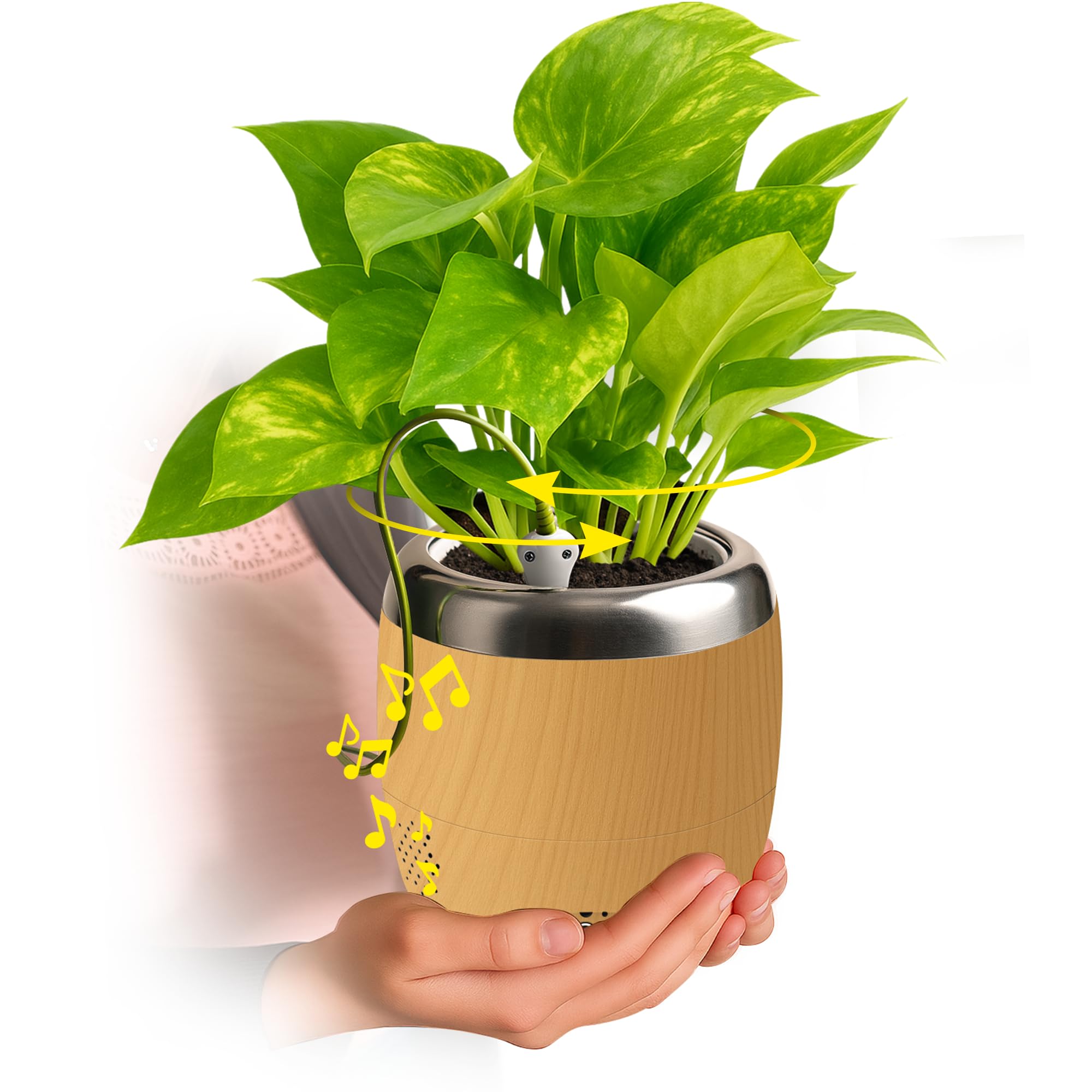
The Plant Petz Robotic Planter, ready for plant insertion.
Setup Instructions
Setting up your Plant Petz planter is designed to be straightforward. Follow these steps to get your interactive plant companion ready:
- Unpack Contents: Ensure you have the Plant Petz planter, inner plant pot, drip tray, smart sensor probe, and 3xAA batteries (included).
- Insert Batteries: Locate the battery compartment at the bottom of the planter. Insert the 3xAA batteries, ensuring correct polarity.
- Place Your Plant: Gently place your plant, still in its nursery pot (up to 4 inches), into the inner plant pot of the Plant Petz planter. The planter is designed to accommodate standard 4-inch plant pots.
- Insert Smart Sensor: Carefully insert the smart sensor probe into the soil of your plant. Ensure it is firmly in place but avoid damaging the plant's roots.
- Power On: Press the power button located on the base of the planter to turn it on. The planter will perform a brief calibration sequence.

Step 1: Carefully place your potted plant into the inner pot of the Plant Petz planter.

Step 2: Insert the smart sensor probe into the soil next to the plant.

Step 3: Press the power button to activate the planter. Ensure batteries are installed.
Setup Demonstration Video
This video demonstrates the key features of the Plant Petz Interactive Pot, including its responsive movements, sound capabilities, and moisture sensing, providing a visual guide for setup.
Operating Instructions
Touch and Motion Response
The Plant Petz planter is equipped with sensors that detect touch and motion, allowing your plant to respond with various movements and sounds. Gently touch the plant's leaves or move near the planter to observe its interactive behaviors. The movements are designed to be gentle and can even contribute to strengthening the plant's stems over time.
This video shows the Plant Petz planter responding with movements to piano music being played nearby, demonstrating its interactive capabilities.
Bluetooth Speaker & Voice Playback
Your Plant Petz planter includes a built-in Bluetooth speaker. You can pair it with your smartphone or other Bluetooth-enabled devices to stream music. The plant will react to the rhythm of the music with its movements. Additionally, you can record a personalized voice message that the planter will play back when interacted with.
- Pairing Bluetooth: Press and hold the Bluetooth (BT) button on the planter's base until the indicator light flashes. On your device, search for "Plant Petz" in your Bluetooth settings and connect.
- Recording a Message: Press and hold the 'REC/PLAY' button until you hear a beep. Speak your message clearly into the planter's microphone. Release the button to stop recording.
- Playing a Message: Briefly press the 'REC/PLAY' button to play your recorded message.
Moisture Sensor
The integrated moisture sensor continuously monitors the soil's moisture level. When your plant needs water, the planter will emit a distinct bubbly sound to alert you, simplifying plant care and ensuring optimal hydration.

The integrated moisture sensor detects soil dryness and triggers an audible alert when watering is needed.
Maintenance
- Cleaning: Wipe the exterior of the planter with a soft, damp cloth. Do not immerse the electronic components in water.
- Battery Replacement: When the planter's performance diminishes or it stops responding, replace the 3xAA batteries. Ensure the battery compartment is securely closed after replacement.
- Drip Tray: Regularly check and empty the drip tray located at the bottom of the planter to prevent water overflow and maintain cleanliness.
- Sensor Care: Periodically check the smart sensor probe for any soil buildup and gently clean it if necessary to ensure accurate moisture readings.
Troubleshooting
- Planter Not Responding:
- Check if the planter is powered on.
- Ensure batteries are correctly installed and not depleted.
- Verify the smart sensor probe is properly inserted into the soil.
- No Sound or Bluetooth Connection Issues:
- Confirm Bluetooth is enabled on your device and the planter is in pairing mode.
- Check the volume settings on both the planter and your connected device.
- Incorrect Watering Alerts:
- Ensure the smart sensor probe is fully inserted into the soil and making good contact.
- Clean the sensor probe if there is any residue.
Specifications
| Feature | Detail |
|---|---|
| Material | Other |
| Color | Sequoia Woodgrain |
| Special Features | Bluetooth Speaker, Interactive, Responsive, Music & Voice Activated, Easy Care Watering Alert, Record a Personalized Message |
| Style | Modern |
| Planter Form | Plant Pot |
| Shape | Round |
| Pattern | Woodgrain |
| Included Components | Instruction Sheet and 3xAA Batteries Included |
| UPC | 850074319023 |
| Model Number | 01-0104100 |
| Manufacturer | Hellotomorrow |
| Item Dimensions | 6 x 6 x 6.75 inches |
| Item Weight | 2.25 Pounds |
| Size | 4 Inch |
Warranty and Support
The Plant Petz Robotic Planter comes with a manufacturer's warranty. For specific details regarding warranty coverage and duration, please refer to the included instruction sheet or contact Hellotomorrow customer support.
For further assistance, troubleshooting, or product inquiries, please consult the detailed instruction sheet provided with your purchase. You may also visit the official Plant Petz website for additional resources and support.
Included in the box: Instruction Sheet and 3xAA Batteries.