
1. Product Overview
The Blomiky E45A/E45AZ is a high-performance Brushless Electronic Speed Control (ESC) designed as a spare part for various RC truck models. It features an integrated heatsink for efficient thermal management and is compatible with both 2S (7.4V) and 3S (11.1V) Lithium batteries.
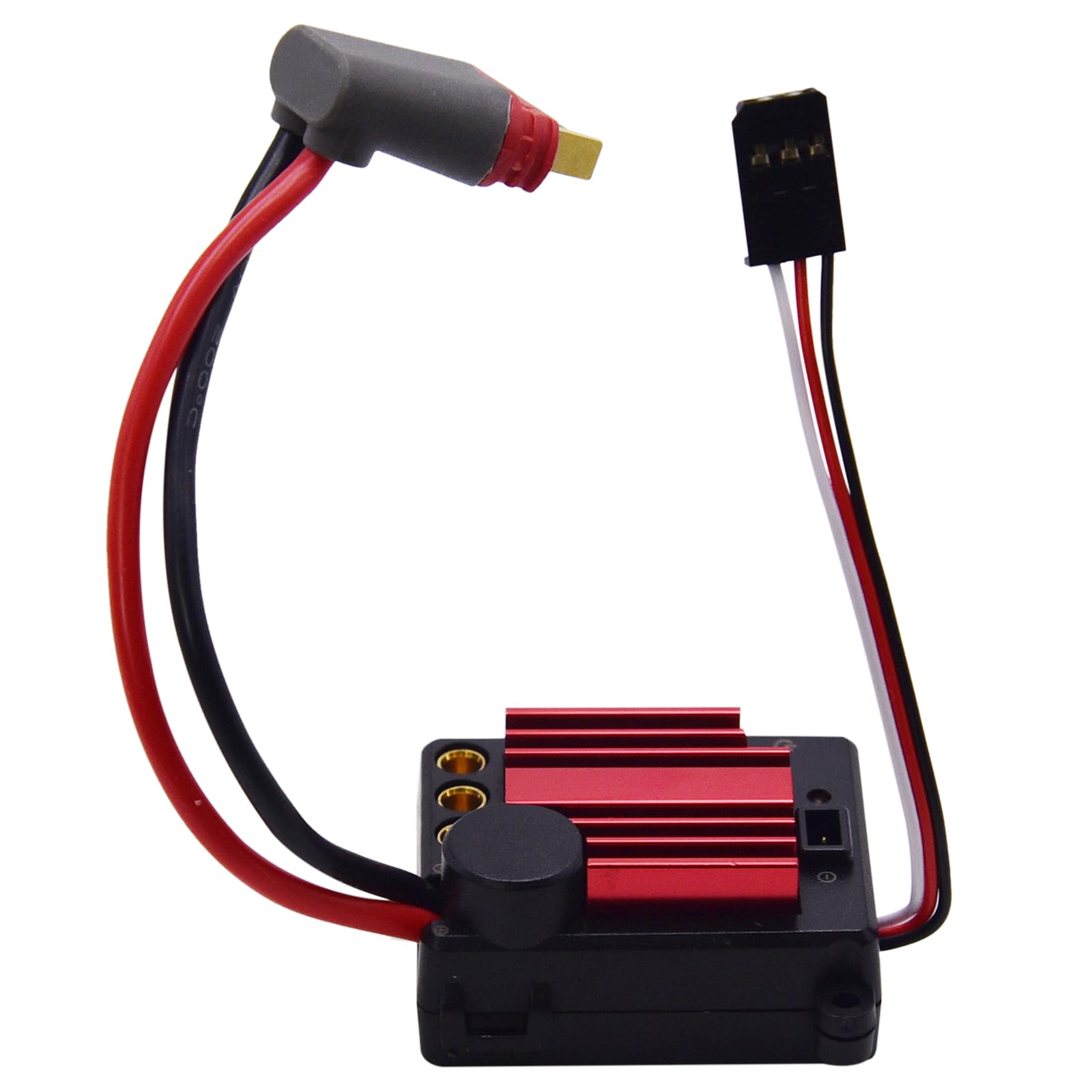
Figure 1: Blomiky E45A/E45AZ Brushless ESC
2. Compatibility
This E45A/E45AZ Brushless ESC is suitable for the following RC truck models:
- MJX Hyper Go 1/14 Scale: H14BM, H14PL, 14209, 14210, 14301, 14302.
- Jetwood 1/14 Scale: Brushless RC cars.
- Bezgar 1/14 Scale: HP141, HP141S Brushless RC cars.
- MJX Hyper Go 1/16 Scale: H16BM, 16208, 16209, 16210, H16GT, H16DR, H16PL.
- Jetwood 1/16 Scale: JC16EP.
- Bezgar 1/16 Scale: H161, H163S RC cars.
The ESC supports 7.4V 2S and 11.1V 3S Lithium batteries.
3. Package Contents
- 1 x Blomiky E45A/E45AZ Brushless ESC
4. Component Identification
Familiarize yourself with the main components of the E45A/E45AZ ESC:

Figure 2: ESC Component Diagram
- Battery Connector: For connecting to the RC vehicle's battery.
- Receiver Wire (3-wire): Connects to the receiver for signal input.
- VCC/BVD Connector: For additional connections or programming, if applicable.
- Heatsink: Red finned component for dissipating heat from the ESC.
- Motor Connectors (3-hole): For connecting the three motor wires (Yellow A, White B, Blue C).
- Power Button: For turning the ESC on and off.
- Indicator Light: Provides status feedback (see Section 6).
5. Installation
Follow these general steps for installing the ESC. Refer to the video below for a visual guide on placement within a Hyper Go 1/14 or 1/16 scale RC car.
- Ensure the RC vehicle is powered off and the battery is disconnected.
- Carefully remove the old ESC, noting the connections.
- Connect the three motor wires (Yellow A, White B, Blue C) from the motor to the corresponding 3-hole connectors on the new E45A/E45AZ ESC.
- Connect the 3-wire receiver cable from the ESC to the appropriate channel on your RC receiver.
- Secure the ESC in its designated location within the RC vehicle using screws (not included).
- Connect the battery connector to your RC vehicle's battery.
Video 1: Blomiky E45A ESC Installation and Fitment Guide for Hyper Go 1/14 and 1/16 RC Trucks. This video demonstrates the physical dimensions of the ESC and shows its placement within compatible RC vehicles.

Figure 3: Example of ESC installed in an RC truck chassis
6. Operating Instructions
To operate the ESC, ensure all connections are secure and the battery is fully charged. Use the power button to turn the unit on or off. The indicator light provides important status information:
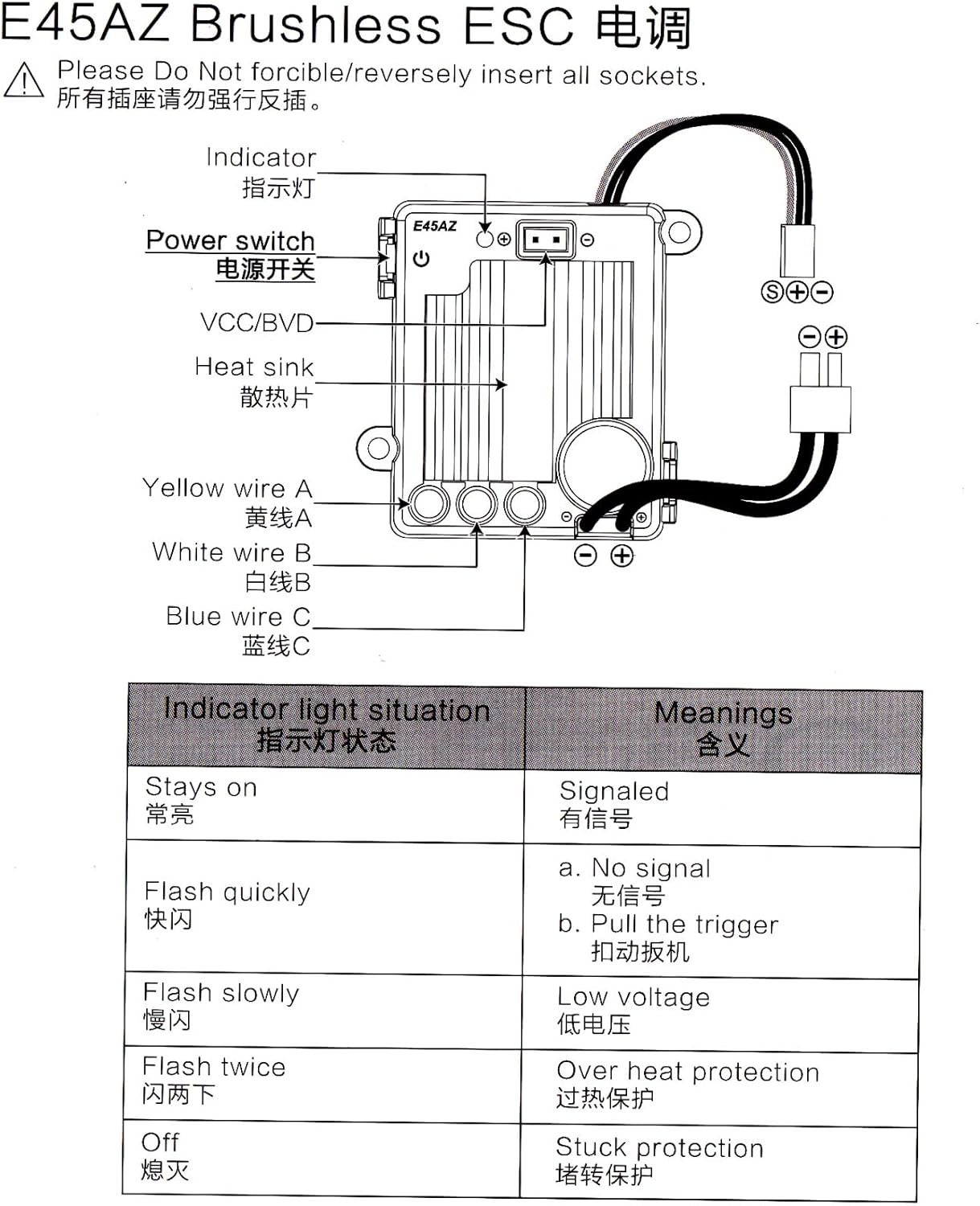
Figure 4: Indicator Light Meanings
| Indicator Light Situation | Meaning |
|---|---|
| Stays on | Signaled (Normal Operation) |
| Flash quickly | No signal or Pull the trigger |
| Flash slowly | Low voltage |
| Flash twice | Overheat protection |
| Off | Stuck protection |
7. Specifications
- Part Number: E45A, E45AZ
- Product Dimensions: 1.63 x 1.32 x 0.82 inches (41 x 33.4 x 20.7 mm)
- Item Weight: 1.49 ounces
- Manufacturer: MJX RC
- Battery Compatibility: 7.4V 2S / 11.1V 3S Lithium battery
8. Troubleshooting
If you encounter issues with your ESC, refer to the indicator light meanings in Section 6. Common issues and their potential solutions include:
- No Power: Check battery connection and charge level. Ensure the power button is pressed.
- Motor Not Responding (Flash quickly): Verify receiver connection and signal from the transmitter. Ensure the throttle trigger is not stuck.
- Reduced Performance (Flash slowly): The battery may be low. Recharge or replace the battery.
- Automatic Shutdown (Flash twice): The ESC may have overheated. Allow it to cool down before resuming operation. Ensure adequate ventilation.
- Motor Stuttering/Not Turning (Off): This could indicate a motor stuck protection. Check for obstructions in the motor or drivetrain.
If problems persist, consult a qualified technician or contact customer support.
9. Maintenance
To ensure the longevity and optimal performance of your ESC:
- Keep the ESC clean and free from dirt, dust, and moisture.
- Regularly inspect all wires and connectors for signs of wear or damage.
- Ensure the heatsink remains clear of debris to allow for proper cooling.
- Avoid operating the ESC in extreme temperatures.
10. Warranty and Support
For warranty information or technical support, please refer to the retailer's policy or contact Blomiky customer service directly. Keep your purchase receipt as proof of purchase.