
1. Introduction
Thank you for choosing the Ice Power IP-6860AD Universal Android Media Player and Evo Tweeters. This system is designed to enhance your in-car audio and entertainment experience with advanced features and clear sound reproduction. This manual provides essential information for proper installation, operation, and maintenance of your new system.
Package Contents:
- 1 × Ice Power IP-6860AD 6.86" Universal Android Media Player
- 1 × Pair of EvoTuning 300W Super Tweeters (with fitting mounts)
- 1 × Remote Control
- 1 × User Manual (this document)
2. Safety Information
Please read all safety instructions carefully before installing or operating the device. Failure to follow these instructions may result in injury or damage to the unit or vehicle.
- Professional Installation Recommended: Due to the complexity of car audio systems, professional installation is highly recommended to ensure correct wiring and functionality.
- Power Supply: Connect the unit only to a 12V DC power supply with a negative ground.
- Wiring: Ensure all wiring is correctly connected according to the wiring diagram. Incorrect wiring can cause damage or fire.
- Driving Safety: Do not operate the unit in a way that distracts you from driving. Always prioritize road safety.
- Temperature: Avoid exposing the unit to extreme temperatures or direct sunlight for extended periods.
- Moisture: Keep the unit away from water and excessive moisture.
3. Product Overview
The Ice Power IP-6860AD is a universal Android media player designed for vehicle integration, offering a wide range of features for entertainment and connectivity. The included Evo Tweeters provide enhanced high-frequency audio reproduction.
Media Player Features:
- 6.86" HD TFT Touchscreen for responsive interaction.
- Android 13 OS for app compatibility and system performance.
- Integrated Bluetooth for hands-free calls and wireless audio streaming.
- Support for Apple CarPlay and Android Auto.
- Full Mirror Link compatibility for Android and iOS devices.
- USB and Auxiliary connectivity.
- Support for front and rear cameras.
- Powerful 60W x 4 audio output.
Evo Tweeters Features:
- 300W peak power handling.
- Designed for crisp, high-frequency audio reproduction.
- Includes fitting mounts for versatile installation.

Figure 3.1: Front view of the Ice Power IP-6860AD Media Player, showing the 6.86-inch touchscreen and control knob.

Figure 3.2: A pair of EvoTuning 300W Super Tweeters, designed for high-frequency audio output.
4. Setup & Installation
Proper installation is crucial for optimal performance. It is strongly recommended that installation be performed by a qualified professional.
4.1 Media Player Installation:
- Disconnect Battery: Before starting, disconnect the vehicle's negative battery terminal to prevent electrical shorts.
- Remove Existing Unit: Carefully remove your vehicle's existing head unit and dashboard trim as required.
- Wiring Connections:
- Connect the main power harness (yellow for constant 12V, red for accessory 12V, black for ground) to your vehicle's wiring.
- Connect speaker wires (typically color-coded) to the corresponding vehicle speaker wires.
- Connect the antenna cable.
- If applicable, connect reverse camera input, steering wheel control wires, and external amplifier outputs.
- Mounting: Secure the IP-6860AD unit into the dashboard opening using the provided mounting brackets.
- Test Functionality: Before reassembling the dashboard, reconnect the battery and perform a basic functionality test (power on, audio, touch screen).
- Reassemble: Once confirmed working, reassemble the dashboard trim.
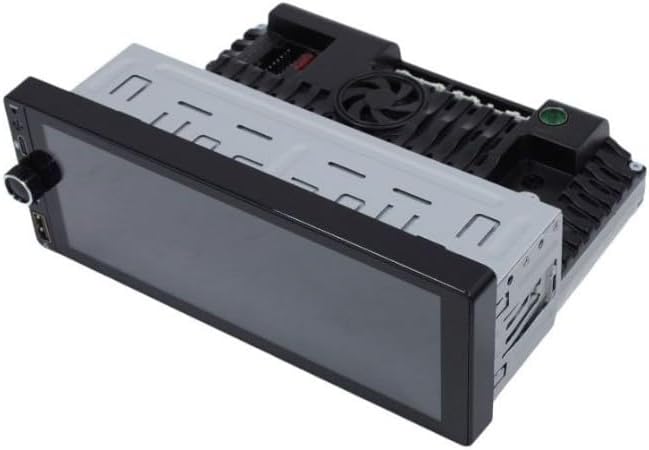
Figure 4.1: Rear view of the Ice Power IP-6860AD Media Player, showing various connection ports for power, speakers, and accessories.
4.2 Evo Tweeters Installation:
The Evo Tweeters are designed for easy integration into most car audio systems. They should be connected to the high-frequency output of your amplifier or directly to the head unit's speaker outputs, often in parallel with existing full-range speakers, using appropriate crossovers if necessary.
- Choose Mounting Location: Select a location that provides optimal sound dispersion, typically on the dashboard, A-pillars, or door panels. Use the included fitting mounts.
- Wiring: Connect the tweeter wires to the appropriate speaker output channels. Ensure correct polarity (+ to + and - to -).
- Secure Mounting: Securely mount the tweeters using the provided hardware.
5. Operating Instructions
This section outlines the basic operation of your Ice Power IP-6860AD Media Player.
5.1 Power On/Off and Basic Navigation:
- Power: The unit typically powers on with the vehicle's ignition. A power button or knob may also be present for manual control.
- Touchscreen: Navigate through menus and applications by touching the 6.86" HD TFT screen.
- Volume: Adjust volume using the physical knob or on-screen controls.
5.2 Android 13 OS:
The unit runs on Android 13, providing access to various applications and settings. You can customize the home screen, download apps from compatible app stores, and manage system settings similar to an Android smartphone.
5.3 Bluetooth Connectivity:
- Go to the Bluetooth settings menu on the media player.
- Enable Bluetooth on your mobile device and search for available devices.
- Select "IP-6860AD" (or similar name) from the list on your phone.
- Confirm the pairing code on both devices.
- Once paired, you can make/receive hands-free calls and stream audio.
5.4 CarPlay & Android Auto:
Connect your compatible iPhone or Android smartphone via USB to access CarPlay or Android Auto. This allows you to use phone features like navigation, music, and messaging directly on the media player's screen.
5.5 Mirror Link:
For devices not supporting CarPlay or Android Auto, Mirror Link allows you to mirror your smartphone's screen onto the media player. Follow the on-screen instructions on the unit to establish the connection for both Android and iOS devices.
5.6 USB/Auxiliary Input:
Connect USB drives for media playback or use the auxiliary input for external audio sources. The unit supports various audio and video formats, including MKV for video encoding.
5.7 Camera Support:
If front and rear cameras are installed, the unit will automatically display the camera feed when reversing or can be manually accessed for the front camera view.
5.8 Supported Internet Services:
The Android OS allows access to various online services such as iTunes, Maps, Netflix, Spotify, and YouTube, provided the unit has an internet connection (e.g., via Wi-Fi hotspot from your phone).
5.9 Remote Control:
Use the included remote control for convenient operation of basic functions such as volume, track skipping, and source selection.
6. Maintenance
Regular maintenance ensures the longevity and optimal performance of your media player and tweeters.
- Screen Cleaning: Use a soft, lint-free cloth to gently wipe the touchscreen. For stubborn smudges, slightly dampen the cloth with water or a screen-safe cleaner. Avoid harsh chemicals.
- General Cleaning: Keep the unit and tweeters free from dust and debris. Use a soft, dry cloth for exterior surfaces.
- Avoid Liquids: Do not spray liquids directly onto the unit or tweeters.
- Software Updates: Periodically check for available software updates for the Android OS to ensure optimal performance and security.
7. Troubleshooting
If you encounter issues with your Ice Power IP-6860AD system, refer to the following common problems and solutions:
- No Power:
- Check the vehicle's fuse box for blown fuses.
- Ensure all power connections (constant 12V, accessory 12V, ground) are secure.
- No Sound:
- Verify that the volume is not muted or set to minimum.
- Check all speaker wire connections for proper polarity and secure contact.
- Ensure the correct audio source is selected.
- Bluetooth Connection Issues:
- Ensure Bluetooth is enabled on both the media player and your mobile device.
- Delete previous pairings and attempt to re-pair the devices.
- Move your mobile device closer to the media player.
- Touchscreen Unresponsive:
- Perform a soft reset by turning the vehicle ignition off and on, or by pressing the reset button if available.
- Ensure the screen is clean and free of obstructions.
- CarPlay/Android Auto Not Connecting:
- Use a high-quality USB cable.
- Ensure CarPlay/Android Auto is enabled in your phone's settings.
- Restart both the phone and the media player.
8. Specifications
| Feature | Specification |
|---|---|
| Brand | Ice Power |
| Model | IP-6860AD |
| Screen Size | 6.86 inches |
| Display Type | HD TFT Touchscreen |
| Operating System | Android 13 |
| Connectivity Technology | Auxiliary, Bluetooth, USB |
| Controller Type | Android |
| Special Features | Full Mirror Link Compatibility, CarPlay, Android Auto, Front/Rear Camera Support |
| Compatible Devices | Speaker, Smartphone |
| Audio Output Mode | Stereo |
| Video Encoding | MKV |
| Output Power | 60W x 4 (Media Player), 300W (Evo Tweeters) |
| Supported Internet Services | iTunes, Maps, Netflix, Spotify, YouTube |
| Wireless Technology | FM, Bluetooth |
| Item Weight | 400 Grams |
| Color | Black |
| UPC | 759649242066 |
9. Warranty Information
The Ice Power IP-6860AD Universal Android Media Player and Evo Tweeters come with a 6-month warranty from the date of purchase. This warranty covers manufacturing defects under normal use. Please retain your proof of purchase for warranty claims. The warranty does not cover damage caused by improper installation, misuse, accidents, or unauthorized modifications.
10. Support
For further assistance, technical support, or warranty inquiries, please contact your retailer or visit the official Ice Power website. Ensure you have your model number (IP-6860AD) and proof of purchase available when seeking support.