
BestGlory B0FFSWTSZ6
BestGlory Big and Tall Leather Office Gaming Chair with Footrest (Model B0FFSWTSZ6) Instruction Manual
Model: B0FFSWTSZ6 | Brand: BestGlory
1. Important Safety Information
Please read and understand all instructions before assembly and use. Keep this manual for future reference.
- Always ensure the chair's weight capacity is not exceeded. This chair supports up to 400 lbs (181 kg).
- Use caution when adjusting the chair's position to prevent injury.
- Ensure all screws and bolts are securely tightened before use. Periodically check and re-tighten as necessary.
- Do not stand on the chair.
- Keep small parts away from children during assembly.
2. Assembly Instructions
Follow these steps to assemble your BestGlory Office Gaming Chair. It is recommended to have two people for certain steps.
2.1 Unpacking and Part Identification
Before beginning assembly, carefully unpack all components and verify against the parts list. Ensure all parts are present and undamaged.

2.2 Base Assembly
- Attach the chair legs to the central base. Use the provided screws (M*10) and tool (S*1) to secure the five chrome legs (B*5) to the central base (A*1).
- Install the wheels. Firmly push each wheel (C*5) into the holes at the end of each leg until it clicks into place.
- Insert the air rod. Turn the assembled base over and place the air rod (D*1) into the central hole of the base.
2.3 Armrest Assembly
- Attach armrest pads to brackets. Secure the armrest pads (G*2) to the armrest brackets (F*2) using screws (P*4).
- Attach the base plate to the seat cushion. Position the base plate (E*1) onto the underside of the seat cushion (H*1), ensuring the "FRONT" label on the seat cushion aligns with the front of the base plate. Use screws (N*4) to secure it. Align all four screws before tightening.
- Install armrests to the seat cushion. Place the seat cushion on its side or on the packaging box for easier access. Attach the assembled armrests to the sides of the seat cushion using the appropriate screws.
2.4 Backrest and Footrest Attachment
- Attach the backrest. Lift the decorative fabric on the backrest (I*1) to expose the screw holes. With assistance, carefully place the backrest onto the seat cushion, aligning the screw holes. Secure with screws (P*4). After tightening, cover the screws with the decorative fabric.
- Install the footrest. Attach the footrest (K*1) to the designated area under the seat cushion using screws (N*4).
- Place the lumbar pillow. Position the lumbar pillow on the backrest for added support.
Installation is now complete!
3. Operating Instructions
Your BestGlory chair offers multiple adjustments for personalized comfort.
3.1 Seat Height Adjustment
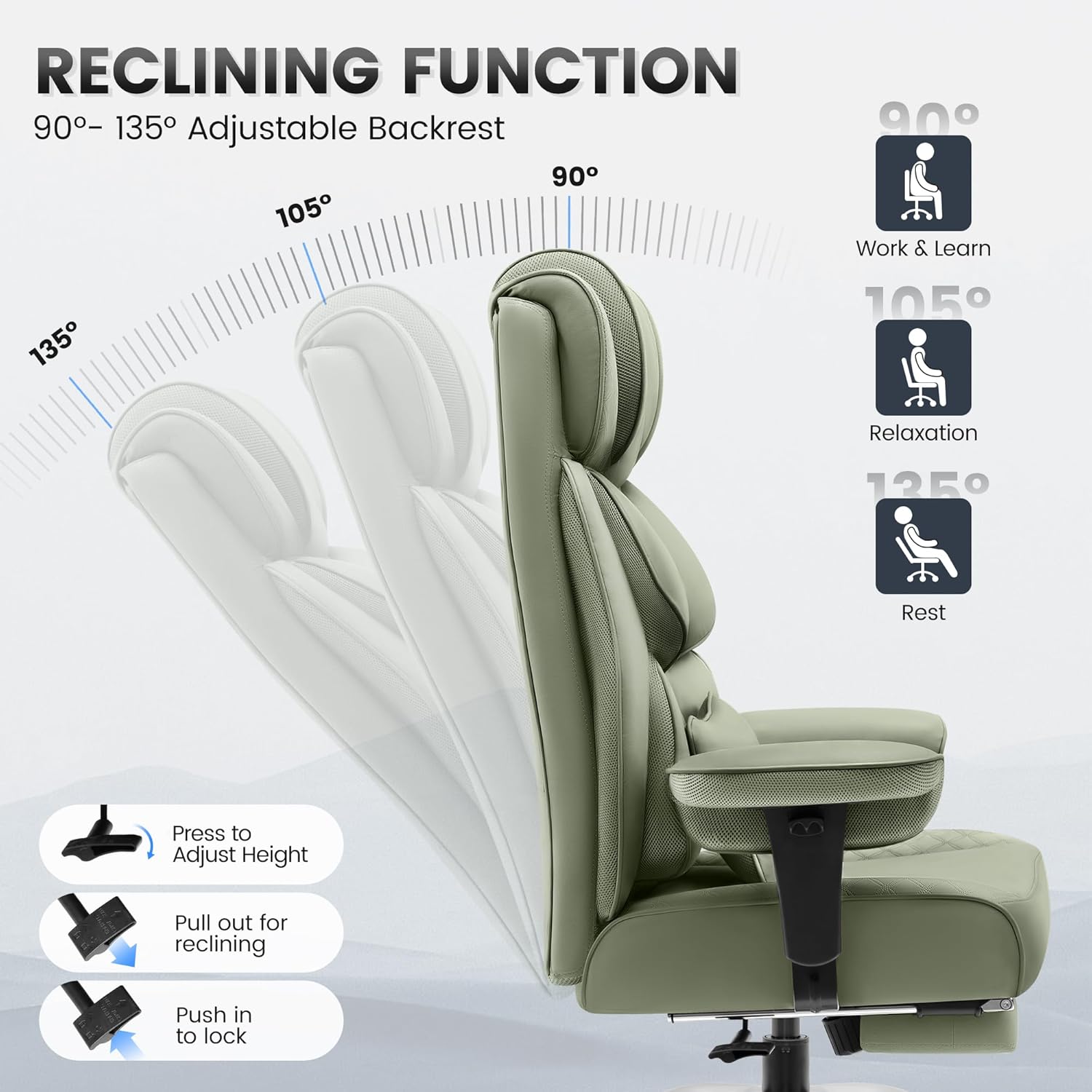
To adjust the seat height, locate the lever on the right side under the seat. Pull the lever up to raise the seat. To lower the seat, pull the lever up while seated. Release the lever at the desired height.

3.2 Reclining Function
The chair features a 90°-135° adjustable backrest with three positions: Work & Learn (90°), Relaxation (105°), and Rest (135°).
- To recline: Pull the recline lever (located on the left side under the seat) outwards and lean back to your desired angle.
- To lock: Push the recline lever inwards to lock the backrest in position.
- To return upright: Pull the recline lever outwards and lean forward.
3.3 Armrest Adjustment
The armrests are adjustable to provide optimal support. Use the buttons or levers on the side of the armrests to raise or lower them to your preferred height.
3.4 Retractable Footrest
For added comfort, especially when reclining, pull out the footrest from underneath the seat. Push it back in when not in use.

4. Maintenance
- Cleaning: Wipe clean with a damp cloth. Avoid harsh chemicals or abrasive cleaners that may damage the faux leather.
- Inspection: Periodically check all bolts and screws to ensure they are tight. Re-tighten if necessary.
- Casters: Keep casters free of debris to ensure smooth rolling.
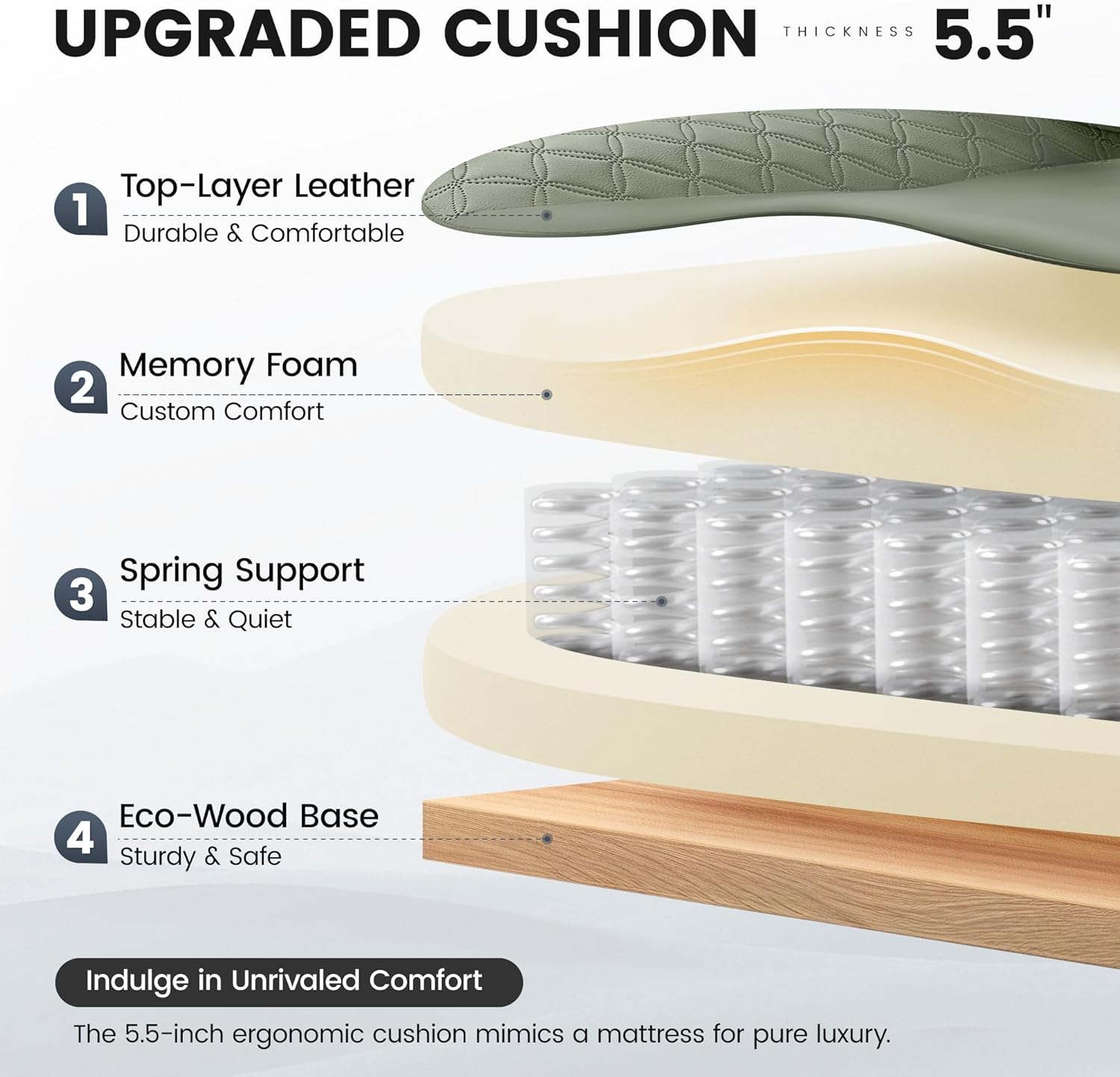
- Leather Care: The high-end luxury imitation leather is designed to be resilient against cat scratches and easy to clean.
5. Troubleshooting
- Chair not adjusting height: Ensure the gas lift lever is fully engaged and the gas cylinder is properly seated in the base. If the issue persists, contact customer support.
- Chair not reclining: Check that the recline lever is pulled out correctly. Ensure no obstructions are preventing the backrest from moving.
- Wobbly chair: Verify that all assembly screws are securely tightened. Check that the chair base is on a flat, even surface.
- Casters not rolling smoothly: Inspect casters for hair or debris and clean as needed.
6. Product Specifications
| Feature | Detail |
|---|---|
| Brand | BestGlory |
| Model Number | B0FFSWTSZ6 |
| Color | Green |
| Product Dimensions | 25"D x 25"W x 40"H |
| Size | Oversized |
| Back Style | Cushion Back |
| Special Features | Adjustable Backrest, Adjustable Height, Big and Tall, Ergonomic, Zero Gravity |
| Product Care Instructions | Wipe Clean |
| Recommended Uses | Computer, Gaming, Office, Reading, Relaxing |
| Maximum Weight Recommendation | 400 Pounds |
| Style | 3 Position Reclining |
| Room Type | Game Recreation Room, Office, Study Room |
| Included Components | Arm Pad, Caster, Cushion |
| Arm Style | Pillow-Top |
| Seat Back Interior Height | 30 Inches |
| Furniture Base Movement | Swivel |
| Seat Height | 21 Inches |
| Seat Depth | 21 inches |
| Fill Material | Memory Foam |
| Cushion Style | Saddle-shape |
| Seat Length | 23.3 Inches |
| Leg Style | Wheels |
| Arm Height | 30 Inches |
| Reclining Position Count | 3 Position |
| Tilting | Yes |
| Chair Backrest Width | 23 Inches |
| Item Weight | 62.8 pounds |
| Material | Faux Leather |

7. Warranty and Support
This product is from a small business brand, BestGlory. For any concerns during installation or use, please contact our customer support team.
- Customer Support Email: cs@bestglorys.com
- Customer Support Phone: +1(970)866-1010
- Online Support: You can also contact the seller through your Amazon account by navigating to "Your Orders" and selecting "Contact Seller" for this product.
Ask a question about this manual
Ask about setup, troubleshooting, compatibility, parts, safety, or missing instructions. Manuals+ will review the question and use this page’s manual context to help answer it.