
VIANIS V8901-PIR
VIANIS V8901-PIR Motion Sensor Outdoor Ceiling Light User Manual
Model: V8901-PIR | Brand: VIANIS
1. Safety Information
Please read these instructions carefully before installation and use. Keep this manual for future reference.
- Electrical Safety: Always turn off the power at the circuit breaker before installing, servicing, or changing bulbs. Ensure proper grounding to avoid electrical shock.
- Qualified Electrician: Installation should be performed by a qualified electrician if you are not familiar with electrical wiring.
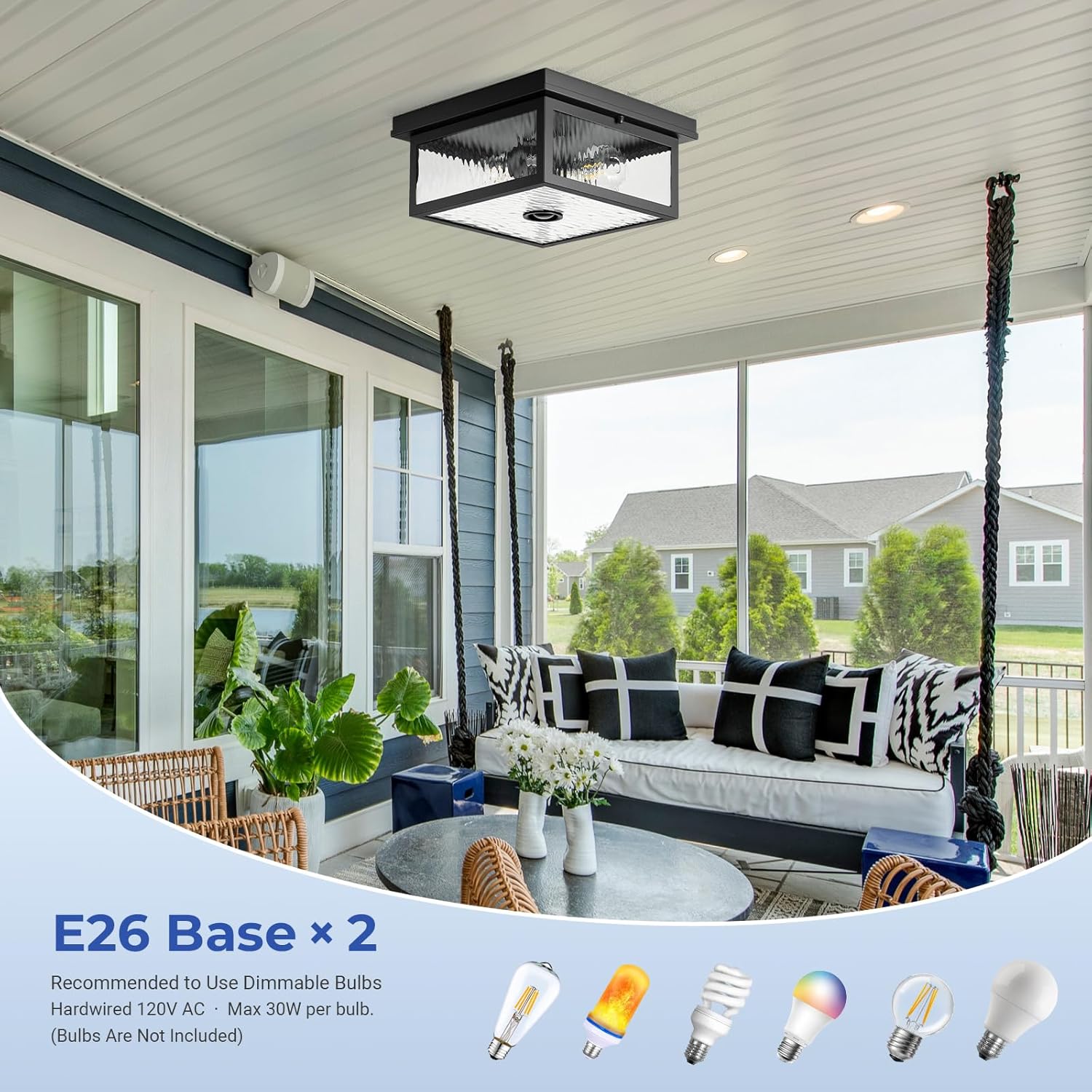
- Bulb Requirements: Use only E26 base dimmable LED bulbs, maximum 30W per bulb. Non-dimmable bulbs may cause malfunction or damage. Bulbs are not included.
- Remote Control Batteries: The remote control requires 2 x AAA batteries (not included).
- Outdoor Use: This fixture is designed for outdoor use and is weatherproof. Ensure all connections are sealed to prevent water ingress.
- Stable Mounting: Ensure the fixture is securely mounted to a stable ceiling surface to prevent it from falling.
2. Package Contents
Verify that all components are present before beginning installation.
- VIANIS Motion Sensor Outdoor Ceiling Light Fixture (1)
- Remote Control (1)
- Mounting Hardware Kit (1)
- Instruction Manual (1)
Note: E26 Dimmable LED Bulbs (Max 30W) and 2 x AAA batteries for the remote control are NOT included and must be purchased separately.
3. Product Overview
The VIANIS V8901-PIR Motion Sensor Outdoor Ceiling Light is designed for convenience and security, featuring a durable construction and smart functionalities.
Key Features:
- Remote Control: Easily adjust settings from the ground, eliminating the need for ladders.
- Motion Sensor: Integrated PIR motion sensor with 360° detection and an adjustable range of 6.5-26 feet (up to 48 ft max coverage diameter).
- 5 Smart Lighting Modes: DIM, ECO+, D2D (Dusk-to-Dawn), Override, and ON modes for various needs.
- Adjustable Brightness: Dimmable from 20% to 100% to suit different activities and preferences.
- Adjustable Illumination Duration: Set the light to stay on for 1-10 minutes after motion detection.
- Durable Construction: Features a UV-coated metal body and water ripple tempered glass, providing weatherproof (rainproof, windproof, sunproof, snowproof, stormproof) and insect-resistant protection.
- E26 Sockets: Equipped with two E26 bulb bases, compatible with dimmable LED bulbs up to 30W each.
Product Components:



4. Installation Instructions
This modern ceiling light features an integrated design for straightforward installation. Follow these steps carefully.
Tools Required (Not Included):
- Screwdriver
- Wire Strippers
- Electrical Tape
- Ladder (for ceiling installation)
Step-by-Step Installation:
- Turn Off Power: Before starting, ensure the power to the installation area is turned OFF at the main circuit breaker to prevent electrical shock.
- Prepare Mounting Surface: Securely attach the mounting bracket to the ceiling junction box using the provided screws. Ensure the bracket is firm and stable.
- Wire Connections: Connect the household wires to the fixture wires according to standard electrical codes (typically black to black, white to white, and ground to ground). Use wire nuts to secure connections and electrical tape for added insulation.
- Mount the Fixture: Carefully align the fixture with the mounting bracket and secure it using the provided screws or nuts. Ensure a tight fit to prevent moisture ingress.
- Install Bulbs: Screw two E26 base dimmable LED bulbs (max 30W each, not included) into the sockets.
- Restore Power: Once the fixture is securely installed and bulbs are in place, turn the power back ON at the circuit breaker.

5. Operating Instructions
The VIANIS Motion Sensor Outdoor Ceiling Light can be controlled via the included remote. Insert 2 x AAA batteries (not included) into the remote before use.
Remote Control Functions:
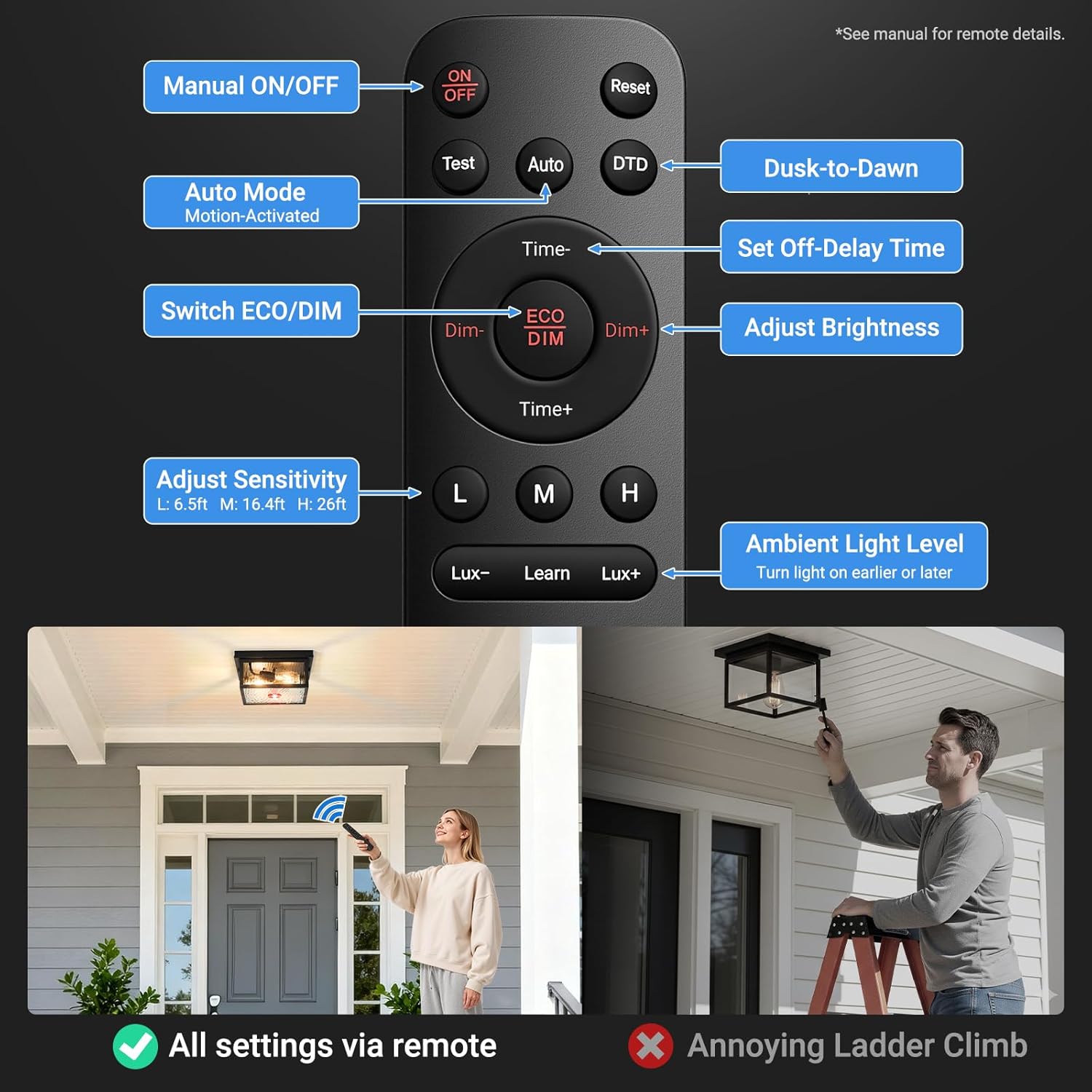
- ON/OFF: Manually turn the light on or off.
- Reset: Resets all settings to factory defaults.
- Test: Activates a test mode for motion sensor functionality.
- Auto: Engages motion-activated mode.
- DTD (Dusk-to-Dawn): Activates Dusk-to-Dawn mode.
- Time-/Time+: Adjusts the duration the light stays on after motion detection (1-10 minutes).
- Dim-/Dim+: Adjusts brightness levels (20%-100%).
- ECO/DIM: Toggles between ECO and DIM modes.
- L/M/H (Sensitivity): Adjusts motion sensor sensitivity (L: 6.5ft, M: 16.4ft, H: 26ft).
- Lux-/Learn/Lux+ (Ambient Light Level): Sets the ambient light threshold for the light to turn on or off. Use "Learn" to set the current ambient light as the threshold.
Smart Lighting Modes:
The light offers 5 distinct modes to cater to various needs, easily switchable via the remote control.


ON Mode: Maintains 100% brightness all day, with manual on/off capability via the remote.
Motion Sensor Settings:
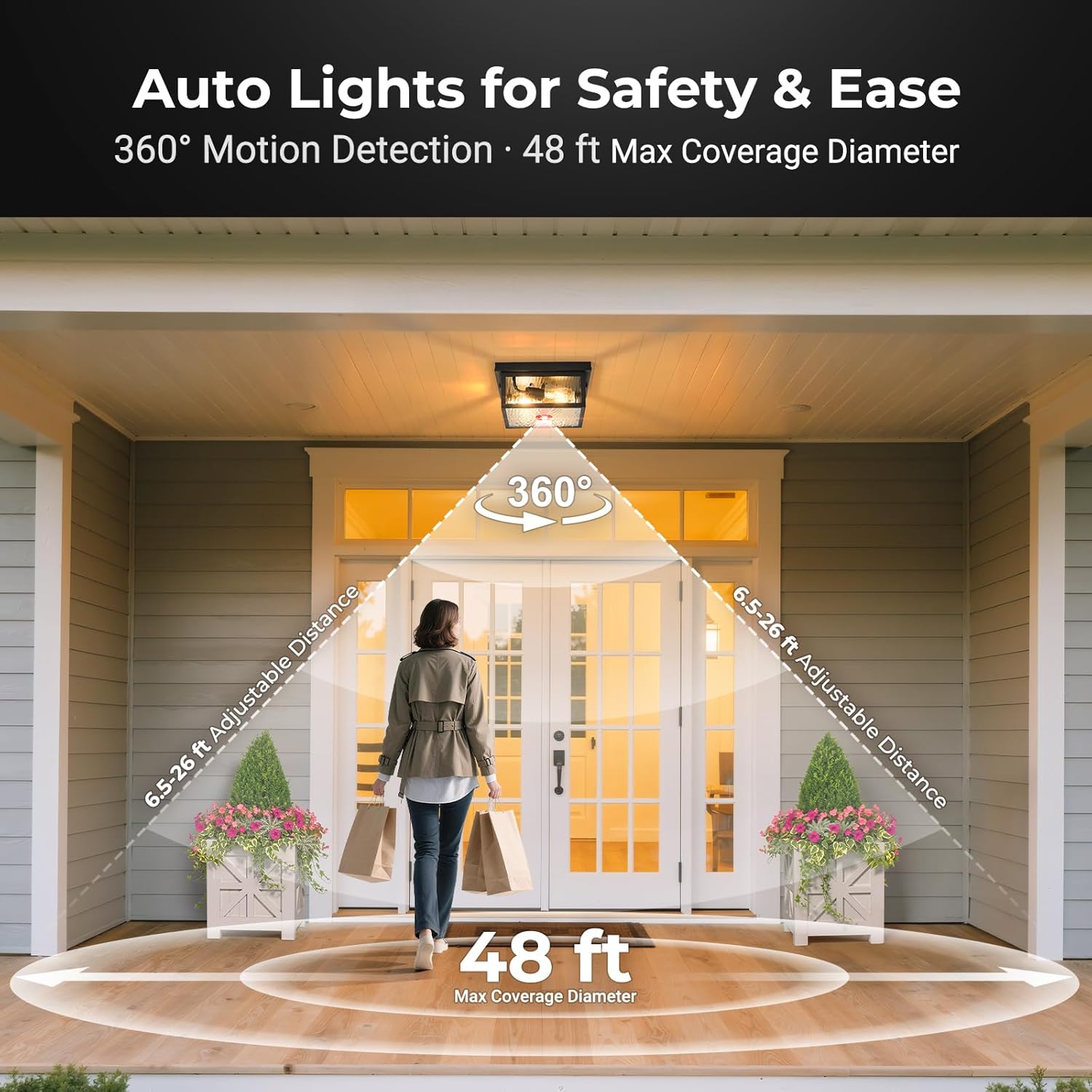

Use the L/M/H buttons on the remote to set the motion sensor's detection sensitivity:
- L (Low): Approximately 6.5 feet detection range.
- M (Medium): Approximately 16.4 feet detection range.
- H (High): Approximately 26 feet detection range.
The Lux-/Learn/Lux+ buttons allow you to adjust the ambient light level at which the sensor activates. Use "Learn" to set the current light level as the trigger point.
Brightness Adjustment:

Use the Dim- and Dim+ buttons on the remote to adjust the light's brightness from 20% to 100% to suit your needs for different occasions.
Official Product Video:
Video Description: An official product video demonstrating the features and functionality of the VIANIS Motion Sensor Outdoor Ceiling Light with Remote, including its design, motion sensor, and various lighting modes.
6. Maintenance
Regular maintenance ensures optimal performance and longevity of your light fixture.
- Cleaning: Turn off power before cleaning. Wipe the fixture with a soft, damp cloth. Do not use abrasive cleaners or solvents, as they may damage the finish or glass.
- Bulb Replacement: Ensure power is off before replacing bulbs. Allow bulbs to cool completely before handling. Replace with E26 base dimmable LED bulbs (max 30W).
- Inspection: Periodically check for any loose connections, damaged wiring, or signs of wear. Address any issues promptly to maintain safety and functionality.
- Weather Resistance: The sealed design is insect and dust resistant, requiring minimal seasonal maintenance.
7. Troubleshooting
If you encounter issues, refer to the following common problems and solutions:
| Problem | Possible Cause | Solution |
|---|---|---|
| Light does not turn on. | No power, faulty bulb, incorrect wiring, remote batteries dead. | Check circuit breaker. Replace bulbs. Verify wiring connections. Replace remote batteries. |
| Motion sensor not detecting. | Incorrect sensitivity setting, sensor obstructed, ambient light too high. | Adjust sensitivity (L/M/H) on remote. Clear obstructions. Adjust Lux setting on remote or ensure it's dark enough for activation. |
| Light stays on constantly. | Continuous motion, incorrect mode, Lux setting too low. | Ensure no constant motion in detection area. Check selected lighting mode. Adjust Lux setting to a higher threshold. |
| Light flickers or dims unexpectedly. | Incompatible bulbs, loose connection, power fluctuations. | Ensure E26 dimmable LED bulbs are used. Check wiring connections. Consult an electrician if power fluctuations are suspected. |
| Remote control not working. | Dead batteries, remote out of range, signal obstruction. | Replace AAA batteries. Ensure remote is within range and pointed at the fixture. Remove any obstructions between remote and light. |
If problems persist, please contact VIANIS customer support.
8. Specifications
| Feature | Detail |
|---|---|
| Brand | VIANIS |
| Model Number | V8901-PIR |
| Color | Black |
| Material | High-quality metal, Water Ripple Glass |
| Style | Modern |
| Light Fixture Form | Ceiling (Flush Mount) |
| Indoor/Outdoor Usage | Outdoor |
| Power Source | Hardwired |
| Control Method | Remote Control |
| Special Features | Dimmable, Motion Sensor, Waterproof, 5 Lighting Modes |
| Light Source | LED (Bulbs not included) |
| Number of Light Sources | 2 |
| Voltage | 120 Volts |
| Wattage (Max per bulb) | 30 Watts |
| Bulb Base | E26 |
| Brightness (Max) | 1000 Lumens |
| Motion Detection Range | Adjustable 6.5-26 feet (48 ft max coverage diameter) |
| Dimensions (L x W x H) | 11.02" x 11.02" x 5.2" |
| Water Resistance Level | Water Resistant |
| Required Assembly | No (Integrated design) |
9. Warranty and Support
Warranty Information:
This VIANIS product is covered by a 1-year manufacturer's warranty from the date of purchase. This warranty covers defects in materials and workmanship under normal use.
The warranty does not cover:
- Damage caused by improper installation or maintenance.
- Damage caused by misuse, abuse, accident, or neglect.
- Damage from natural disasters or acts of God.
- Consumable parts such as light bulbs.
- Unauthorized repairs or modifications.

Customer Support:
For technical assistance, warranty claims, or any questions regarding your VIANIS product, please contact our customer service team.
Please have your model number (V8901-PIR) and purchase date ready when contacting support.
Ask a question about this manual
Ask about setup, troubleshooting, compatibility, parts, safety, or missing instructions. Manuals+ will review the question and use this page’s manual context to help answer it.