
1. Introduction
The Debra EST-12 Pro is a UHF Stereo Wireless In-Ear Monitor System designed for professional audio monitoring. This portable and rechargeable system offers 20 adjustable channels, making it suitable for live performances, recording sessions, and conferences. It features 24-bit/48KHz HD audio with DSP noise reduction and a one-touch stereo/mono switching function for versatile use.
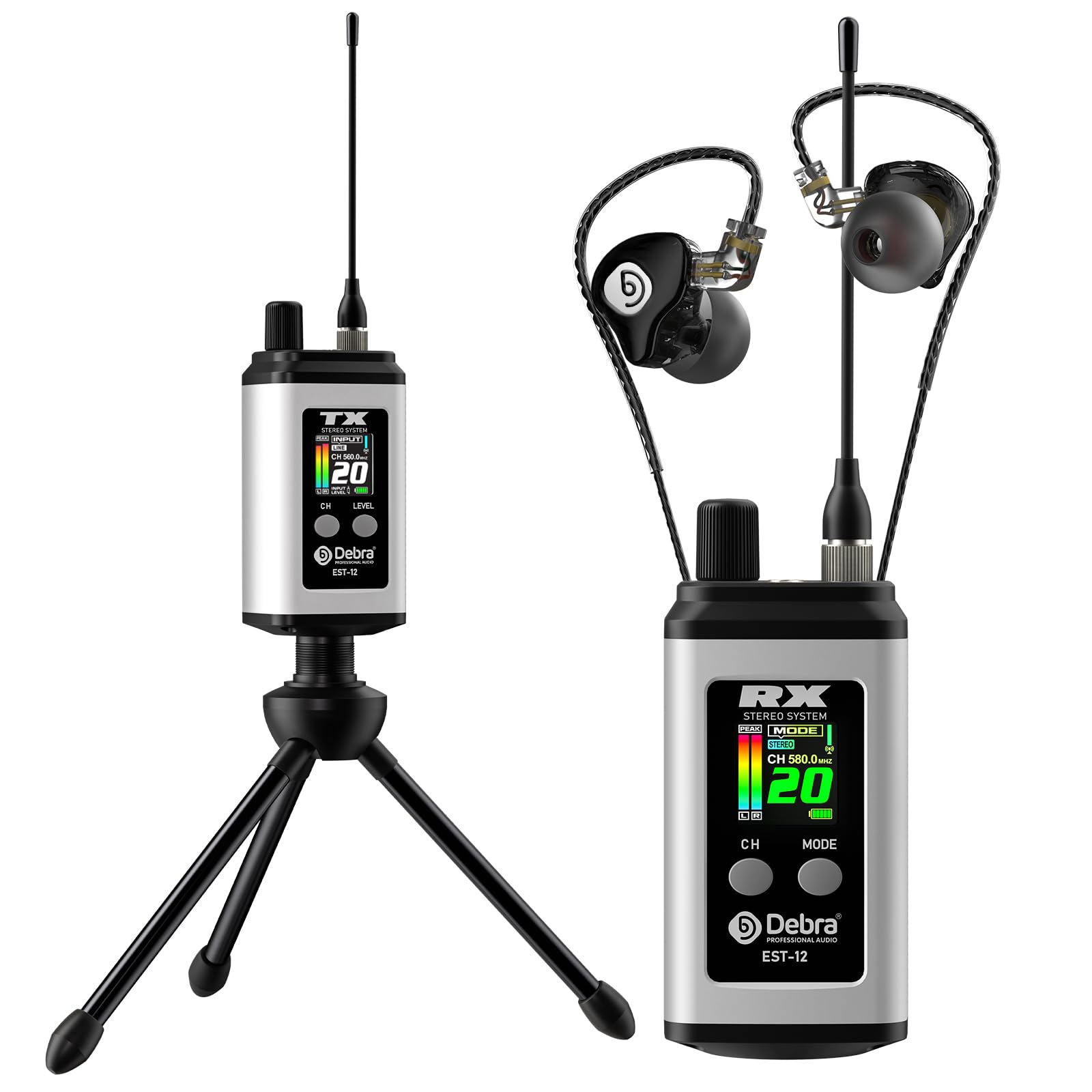
Image: Debra EST-12 Pro Wireless In-Ear Monitor System, showing the transmitter and receiver units.
2. Package Contents
Verify that all items listed below are included in your package:
- Transmitter (TX) x 1
- Receiver (RX) x 1
- Bracket x 1
- Monitor Earphone x 1
- Type-C Cable x 1
- 3.5mm Cable x 1
- User Manual x 1
- Zipper Bag x 1

Image: All components included in the Debra EST-12 Pro package, laid out for inspection.
3. Component Identification
Familiarize yourself with the various parts of the transmitter and receiver units:

Image: Detailed diagram showing the labeled components of both the transmitter (TX) and receiver (RX) units.
Transmitter (TX)
- Mini BNC Antenna Interface: For connecting the detachable antenna.
- Audio Input Interface (3.5mm): Connect your audio source here.
- Switch/Volume Control: Power on/off and adjust input level.
- Signal Antenna (Detachable): For wireless signal transmission.
- TFT Information Screen: Displays channel, input level, and battery status.
- Transmitter 1/4 Bracket Interface: For mounting the transmitter on a stand.
- Channel Switch Button (CH): To change the transmission channel.
- Transmitter Input Gain Switch (Line/Mic): Adjusts input sensitivity.
Receiver (RX)
- Mini BNC Antenna Interface: For connecting the detachable antenna.
- Switch/Volume Control: Power on/off and adjust output volume.
- Signal Antenna (Detachable): For wireless signal reception.
- TFT Information Screen: Displays channel, mode (stereo/mono), and battery status.
- Channel Switch Button (CH): To change the reception channel.
- Receiver Stereo/Mono Switch (MODE): Toggles between stereo and mono audio output.
- Headphone Interface (3.5mm): Connect your in-ear monitors or headphones here.
- Receiver Back Clip: For attaching the receiver to clothing or a belt.
4. Setup Instructions
4.1 Charging the Units
Both the transmitter and receiver units are equipped with built-in rechargeable batteries. Use the provided Type-C cable to charge them. A full charge typically takes approximately 2 hours.
- Connect the Type-C cable to the charging port on each unit.
- Connect the other end of the cable to a standard USB power adapter (5V recommended).
- The battery indicator on the TFT screen will show charging status.

Image: The receiver unit connected to a USB-C charging cable, illustrating the charging process.
4.2 Connecting the Antenna
Attach the detachable antennas to both the transmitter and receiver units by screwing them into the Mini BNC Antenna Interfaces.
4.3 Audio Source Connection
Connect your audio source (e.g., mixer, phone, MP3 player) to the transmitter's 3.5mm Audio Input Interface using the provided 3.5mm cable.

Image: Illustration of connecting the transmitter to an audio mixer, smartphone, or MP3 player.
4.4 Pairing the Units
The transmitter and receiver should automatically pair when powered on and set to the same channel. If pairing issues occur, ensure both units are on the same channel and within range.
- Power on both the transmitter and receiver using their respective power switches.
- Use the 'CH' button on both units to select the desired channel. Ensure both are set to the same channel number for proper operation.
- The TFT screen will display the selected channel.

Image: A transmitter unit wirelessly connected to multiple receiver units, demonstrating multi-receiver compatibility.
5. Operating Instructions
5.1 Power On/Off and Volume Control
- To power on or off, rotate the Switch/Volume Control knob.
- Adjust the desired listening volume on the receiver by rotating the same knob.
- Adjust the input level on the transmitter to prevent clipping or distortion.
5.2 Channel Selection
The system supports 20 adjustable UHF channels (560-590MHz). To change channels:
- Press the 'CH' button on both the transmitter and receiver to cycle through available channels.
- Ensure both units are set to the same channel for optimal performance and to avoid interference.

Image: The EST-12 Pro display indicating 20 available channels for selection.
5.3 Stereo/Mono Mode Switching
The receiver allows for one-touch switching between stereo and mono modes:
- On the receiver unit, press the 'MODE' button to toggle between 'STEREO' and 'MONO' output.
- The selected mode will be displayed on the TFT screen.

Image: The receiver's TFT screen displaying the option to switch between Stereo and Mono modes.
5.4 Monitoring Range
The system provides a stable transmission range of up to 80 meters (approximately 260 feet) in optimal environments, thanks to its UHF digital technology. Signal penetration and anti-interference capabilities are strong.

Image: Diagram illustrating the 80-meter ultra-far signal transmission range of the Debra EST-12 Pro system.
5.5 Wearing the In-Ear Monitors
The included in-ear monitors are designed for comfort during extended use. Ensure a proper fit for optimal sound isolation and audio quality.

Image: A person wearing the in-ear monitors, demonstrating their comfortable design for prolonged use.
6. Maintenance
To ensure the longevity and optimal performance of your Debra EST-12 Pro system, follow these maintenance guidelines:
- Cleaning: Use a soft, dry cloth to clean the units. Avoid using harsh chemicals or abrasive materials.
- Storage: Store the system in the provided zipper bag when not in use to protect it from dust and physical damage.
- Battery Care: Recharge the units regularly, even if not in frequent use, to maintain battery health. Avoid fully discharging the batteries for extended periods.
- Antenna: Handle the detachable antennas with care to prevent bending or breaking.
7. Troubleshooting
If you encounter issues with your EST-12 Pro system, refer to the following common problems and solutions:
| Problem | Possible Cause | Solution |
|---|---|---|
| No sound or intermittent audio |
|
|
| Poor sound quality (noise, distortion) |
|
|
| Short battery life |
|
|
8. Technical Specifications
| Feature | Specification |
|---|---|
| Brand | D Debra |
| Model Number | EST-12 |
| Wireless Technology | RF (UHF) |
| Frequency Range | 560-590MHz |
| Total Number of Channels | 20 |
| Effective Working Distance | ≥80 meters (optimal environment) |
| Audio Compression and Expansion | DSP Digital Audio |
| Audio Sampling Depth | 24bit, 48KHz |
| Audio Frequency Response | 60Hz-20KHz |
| Dynamic Range | 95 dB |
| Audio Signal-to-Noise Ratio | 120dB |
| Total Harmonic Distortion | ≤0.8% @ 1KHz |
| Operating Temperature Range | -10 ~ +50 ℃ |
| Receiver Battery Life | ≥6 hours |
| Transmitter Battery Life | ≥5 hours |
| Battery Charge Time | 2 hours |
| Headphone Impedance | 32 ohm |
| Headphone Jack | 3.5 mm Jack |
| Enclosure Material | Metal, Plastic |
| Item Weight | 0.84 kg |

Image: Detailed view of the Debra EST-12 Pro unit with technical parameters and dimensions.
9. Official Product Video
Video: An official overview of the Debra EST-12 Pro Stereo Wireless In-Ear Monitor system, highlighting its features and functionality.
10. Warranty and Support
The Debra EST-12 Pro UHF Stereo Wireless In-Ear Monitor System comes with a 1-year manufacturer's warranty.
For technical support, warranty claims, or further assistance, please refer to the contact information provided on the product packaging or the official D Debra website.