1. Introduction
This manual provides detailed instructions for the installation, operation, and maintenance of your Hodozzy 7-inch 2 Din Car Stereo. Please read this manual thoroughly before using the product to ensure proper function and safety.

2. Package Contents
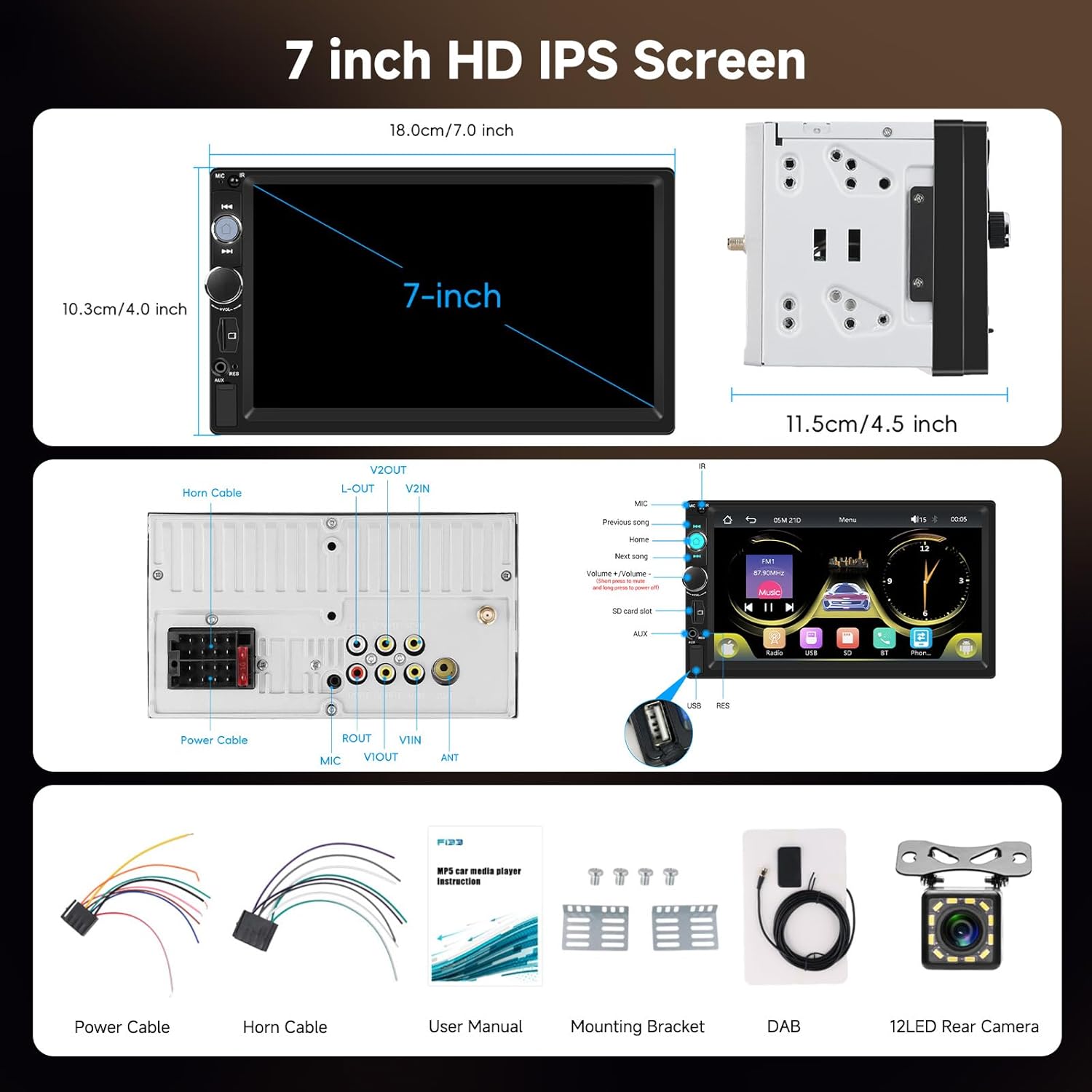
Verify that all components are present in the package:
- Hodozzy 7-inch 2 Din Car Stereo Unit
- Power Cable
- Horn Cable
- User Manual
- Mounting Brackets
- DAB Antenna
- 12LED Rear Camera
3. Setup and Installation
3.1 General Installation
The Hodozzy car stereo is designed for a standard 2 Din slot. Ensure your vehicle has adequate space for installation. Professional installation is recommended.
3.2 Wiring Connections
Connect the power cable, horn cable, and other necessary audio/video cables to the corresponding ports on the rear of the unit. Refer to the wiring diagram in the included user manual for specific connections.
3.3 DAB Antenna Installation
For optimal DAB+ radio reception, install the included DAB antenna. Follow these steps:
- Disassemble the plastic border of the right window.
- Remove the protective paper from the black film and transparent film on the antenna.
- Stick the black film on the metal frame and transparent film on the glass. Remember to leave space for the plastic border.
- Tighten the black film and transparent film, and fix the cable securely.
- Put the plastic border back. Be careful not to break the cable.
- Install the DAB antenna with a 2-3CM gap from the window frame, ensuring the AMP is at the top.

3.4 Rear Camera Installation
Connect the included 12LED rear camera to the designated input on the car stereo. The camera is waterproof and features night vision. It will automatically activate when the vehicle is shifted into reverse, displaying parking guidelines on the screen.

4. Operating Instructions
4.1 Basic Functions
- Power On/Off: Press the power button to turn the unit on or off.
- Volume Control: Use the rotary knob or on-screen controls to adjust the volume.
4.2 Radio Functions (DAB+/FM)
The unit supports both DAB+ digital radio and traditional FM radio. Use the 'Radio' application on the touchscreen to access these features.
- DAB+ Radio: Enjoy crystal-clear digital radio with interference-free reception. Scan for available stations and save your favorites.
- FM Radio: Tune into FM frequencies (87.5-108 MHz). Auto-scan and manual tuning options are available.

4.3 Wireless Carplay and Android Auto
Connect your iOS or Android smartphone wirelessly or via USB for seamless integration. This allows access to navigation, music, calls, messages, and voice control (Siri/Google Assistant) directly from the car stereo display.
- Wireless Connection: Enable Bluetooth and Wi-Fi on your phone and connect to the car stereo. Follow the on-screen prompts to initiate Carplay or Android Auto.
- Wired Connection: Connect your phone to the USB port using a compatible cable.

4.4 Mirror Link
The unit supports wired Mirror Link technology, allowing you to display your mobile phone's screen directly onto the car stereo. Connect your phone via USB and follow the instructions on the stereo to activate Mirror Link.
4.5 Bluetooth 5.2
Pair your smartphone with the car stereo via Bluetooth 5.2 for stable hands-free calling and audio streaming. Access your phonebook and call history directly from the stereo.
4.6 Multimedia Playback
- USB/Type-C/TF Card: Insert a USB drive, Type-C device, or TF card into the respective ports to play audio and video files.
- AUX Input: Connect external audio devices using the 3.5mm AUX input.
- Video Output: The car stereo features video output to independently transmit video signals to rear headrest monitors or auxiliary screens, providing entertainment for rear passengers while maintaining front display functionality.

4.7 Customization and Settings
- 7-Color Backlight: Personalize the driving atmosphere by choosing from 7 different colors for the backlit buttons.
- EQ Settings: Adjust audio output with customizable EQ effects to suit your preferences.
- Steering Wheel Control (SWC): Connect your vehicle's steering wheel controls to the unit for convenient operation of functions like volume adjustment, track skipping, and answering calls without taking your hands off the wheel.

5. Maintenance
To ensure the longevity and optimal performance of your Hodozzy car stereo, follow these maintenance guidelines:
- Cleaning: Use a soft, dry cloth to clean the screen and exterior surfaces. Avoid abrasive cleaners or solvents.
- Software Updates: Periodically check the Hodozzy official website for any available software updates. Follow the provided instructions carefully for any update procedures.
- Environmental Conditions: Avoid exposing the unit to extreme temperatures, direct sunlight for prolonged periods, or excessive moisture.
6. Troubleshooting
If you encounter issues with your car stereo, refer to the following common problems and solutions:
- No Power:
- Check all power connections to ensure they are securely fastened.
- Verify the vehicle's fuse for the stereo is intact.
- No Sound:
- Ensure the volume is not muted or set to minimum.
- Check speaker connections.
- Verify audio source selection is correct (e.g., FM, DAB, Bluetooth, USB).
- Bluetooth Connection Issues:
- Ensure Bluetooth is enabled on both the stereo and your smartphone.
- Delete previous pairings and attempt to re-pair the devices.
- Restart both the stereo and your smartphone.
- Carplay/Android Auto Not Connecting:
- For wired connections, try a different USB cable.
- For wireless connections, ensure Wi-Fi is also enabled on your phone.
- Check your phone's settings to ensure Carplay/Android Auto is enabled and allowed for the device.
- Rear Camera Not Displaying:
- Verify the camera's video input cable is correctly connected to the stereo.
- Ensure the reverse trigger wire is properly connected to the vehicle's reverse light circuit.
If the problem persists after attempting these solutions, please contact Hodozzy customer support.
7. Specifications
| Feature | Specification |
|---|---|
| Model | SF20250913B0FFSP88LB |
| Screen Size | 7-inch HD IPS |
| Dimensions (Unit) | 18.0 x 10.3 cm (7.0 x 4.0 inches) front panel, 11.5 cm (4.5 inches) depth |
| Package Dimensions | 25.6 x 19 x 14.5 cm |
| Weight | 1.02 Kilograms |
| Power Output | 45 Watts (per channel), 180 Watts (total) |
| Audio Output Mode | Surround, Stereo |
| Surround Configuration | 4.1 |
| Connectivity Technology | Bluetooth 5.2, USB, Type-C, AUX, TF Card |
| Compatible Devices | Smartphone |
| Supported Media Formats | AVI, WAV, WMA, RM, RMVB, MP4, MKV, 3GP |
| Special Features | Android Auto, Apple CarPlay, Built-in Bluetooth, DAB+, Mirror Link, Rear Camera Input, Steering Wheel Control, 7-Color Backlight |
| Included Components | Backup Camera |
8. Warranty and Support
For warranty information and technical support, please refer to the documentation included with your product or visit the official Hodozzy website. Contact Hodozzy customer service for assistance with any product-related inquiries or issues.


