
1. Safety Instructions
Please read all instructions carefully before using the appliance and retain them for future reference. Failure to follow these instructions may result in electric shock, fire, or serious injury.
General Safety
- This appliance is intended for household use only. Do not use it for commercial or industrial purposes.
- Do not use the appliance on wet surfaces or to pick up liquids. This is a dry vacuum cleaner.
- Keep hair, loose clothing, fingers, and all parts of the body away from openings and moving parts.
- Do not pick up flammable or combustible materials (lighter fluid, gasoline, kerosene, etc.) or use in areas where they may be present.
- Do not pick up anything that is burning or smoking, such as cigarettes, matches, or hot ashes.
- Always turn off the appliance before connecting or disconnecting the floor brush, extension tube, or other accessories.
- Store the appliance indoors in a cool, dry place.
Electrical Safety
- Use only the charger supplied by the manufacturer to recharge the appliance.
- Do not use the appliance if the charger cord or plug is damaged.
- Do not handle the charger or appliance with wet hands.
Battery Safety
- This appliance uses two 4000mAh AAAA batteries.
- Do not incinerate the appliance even if it is severely damaged. The batteries may explode in a fire.
- Do not short-circuit the battery terminals.
- If the battery leaks, avoid contact with skin and eyes. If contact occurs, wash with plenty of water and seek medical advice.
2. Product Overview
The denqir RD-101 Cordless Vacuum Cleaner is designed for efficient cleaning across various surfaces in your home. It features a powerful brushless motor and a versatile design for comprehensive cleaning.
Components
- Main Vacuum Unit (with 800ml dust cup)
- 2 x 4000mAh Detachable Batteries
- Charger
- Floor Brush with LED Headlights
- Telescopic Extension Tube
- Long Straw Attachment
- 2-in-1 Brush Attachment
- Wall Mount Bracket
- User Manual
Key Features
- Powerful Brushless Motor: 750W motor providing up to 60KPa suction power.
- Multiple Suction Modes: Three modes (30KPA, 50KPA, 60KPA) for different cleaning needs.
- Long Runtime: Up to 70 minutes on low mode with two 4000mAh detachable batteries.
- Intelligent LED Display: Shows remaining battery life, current suction mode, and fault prompts.
- 8-Layer Filtration System: Fully sealed system with HEPA filter cotton, stainless steel filter, and double cyclonic separation, capturing 99% of fine particles.
- Versatile Attachments: 6-in-1 design for cleaning floors, carpets, pet hair, crevices, curtains, and car interiors.
- Adjustable Design: Telescopic handle (40-52 inches) and 90°-180° adjustable floor brush with LED headlights.

Figure 1: denqir 700W Cordless Vacuum Cleaner with included accessories.
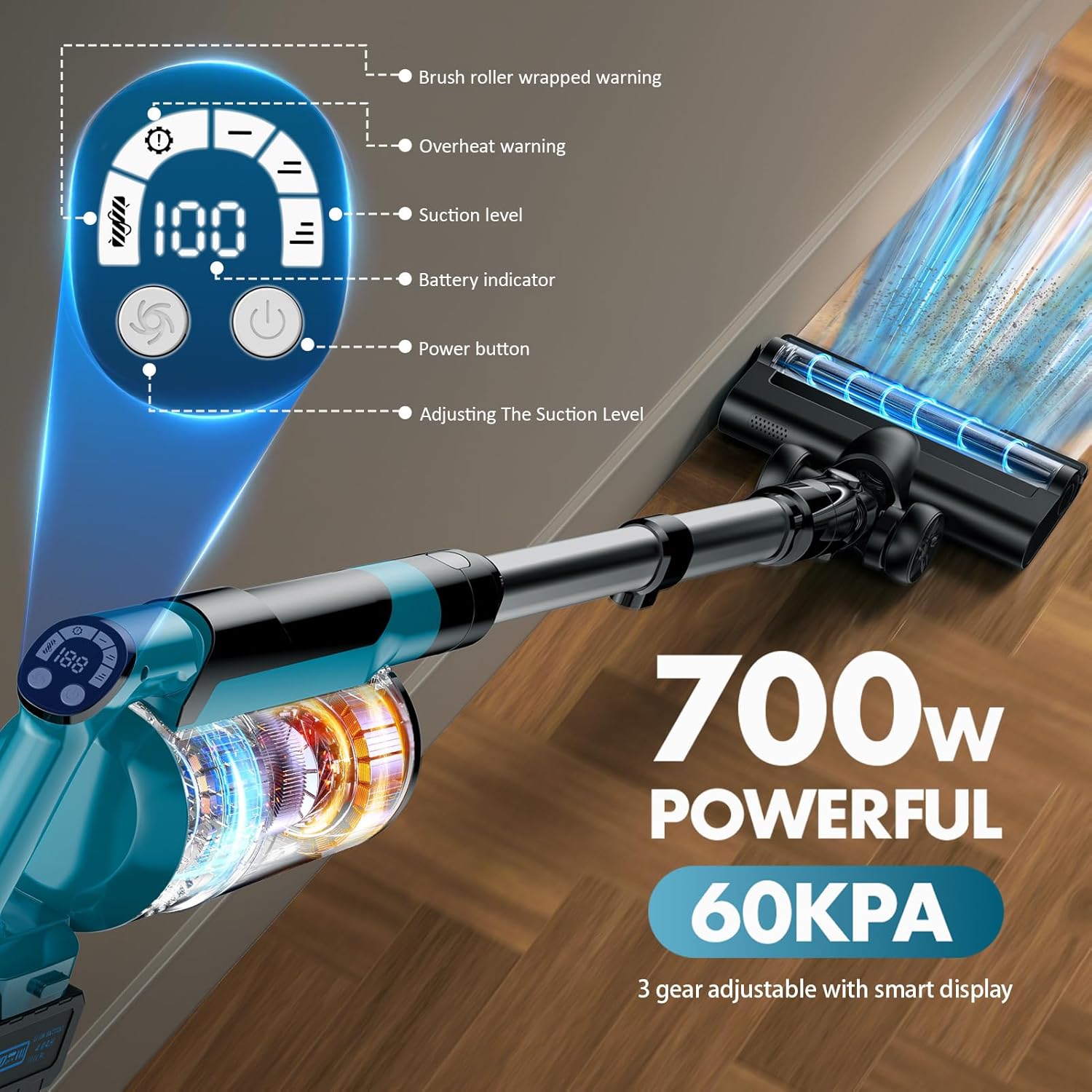
Figure 2: Close-up of the intelligent LED display on the main unit.

Figure 3: The two 4000mAh detachable batteries for extended runtime.
3. Setup
Assembly
- Attach the Battery: Slide one of the 4000mAh batteries into the main vacuum unit until it clicks securely into place.
- Connect Extension Tube: Insert the telescopic extension tube into the main vacuum unit until it locks. Adjust the length as needed (40-52 inches).
- Attach Floor Brush: Connect the floor brush to the other end of the extension tube. Ensure it clicks firmly.
- Alternative Attachments: For handheld use or specific cleaning tasks, attach the long straw or 2-in-1 brush directly to the main unit or the extension tube.
Battery Charging
The vacuum cleaner comes with two detachable batteries. It is recommended to fully charge both batteries before first use.
- Connect the charger to a power outlet.
- Attach the charger cable to the battery. The intelligent display on the main unit (if battery is attached) or the battery indicator lights will show charging progress.
- Alternatively, you can install the provided wall mount bracket and charge the vacuum directly on the wall.
Video 1: Unboxing and assembly demonstration of the denqir Cordless Vacuum Cleaner.
Video 2: Review and assembly of the denqir Cordless Vacuum Cleaner, highlighting its features.
4. Operating Instructions
Powering On/Off
- Press the power button on the intelligent display to turn the vacuum cleaner on or off.
- The intelligent display will activate, showing battery status and current suction mode.
Adjusting Suction Modes
- The vacuum cleaner has three suction modes: 30KPA (low), 50KPA (medium), and 60KPA (MAX).
- Press the mode button on the intelligent display to cycle through the different suction levels.
- Select the appropriate mode for your cleaning task (e.g., low for light dust, MAX for deep cleaning carpets or pet hair).

Figure 4: The intelligent display allows selection of three suction modes.
Using Attachments
- Floor Brush: Ideal for hard floors and carpets. The LED headlights illuminate dust and debris. The brush can be adjusted 90°-180° for easy maneuverability under furniture.
- Long Straw Attachment: Use for narrow areas such as car seat crevices, window sills, or between furniture.
- 2-in-1 Brush Attachment: Suitable for cleaning curtains, beds, sofas, and pet cushions.
- The telescopic handle can be adjusted to reach high areas like ceilings or low areas without excessive bending.
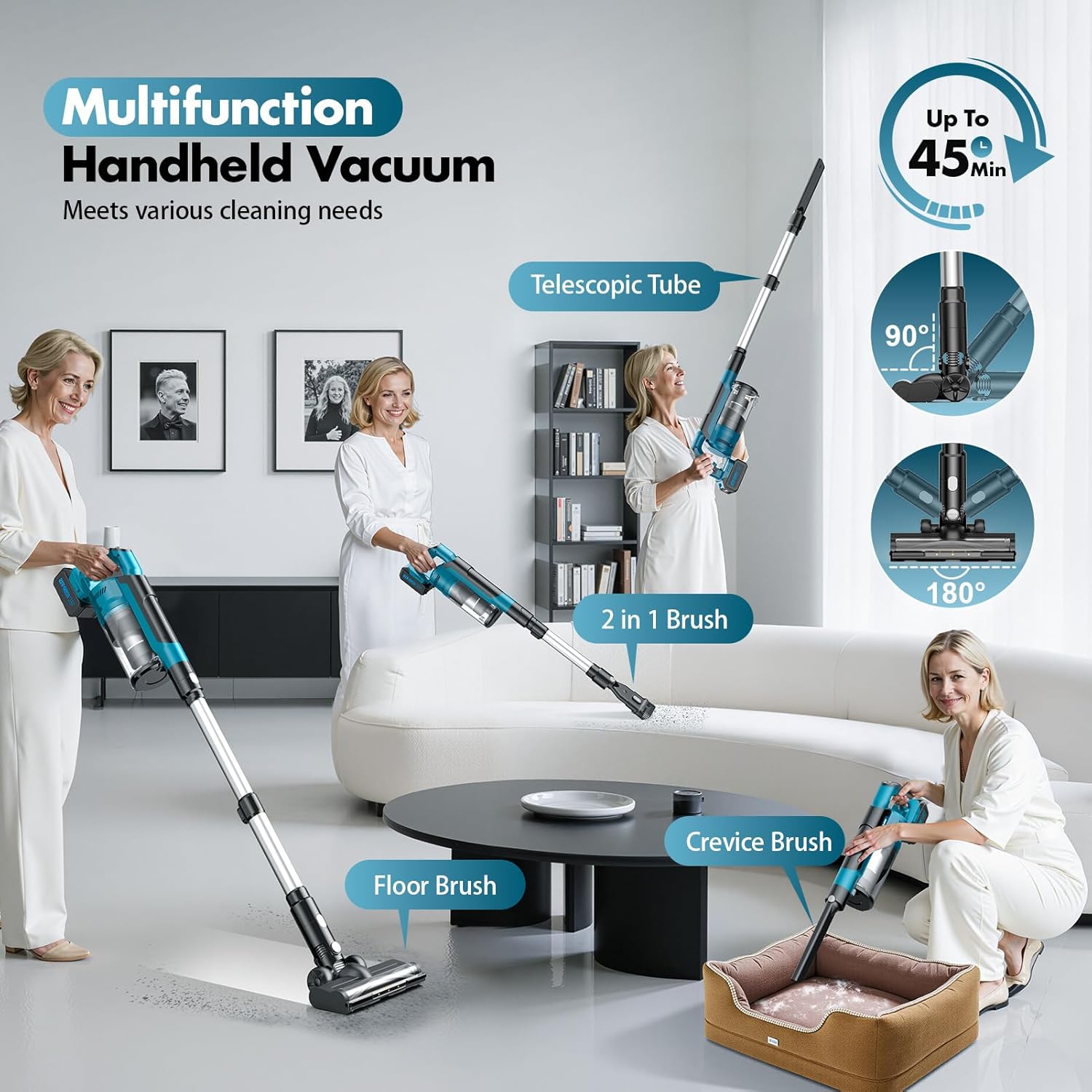
Figure 5: The vacuum can be configured with different attachments for various cleaning tasks.
Video 3: Full review of the vacuum cleaner's features and operation.
5. Maintenance
Emptying the Dust Cup
- The 800ml dust cup features a one-touch emptying design.
- Position the dust cup over a trash bin.
- Press the release button on the dust cup to open the bottom flap and empty the contents.
- Close the flap securely after emptying.

Figure 6: The dust cup can be emptied with a single click.
Cleaning the Filtration System
The 8-layer filtration system, including the HEPA filter, is removable and washable. Regular cleaning ensures optimal suction and air quality.
- To access the filter, detach the dust cup from the main unit.
- Twist and pull out the filter components.
- Wash the filter components under running water. Ensure they are completely dry before reassembling.
- Reassemble the filter components and reattach the dust cup to the main unit.

Figure 7: The 8-layer filtration system ensures efficient particle capture.
Cleaning the Brush Roll
Periodically check the floor brush for tangled hair or debris. The brush roll can be removed for easier cleaning.
- Locate the release mechanism on the side of the floor brush.
- Unlock and remove the brush roll.
- Remove any tangled hair or debris using scissors or the provided cleaning tool.
- Reinsert the brush roll and lock it back into place.
6. Troubleshooting
E3 Error
- If the intelligent display shows an "E3 error" while picking up hair, this indicates the brush roll may be stuck or clogged.
- Turn off the vacuum cleaner.
- Remove the brush roll as described in the Maintenance section.
- Clear any tangled hair or obstructions from the brush roll and the brush head area.
- Reassemble the brush roll and restart the vacuum cleaner.
- If the error persists, please contact customer support.
General Issues
- No Power: Ensure the battery is fully charged and correctly installed. Check the charger connection.
- Reduced Suction: Check if the dust cup is full and needs emptying. Inspect the filters for clogging and clean them if necessary. Ensure all attachments are securely connected. Check the brush roll for obstructions.
- Unusual Noise: Turn off the vacuum and check for any foreign objects in the brush head, extension tube, or dust cup.
7. Specifications
| Feature | Specification |
|---|---|
| Brand | denqir |
| Model Name | RD-101 |
| Special Feature | Cordless, Detachable Battery, Headlight, High Power, Portable |
| Motor Horsepower | 750 Watts |
| Wattage | 700 watts |
| Suction Power | 60KPa (Max) |
| Number of Speeds/Power Levels | 3 |
| Battery Type | 2 x 4000mAh AAAA batteries (included) |
| Battery Life | Up to 70 minutes (low mode) |
| Dust Cup Capacity | 0.8 Liters |
| Filter Type | Cartridge (HEPA filter cotton, stainless steel filter) |
| Product Dimensions | 11.42"L x 7.09"W x 17.72"H |
| Item Weight | 5.29 pounds |
| Color | Blue |
| Recommended Uses | Bed, Car, Dorm, Hardwood Floor, Household, Pet Hair |
8. Warranty and Support
After-Sales Service
denqir provides 24x7 friendly customer support. If you have any questions or encounter issues with your vacuum cleaner, please contact us. Our after-sales service experts will reply to your inquiry within 12 hours and will do their best to resolve your problems.
Please refer to the detailed steps on the product page or consult the user manual for specific instructions on disassembling and cleaning the dust filter.