1. Introduction
The Debra EST-12 Pro UHF Stereo Wireless In-Ear Monitor System provides high-fidelity audio monitoring for various applications, including live performances, recording, and conferences. This portable and rechargeable system features 20 adjustable channels, ensuring stable and clear audio transmission with ultra-low latency. This manual provides detailed instructions for setup, operation, and maintenance of your EST-12 system.
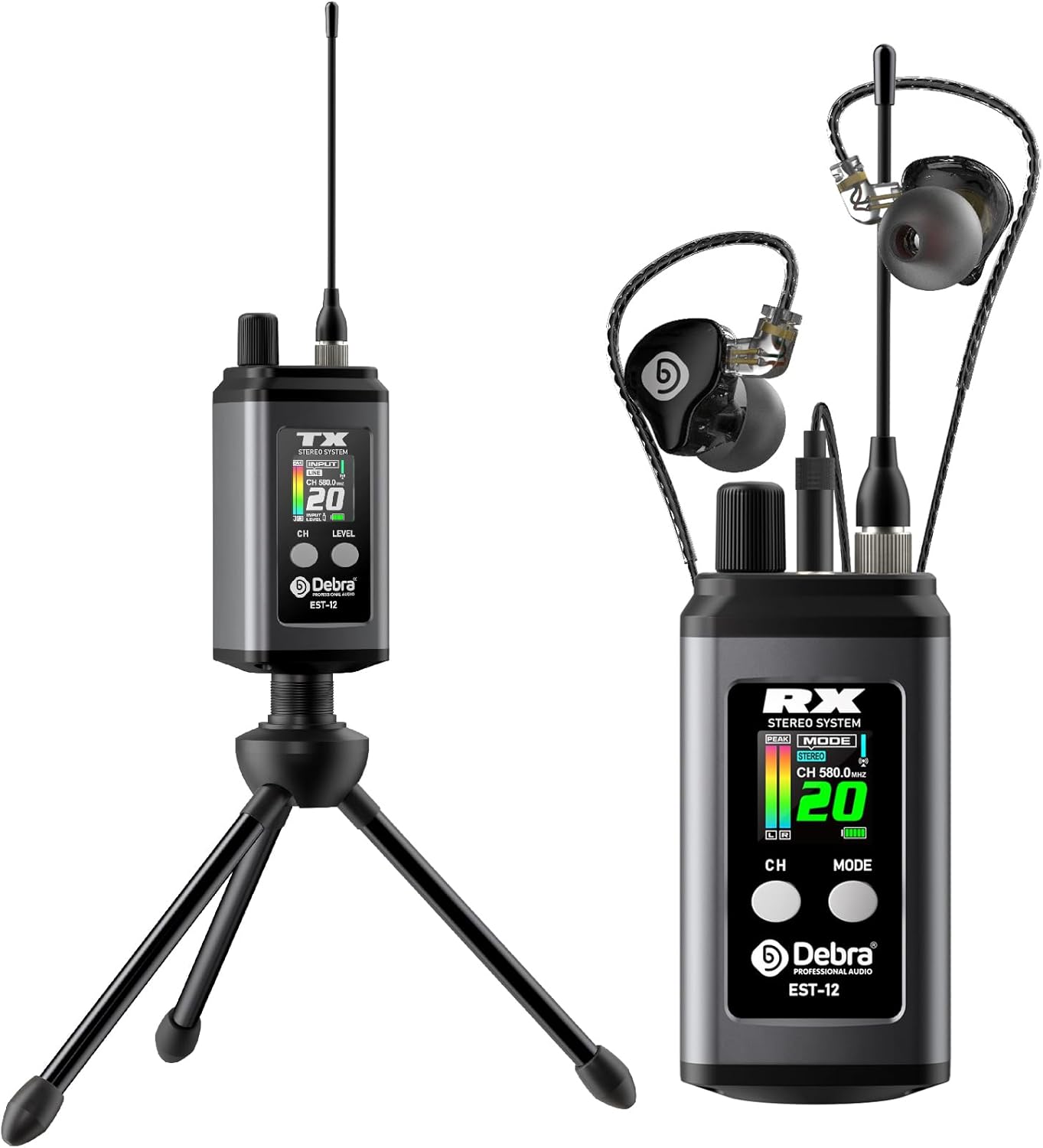
Figure 1: Debra EST-12 Pro UHF Stereo Wireless In-Ear Monitor System components.

Figure 2: Overview of the EST-12 Stereo Portable Wireless IEM System.

Figure 3: Applicable scenarios for the EST-12 system.
2. Product Features
- Hi-Fi Stereo/Mono Switchable: Delivers 24bit/48KHz HD audio with DSP noise reduction. Easily switch between stereo and mono modes for diverse monitoring needs.
- UHF Long-Range Stability: Utilizes UHF digital technology (560-590MHz) for stable transmission up to 80 meters (approximately 260 feet) with strong anti-interference capabilities and obstacle penetration.
- 20 Adjustable Channels: Offers 20 manually adjustable channels to avoid signal interference and allows for unlimited matching of multiple receivers to a single transmitter.
- Extended Battery Life & Portable Charging: Receiver provides over 6 hours of operation, and the transmitter over 5 hours, with convenient USB-C charging.
- User-Friendly Design: Lightweight (0.1Kg per unit) with comfortable earpieces and a durable metal casing.

Figure 4: Key features of the EST-12 system.

Figure 5: Ultra-low latency performance of the system.

Figure 6: UHF signal transmission range of up to 260 feet.
3. Package Contents
Verify that all items listed below are included in your package:
- 1 x Transmitter
- 1 x Receiver
- 1 x Bracket (for transmitter)
- 1 x Monitor Earphone
- 1 x 3.5mm Cable
- 1 x User Manual (this document)
- 1 x Type-C Cable (for charging)
- 1 x Zipper Bag (for storage)

Figure 7: Complete package contents.
4. Setup Guide
- Charge Devices: Before first use, fully charge both the transmitter and receiver using the provided USB-C cable. Connect the cable to a 5V power adapter (not included). The charging time is approximately 2 hours.
- Connect Transmitter:
- Attach the antenna to the transmitter.
- Connect your audio source (e.g., mixer, phone, MP3 player) to the transmitter's 3.5mm input jack using the supplied 3.5mm cable.
- Optionally, attach the transmitter to the included bracket/stand for stable placement.
- Connect Receiver:
- Attach the antenna to the receiver.
- Plug the monitor earphone into the receiver's 3.5mm headphone jack.
- Power On: Turn on both the transmitter and receiver. The TFT display will illuminate.
- Pairing: The transmitter and receiver should automatically pair. If not, ensure they are on the same channel. Refer to the "Operating Instructions" section for channel adjustment.

Figure 8: Connection examples and applicable scenarios.

Figure 9: Audio input and bracket connection details.
5. Operating Instructions
5.1. Power On/Off
Press and hold the power button on both the transmitter (TX) and receiver (RX) units to turn them on or off. The TFT display will illuminate.
5.2. TFT Display Information
The high-definition TFT display provides dynamic information about the system's status, including channel number, input level, stereo/mono mode, and battery level.

Figure 10: High-definition dynamic information display (TFT).
5.3. Channel Adjustment
The EST-12 system offers 20 adjustable channels (560-590MHz) to prevent interference. To change the channel:
- On the transmitter or receiver, locate the "CH" button.
- Press the "CH" button to cycle through the available channels.
- Ensure both the transmitter and all connected receivers are set to the same channel for proper operation.

Figure 11: Channel switching functionality.

Figure 12: Visual representation of 20 switchable channels.
5.4. Stereo/Mono Mode Switching
The system supports both stereo and mono audio output. To switch modes:
- On the receiver unit, locate the "MODE" button.
- Press the "MODE" button to toggle between Stereo and Mono modes. The current mode will be displayed on the TFT screen.

Figure 13: Stereo/Mono mode switch on the receiver.

Figure 14: Switching between Stereo and Mono modes.
5.5. Volume Adjustment
Adjust the volume on the receiver unit using the dedicated volume control knob or buttons, if present. Ensure the input level from your audio source is appropriate to avoid distortion.
5.6. Multiple Receiver Connection
The EST-12 system supports connecting multiple receivers to a single transmitter. Simply set all additional receivers to the same channel as the transmitter for simultaneous monitoring.

Figure 15: Connecting multiple receivers to one transmitter.
6. Technical Specifications
System Parameters
| RF Carrier Frequency | 560-590MHz |
| Total Number of Channels | 20 |
| Frequency Stability | 0.005% |
| Effective Working Distance | ≥80 meters (optimal environment) |
| Audio Compression & Expansion | DSP Digital Audio |
| Audio Sampling Depth | 24bit, 48KHz |
| Audio Frequency Response | 60Hz~20KHz |
| Dynamic Range | 95 dB |
| Audio Signal-to-Noise Ratio | 120dB |
| Total Harmonic Distortion | ≤0.8% @1KHz |
| Operating Temperature Range | -10℃ ~ +50℃ |
Receiver Technical Parameters
| Receiver Bandwidth | 560-590MHz |
| Receiving Mode | Dual-channel, superheterodyne |
| Image Suppression | 45dBm |
| Receiving Sensitivity | <-99dBm |
| Frequency Synchronization Mode | FM |
| Audio Output | 1 Stereo headphone output |
| Headphone Output Power | 80mW@16Ω |
| Power Supply | Built-in 3.7V lithium battery; supports external power bank |
| Normal Working Current | 130mA |
| Battery Use Time | ≥6 hours |
Transmitter Technical Parameters
| Carrier Bandwidth | 560-590MHz |
| Oscillation Mode | PLL frequency synthesis |
| Transmit Power | 10mW |
| Carrier Error | 0.005% |
| Harmonic Radiation | -32dBm |
| Modulation Mode | GFSK |
| Frequency Error | <=10ppm |
| Stereo Input Interface | Φ3.5mm |
| Input Impedance | 2.2KΩ |
| Frequency Setting | FM |
| Power Supply | Built-in 3.7V lithium battery; supports external power bank |
| Normal Working Current | 160mA |
| Battery Use Time | ≥4 hours |

Figure 16: Technical parameters and physical dimensions.
7. Troubleshooting
This section addresses common issues you might encounter with your EST-12 system.
| Problem | Possible Cause | Solution |
|---|---|---|
| No sound from earphones. |
|
|
| Interference or poor sound quality. |
|
|
| Short battery life. |
|
|
8. Maintenance
Proper care and maintenance will ensure the longevity and optimal performance of your Debra EST-12 system.
- Cleaning: Use a soft, dry cloth to clean the units. Avoid using harsh chemicals or abrasive materials.
- Storage: Store the system in a cool, dry place, away from direct sunlight and extreme temperatures. Use the provided zipper bag for protection during transport and storage.
- Battery Care: For optimal battery health, fully charge the units before long periods of storage and recharge them every 3-6 months if not in use.
- Antennas: Handle antennas with care to prevent bending or breaking.

Figure 17: Charging and battery life information.
9. Warranty and Support
The Debra EST-12 Pro UHF Stereo Wireless In-Ear Monitor System comes with a standard manufacturer's warranty. Please refer to the warranty card included in your package or contact Debra customer support for specific warranty terms and conditions.
For technical assistance, troubleshooting, or service inquiries, please visit the official Debra website or contact their customer support team. Contact information can typically be found on the product packaging or the manufacturer's website.
Note: Keep your purchase receipt as proof of purchase for warranty claims.