
1. Introduction
Welcome to the AdivaX Military Smart Watch KE5 user manual. This guide provides detailed instructions to help you get started with your new smartwatch, understand its features, and ensure optimal performance. The AdivaX KE5 is designed for rugged durability and advanced functionality, making it suitable for various outdoor and daily activities.

Image: Front view of the AdivaX Military Smart Watch KE5.
2. What's in the Box
- 1 x Smart Watch Body
- 1 x User Manual (this document)
- 1 x Watch Band
- 1 x Charging Cable
- 1 x Customized Box
3. Product Features
3.1 Rugged Military Design
The AdivaX KE5 features a zinc alloy case, engineered to withstand extreme conditions. It has passed military-grade tests for temperature, air pressure, and dust resistance, ensuring robust durability. The watch is 3ATM waterproof, allowing use during swimming or diving.

Image: Illustration of the AdivaX KE5's military-grade durability and 3ATM waterproof rating.
3.2 Integrated LED Flashlight & Compass
Equipped with a high-brightness LED flashlight offering three modes: strong light, flash, and SOS. Brightness levels are adjustable. A built-in compass assists with navigation during outdoor activities.

Image: The AdivaX KE5 smartwatch displaying its integrated LED flashlight function.
3.3 Built-in GPS & Sports Modes
The smartwatch features built-in GPS supporting six satellite systems (GPS, Beidou, Galileo, GLONASS, NAVIC, QZSS) for accurate positioning. It offers over 110 sports modes to track various activities, displaying movement tracks and data.

Image: The AdivaX KE5 smartwatch showcasing its built-in GPS module with dual-band positioning and offline map capabilities.
3.4 24-Hour Health Monitoring
Upgraded sensors provide real-time monitoring of heart rate, blood oxygen (SpO2), stress levels, and sleep patterns. Data can be viewed and analyzed via the GloryFit APP to help manage health.

Image: The AdivaX KE5 smartwatch displaying heart rate, blood oxygen, and sleep monitoring features.
3.5 Multi-functionality & Long Battery Life
Connects via Bluetooth 5.3 for calls and message notifications. Includes features like calculator, weather, music control, alarm, and camera remote. A 530mAh battery provides 7-10 days of use and up to 30 days of standby time on a 2-hour charge.

Image: The AdivaX KE5 smartwatch highlighting its extra-long battery life and charging time.
4. Setup Guide
4.1 Initial Charging
Before first use, fully charge your AdivaX KE5 smartwatch using the provided magnetic charging cable. Connect the cable to a USB power source. The watch display will indicate charging status.
4.2 App Installation and Pairing
- Download the GloryFit APP from your smartphone's app store (compatible with Android 5.0+ and iOS 13.0+).
- Ensure Bluetooth is enabled on your smartphone.
- Open the GloryFit APP and follow the on-screen instructions to create an account or log in.
- In the app, navigate to the device section and select 'Add Device'.
- Select the AdivaX KE5 from the list of available devices to pair.
- Confirm the pairing request on both your watch and smartphone.
Once paired, you can customize settings, sync data, and manage notifications through the GloryFit APP.
Video: Demonstrates enabling workout mode on the phone and connecting to the AdivaX KE5 smartwatch for GPS tracking and data synchronization.
5. Operating Instructions
5.1 Basic Navigation
- Swipe Up/Down: Scroll through menus and notifications.
- Swipe Left/Right: Access quick functions or widgets.
- Tap: Select an item or confirm an action.
- Side Buttons: Use for navigation, power on/off, or quick access to specific features.
5.2 Making/Receiving Calls & Messages
After pairing with your smartphone via Bluetooth, you can make and receive calls directly from your watch. Incoming messages from various apps (Twitter, Facebook, Skype, WhatsApp, etc.) will be displayed on the watch screen.
Video: Demonstrates the call function, flashlight, sports modes, health tracking, and app synchronization of the AdivaX KE5 smartwatch.
5.3 Using the LED Flashlight
Access the flashlight function from the watch menu. Select from strong light, flash, or SOS modes. Brightness can be adjusted as needed.
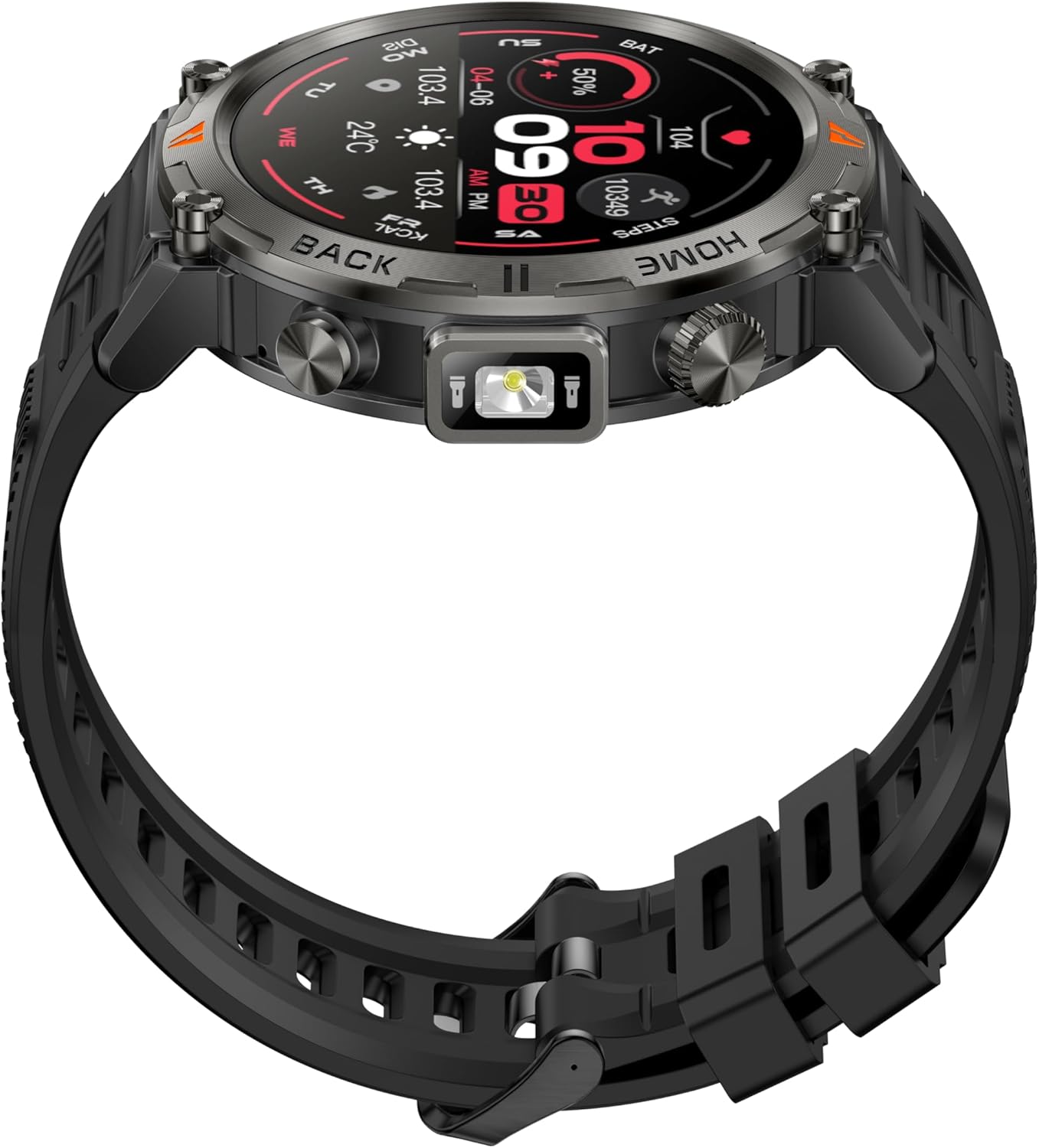
Image: Side view of the AdivaX KE5 smartwatch, highlighting the integrated LED flashlight.
5.4 GPS and Sports Tracking
Select your desired sport mode from the watch menu. The built-in GPS will track your movement, distance, pace, and other relevant data. This information is synced to the GloryFit APP for detailed analysis and route mapping.
5.5 Health Monitoring
The watch continuously monitors your heart rate, blood oxygen, stress, and sleep. View real-time data on the watch or access historical data and detailed analysis in the GloryFit APP.
5.6 Other Functions
The AdivaX KE5 includes a variety of useful tools:
- Calculator: Perform basic calculations directly on your wrist.
- Weather Forecast: Get real-time weather updates.
- Music Control: Manage music playback on your connected smartphone.
- Alarm: Set alarms and reminders.
- Camera Remote: Control your smartphone camera remotely.
6. Maintenance
- Cleaning: Wipe the watch and strap regularly with a soft, dry cloth. For stubborn dirt, use a slightly damp cloth and mild soap, then rinse and dry thoroughly.
- Water Exposure: While 3ATM waterproof, avoid prolonged exposure to hot water or steam. Ensure the watch is dry before charging.
- Charging: Use only the provided charging cable. Avoid using damaged cables or chargers.
- Storage: Store the watch in a cool, dry place when not in use.
7. Troubleshooting
| Problem | Possible Solution |
|---|---|
| Watch not turning on | Ensure the watch is fully charged. Press and hold the power button for several seconds. |
| Unable to pair with phone | Check if Bluetooth is enabled on your phone. Ensure the watch is within range. Restart both the watch and phone. Reinstall the GloryFit APP if necessary. |
| Inaccurate health data | Ensure the watch is worn snugly on your wrist. Clean the sensors on the back of the watch. Avoid excessive movement during measurements. |
| Notifications not appearing | Check notification settings in the GloryFit APP and your phone's system settings. Ensure the app has necessary permissions. |
| Short battery life | Reduce screen brightness, disable unnecessary features (e.g., continuous heart rate monitoring if not needed), and ensure background app refresh is optimized. |
8. Specifications
- Model Number: KE5
- Brand: AdivaX
- Screen Size: 1.45 Inches
- Battery Capacity: 530 mAh (Lithium Polymer)
- Connectivity: Bluetooth 5.3
- Water Resistance: 3ATM
- GPS: Built-in GPS (supports 6 satellite systems)
- Operating System Compatibility: Android 5.0+, iOS 13.0+
- Special Features: LED Flashlight, Compass, Heart Rate Monitor, Blood Oxygen Monitor, Sleep Tracker, 110+ Sport Modes, Bluetooth Calling, Message Notifications, Weather Forecast, Music Control, Camera Remote.
- Item Weight: 5.9 ounces (0.17 Kilograms)
9. Warranty and Support
AdivaX offers a 12-month money-back guarantee or free replacement for this product. If you encounter any issues or have questions, please contact our professional service team via email. We aim to reply within 24 hours and provide the best possible solution.