1. Introduction
Welcome to the user manual for your Samsung The Frame LS03D QLED 4K Smart TV. This television is designed to seamlessly blend into your living space, transforming into a stunning piece of art when not in use. Featuring Quantum Dot technology for vibrant colors, 4K UHD resolution, and a 120Hz refresh rate, it delivers an exceptional viewing experience. This manual will guide you through the installation, operation, and maintenance of your new TV.
Key features include:
- QLED 4K UHD Display with Art Mode for gallery-style viewing.
- Quantum HDR and 100% Color Volume powered by Quantum Dot.
- Built-In Alexa, Voice Remote, and Smart Hub with access to popular streaming apps.
- 120Hz Refresh Rate for smooth motion clarity.
- Slim Fit Wall Mount and One Connect Box for a clean installation.
2. What's in the Box
Carefully unpack your Samsung The Frame TV and ensure all components are present. The package should contain the following items:
- Samsung The Frame LS03D QLED 4K Smart TV
- SolarCell Remote™ TM2361E
- Slim Fit Wall Mount
- Simple Stand (for tabletop placement)
- One Connect Box
- Power Cable
- User Manual and E-Manual (digital version)
- 6ft HDMI Cable (included in bundle)

Image: Components included in the Samsung The Frame TV package, showing the TV, SolarCell Remote, One Connect Box, and various cables and accessories.
3. Setup
3.1 Physical Installation
Your Samsung The Frame TV offers versatile installation options:
- Slim Fit Wall Mount: For a flush, art-like appearance, use the included Slim Fit Wall Mount. Follow the detailed instructions provided with the mount for secure installation. Ensure the wall can support the TV's weight.
- Simple Stand: If you prefer tabletop placement, attach the Simple Stand according to the instructions in the separate stand assembly guide. Place the TV on a stable, level surface.

Image: Illustration demonstrating the Slim-Fit Wall Mount for a flush installation and the One Connect Box for simplified cable management, reducing clutter.
3.2 Connecting Devices (One Connect Box)
The One Connect Box centralizes all your connections, allowing for a single, thin cable to run to the TV, minimizing clutter. Connect your external devices to the One Connect Box:
- HDMI Ports (x4): Connect Blu-ray players, game consoles, soundbars, and other HDMI-enabled devices.
- USB Ports (x2): Connect USB drives for media playback or external accessories.
- Ethernet (LAN) Port: For a wired internet connection.
- Optical Audio Output: For connecting to a sound system or home theater receiver.
- RF Input: For connecting an antenna or cable TV.
- One Connect Cable: Connect this specialized cable from the One Connect Box to the TV.
Once all devices are connected, plug the power cable into the One Connect Box and then into a wall outlet.
3.3 Initial Power-On and Smart Setup
Upon first power-on, the TV will guide you through the initial setup process. This includes:
- Language Selection: Choose your preferred language.
- Network Connection: Connect to your Wi-Fi network or confirm the wired Ethernet connection.
- Samsung Account: Sign in or create a Samsung account to access Smart Hub features and apps.
- Channel Scan: If using an antenna, the TV will scan for available channels.
- Voice Assistant Setup: Configure built-in Alexa for voice control.
4. Operating Your TV
4.1 Basic TV Functions
Use the SolarCell Remote to navigate your TV:
- Power Button: Turns the TV on/off.
- Volume Buttons: Adjusts the volume.
- Channel Buttons: Changes TV channels (if applicable).
- Directional Pad and Select Button: Navigate menus and select options.
- Home Button: Accesses the Smart Hub.
- Voice Button: Activates the voice assistant (Alexa).
4.2 Art Mode
When the TV is off, The Frame can transform into a digital art display. Press the Art Mode button on your remote or select Art Mode from the Smart Hub.
- Samsung Art Store: Access over 2,500 artworks from leading museums and artists. A subscription may be required for full access.
- My Collection: Display your own photos or previously purchased artworks.
- Motion Sensor: The TV can detect presence and automatically turn on Art Mode when someone enters the room, and turn off when no one is detected, saving energy.
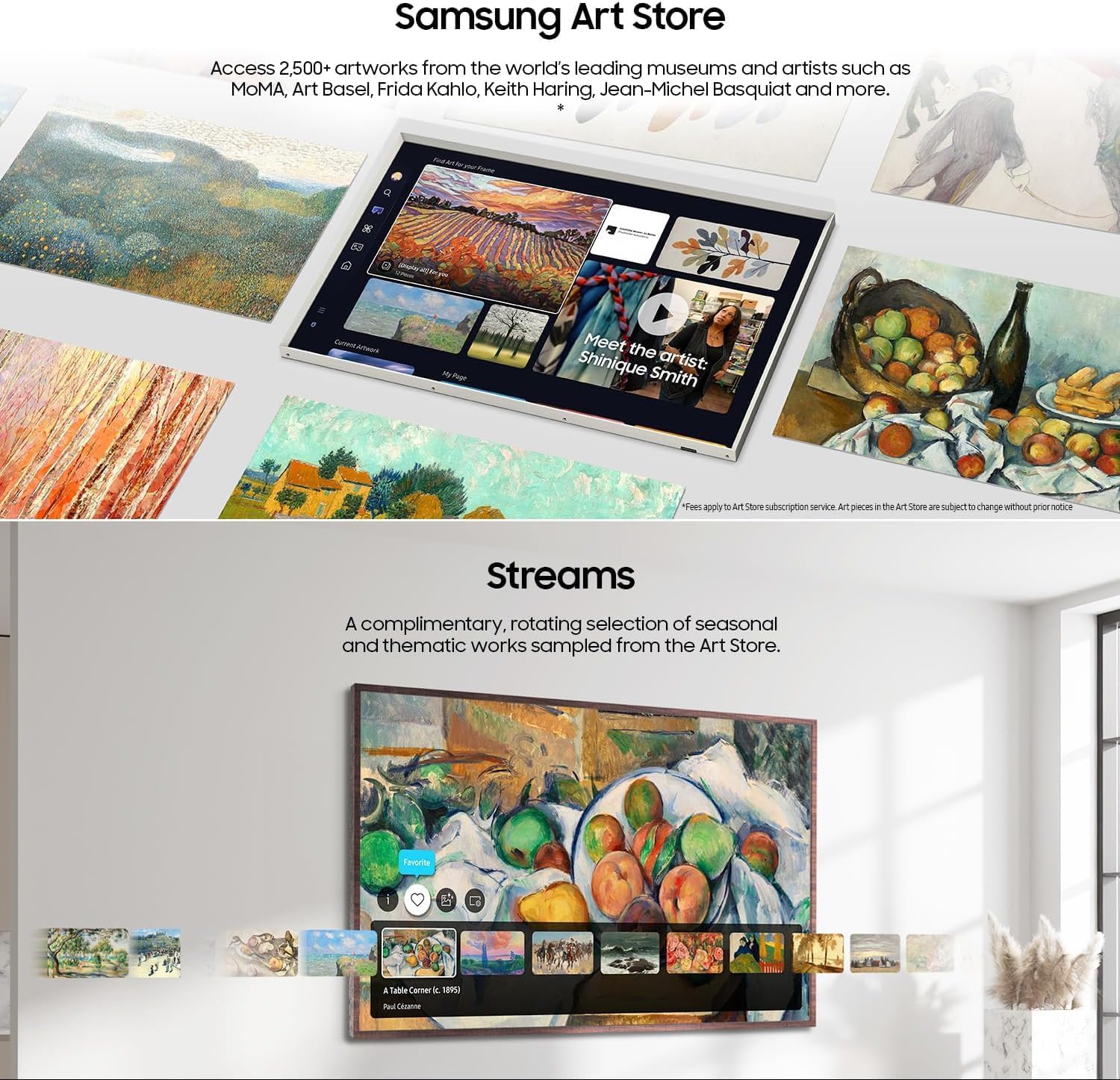
Image: The Samsung Art Store interface, showcasing a wide selection of artworks available for display on The Frame TV, alongside options for streaming content.
4.3 Smart Hub and Streaming
The Smart Hub is your central access point for all smart features, apps, and connected devices.
- Streaming Apps: Easily access popular services like Netflix, Hulu, Amazon Prime Video, and others. Your bundle includes premium streaming access to Brain.fm, Daily Burn, and Galaxy TV.
- Samsung TV Plus: Enjoy over 2,700 free channels, including 400+ premium Samsung TV Plus channels, without additional subscriptions.
- Voice Control: Use the built-in Alexa to search for content, control playback, adjust settings, and more, simply by speaking into your remote.

Image: The Samsung TV Plus and Gaming Hub interface, displaying a variety of streaming applications and gaming services available for access on the TV.
4.4 Gaming Hub
The Gaming Hub provides instant access to cloud gaming services without needing a console. Enjoy titles from Xbox Game Pass, NVIDIA GeForce NOW, and Amazon Luna directly on your TV.
5. Maintenance
5.1 Cleaning Your TV
To maintain the pristine condition of your Samsung The Frame TV:
- Screen: Gently wipe the screen with a soft, dry microfiber cloth. For stubborn smudges, slightly dampen the cloth with distilled water. Avoid using harsh chemicals, abrasive cleaners, or direct spraying onto the screen.
- Frame and Body: Wipe the frame and TV body with a soft, dry cloth.
- One Connect Box: Keep the One Connect Box and its cables free of dust.
5.2 Software Updates
Your TV may periodically receive software updates to improve performance and add new features. Ensure your TV is connected to the internet. You can check for updates manually via the TV's settings menu (Settings > Support > Software Update > Update Now) or enable automatic updates.
6. Troubleshooting
If you encounter issues with your TV, try the following common solutions:
- No Power: Ensure the power cable is securely connected to the One Connect Box and the wall outlet. Check if the outlet is working.
- No Picture/Sound: Verify that the correct input source is selected. Check all HDMI and audio cables for secure connections.
- Remote Not Working: Check the remote's battery level (SolarCell remote charges via indoor light or USB-C). Ensure there are no obstructions between the remote and the TV.
- Network Connection Issues: Restart your router and modem. Reconnect the TV to your Wi-Fi network in the settings. For wired connections, check the Ethernet cable.
- Picture Quality Issues: Adjust picture settings (brightness, contrast, color) in the TV menu. Ensure the content source is high quality.
- Art Mode Not Activating: Check the motion sensor settings. Ensure the TV is not in a power-saving mode that disables Art Mode.
For more detailed troubleshooting, refer to the E-Manual accessible through your TV's settings or visit the Samsung support website.
7. Specifications
| Feature | Specification |
|---|---|
| Brand | Samsung |
| Model | LS03D |
| Screen Size | 65 Inches (166 cm diagonal) |
| Display Technology | QLED |
| Resolution | 4K UHD |
| Refresh Rate | 120Hz |
| Aspect Ratio | 16:9 |
| Special Features | Bezel-Less Design, Built-In Speaker, Art Mode, Quantum HDR, 100% Color Volume, Alexa Built-in, Smart Hub, Gaming Hub, Certified Glare-Free Matte Display, Pantone Validated Colors |
| Connectivity | Bluetooth, Ethernet, HDMI (x4), USB (x2), Wi-Fi, Optical Audio Output, RF Input |
| Supported Internet Services | Netflix, Hulu, Amazon Prime Video, Brain.fm, Daily Burn, Galaxy TV, Samsung TV Plus, Xbox Game Pass, NVIDIA GeForce NOW, Amazon Luna |
| Item Weight | 78 Pounds |
8. Warranty and Support
8.1 Protection Plan
This product bundle includes a 24-month CPS Protection Plan, providing extended coverage for your peace of mind. Please refer to the separate CPS Protection Plan documentation for full terms and conditions.
8.2 Customer Support
For technical assistance, warranty claims, or further inquiries, please contact Samsung Customer Support. You can find contact information and additional resources by visiting the official Samsung website or the Samsung Store:
Visit the Samsung Store on Amazon
Please have your model number (LS03D) and serial number ready when contacting support.


