
1. Introduction
This manual provides essential information for the proper installation, operation, maintenance, and troubleshooting of the Sourcefy 90-030-0725 motor. This motor is designed as a replacement component for specific high-capacity barrel fans.
The 90-030-0725 Motor is a 1/3 HP, 120V electric motor intended for use in 36-inch BDF series barrel fans (models from 2012–2017). It operates at 530 RPM and draws 4.9 amps, providing reliable airflow performance. It features a short shaft design for straightforward integration with compatible fan assemblies.
2. Product Specifications
- Model Number: 90-030-0725
- Horsepower (HP): 1/3 HP
- Voltage: 120 Volt AC
- Frequency: 60Hz
- Capacitor Required: 25uF
- Amperage: 4.0 to 5.0 Amps (depending on fan speed setting)
- Maximum High RPM Setting: 540 RPM
- Minimum Low RPM Setting: 460 RPM
- Shaft Diameter: 12 MM
- Shaft Length from Motor Housing: 40 MM
- Bolt Mount: 6 MM
- Square Mounting Bolt Spacing: 120 MM
- Compatibility: Used on all 36-BDF Series fans from 2012 through 2017, including:
- Master High Capacity Barrel Fan: MAC-36-BDF
- Circulating Fans by Tractor Supply: CL-36-BDF-A
- Portable Air Circulators: BCB-36-BDF
- Portable Air Circulators: PT-36-BDF
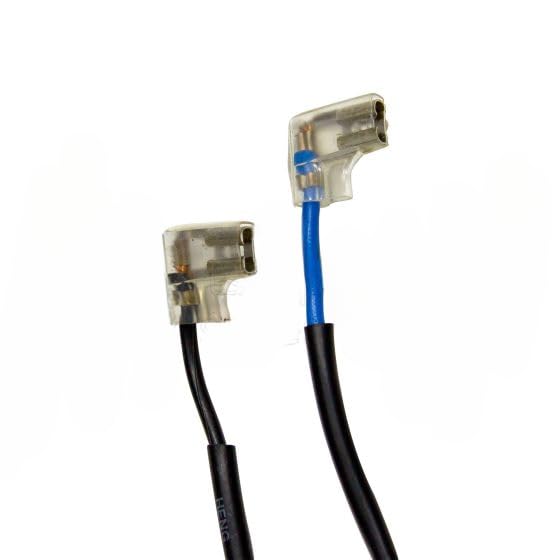
Image 1: Overview of the Sourcefy 90-030-0725 motor, showing its general appearance and wiring harness.
3. Safety Information
Read and understand all safety instructions before installing or operating the motor. Failure to follow these instructions may result in electric shock, fire, or serious injury.
- Electrical Safety: Always disconnect power to the fan unit before attempting any installation, maintenance, or repair. Ensure all electrical connections are secure and properly insulated.
- Qualified Personnel: Installation and servicing should only be performed by qualified and experienced personnel.
- Personal Protective Equipment (PPE): Wear appropriate PPE, including safety glasses and gloves, during installation and maintenance.
- Component Compatibility: Use only the specified capacitor (25uF) and ensure all replacement parts are compatible with the fan model.
- Ventilation: Ensure adequate ventilation around the motor during operation to prevent overheating.
4. Setup and Installation
This motor is a replacement part. Refer to the original fan's instruction manual for specific disassembly and reassembly procedures. The following steps provide general guidance for motor replacement.
- Disconnect Power: Ensure the fan unit is unplugged from the power source and cannot be accidentally reconnected.
- Access Motor: Carefully open the fan housing to gain access to the existing motor. This may involve removing grilles, guards, or other covers.
- Document Connections: Before disconnecting any wires, take clear photos or make a diagram of the existing wiring connections, especially for the capacitor and power supply.
- Remove Old Motor: Disconnect the wiring from the old motor and capacitor. Unbolt the old motor from its mounting brackets.
- Install New Motor: Position the new Sourcefy 90-030-0725 motor into the fan housing. Secure it using the 6 MM mounting bolts, ensuring the 120 MM square mounting bolt spacing aligns correctly.
- Connect Wiring: Reconnect the wiring to the new motor and the 25uF capacitor according to your documented connections. Ensure all connections are tight and insulated. Refer to the close-up image of the wiring harness for connector types.
- Reassemble Fan: Carefully reassemble the fan housing, ensuring all guards and covers are securely in place before restoring power.
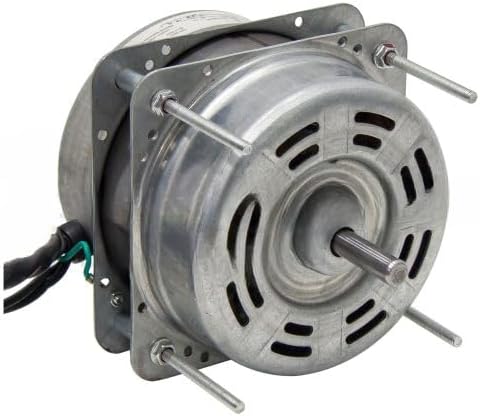
Image 2: Rear view of the motor, highlighting the shaft and mounting bolts for installation.
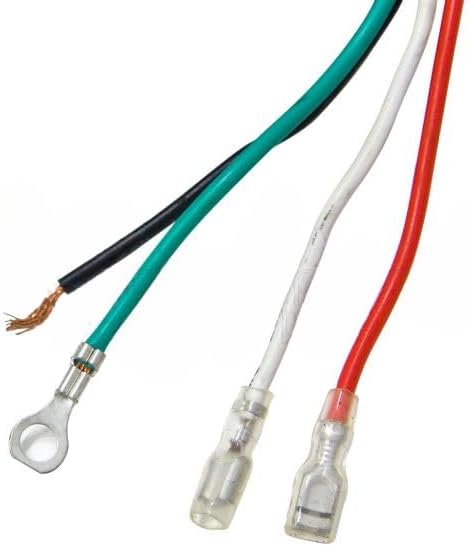
Image 3: Detailed view of the motor's wiring harness and electrical connectors.
5. Operating Instructions
Once the motor is correctly installed in the compatible fan unit, operation is controlled by the fan's original switches and controls.
- Power On: Plug the fan unit into a suitable 120V AC power outlet.
- Fan Speed: Use the fan's speed selector switch to choose the desired airflow. The motor supports speeds ranging from 460 RPM (low) to 540 RPM (high).
- Monitoring: During initial operation, observe the fan for any unusual noises, vibrations, or signs of overheating. If any issues are detected, immediately disconnect power and refer to the troubleshooting section.
6. Maintenance
Regular maintenance helps ensure the longevity and efficient operation of your motor.
- Power Disconnection: Always disconnect power before performing any maintenance.
- Cleaning: Periodically clean the exterior of the motor and fan blades to prevent dust and debris buildup, which can impede airflow and lead to overheating. Use a soft, dry cloth or compressed air.
- Inspection: Regularly inspect the motor for any signs of wear, damage, or loose connections. Check the wiring for fraying or damage.
- Lubrication: This motor is typically sealed and does not require user lubrication. Do not attempt to lubricate unless specifically instructed by the manufacturer.
7. Troubleshooting
If you encounter issues with the motor, refer to the following common troubleshooting steps:
| Problem | Possible Cause | Solution |
|---|---|---|
| Motor does not start | No power; Loose wiring; Faulty capacitor; Motor seized | Check power supply; Inspect all connections; Test/replace capacitor; Inspect motor for obstructions or damage. |
| Motor runs slowly or with reduced power | Faulty capacitor; Incorrect voltage; Obstruction in fan blades | Test/replace capacitor; Verify power supply voltage; Clear any obstructions from fan blades. |
| Motor overheats | Poor ventilation; Excessive load; Internal motor fault | Ensure clear airflow around motor; Check for fan blade obstructions; If problem persists, motor may need replacement. |
| Unusual noise or vibration | Loose mounting; Damaged fan blades; Bearing wear | Tighten mounting bolts; Inspect fan blades for damage and balance; If noise persists, motor may require professional inspection. |
If troubleshooting steps do not resolve the issue, contact Sourcefy customer support.
8. Warranty and Support
This Sourcefy motor comes with a 6 Months Unlimited Warranty, ensuring quality and reliability. The motor has been pressure and computer tested for consistent quality and unsurpassed reliability.
For technical assistance, warranty claims, or further inquiries, please contact Sourcefy customer support through their official channels. When contacting support, please have your product model number (90-030-0725) and purchase information available.