
1. Introduction
Thank you for choosing the Makute TP131-330 2000W Wood Planer. This advanced electric tool is designed to enhance the quality of wooden surfaces through precise planing and smoothing. With its powerful 2000W motor and high-speed operation, it delivers excellent results efficiently. This planer is ideal for both professional carpenters and woodworking enthusiasts, providing accuracy for various wood types in workshops and home projects. Please read this manual carefully before operation to ensure safe and effective use of your new tool.
2. Safety Instructions
WARNING: Read all safety warnings, instructions, illustrations, and specifications provided with this power tool. Failure to follow all instructions listed below may result in electric shock, fire, and/or serious injury.
- Work Area Safety: Keep your work area clean and well-lit. Cluttered or dark areas invite accidents. Do not operate power tools in explosive atmospheres, such as in the presence of flammable liquids, gases, or dust.
- Electrical Safety: Power tool plugs must match the outlet. Never modify the plug in any way. Avoid body contact with earthed or grounded surfaces such as pipes, radiators, ranges, and refrigerators.
- Personal Safety: Always wear eye protection, hearing protection, and a dust mask. Dress properly; do not wear loose clothing or jewelry. Keep hair and clothing away from moving parts.
- Tool Use and Care: Do not force the power tool. Use the correct power tool for your application. Disconnect the plug from the power source before making any adjustments, changing accessories, or storing power tools.
- Specific Planer Safety: Always ensure the workpiece is securely supported. Keep hands away from the cutter head. Never reach into the chip ejection port while the machine is running.
3. Product Overview
The Makute TP131-330 Wood Planer is a robust machine designed for precision woodworking. Familiarize yourself with its components for safe and effective operation.
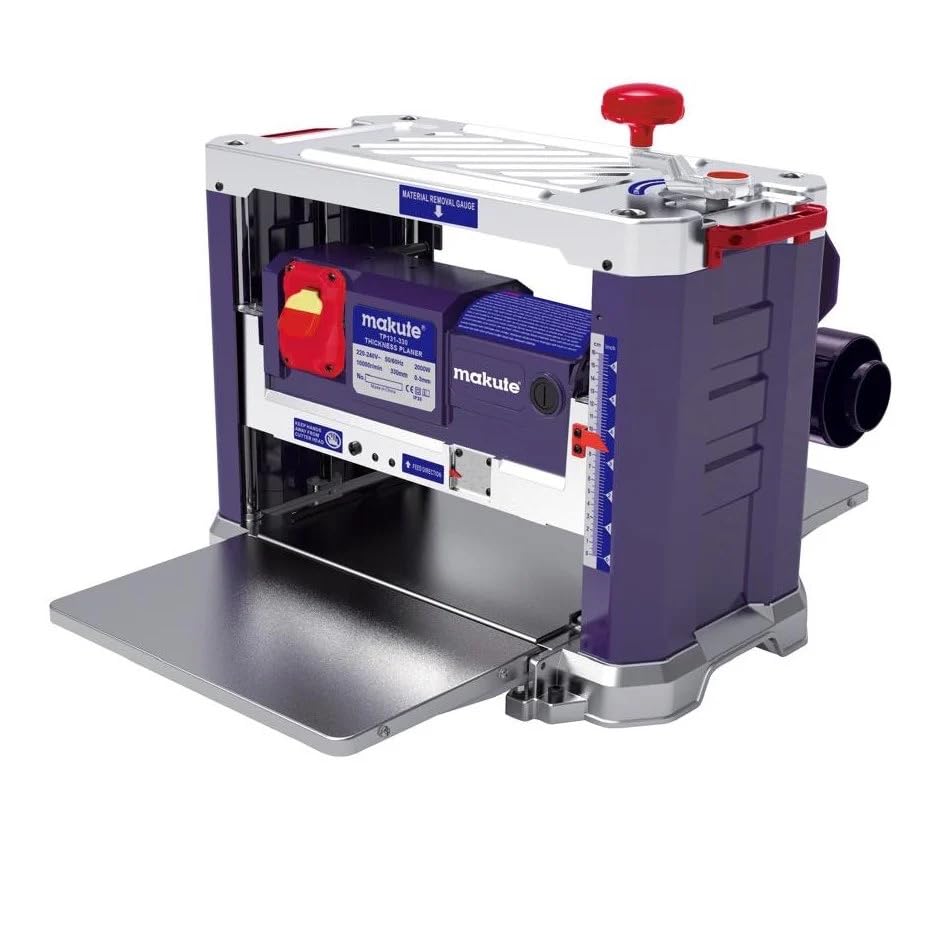
Figure 1: Top-down view of the Makute TP131-330 Wood Planer, showing the main housing and adjustment knobs.

Figure 2: Front view of the planer, illustrating the material feed table and cutter head area.

Figure 3: Close-up of the control panel, including the power switch and product specification label.
4. Specifications
| Feature | Specification |
|---|---|
| Manufacturer | Makute |
| Model Number | TP131-330 |
| Motor Power | 2000W |
| Voltage/Frequency | 230V / 50~60Hz |
| No-load Speed | 10000/minute |
| Blade Size | 334 x 22.2 mm |
| Number of Blades | 2 |
| Planing Width | 330 mm |
| Planing Thickness per Pass | 0-3 mm |
| Planing Wood Block Thickness | 6-160 mm |
| Feed Rate | 6.4 m/minute |
| Item Weight | 29 Kilograms |
| Product Dimensions | 58 x 39 x 46 cm |
| Color | Dark Blue |
| Batteries Required | No |
5. Setup
- Unpacking: Carefully remove the planer and all accessories from the packaging. Inspect for any damage during transit.
- Stable Placement: Place the planer on a sturdy, level workbench or stand. Ensure it is securely fastened to prevent movement during operation.
- Dust Collection: Connect a suitable dust collection system to the planer's dust port. This is crucial for maintaining a clean work environment and for your safety.
- Power Connection: Ensure the power switch is in the OFF position before plugging the planer into a grounded electrical outlet. Verify that the voltage and frequency match the tool's specifications.
- Initial Inspection: Check that all guards are in place and secure. Ensure the cutter head is free of obstructions and the blades are properly installed and sharp.
6. Operating Instructions
- Material Preparation: Ensure your workpiece is free of nails, screws, or other foreign objects that could damage the blades. The wood should be clean and dry.
- Adjusting Planing Depth: Use the depth adjustment knob to set the desired planing depth. For best results and to avoid overloading the motor, take shallow passes (0-3mm per pass).
- Power On: Turn on the planer. Allow the motor to reach full speed before feeding the workpiece.
- Feeding the Workpiece: Gently feed the workpiece into the planer's infeed table, keeping it flat against the table and fence. The planer's automatic feed system will pull the wood through. Maintain firm but gentle pressure.
- Receiving the Workpiece: Support the workpiece as it exits the outfeed table to prevent it from dropping and causing snipe.
- Multiple Passes: For significant material removal, make several shallow passes rather than one deep pass. This extends blade life and produces a smoother finish.
- Power Off: Once planing is complete, turn off the planer and wait for the cutter head to come to a complete stop before leaving the machine.
7. Maintenance
Regular maintenance ensures the longevity and optimal performance of your Makute Wood Planer.
- Cleaning: After each use, disconnect the power and clean the machine thoroughly. Remove all wood chips and dust from the tables, cutter head area, and dust port. Use compressed air if available.
- Blade Inspection and Replacement: Regularly inspect the planer blades for sharpness and damage. Dull or chipped blades can lead to poor finish quality and increased motor strain. Refer to the manufacturer's instructions for safe blade replacement.
- Table Waxing: Periodically apply a thin coat of paste wax to the infeed and outfeed tables to reduce friction and prevent rust.
- Motor Brushes: If applicable, check and replace carbon brushes as recommended by the manufacturer to maintain motor efficiency.
- Storage: Store the planer in a clean, dry place, away from moisture and direct sunlight.
8. Troubleshooting
| Problem | Possible Cause | Solution |
|---|---|---|
| Poor surface finish (rough, torn grain) | Dull or damaged blades; too deep a cut; feeding too fast; wood grain direction. | Replace or sharpen blades; reduce depth of cut; feed slower; adjust wood orientation. |
| Snipe (depressions at ends of workpiece) | Improper support of workpiece; infeed/outfeed tables not level with cutter head. | Ensure proper support at both ends; check and adjust table alignment. |
| Motor stalls or slows down significantly | Overloading (too deep a cut); dull blades; insufficient power supply. | Reduce depth of cut; replace blades; check power source and extension cord. |
| Excessive vibration or noise | Loose components; unbalanced blades; worn bearings. | Check all fasteners; inspect blades for damage/balance; contact service for bearing issues. |
| Dust port clogging | Ineffective dust collection; wet wood; excessive chip production. | Ensure dust collector is powerful enough; use dry wood; take shallower cuts. |
9. Warranty and Support
For warranty information, technical support, or to order replacement parts, please contact Makute customer service directly. Refer to your purchase documentation or the manufacturer's official website for contact details.
Please have your model number (TP131-330) and serial number (if applicable) ready when contacting support.