
FURNIMAT 3-seater Flip Back
FURNIMAT 3-Seater Dual Reclining Sofa with Flip Back Console User Manual
Model: 3-seater Flip Back | Brand: FURNIMAT
1. Introduction
Thank you for choosing the FURNIMAT 3-Seater Dual Reclining Sofa with Flip Back Console. This manual provides essential information for the safe assembly, operation, and maintenance of your new sofa. Please read it thoroughly before use and retain it for future reference.
This versatile sofa features dual reclining seats, a convertible flip-back console with cup holders, integrated USB charging ports, and cell phone holders, designed for comfort and convenience in various living spaces.

Image 1: The FURNIMAT 3-Seater Dual Reclining Sofa with its flip-back console in use, featuring storage and cup holders.
2. Safety Information
- Weight Capacity: The maximum load capacity for each seat is 360 lbs (163 kg). Do not exceed this limit. The total weight capacity for the sofa is 1080 lbs (490 kg).
- Pinch Points: Keep hands and feet clear of the reclining mechanism during operation to prevent injury.
- Children and Pets: Supervise children and pets around the sofa, especially when operating the reclining function.
- Placement: Ensure the sofa is placed on a level surface and has adequate clearance from walls or other furniture when reclining.
- Electrical Safety: Only use the provided power cables and ensure they are not pinched or damaged. Disconnect power before cleaning or moving the sofa.
3. Package Contents
Your FURNIMAT sofa is shipped in multiple packages. Please ensure all components are present before beginning assembly.
- Left Seat Base with Armrest
- Right Seat Base with Armrest
- Middle Seat Base
- Left Backrest
- Right Backrest
- Middle Backrest (Flip Console)
- Connecting Plates and Screws
- USB Power Cables
- Cell Phone Holders (2)
- Assembly Tools (Allen wrench)
4. Setup and Assembly
Assembly is designed to be straightforward and typically takes about 30 minutes with two people. All necessary tools are included.
Assembly Steps:
- Connect the Bases: Place the three seat bases (left, middle, right) upside down on a soft, clean surface. Use the provided connecting plates and screws to securely join the bases together. Ensure all screws are tightened.
- Attach Armrests: Align the armrests with the corresponding slots on the side of the left and right seat bases. Slide them down firmly until they are securely in place.
- Install Backrests: For each seat, align the backrest with the metal brackets on the seat base. Push down firmly until you hear a 'click', indicating it is locked into position. Repeat for all three backrests.
- Connect Power Cables: Locate the power cables for the USB ports. Connect them according to the instructions provided in the package.
- Install Cell Phone Holders: Twist the cell phone holders into the designated slots on the armrests.
Video 1: This video demonstrates the assembly process and highlights key features of the FURNIMAT Loveseat Recliner Sofa, including connecting components and installing accessories.
5. Operating Instructions
5.1 Reclining Function
The left and right seats feature a smooth manual reclining function. To recline:
- Locate the pull ring on the side of the seat (between the seat and the armrest).
- Pull the ring to release the footrest.
- Lean back gently to adjust the backrest to your desired angle (from 90° for reading to 150° for sleeping).
- To return to the upright position, push the footrest down with your feet and lean forward. The backrest will return to its original position.
The middle seat remains fixed and does not recline.

Image 2: Illustration of the manual reclining mechanism and various comfortable positions.
5.2 Flip-Back Console
The middle backrest can be flipped down to reveal a convenient console table. This console includes two cup holders and provides a flat surface for snacks or devices.
- To deploy the console: Gently pull the top of the middle backrest forward and down.
- To return to a seat: Lift the console backrest until it locks into the upright position.

Image 3: The flip-back console in use, providing a convenient surface and cup holders.
5.3 USB Ports and Cell Phone Holders
Each armrest is equipped with a USB charging port and a slot for a flexible cell phone holder.
- USB Ports: Plug your device's USB cable into the port to charge. Ensure the sofa is connected to a power source.
- Cell Phone Holders: The flexible holders can be adjusted to position your phone vertically or horizontally for optimal viewing.
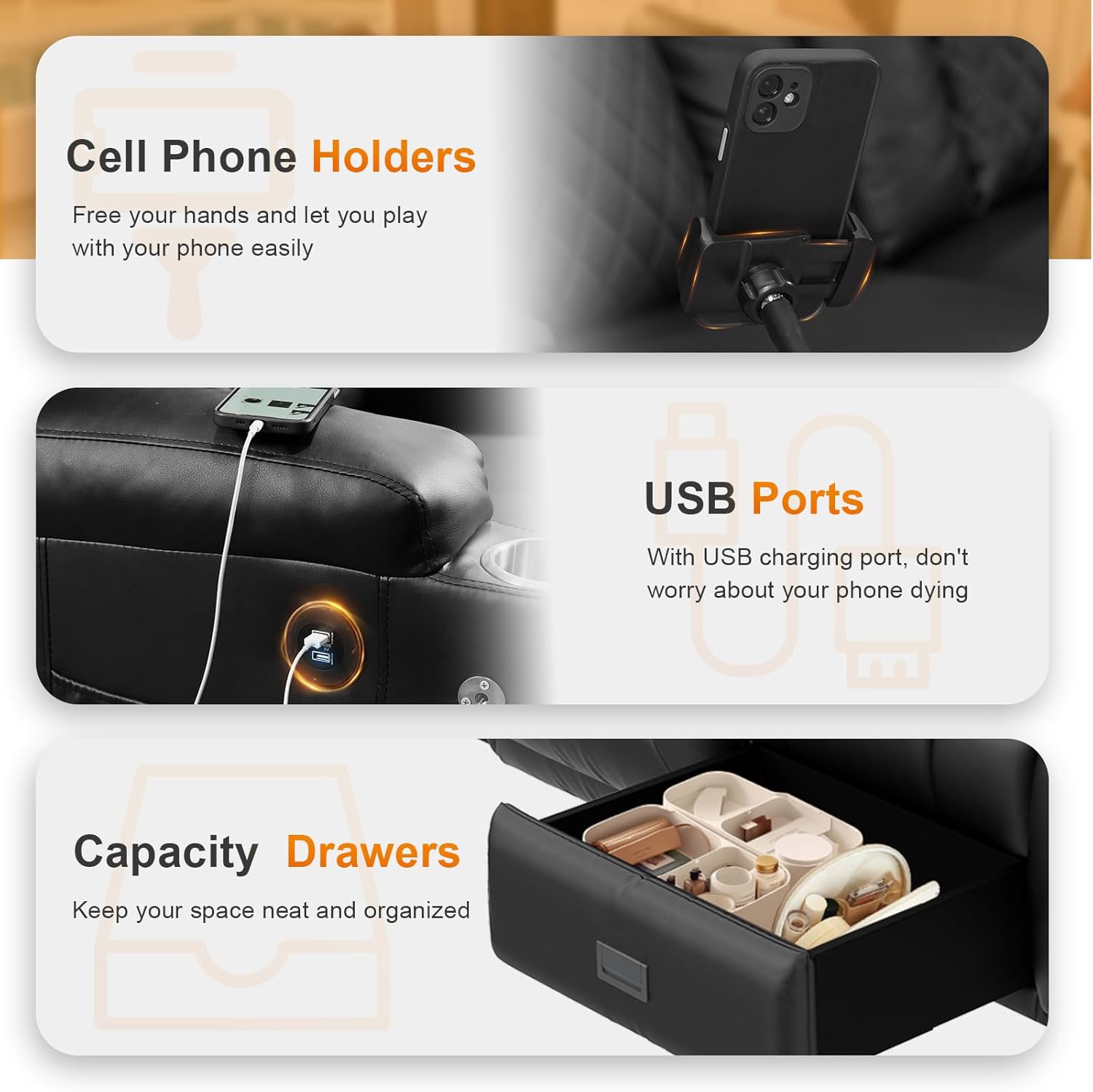
Image 4: Details of the integrated USB ports, cell phone holders, and storage drawers.
5.4 Storage Drawers and Side Pockets
The sofa includes large capacity drawers beneath the seats and side pockets on the armrests for convenient storage.
- Drawers: Pull the handle to open the drawers for storing items like blankets, magazines, or remote controls.
- Side Pockets: Use the side pockets on the armrests to keep smaller items like books or remotes within easy reach.
6. Maintenance
To ensure the longevity and appearance of your FURNIMAT sofa, follow these maintenance guidelines:
- Cleaning: The high-quality PU leather upholstery is waterproof, breathable, and easy to clean. Wipe spills immediately with a soft, damp cloth. For general cleaning, use a mild soap solution and wipe dry. Avoid harsh chemicals or abrasive cleaners.
- Dusting: Regularly dust the sofa with a soft, dry cloth.
- Mechanism Care: Periodically check the reclining mechanism for any loose screws or components. Tighten as necessary. Avoid forcing the mechanism.
- Sunlight Exposure: Avoid prolonged exposure to direct sunlight to prevent fading and material degradation.
7. Troubleshooting
- Recliner not engaging/disengaging smoothly: Check for any obstructions around the mechanism. Ensure the pull tab is fully engaged or disengaged. If the issue persists, inspect the connecting rods under the seat.
- USB ports not charging: Verify that the sofa is properly plugged into a working power outlet. Check the USB cable connection to the sofa's internal wiring. Try a different USB cable or device to rule out device-specific issues.
- Sofa feels unstable: Ensure all connecting plates and backrest brackets are securely fastened. Check that the sofa is on a level surface.
If you encounter any issues not listed here or require further assistance, please contact FURNIMAT customer service.
8. Specifications
| Brand | FURNIMAT |
| Model Name | 3-seater Flip Back |
| Product Dimensions (D x W x H) | 28.7"D x 78.1"W x 40.6"H |
| Item Weight | 201 Pounds |
| Weight Capacity (Maximum) | 1080 Pounds (360 lbs per seat) |
| Seating Capacity | 3 |
| Upholstery Fabric Type | Faux Leather (Artificial Leather) |
| Frame Material Type | Sturdy solid wood frame and iron frame |
| Fill Material | Cotton, High-density foam |
| Reclining Seat Count | 2 |
| Reclining Position Count | 3 Position |
| Special Features | 2 Cell Phone Holders, Ergonomic Design, Flip Backrest Console, Home Theater Recliner Sofa, USB Ports, 4 Cup Holders, Storage Drawers |

Image 5: Detailed product dimensions and weight capacity.
9. Warranty and Support
FURNIMAT provides replacement of new parts and warranty service for your sofa. If you encounter any problems during the assembly process or while using the product, please do not hesitate to contact our professional customer service team. We are committed to providing you with the best solution within 24 hours.
For support, please refer to the contact information provided with your purchase or visit the official FURNIMAT website.
Ask a question about this manual
Ask about setup, troubleshooting, compatibility, parts, safety, or missing instructions. Manuals+ will review the question and use this page’s manual context to help answer it.