
1. Product Overview
The KVV E-GT3070 Electric Golf Push Cart is designed for effortless club transport across various terrains. It features a compact, lightweight aluminum frame, remote control operation, and a dual-mode design allowing for both electric and manual use. This manual provides essential information for the safe and efficient operation of your golf cart.
Key Features:
- Extreme Compact and Lightweight Design: Folds to 17.5" x 18.7" x 22" for easy storage and transport.
- Hands-Free Remote Control: Navigate with multiple speeds (1-9) across various terrains.
- Dual-Mode Design: Seamlessly switch between remote control and manual push mode.
- Effortless Maneuverability: Height-adjustable handle and 360° rotating front wheels.
- Ample Storage Space and Practical Accessories: Includes a carry bag, drink holder, umbrella holder, remote control holder, and an insulated cooler bag.

Image: Golfer walking alongside the KVV E-GT3070 Electric Golf Push Cart on a golf course.
2. Packing List
Please verify that all components are included in your package:
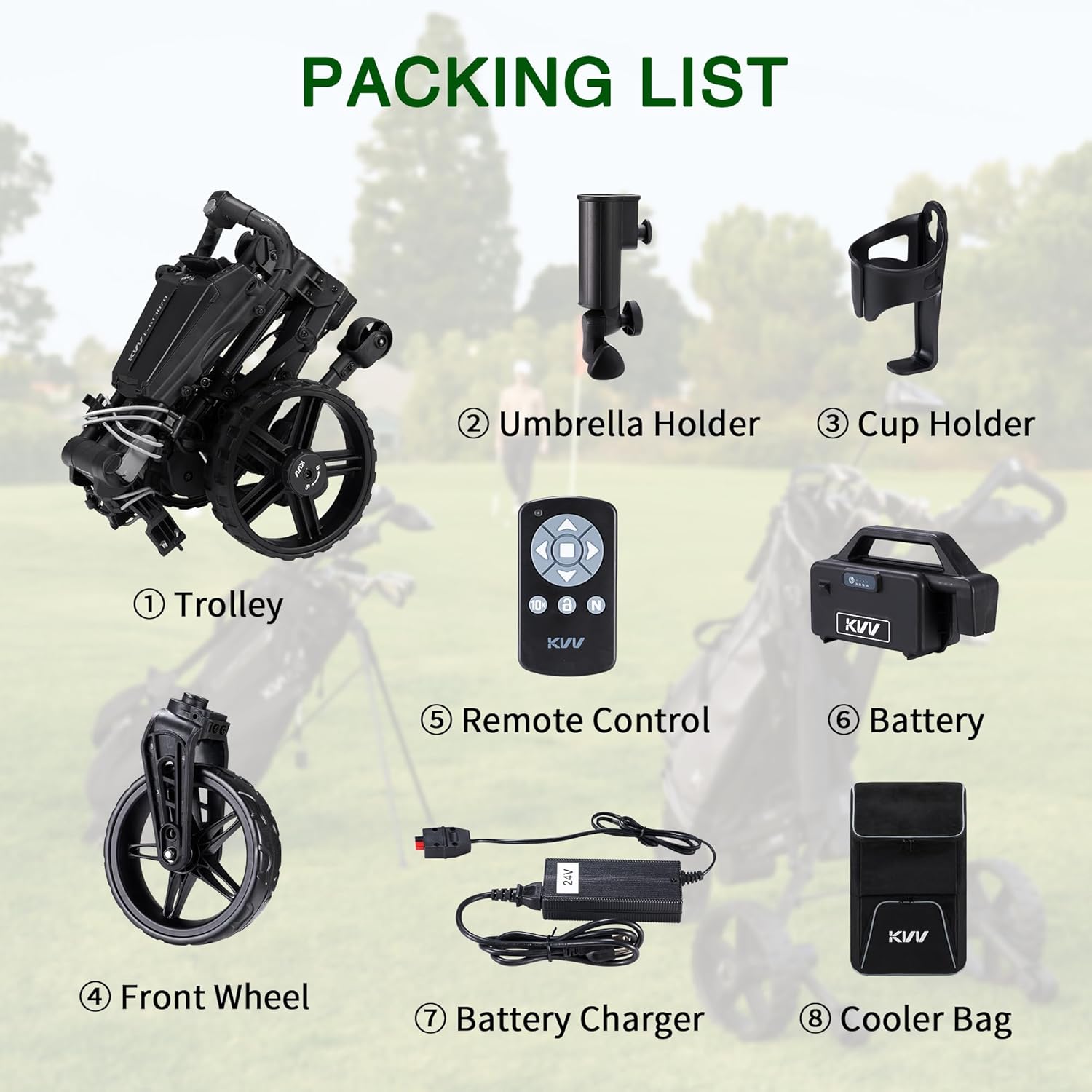
Image: Diagram showing all included components of the KVV E-GT3070 Electric Golf Push Cart.
- Golf Cart Frame (Trolley)
- Umbrella Holder
- Cup Holder
- Front Wheel
- Remote Control
- Battery
- Battery Charger
- Insulated Cooler Bag
3. Setup Instructions
3.1 Unfolding the Cart
Follow these steps to unfold your KVV E-GT3070 Electric Golf Push Cart:
- Pull the small wheel inward and upward.
- Separate the battery from the frame (if already attached).
- Open the buckle and fold the panel.
- Press the button and fold the front wheel into position.
- Unfold the main frame until it locks into place.
- Ensure all parts are securely locked before use.

Image: Visual guide for unfolding the cart.
Video: KVV Electric Golf Push Cart GT3070 Unfolding Steps Outside. This video demonstrates the process of unfolding the golf cart for use.
3.2 Battery Installation
Insert the fully charged lithium battery into its designated compartment on the cart frame. Ensure it clicks securely into place.
Video: KVV Electric Golf Push Cart How to Use. This video includes steps on battery insertion and initial setup.
3.3 Attaching Accessories
Attach the umbrella holder, cup holder, and remote control holder to their respective slots on the cart's handle console. The insulated cooler bag can be attached to the cart frame as desired.

Image: Close-up of the cart's handle console showing accessory attachment points.
4. Operating Instructions
4.1 Powering On/Off
To power on the cart, press the power switch located on the handle. The indicator light will illuminate. To power off, press and hold the power switch until the light turns off.
4.2 Remote Control Operation
The remote control allows for hands-free operation with 9 speed levels and directional control.
- Forward/Accelerate: Use the ▲ button.
- Backward/Decelerate: Use the ▼ button.
- Turn Left: Use the ◀ button.
- Turn Right: Use the ▶ button.
- Go/Stop: Use the central button.
- Speed Adjustment: Use the ▲ and ▼ buttons on the remote to adjust the speed gear from 1-9.
- Reverse Speed: Long press the ▼ button to move backward; the reverse speed is fixed at "5".
- Lock/Unlock: Press the lock button to lock the remote control keypad. The remote will automatically lock if not operated for 10 minutes. To unlock, press and hold for 5 seconds.

Image: Remote control functions and power switch details.
Video: KVV Electric Golf Cart Remote Control Operation Guide. This video demonstrates how to use the remote control for the golf cart.
4.3 Manual Mode
When the battery is low or in specific environments, you can switch to manual push mode. To engage manual mode, disengage the clutch on the wheels by turning the wheel knob 90° counterclockwise. To re-engage the clutch for electric mode, turn the knob 90° clockwise.

Image: Clutch engagement and disengagement for manual mode.
4.4 Remote Control Pairing
To pair a new remote control:
- Within 10 seconds of turning on the cart, press and hold the speed knob until "E" appears on the display.
- Quickly press the "N" key on the new remote 3 times.
- Once the screen shows "■", pairing is complete. The old remote will be deactivated.

Image: Remote control pairing instructions.
5. Maintenance
Regular maintenance ensures the longevity and optimal performance of your KVV E-GT3070 Electric Golf Push Cart.
- Cleaning: Wipe down the cart frame and wheels with a damp cloth after each use to remove dirt and debris. Avoid using harsh chemicals or abrasive cleaners.
- Battery Care: Always fully charge the battery after each use, even if only used for a short period. Store the battery in a cool, dry place when not in use. Do not allow the battery to fully discharge for extended periods.
- Wheel Inspection: Periodically check the wheels for any signs of wear or damage. Ensure they rotate freely and are securely attached.
- Storage: When storing the cart for extended periods, ensure it is clean, dry, and the battery is fully charged and disconnected. Store in a cool, dry environment.
6. Troubleshooting
If you encounter issues with your KVV E-GT3070 Electric Golf Push Cart, refer to the following common troubleshooting steps:
| Problem | Possible Cause | Solution |
|---|---|---|
| Cart does not power on. | Battery not charged or not connected. | Ensure battery is fully charged and properly inserted. Check power switch. |
| Remote control not responding. | Remote battery low, remote locked, or not paired. | Replace remote battery. Unlock remote (press and hold lock for 5s). Re-pair remote as per Section 4.4. |
| Cart not moving in electric mode. | Clutch disengaged (manual mode active). | Engage the clutch by turning the wheel knob 90° clockwise. |
| Jerky turning or inconsistent speed. | Uneven terrain, remote signal interference, or wheel slippage. | Operate on smoother terrain. Ensure clear line of sight to cart. Check wheel clutches are fully engaged. |
| Cart enters sleep mode unexpectedly. | Inactivity. | Press any button on the remote or the main power switch to reactivate. |
If problems persist, please contact KVV customer support.
7. Specifications
| Feature | Detail |
|---|---|
| Model Name | E-GT3070 |
| Brand | KVV |
| Material | Aluminum |
| Item Weight | 27.9 pounds |
| Package Weight | 18.39 kg |
| Folded Dimensions (L x W x H) | 17.5" x 18.7" x 22" |
| Included Components | Battery and Battery Charger, Golf Cart Frame, Insulated Cooler Bag, Remote Control, Umbrella Holder and Cup Holder |

Image: KVV E-GT3070 Electric Golf Push Cart dimensions (folded and unfolded).
8. Warranty and Support
8.1 Warranty Information
The KVV E-GT3070 Electric Golf Push Cart comes with a 2 Year Manufacturer Warranty. Please retain your proof of purchase for warranty claims.
8.2 Customer Support
For any questions, technical assistance, or warranty claims, please contact KVV customer support. Refer to the contact information provided with your product packaging or visit the official KVV website for support details.