
1. Introduction
Thank you for choosing the Doerpuz Puzzle Storage Folder. This manual provides essential information for the proper setup, operation, and maintenance of your new puzzle storage solution. Designed to protect and organize your completed or in-progress puzzles, this folder offers convenience and durability for puzzle enthusiasts.

Figure 1: Doerpuz Puzzle Storage Folder (closed view)
2. Product Overview
The Doerpuz Puzzle Storage Folder is engineered for optimal puzzle organization and portability. Key features include:
- Central Mesh Window: Display your favorite completed puzzle on the front cover.
- Ergonomic Handle: A comfortable grip for easy transport.
- Easy Rubber Cord Closure: Securely fastens the folder, replacing traditional button closures.
- Transparent Name Card Pocket: Personalize your folder with a name or message.
- Labeling Tabs: Quickly identify and access specific puzzles without opening each page.
- Top-Loading Sleeves: Facilitates easy insertion and removal of puzzles without damage.
- Water & Dust Resistant: Provides protection for your puzzles.
- Capacity: Holds puzzles up to 31.89 x 24.02 inches, accommodating up to 1500 pieces. Includes 20 double-sided sleeves, holding up to 40 puzzles.
2.1 Visual Features

Figure 2: Central Mesh Window for displaying puzzles.

Figure 3: Transparent Name Card Pocket for personalization.
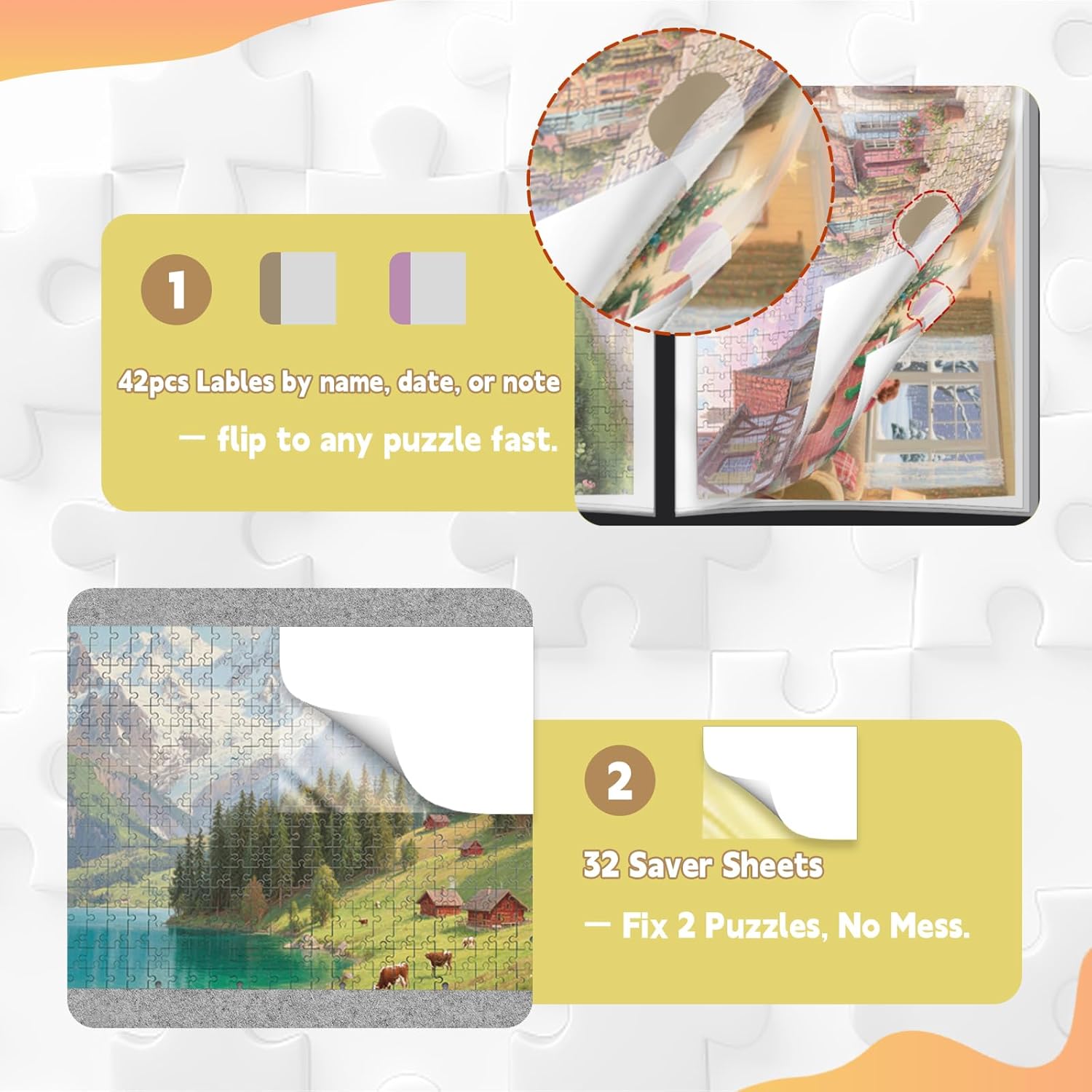
Figure 4: Labeling Tabs and Saver Sheets for organization.

Figure 5: Upgraded features for enhanced usability.

Figure 6: Folder dimensions and capacity.

Figure 7: Top-loading mechanism for puzzle insertion.
3. Setup
Before storing your puzzles, follow these simple steps:
- Unpack the Folder: Carefully remove the puzzle storage folder from its packaging.
- Prepare Puzzles: Ensure your puzzles are fully assembled and flat. For added protection, use the provided saver sheets between puzzles if desired.
- Personalize (Optional):
- Write your name or a custom message on the provided name card.
- Insert the name card into the transparent pocket on the front cover.
- Apply Labeling Tabs (Optional):
- Use the included labeling tabs to categorize your puzzles (e.g., by theme, date, or difficulty).
- Attach the tabs to the edge of each puzzle sleeve for quick identification.
4. Operating Instructions
4.1 Inserting a Puzzle
- Open the folder by releasing the rubber cord closure.
- Select an empty sleeve. The sleeves are top-loading.
- Gently slide your completed puzzle into the sleeve from the top opening. Ensure the puzzle is flat to avoid bending or damage.
- If storing multiple puzzles in one sleeve (using both sides), place a saver sheet between them for protection.
4.2 Displaying a Puzzle
To display a puzzle through the central mesh window:
- Insert the desired puzzle into the very first sleeve of the folder.
- Close the folder. The central mesh window will frame a portion of your puzzle, allowing it to be showcased.
4.3 Transporting the Folder
Use the ergonomic handle located on the spine of the folder for easy and comfortable carrying. Ensure the rubber cord closure is securely fastened before transport to prevent puzzles from shifting or falling out.
Video 1: Official product video demonstrating the features and use of the Doerpuz Puzzle Storage Folder, including how to insert puzzles, use labeling tabs, and carry the folder.
5. Maintenance
- Cleaning: Wipe the exterior of the folder with a soft, damp cloth. Avoid abrasive cleaners or harsh chemicals.
- Storage: Store the folder in a cool, dry place away from direct sunlight to prevent material degradation and fading of puzzles.
- Handling: Always handle the folder with care, especially when full, to maintain its structural integrity.
6. Troubleshooting
| Problem | Possible Cause | Solution |
|---|---|---|
| Puzzles not fitting in sleeves. | Puzzle dimensions exceed sleeve capacity. | Ensure your puzzle is within the maximum size of 31.89 x 24.02 inches. |
| Folder not closing securely. | Too many puzzles stored, or rubber cord is not properly engaged. | Reduce the number of puzzles if exceeding capacity. Ensure the rubber cord is stretched and hooked onto the closure mechanism. |
| Puzzles sliding out during transport. | Folder not securely closed. | Always double-check that the rubber cord closure is firmly secured before moving the folder. |
7. Specifications
| Feature | Detail |
|---|---|
| Brand | Doerpuz |
| Model Number | PTSN |
| Material | Plastic |
| Color | Black |
| Max Puzzle Size | 31.89" L x 24.02" W (Inner Page Size: 32.6" x 25.2") |
| Max Puzzle Pieces | 1500 pieces |
| Number of Sleeves | 20 double-sided sleeves (holds up to 40 puzzles) |
| Item Weight | 2.9 Kilograms |
| Included Components | Puzzle storage folder, Name Card, Stickers, Tabs |
| Additional Features | DIY, Portable, Scratch Resistant, Water Resistant |
8. Warranty & Support
Warranty: The manufacturer, Doerpuz, states "No Warranty" for this product. Please refer to the retailer's return policy for any issues upon receipt.
Customer Support: For any questions or concerns regarding your Doerpuz Puzzle Storage Folder, please contact the retailer where the product was purchased. You may also visit the official Doerpuz brand page on Amazon for additional product information and support resources: Doerpuz Brand Store.