
1. Introduction
This manual provides essential information for the safe and efficient operation of your VEVOR 12V 40A LiFePO4 Lithium Battery Charger. This smart charger is specifically designed for 12V (12.8V) LiFePO4 deep cycle rechargeable batteries, delivering a 14.6V DC charging voltage and 40A charging current. It is suitable for various applications including RVs, boats, golf carts, and solar systems.
Note: This charger is not suitable for lead-acid batteries.

Image 1.1: VEVOR 12V 40A LiFePO4 Battery Charger with a battery, highlighting its charging capacity.
2. Safety Instructions
Please read and understand all safety instructions before operating the charger. Failure to follow these instructions may result in electric shock, fire, or serious injury.
- Ventilation: Always operate the charger in a well-ventilated area.
- Moisture: Do not expose the charger to water, rain, or excessive moisture.
- Flammable Materials: Keep the charger away from volatile gases or open flames.
- Battery Type: This charger is exclusively for 12V LiFePO4 batteries. Do not attempt to charge other battery types, especially lead-acid batteries.
- Connections: Ensure all connections are secure and correct before plugging the charger into an AC outlet. Incorrect polarity can damage the battery and charger.
- Damage: Do not operate the charger if it has been dropped, damaged, or if the power cord or output cables are frayed or broken.
- Disassembly: Do not attempt to disassemble or modify the charger. Refer all servicing to qualified personnel.
- Children: Keep the charger and batteries out of reach of children.

Image 2.1: Overview of the charger's multiple safety protection features.
3. Product Overview
The VEVOR 12V 40A LiFePO4 Battery Charger is designed for reliable and efficient charging. It features a durable aluminum alloy shell, an ergonomic handle for portability, and a built-in cooling fan for heat dissipation.
3.1 Components
- VEVOR 12V 40A LiFePO4 Battery Charger Unit
- 50A Anderson to M8 Terminal Adapter Cable (1.4 ft / 0.42 m)
- AC Power Cord (4.92 ft / 1.5 m)

Image 3.1: Main components of the VEVOR 12V 40A LiFePO4 Battery Charger.
3.2 LED Indicators
The charger features clear LED indicators to display the charging status:
- Always On Red: Charging in progress
- Always On Green: Battery fully charged
- Flashes Green: Standby mode
- Flashes Red: Fault state (e.g., reverse polarity, short circuit)

Image 3.2: LED indicators on the charger for status monitoring.
4. Setup
Follow these steps to set up your VEVOR LiFePO4 Battery Charger:
- Connect to Battery: Connect the 50A Anderson to M8 terminal adapter cable to your 12V LiFePO4 battery. Ensure the positive (red) terminal of the cable connects to the positive terminal of the battery, and the negative (black) terminal of the cable connects to the negative terminal of the battery.
- Connect Charger: Connect the output cable of the charger to the Anderson connector of the adapter cable. Ensure a secure connection.
- Connect to AC Power: Plug the AC power cord into the charger, then plug the other end into a standard 100-120V AC, 60Hz wall outlet.
- Verify: The charger will initiate the charging process, and the LED indicator will show the current status.
Important: Always connect the charger to the battery first, then to the AC power source. Disconnect in reverse order (AC power first, then battery).

Image 4.1: Step-by-step connection guide for the Anderson connector setup.
5. Operating Instructions
The VEVOR LiFePO4 Battery Charger features a 4-stage intelligent charging curve and a 0V activation function to optimize battery health and charging efficiency.
5.1 4-Stage Intelligent Charging Curve
The charger automatically detects your battery's status and proceeds through the following stages:
- T0: Reverse Connection Detection: Checks for incorrect polarity.
- T1: Precharge Stage: Wakes up low-voltage batteries with a gentle trickle charge.
- T2: CC Stage (Constant Current): Rapid charging phase where the charger delivers a constant high current (40A) until the battery voltage reaches a certain level.
- T3: CV Stage (Constant Voltage): The charger maintains a constant voltage (14.6V DC) while the current gradually decreases to prevent overcharge.
- T4: Battery Full Stage: The output current cuts off once the battery is fully charged, maintaining optimal battery level. The LED indicator will turn green.
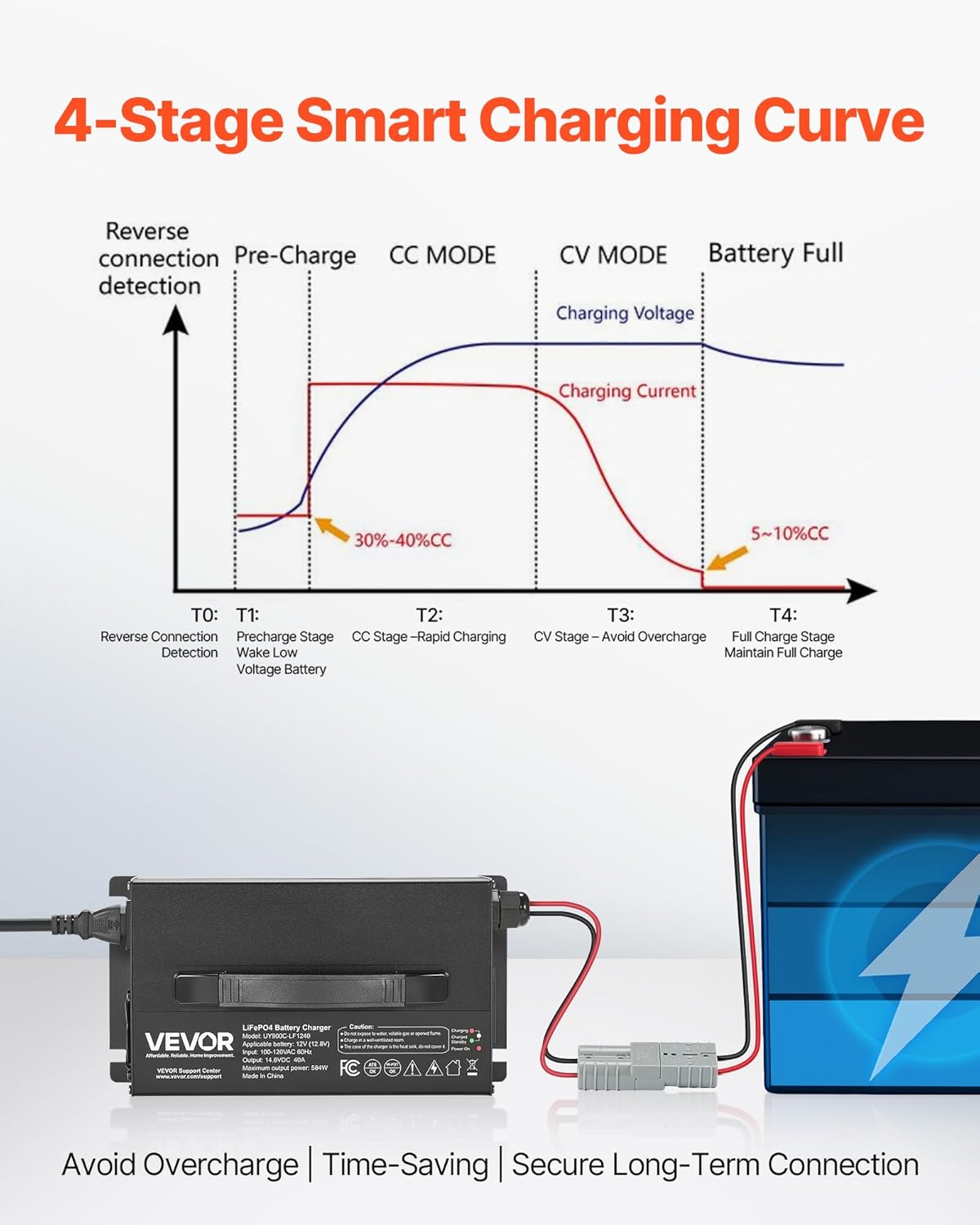
Image 5.1: Detailed diagram of the 4-stage intelligent charging curve.
5.2 0V Activation Function
The charger includes a 0V activation feature that can efficiently wake up LiFePO4 batteries that are in BMS (Battery Management System) protection mode due to prolonged low voltage or over-discharge. This function helps to restore the battery to a secure voltage level, extending its lifespan.
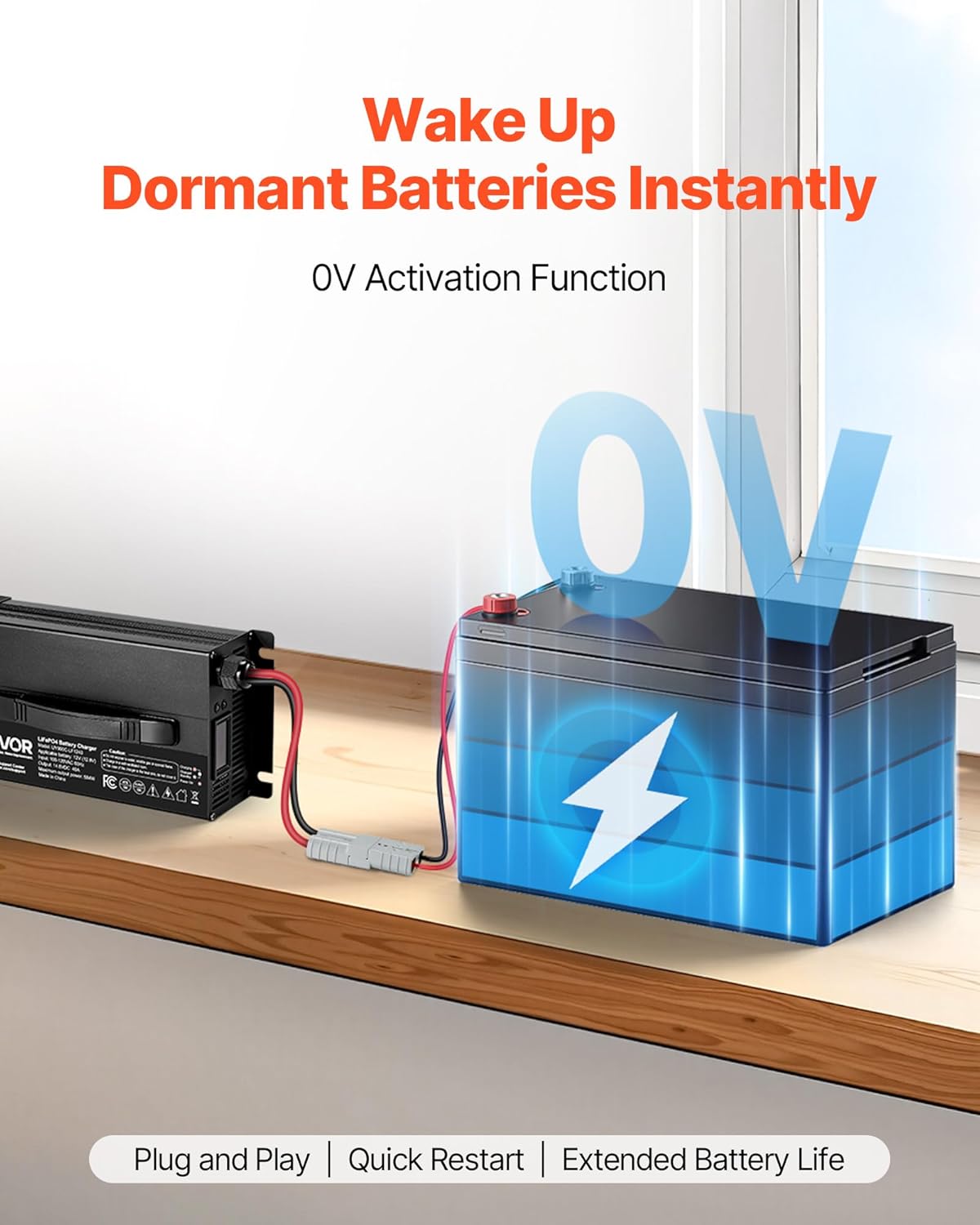
Image 5.2: Visual representation of the 0V activation feature.
6. Maintenance
Proper maintenance ensures the longevity and optimal performance of your charger.
- Cleaning: Keep the charger clean and free from dust and debris. Use a dry, soft cloth for cleaning. Do not use solvents or abrasive cleaners.
- Storage: Store the charger in a cool, dry, and well-ventilated place when not in use.
- Connections: Periodically inspect the power cord, output cables, and connectors for any signs of wear, damage, or corrosion. Replace damaged components immediately.
- Ventilation: Ensure the cooling fan vents are not obstructed during operation to allow for proper heat dissipation.
7. Troubleshooting
If you encounter issues with your VEVOR LiFePO4 Battery Charger, refer to the following common troubleshooting steps:
- Charger Not Turning On:
- Check if the AC power cord is securely plugged into both the charger and the wall outlet.
- Verify that the wall outlet has power.
- Battery Not Charging (Red LED not on):
- Ensure the Anderson connector and M8 terminal adapter cable are securely connected to both the charger and the battery.
- Check for correct polarity (+ to + and - to -) between the charger output and the battery terminals.
- Confirm the battery is a 12V LiFePO4 type. This charger is not compatible with other battery chemistries.
- If the battery is deeply discharged (0V), the 0V activation function should attempt to wake it up. Allow some time for this process.
- Fault State (Red LED Flashing):
- This indicates a protection mode has been activated (e.g., reverse polarity, short circuit, over-voltage, overheat).
- Immediately disconnect the charger from both AC power and the battery.
- Inspect all connections for correct polarity and ensure there are no short circuits.
- Allow the charger to cool down if it feels hot.
- Reconnect the charger following the setup instructions carefully.
- Slow Charging:
- Ensure the battery capacity is within the charger's recommended range for efficient charging.
- Verify that the charger is operating in a well-ventilated environment to prevent thermal throttling.
If the problem persists after following these steps, please contact VEVOR customer support.
8. Specifications

Image 8.1: Product dimensions and technical specifications.
| Feature | Specification |
|---|---|
| Model Number | UY900C-LF1240 |
| Main Material | Aluminum Alloy |
| Compatible Battery | 12V (12.8V) LiFePO4 |
| Input Voltage/Frequency | 100-120V AC/60Hz |
| Charging Voltage | 14.6V DC |
| Charging Current | 40A |
| Max Output Power | 584W |
| Power Cord Length | 4.92 ft / 1.5 m |
| Output Cord Length | 39.37 in / 1 m |
| Adapter Cable Length | 16.54 in / 0.42 m |
| Net Weight | 5.51 lbs / 2.5 kg |
| Product Dimensions (L x W x H) | 10.24 x 5.31 x 2.76 in / 260 x 135 x 70 mm |
9. Warranty and Support
For warranty information, please refer to the documentation provided with your purchase or contact your retailer. VEVOR offers customer support for product assistance.
VEVOR Support Center: www.vevor.com/support


