
1. Introduction
This manual provides detailed instructions for the proper use and maintenance of your Haowolf SP05 Open Ear Earbuds. Please read this manual thoroughly before using the product to ensure optimal performance and longevity.
2. Package Contents
Verify that all items are present in the package:
- Haowolf SP05 Open Ear Earbuds (Left and Right)
- Charging Case
- USB Charging Cable
- User Manual
3. Product Overview

Image: Haowolf SP05 Open Ear Earbuds and their charging case. The earbuds feature an open-ear design, and the case has a digital display for battery levels.
The Haowolf SP05 Open Ear Earbuds are designed for comfort and situational awareness, allowing you to hear your surroundings while enjoying audio. They feature Bluetooth 5.3 connectivity, IPX6 water resistance, and a long battery life.
4. Setup
4.1 Charging the Earbuds and Case
Before first use, fully charge the earbuds and charging case.
- Connect the charging case to a USB power source using the provided USB cable.
- Place the earbuds into the charging case. Ensure they are correctly seated; the digital display on the case will show the charging status.
- The LED display on the charging case indicates the battery percentage of the case and individual charging status for each earbud (L and R).

Image: The charging case's digital LED display showing the overall case battery percentage and individual charging indicators for the left and right earbuds.
A full charge provides approximately 20 hours of playtime for the earbuds, with the charging case offering an additional 20 hours, totaling up to 40 hours of combined playtime.
4.2 Pairing with a Device
- Open the charging case. The earbuds will automatically power on and enter pairing mode.
- On your device (smartphone, tablet, etc.), enable Bluetooth.
- Search for available Bluetooth devices and select "SP05" from the list.
- Once connected, a voice prompt will confirm successful pairing. The earbuds are now ready for use.
5. Operating Instructions
5.1 Wearing the Earbuds
The SP05 earbuds feature an open-ear design that rests gently on your ear, providing comfort and allowing you to remain aware of your surroundings.

Image: A man wearing the Haowolf SP05 open-ear earbuds, demonstrating their secure and comfortable fit without entering the ear canal.
- Identify the Left (L) and Right (R) earbuds.
- Gently place each earbud over your ear, ensuring the speaker portion is positioned near your ear canal without entering it.
- Adjust for a secure and comfortable fit. The ergonomic design is intended to stay in place during physical activity.
5.2 Touch Controls
The earbuds are equipped with touch-sensitive controls for various functions:

Image: A visual guide to the touch controls on the Haowolf SP05 earbuds, detailing single, double, triple taps, and long presses for various functions.
- Volume + (R): Single click right earbud.
- Volume - (L): Single click left earbud.
- Pause/Play (L/R): Double click either earbud.
- Answer Call/Hang-up (L/R): Double click either earbud during an incoming call or active call.
- Siri (L/R): Triple click either earbud to activate voice assistant.
- Gaming Mode (L/R): Click either earbud 5 times.
- Previous Song (L): Long press left earbud for 2 seconds.
- Next Song (R): Long press right earbud for 2 seconds.
- Reject Call (L/R): Long press either earbud for 2 seconds during an incoming call.
5.3 Power On/Off
- Power On: Open the charging case, and the earbuds will automatically power on.
- Power Off: Place the earbuds back into the charging case and close the lid. They will automatically power off and begin charging.
6. Maintenance
6.1 Cleaning
Regular cleaning helps maintain performance and hygiene.
- Use a soft, dry, lint-free cloth to wipe the earbuds and charging case.
- Do not use harsh chemicals, cleaning solvents, or strong detergents.
- Avoid getting moisture into any openings.
6.2 Water Resistance (IPX6)
The Haowolf SP05 earbuds are rated IPX6 waterproof, meaning they are protected against high-pressure water jets from any direction. This makes them suitable for workouts and outdoor activities where they may be exposed to sweat or rain.
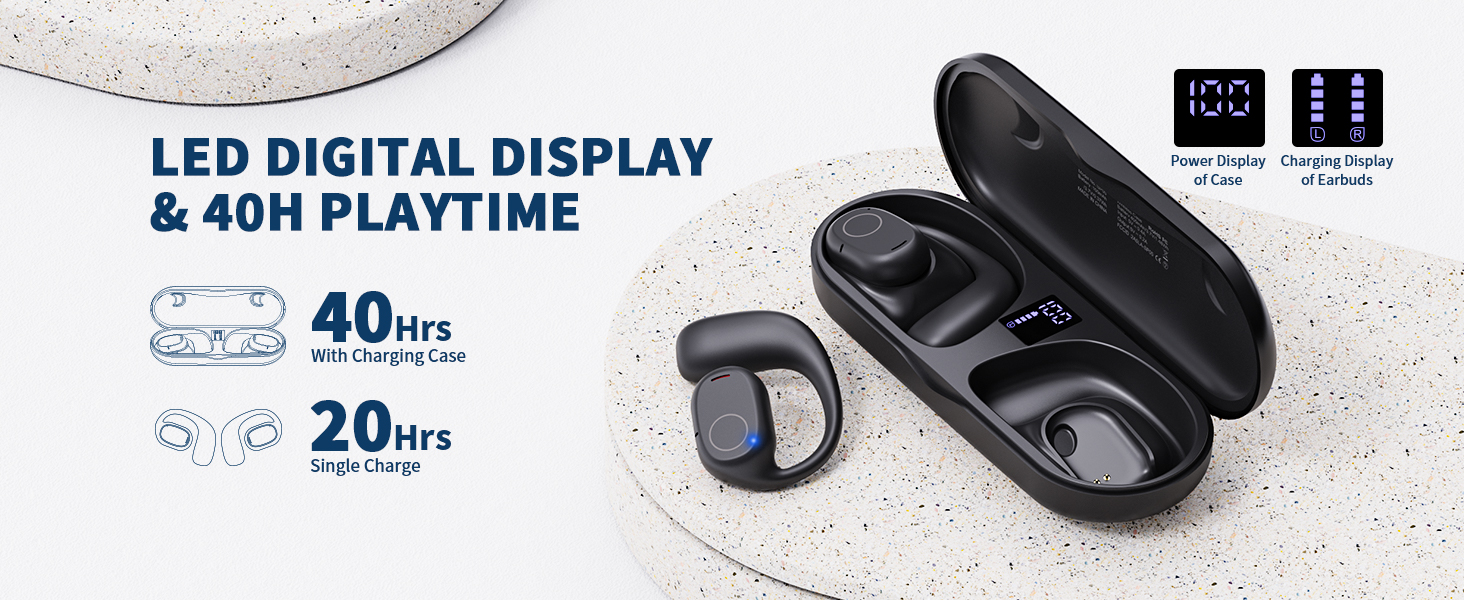
Image: Haowolf SP05 earbuds shown with water splashing, illustrating their IPX6 waterproof capability.
Important: The charging case is not waterproof. Do not expose the charging case to water or moisture. Ensure earbuds are completely dry before placing them back into the charging case to prevent damage.
6.3 Storage
When not in use, store the earbuds in their charging case to protect them from dust and damage.
7. Troubleshooting
- Earbuds not pairing:
- Ensure earbuds are charged and out of the case.
- Turn off Bluetooth on your device and turn it back on.
- Forget the device "SP05" from your device's Bluetooth settings and try pairing again.
- Restart your device.
- No sound from one earbud:
- Place both earbuds back into the charging case, close the lid, wait a few seconds, then take them out again.
- Ensure both earbuds are charged.
- Charging case not charging:
- Check the USB cable and power adapter for damage.
- Try a different USB cable or power source.
- Touch controls unresponsive:
- Ensure your fingers are clean and dry.
- Try restarting the earbuds by placing them in the case and taking them out.
8. Specifications
| Model Name | SP05 |
| Brand | Haowolf |
| Connectivity Technology | Wireless (Bluetooth) |
| Bluetooth Version | 5.3 |
| Ear Placement | Open Ear |
| Water Resistance Level | IPX6 Waterproof |
| Battery Life (Earbuds) | 20 Hours |
| Total Playtime (with Case) | 40 Hours |
| Control Method | Touch |
| Audio Driver Type | Dynamic Driver (16.2mm) |
| Frequency Range | 20 Hz - 20,000 Hz |
| Item Weight | 5.6 ounces |
9. Warranty and Support
For warranty information, please refer to the documentation included with your purchase or contact your retailer. For further assistance or technical support, please visit the official Haowolf website or contact their customer service department.