
1. Introduction
Thank you for choosing the Patikuin Vanity Desk. This manual provides detailed instructions for the assembly, operation, and maintenance of your new vanity desk. Please read this manual thoroughly before assembly and use to ensure proper function and safety.
2. Safety Information
Please observe the following safety precautions:
- Assembly may require tools and caution to avoid injury. Always follow the assembly instructions carefully.
- Always unplug electrical components before cleaning or performing maintenance.
- Do not overload the vanity with heavy items to prevent tipping. Utilize the anti-toppling devices provided.
- Ensure all electrical connections are secure and comply with local electrical codes.
- Keep liquids away from electrical outlets and components.
3. Package Contents
Before assembly, verify that all parts are present. Refer to the included assembly guide for a complete list of components and hardware.
- Vanity Desk components
- LED Mirror
- Storage Stool
- Power Outlet unit (pre-installed or separate)
- Assembly Hardware
- Anti-toppling devices
- Instruction Manual (this document)
4. Setup and Assembly
Assembly is required for this vanity desk. Please follow the step-by-step instructions provided in the separate assembly guide included with your product. All parts are pre-drilled and numbered for easier setup, typically taking approximately 45 minutes.
4.1 Key Assembly Steps:
- Unpack all components and verify against the parts list.
- Assemble the main desk frame.
- Install drawers and shelves.
- Attach the LED mirror securely.
- Assemble the storage stool.
- Install the anti-toppling devices to a wall for enhanced stability.


5. Operating Instructions
5.1 LED Light Mirror
The vanity mirror features an integrated LED light with three adjustable color modes: warm white, warm yellow, and cool light. The light is dimmable via a touch control switch located on the mirror surface.
- To turn on/off: Lightly touch the power icon on the mirror.
- To change color mode: Briefly touch the mode icon to cycle through warm white, warm yellow, and cool light.
- To adjust brightness: Press and hold the power icon to dim or brighten the light. Release when the desired brightness is achieved.

5.2 Integrated Power Outlet
The vanity desk includes a built-in power outlet unit for convenient charging and powering of beauty tools and devices. It features 2 AC outlets (125V/12A), 1 USB port (5V/2.4A), and 1 Type-C port (5V/2.4A). The power cord is 4.9 feet long.
- Connect the vanity desk's main power cord to a standard wall outlet.
- Plug in your devices to the appropriate AC, USB, or Type-C ports.
- Ensure devices are compatible with the provided voltage and amperage.
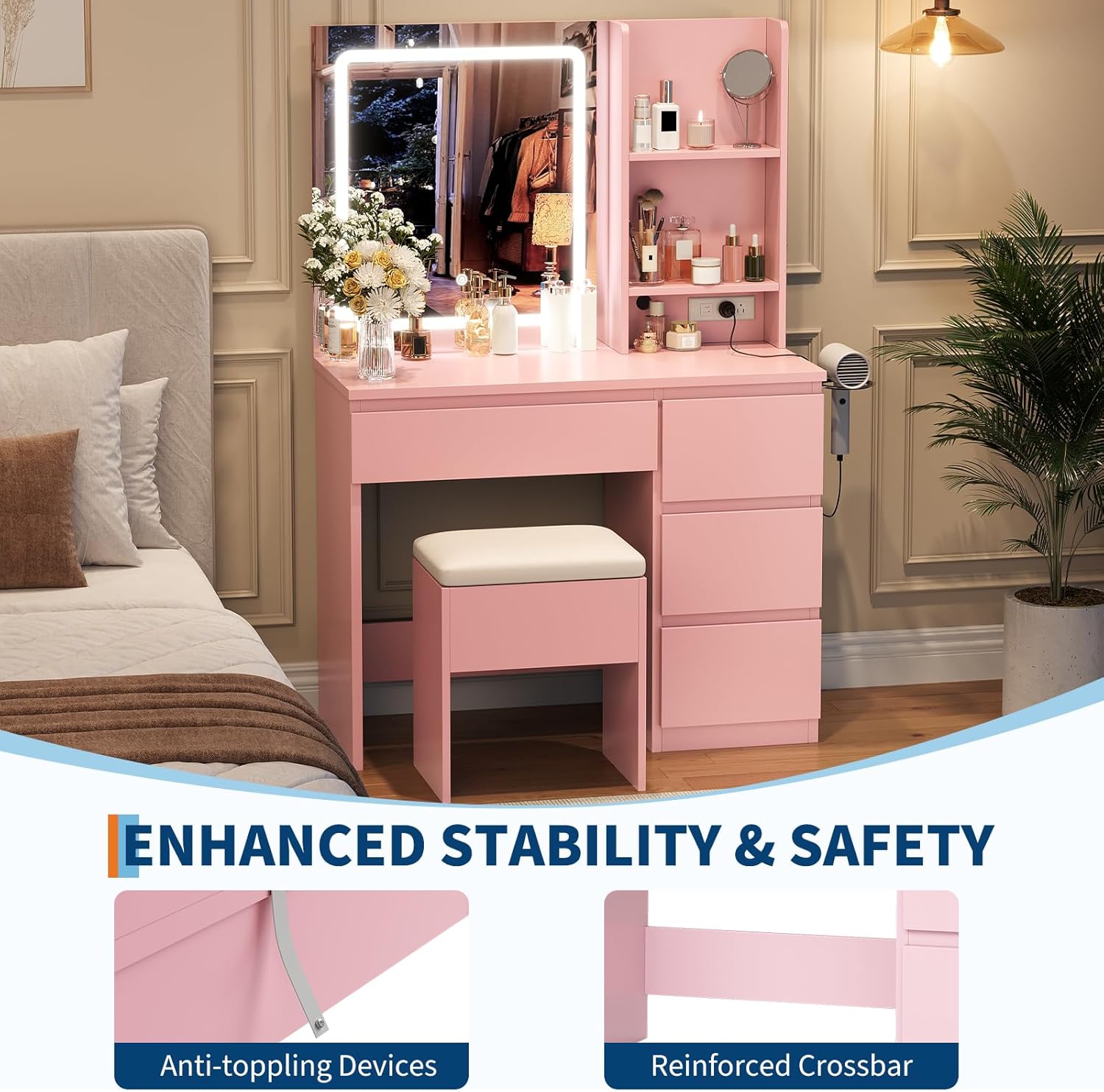
5.3 Storage Solutions
The vanity desk is designed with multiple storage options to keep your items organized:
- Large Drawer: One spacious drawer (23.7" x 5.3") located under the main tabletop.
- Compact Drawers: Three smaller drawers (13" x 7.8" each) on the side.
- Open Shelves: Two open shelves adjacent to the mirror for easy access to frequently used items.
- Storage Stool: The included stool features a hidden compartment for additional storage.
- Hair Dryer Holder: A dedicated holder is provided for organizing your hair dryer.


6. Maintenance
Proper care and maintenance will extend the life of your vanity desk.
- Cleaning: Wipe surfaces with a soft, damp cloth. Avoid harsh chemicals or abrasive cleaners that may damage the finish.
- Mirror Care: Clean the mirror with a glass cleaner and a lint-free cloth. Do not spray cleaner directly onto the mirror, especially near electrical components.
- Electrical Components: Ensure the unit is unplugged before cleaning any electrical parts. Keep outlets free from dust and debris.
- Stability Check: Periodically check all screws and fasteners to ensure they are tight. Re-tighten if necessary. Verify that anti-toppling devices are securely attached.
7. Troubleshooting
If you encounter issues with your vanity desk, refer to the following common problems and solutions:
| Problem | Possible Cause | Solution |
|---|---|---|
| LED mirror lights do not turn on. | Not plugged in, loose connection, power outage, faulty switch. | Ensure the vanity is plugged into a working outlet. Check all electrical connections. Try touching the switch again. |
| Power outlets are not working. | Vanity not plugged in, circuit breaker tripped, faulty outlet unit. | Verify the main power cord is securely plugged in. Check your home's circuit breaker. Test with another device. |
| Drawers are stiff or do not slide smoothly. | Improper assembly, debris in tracks, overloaded drawer. | Check assembly instructions for correct drawer slide installation. Clear any obstructions from the tracks. Reduce drawer contents. |
| Vanity feels unstable. | Loose fasteners, anti-toppling devices not installed. | Tighten all screws and bolts. Ensure anti-toppling devices are properly installed and secured to a wall stud. |
8. Specifications
| Feature | Detail |
|---|---|
| Brand | Patikuin |
| Model Number | PHK_33JCXE9S-qQ3h |
| Product Dimensions (D x W x H) | 15.75" x 36.85" x 55.12" |
| Item Weight | 88 pounds |
| Frame Material | Wood |
| Assembly Required | Yes |
| LED Mirror Size | 23.6" x 25.8" (approximate, derived from image) |
| LED Light Modes | 3 (Warm White, Warm Yellow, Cool Light), Dimmable |
| Power Outlet | 2 AC (125V/12A), 1 USB (5V/2.4A), 1 Type-C (5V/2.4A) |
| Power Cord Length | 4.9 feet |
| Large Drawer Dimensions | 23.7" x 5.3" (approximate, derived from feature bullets) |
| Compact Drawer Dimensions | 13" x 7.8" (each, approximate, derived from feature bullets) |
| Stool Dimensions | 15.4" x 11" x 17.7" (approximate, derived from feature bullets) |
9. Warranty and Support
For warranty information or technical support, please refer to the contact details provided with your purchase documentation or visit the official Patikuin website. Keep your purchase receipt for warranty claims.
For further assistance, you may contact the seller, WozhiWo, through the Amazon platform.