1. Introduction
This manual provides detailed instructions for the setup, operation, and maintenance of your Generic Wireless Indoor Outdoor Weather Station. This device offers comprehensive environmental monitoring, including indoor and outdoor temperature and humidity, weather forecasting, atomic clock synchronization, and customizable alerts. Please read this manual thoroughly before using the product to ensure proper function and longevity.
2. Package Contents
- 1 x Main Weather Station Unit
- 3 x Wireless Remote Sensors
- 1 x DC Power Adapter
- 1 x User Manual (this document)
3. Product Overview
The Generic Wireless Indoor Outdoor Weather Station features a vibrant VA color display and connects wirelessly to up to three remote sensors to provide accurate environmental data. The main unit displays time, date, indoor/outdoor temperature and humidity, weather forecast, moon phase, tide indicator, and sunrise/sunset times.

Figure 3.1: Main Weather Station Unit and Remote Sensors
The main unit offers two mounting options: a foldable stand for tabletop use and a hanging hole for wall mounting.
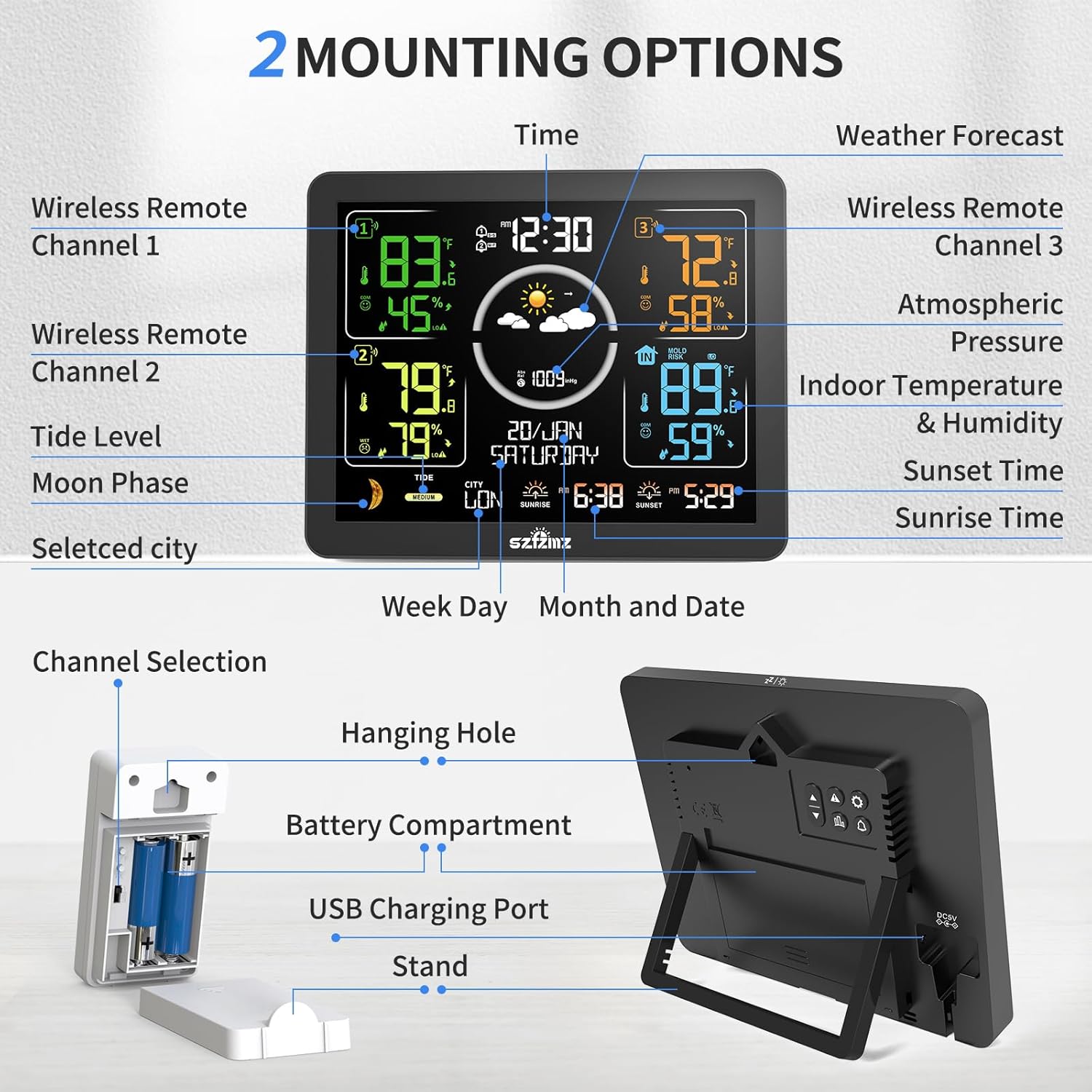
Figure 3.2: Weather Station Display Layout and Physical Features
The display provides information such as:
- Time (Atomic Clock synchronized)
- Date and Day of the Week
- Indoor Temperature and Humidity
- Outdoor Temperature and Humidity (up to 3 sensors)
- Weather Forecast Icons (Sunny, Partly Cloudy, Cloudy, Rainy, Stormy, Snowy)
- Atmospheric Pressure and Trend
- Moon Phase and Tide Indicator
- Sunrise and Sunset Times
- Comfort Indicator
- Max/Min Temperature and Humidity Records
- Low Battery Indicator
4. Setup
4.1 Powering the Main Unit
The main unit can be powered by either the included DC adapter or batteries (not included).
- DC Adapter: Connect the DC adapter to the power port on the back of the main unit and plug it into a wall outlet. When using the adapter, the backlight will remain constantly on with adjustable brightness levels.
- Batteries: Insert 2 x LR03 AAA batteries (not included) into the battery compartment on the back of the main unit. When powered by batteries, the display will light up for 15 seconds when touched and then turn off automatically to conserve power.

Figure 4.1: Power Modes and Backlight Behavior
4.2 Setting Up Remote Sensors
The weather station supports up to three wireless remote sensors. Each sensor requires 2 x AA batteries (not included).
- Open the battery compartment on each remote sensor and insert 2 x AA batteries, observing polarity.
- Select a unique channel (1, 2, or 3) for each sensor using the channel switch inside the battery compartment. For optimal connection, assign Channel 1, Channel 2, and Channel 3 to your sensors respectively.
- Place the remote sensors in desired outdoor or indoor locations within a 60-meter (200-foot) open-air transmission range from the main unit. Ensure they are protected from direct rain and sunlight for accurate readings and longevity.

Figure 4.2: Remote Sensor Placement and Channel Selection
4.3 Initial Time and Date Synchronization
The weather station features an atomic clock function that automatically or manually searches for WWVB signals to calibrate the time.
- Upon initial power-up, the station will attempt to synchronize with the WWVB atomic clock signal. This process may take several minutes.
- If automatic synchronization fails or you wish to set it manually, refer to the operating instructions for manual time setting.
- Set the correct time zone for your location (AST, EST, CST, MST, PST, AKT, HST, HAT) to ensure accurate time display.
5. Operating Instructions
5.1 Display Information
The VA color display provides a clear overview of all collected data. The display is designed for optimal readability with deeper black levels and better contrast.

Figure 5.1: Upgraded Colorful VA Display
5.2 Weather Forecast
The weather station calculates a weather forecast for the next 12 hours based on barometric pressure trends. The forecast is displayed using six distinct icons:
- Sunny
- Slightly Cloudy
- Cloudy
- Rainy
- Stormy
- Snowy

Figure 5.2: Weather Forecast Icons
5.3 Alarm and Snooze Function
The weather station includes two daily alarm settings with a snooze function. Refer to the device's buttons (e.g., 'ALARM', 'SET') for specific instructions on setting and activating alarms. The snooze function typically activates by pressing a designated button (often the backlight/snooze button) when an alarm sounds.
5.4 Backlight Adjustment
When powered by the DC adapter, the backlight offers 4 levels of brightness. Use the designated button (often labeled 'LIGHT' or 'BRIGHTNESS') to cycle through the brightness levels or turn the backlight off.
5.5 Customizable Alerts
The weather station supports customizable alerts for upper and lower temperature and humidity limits, as well as a frost warning. Consult the device's settings menu for instructions on how to set these alerts. When an alert condition is met, the station will provide an audible or visual notification.
6. Maintenance
6.1 Battery Replacement
Replace batteries in the main unit (2 x LR03 AAA) and remote sensors (2 x AA each) when the low battery indicator appears on the display. Ensure correct polarity when inserting new batteries.
6.2 Cleaning
Wipe the main unit and sensors with a soft, dry cloth. Do not use abrasive cleaners or immerse the units in water. Keep the devices away from excessive dust and moisture.
7. Troubleshooting
7.1 Sensor Connection Issues
If a remote sensor is not displaying data:
- Ensure the sensor has fresh batteries and the channel switch is set correctly (1, 2, or 3).
- Verify the main unit is within the 60-meter transmission range of the sensor.
- Check for obstructions between the sensor and the main unit, such as thick walls or large metal objects.
- Try re-pairing the sensor by removing and reinserting its batteries, then initiating a sensor search on the main unit (refer to device-specific instructions for this process).
7.2 Time Synchronization Problems
If the atomic clock is not synchronizing:
- Ensure the weather station is placed in an area with good reception, away from electronic interference.
- Manually initiate a WWVB signal search (refer to device-specific instructions).
- Verify the correct time zone is selected.
7.3 Inaccurate Readings
Our sensors adhere to industry standards of ±1 °C (±1.8 °F) / ±5% RH tolerance. If variations exceed these ranges after 3 hours of co-located testing, please contact support for calibration guidance or replacement.
8. Specifications
| Feature | Specification |
|---|---|
| Model Number | TX07-EM3566W |
| Product Dimensions | 3.15 x 17.09 x 14.1 cm; 648.64 g |
| Main Unit Power Source | AC/DC Adapter (included) or 2 x LR03 AAA Batteries (not included) |
| Remote Sensor Power Source | 2 x AA Batteries (not included) per sensor |
| Wireless Transmission Range | Up to 60 meters (200 feet) in open area |
| Special Features | Alarm, Customizable Alert, Adjustable Brightness, Wireless, Atomic Clock |
| Recommended Uses | Home, Office |
9. Warranty and Support
This product is covered by a manufacturer's warranty. For specific warranty terms and conditions, please refer to the product packaging or contact the retailer. If you encounter any issues or require technical assistance, please contact the seller or manufacturer for support. Guidance for calibration or replacement under warranty is available for sensor accuracy issues.

