1. Introduction
This manual provides detailed instructions for the VINABTY RC933A FMB1 replacement voice remote control. It is designed to be compatible with various TCL Mini LED Smart TV models. Please read this manual thoroughly to ensure proper setup and operation of your new remote control.

Image 1.1: Front view of the VINABTY RC933A FMB1 replacement voice remote control, showing all buttons and its ergonomic design.
2. Product Features
- Model: RC933A FMB1
- Compatibility: Specifically designed for TCL Mini LED Smart TV models including 65C8K, 75C89K, 75Q8CX7, Q8CX7, 85Q8CX7, 98Q8CX7, W8U-RC933A.
- Voice Control: Integrated voice command functionality for enhanced user interaction.
- Direct Use: Operates directly within a 10-meter range after successful pairing.
- Ergonomic Design: Crafted for comfortable handling and ease of use.
- Dedicated App Buttons: Quick access buttons for popular streaming services like Netflix, Prime Video, and YouTube.
3. Setup
3.1. Battery Installation
To begin using your remote control, you must first install the batteries. This remote control requires two AAA batteries (not included).
- Locate the battery compartment cover on the back of the remote control.
- Press down on the latch and slide the cover downwards to open the compartment.
- Insert two AAA batteries, ensuring the positive (+) and negative (-) terminals match the diagrams inside the compartment.
- Slide the battery compartment cover back into place until it clicks securely.

Image 3.1: Back view of the remote control with the battery compartment open, illustrating the correct orientation for AAA battery insertion.
3.2. Pairing the Remote Control
The VINABTY RC933A FMB1 remote control must be paired with your TCL Mini LED Smart TV to enable full functionality, including voice control. The pairing process may vary slightly depending on your specific TV model. Please refer to your TV's user manual for precise pairing instructions. Generally, the steps involve:
- Ensure your TV is powered on.
- Navigate to the TV's settings menu (often found by pressing a 'Settings' or 'Gear' icon button on your old remote or TV).
- Look for options such as 'Remotes & Accessories', 'Bluetooth', or 'Add Device'.
- Follow the on-screen prompts to put your TV into pairing mode.
- On the new VINABTY remote, press and hold the 'OK' button (center of the navigation pad) and the 'Home' button simultaneously for a few seconds until an indicator light on the remote flashes or the TV confirms pairing.
- Once paired, a confirmation message should appear on your TV screen.
If pairing is unsuccessful, ensure the batteries are correctly installed and try the process again. Maintain a close distance between the remote and the TV during pairing.
4. Operating Instructions
4.1. Button Functions Overview
The VINABTY RC933A FMB1 remote control features a standard layout with dedicated buttons for various functions. Familiarize yourself with the button layout for optimal use.
Image 4.1: Front view of the remote control, illustrating the position of each button.
- Power Button (⏻): Turns the TV on or off.
- Mute Button (🔇): Mutes or unmutes the TV audio.
- Source/Input Button (⎚): Selects the input source (HDMI, AV, etc.).
- Menu Button (☰): Accesses the TV's main menu or quick settings.
- Navigation Pad (Circular): Used to navigate through menus and content.
- OK Button (Center of Nav Pad): Confirms selections.
- Back Button (←): Returns to the previous screen or menu.
- Home Button (🏠): Returns to the TV's home screen.
- Settings Button (⚙️): Opens the TV's settings menu.
- Volume Up/Down (+ / -): Adjusts the TV volume.
- Channel Up/Down (∧ / ∨): Changes TV channels.
- Voice Control Button (🎤): Activates the voice assistant (see section 4.2).
- Numeric/Text Input Button (123): Accesses numeric keypad or text input.
- T-Channel Button (T CHANNEL): Dedicated button for TCL Channel or similar feature.
- Netflix Button: Direct access to the Netflix application.
- Prime Video Button: Direct access to the Amazon Prime Video application.
- YouTube Button: Direct access to the YouTube application.
4.2. Voice Control Function
The voice control feature allows you to issue commands to your TV using your voice. This function requires the remote to be successfully paired via Bluetooth.
- Press the Voice Control Button (microphone icon) on the remote.
- Hold the remote approximately 10-30 cm (4-12 inches) from your mouth.
- Speak your command clearly into the microphone. Examples include: "Open Netflix," "Search for action movies," "Change to HDMI 1," or "What's the weather?"
- Release the button after speaking your command.

Image 4.2: The voice control button, indicated by a colorful microphone icon, used to activate voice commands.
4.3. Operating Range
The remote control operates effectively within a range of up to 10 meters (approximately 33 feet) from your television. Ensure there are no significant obstructions between the remote and the TV for optimal performance.
5. Maintenance
- Cleaning: Use a soft, dry cloth to clean the remote control. Do not use liquid cleaners or abrasive materials, as they may damage the surface or internal components.
- Battery Replacement: Replace batteries when the remote's response becomes sluggish or stops working. Always replace both batteries at the same time with new ones of the same type (AAA).
- Storage: When not in use for extended periods, remove the batteries to prevent leakage, which can damage the remote. Store the remote in a cool, dry place.
- Avoid Extreme Conditions: Do not expose the remote to extreme temperatures, direct sunlight, or high humidity.
6. Troubleshooting
| Problem | Possible Cause | Solution |
|---|---|---|
| Remote not responding | Dead or incorrectly installed batteries. Remote not paired. Obstruction between remote and TV. | Check battery orientation and replace if necessary. Re-pair the remote control (refer to Section 3.2). Ensure a clear line of sight to the TV. |
| Voice control not working | Remote not paired via Bluetooth. Microphone blocked. Speaking too softly or too far. | Ensure the remote is paired (Section 3.2). Check if anything is covering the microphone. Speak clearly and closer to the remote. |
| Buttons are sticky or unresponsive | Dirt or debris under buttons. | Clean the remote control (refer to Section 5). Avoid spilling liquids on the remote. |
| Short operating range | Low battery power. Interference. | Replace batteries. Minimize electronic interference from other devices. |
7. Specifications
| Feature | Detail |
|---|---|
| Brand | VINABTY |
| Model | RC933A FMB1 |
| Compatible Devices | TCL Mini LED Smart TVs (65C8K, 75C89K, 75Q8CX7, Q8CX7, 85Q8CX7, 98Q8CX7, W8U-RC933A) |
| Connectivity Technology | Infrared, Bluetooth (for voice control and pairing) |
| Special Features | Voice Control, Ergonomic Design, Dedicated App Buttons |
| Power Source | 2 x AAA Batteries (not included) |
| Maximum Range | 10 Meters |
| Material Type | Plastic |
| Product Dimensions | 10 x 5 x 0.9 cm (approximately 3.94 x 1.97 x 0.35 inches) |
| Item Weight | 50 g (approximately 0.11 lbs) |
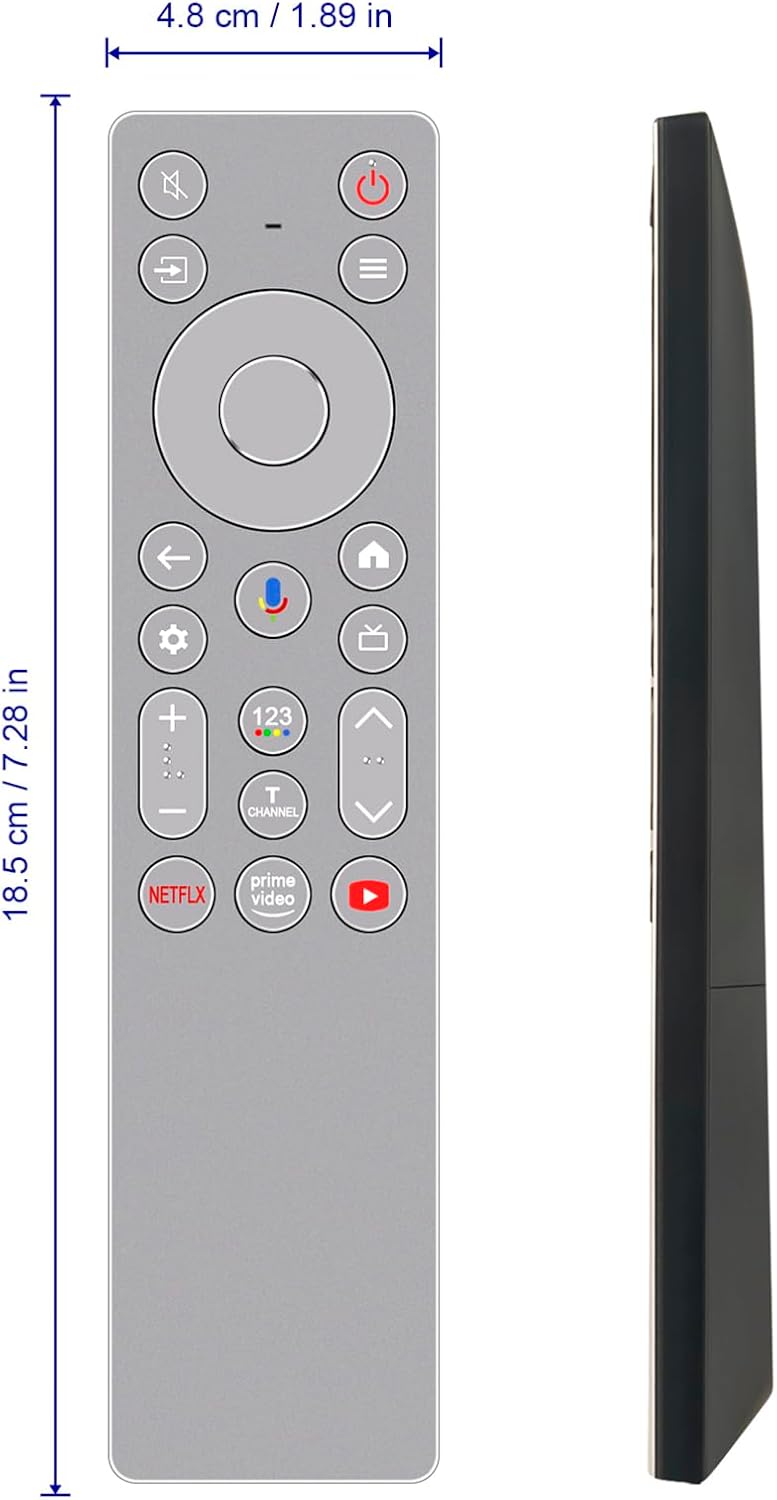
Image 7.1: Dimensions of the VINABTY RC933A FMB1 remote control.
8. Warranty and Support
For any questions, technical assistance, or warranty inquiries regarding your VINABTY RC933A FMB1 replacement voice remote control, please contact your retailer or the manufacturer directly. Please retain your proof of purchase for warranty validation.