
Introduction
This manual provides essential information for the safe and efficient operation of your Kol Air 34-Pint Dehumidifier. Please read these instructions thoroughly before use and retain for future reference. This dehumidifier is designed to reduce humidity in spaces up to 2,500 sq. ft., removing up to 34 pints (16L) of moisture daily.

Image: Kol Air 34-Pint Home Dehumidifier in a living room, illustrating its effective indoor humidity reduction.
Safety Information
Always follow basic safety precautions when using electrical appliances to reduce the risk of fire, electric shock, and injury.
- Ensure the unit is placed on a level, stable surface.
- Do not operate the unit with a damaged cord or plug.
- Keep the unit away from water and other liquids.
- Do not block air inlets or outlets.
- Unplug the unit before cleaning or maintenance.
- This appliance is not intended for use by persons (including children) with reduced physical, sensory or mental capabilities, or lack of experience and knowledge, unless they have been given supervision or instruction concerning use of the appliance by a person responsible for their safety.

Image: The child lock feature prevents accidental changes to settings, ensuring safety around children and pets.
Product Overview
Key Features:
- Powerful Dehumidification: Removes up to 34 pints (16L) of moisture daily, covering areas up to 2,500 sq. ft.
- Multiple Modes: Dry Mode (for laundry drying), Auto Mode (maintains 30%-80% humidity), Sleep Mode (ultra-quiet, screen off).
- 24-Hour Timer: Program operation schedules for convenience and energy saving.
- Continuous Drainage: Includes a drain hose for hands-free operation, eliminating the need for manual emptying.
- Auto Defrost: Operates effectively in low temperatures (down to 41°F / 5°C) by preventing ice buildup.
- Washable Filter: Captures dust and pollen, contributing to cleaner air.
- Child Lock: Prevents accidental changes to settings.
- Portability: Equipped with 360° swivel wheels and a hidden handle for easy movement.

Image: Front view of the Kol Air Dehumidifier, showcasing its digital display and modern design.

Image: Visual representation of the dehumidifier's key features, including full water protection, auto defrost, and multiple modes.
Setup
Unpacking:
Carefully remove the dehumidifier from its packaging. Check for any signs of damage. Remove all internal packing materials and accessories, including the drain hose and instruction manual.
Placement:
Place the dehumidifier on a firm, level surface in the area where humidity control is desired. Ensure there is at least 8 inches (20 cm) of space around the unit for proper airflow. The unit is equipped with 360° swivel wheels for easy relocation.

Image: Close-up of the 360° swivel wheels, highlighting the unit's mobility.
Drainage Options:
Your Kol Air dehumidifier offers two drainage methods:
- Manual Drainage: The unit collects water in its internal water tank. When the tank is full, the unit will automatically shut off and indicate that it needs to be emptied.
- Continuous Drainage: For extended operation without manual intervention, connect the included drain hose to the continuous drainage port on the back of the unit. Route the hose to a suitable drain (e.g., floor drain, sink) ensuring it is sloped downwards for gravity drainage.

Image: Illustration of both manual water tank drainage and continuous drainage with a hose.

Image: The dehumidifier displaying a 'Water Full' reminder, indicating the need to empty the tank.
Operating Instructions
The control panel is located on the top of the unit, featuring intuitive touch controls and a digital display.
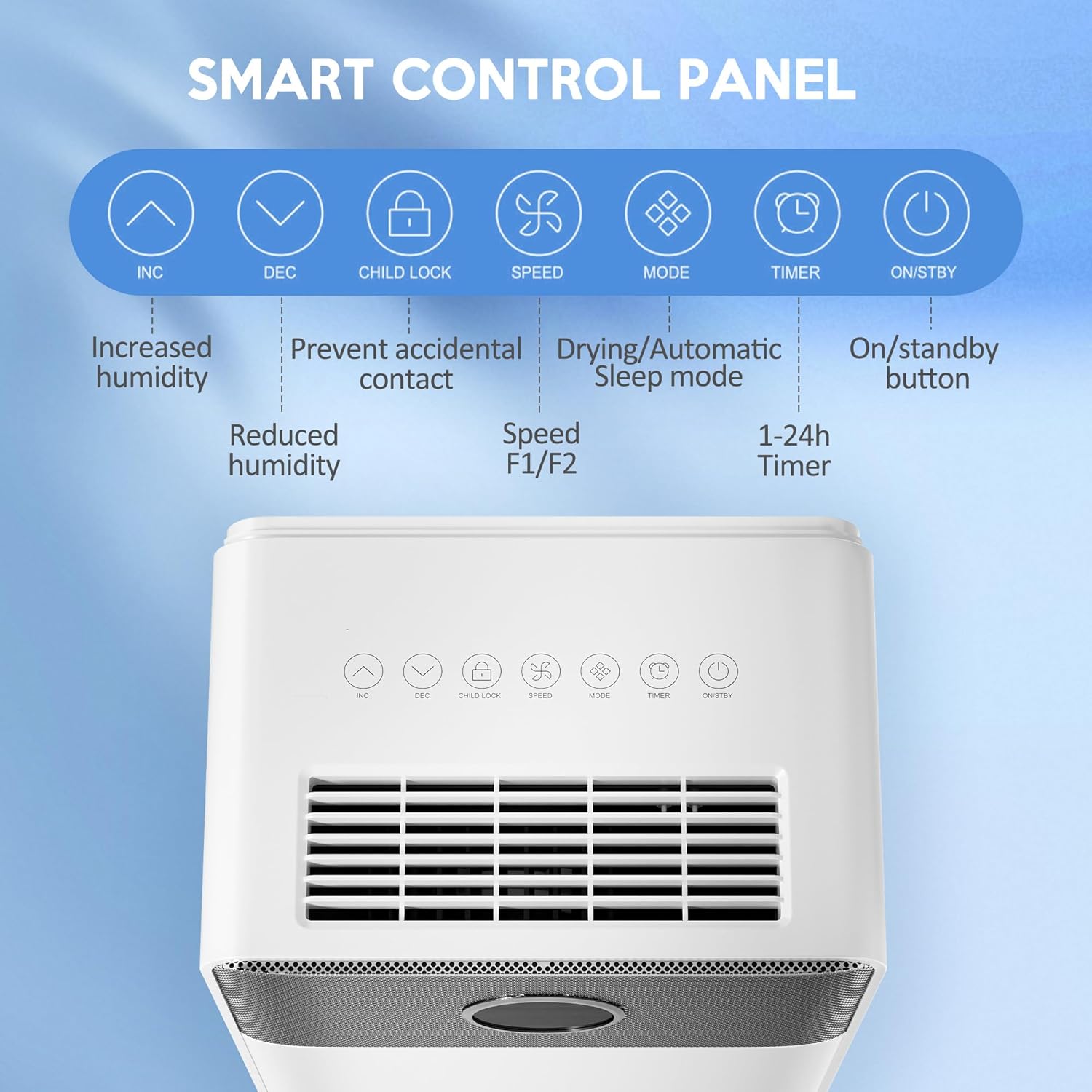
Image: Close-up of the smart control panel with clearly labeled buttons for various functions.
Control Panel Functions:
- ON/STANDBY Button: Powers the unit on or off.
- MODE Button: Cycles through available operating modes:
- Dry Mode: For rapid drying, such as laundry.
- Auto Mode: Automatically maintains humidity levels between 30% and 80%.
- Sleep Mode: Operates quietly (below 35dB) with the screen display turned off after 30 seconds for undisturbed rest.
- SPEED Button: Selects between High (F2) and Low (F1) fan speeds.
- INC/DEC Buttons (Up/Down Arrows): Adjusts the target humidity level (30%-80% in 5% increments) or sets the timer duration.
- TIMER Button: Activates and sets the 24-hour timer for scheduled operation.
- CHILD LOCK Button: Press and hold to activate/deactivate, preventing accidental changes to settings.

Image: Visual explanation of the Drying, Automatic, and Sleep modes in different environments.
Maintenance
Emptying the Water Tank:
When the water tank is full, the unit will stop operating and display a 'Water Full' indicator. Carefully pull out the water tank from the back of the unit, open the lid, and pour out the collected water. Replace the tank securely to resume operation.

Image: Step-by-step guide on how to pull out, open, pour, and reset the water tank.
Cleaning the Air Filter:
The washable filter helps maintain air quality and dehumidifier efficiency. It is recommended to clean the filter once a month or more frequently depending on usage and air quality. To clean, remove the filter from the back of the unit, wash it with mild soap and water, rinse thoroughly, and allow it to dry completely before reinserting.

Image: The washable filter being cleaned under running water, demonstrating easy maintenance.
Troubleshooting
If you encounter issues with your dehumidifier, please refer to the following common problems and solutions:
| Problem | Possible Cause | Solution |
|---|---|---|
| Unit does not turn on | No power; Power button not pressed; Water tank full or improperly installed. | Check power connection; Press ON/STANDBY button; Empty and re-install water tank correctly. |
| No dehumidification | Room temperature too low; Air filter clogged; Humidity setting too high. | Ensure room temperature is above 41°F (5°C); Clean air filter; Lower target humidity setting. |
| Unit is noisy | Unit not on a level surface; Air filter clogged. | Place on a level surface; Clean air filter. |
| Water leakage | Water tank improperly installed; Drain hose not securely connected or blocked. | Re-install water tank; Check drain hose connection and ensure it's not blocked. |
Specifications
- Model: B0FFM72FNH
- Brand: Kol Air
- Dehumidification Capacity: 34 Pints (16L) per day
- Coverage Area: Up to 2,500 Sq.Ft
- Product Dimensions: 7.5"D x 10.6"W x 18.8"H
- Item Weight: 23.6 pounds
- Humidity Control Range: 30% - 80%
- Special Features: Adjustable Humidity Control, Digital Display, Portable, Automatic Shutoff, Continuous Draining, Automatic Defrost, Sleep Mode, Quiet Operation, Timer, Child Lock, Washable Filter, Removable Tank, 360° Swivel Wheels.
- UPC: 614172912780
Warranty and Support
For warranty information, product support, or to purchase replacement parts, please contact Kol Air customer service. Refer to your purchase documentation for specific warranty terms and contact details.
For additional assistance, please visit the official Kol Air website or contact their support team directly.