
1. Product Overview
The Generic Electronic Cash Register, Model C50, is a versatile and durable system designed for various retail environments. It integrates essential functions such as sales processing, receipt printing, and reporting, making it suitable for supermarkets, convenience stores, bakeries, and other businesses.
This cash register features an 81-key waterproof keyboard, an LCD display, an 8-digit LED customer display, and a built-in thermal printer. It also includes a cash drawer and supports connections to external devices like barcode readers and kitchen printers.
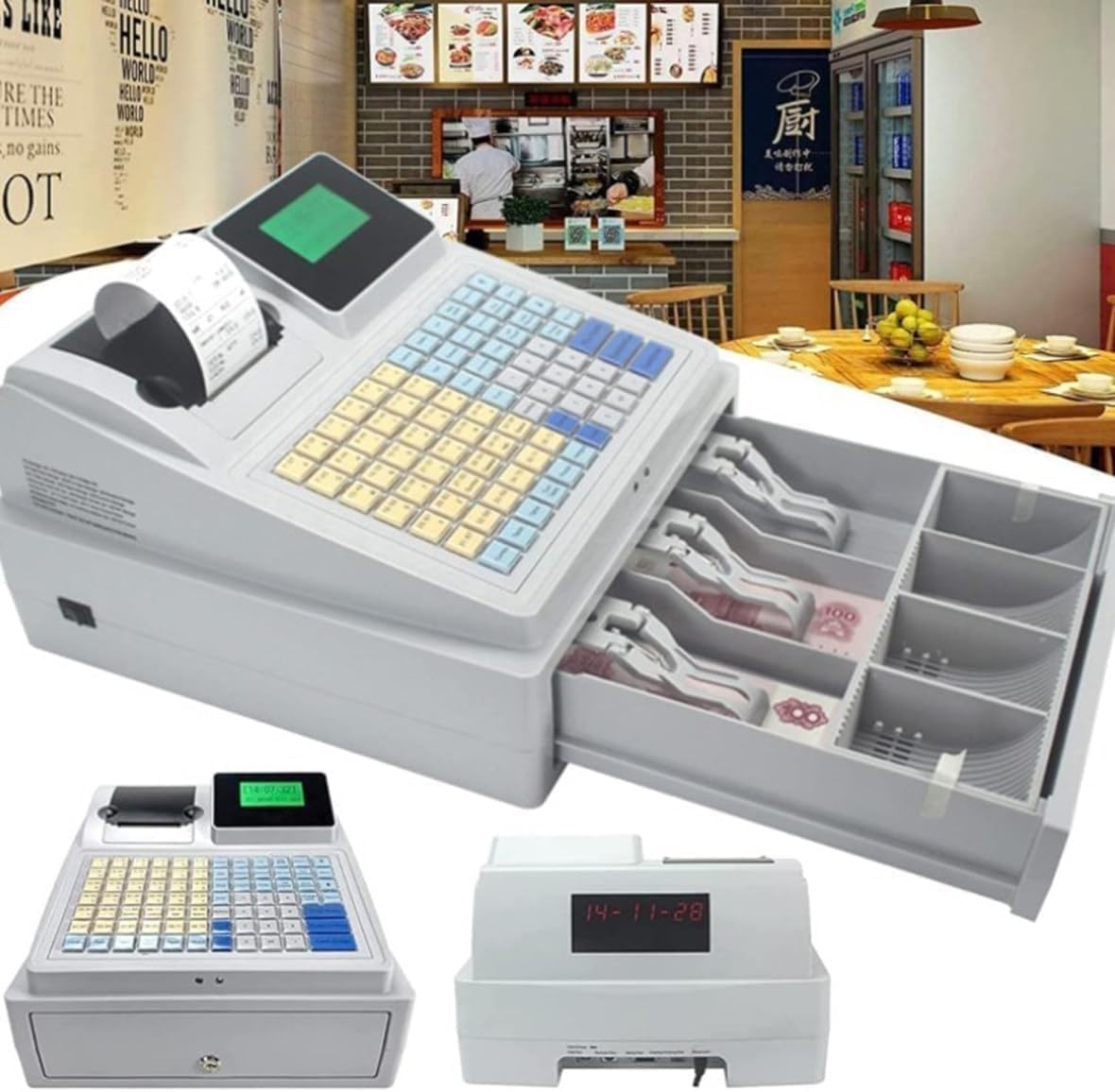
Figure 1.1: The Generic Electronic Cash Register, Model C50, in a typical retail environment, showcasing its integrated design with an open cash drawer.
2. Specifications
Detailed technical specifications for the Electronic Cash Register Model C50:
| Feature | Detail |
|---|---|
| Product Name | Cash Register Model C50 |
| Printing Speed | 90 mm/second |
| Power Supply | DC 8V, 3A |
| Display (Operator) | LCD screen (128 x 64mm) |
| Customer Display | 8-digit LED |
| Keyboard | 81 keys (Waterproof) |
| Net Weight | 2.94 kg |
| Gross Weight | 4.02 kg |
| Machine Size | 330 x 310 x 188 mm (Length x Width x Height) |
| Packaging Size | 385 x 365 x 260 mm |
| Material | High-quality ABS |

Figure 2.1: Product dimensions and key specifications.
3. Setup and Installation
3.1 Unpacking
- Carefully remove the cash register and all accessories from the packaging.
- Verify that all components listed in the packing list are present.
- Retain the packaging for future transport or storage.
3.2 Power Connection
- Connect the DC 8V, 3A power adapter to the power interface located at the rear of the cash register.
- Plug the power adapter into a standard electrical outlet.
3.3 Paper Roll Installation
- Open the thermal printer cover.
- Insert a thermal paper roll into the compartment, ensuring the paper feeds correctly.
- Close the printer cover securely.

Figure 3.1: Paper roll installation and cash drawer operation.
3.4 Connecting Peripherals
The cash register supports various external connections:
- USB Communication Interface: For connecting to a computer or other USB devices.
- Scanner Interface: For connecting a barcode reader to enable barcode recognition.
- KB Port: For keyboard input (if an external keyboard is used).
- External Print Port: For connecting an additional printer, such as a kitchen printer.
- Cash Drawer Port: For connecting the integrated cash drawer or an external one.

Figure 3.2: Rear panel connections for peripherals.
4. Operating Instructions
The cash register is equipped with an 81-key color-coded keyboard and an LCD display for intuitive operation.

Figure 4.1: Key components of the cash register.
4.1 Basic Sales Functions
- General Sales: Process standard transactions for items.
- Opening Sales: Initiate a new sales session.
- Member Sales: Process sales for registered members, potentially applying discounts or loyalty points.
4.2 Report Functions
The cash register provides comprehensive reporting capabilities to manage sales and inventory:
- Period Reports: Generate reports for specific timeframes.
- Daily Sales Volume: View total sales for a given day.
- Monthly Sales Volume: View total sales for a given month.
- PLU Summary: Summarize sales by Product Look-Up (PLU) codes.
- PLU Inventory: Track inventory levels for PLU items.
- Out of Stock Items: Identify items that are out of stock.
- Cash Reports: Reconcile cash transactions.
4.3 Banknote Verification
The cash register includes a built-in LED banknote recognition function to assist in verifying currency authenticity.

Figure 4.2: Color-coded keyboard and banknote verification feature.
4.4 Background Software
Utilize the background software for advanced management tasks:
- System Configuration: Customize settings and parameters.
- Data Backup: Securely back up sales and inventory data.
- Data Management: Organize and maintain product and transaction data.
5. Maintenance
The Electronic Cash Register Model C50 is designed for easy maintenance to ensure long-term performance.
- Cleaning: Regularly wipe the exterior with a soft, damp cloth. Avoid abrasive cleaners or solvents.
- Keyboard: The keyboard is waterproof, allowing for easy cleaning of spills. Ensure no liquids enter other parts of the machine.
- Printer Head: Periodically clean the thermal print head according to manufacturer guidelines to ensure clear receipt printing.
- Dust Removal: Keep the ventilation openings clear of dust to prevent overheating.
6. Troubleshooting
This section provides solutions to common issues you might encounter with your cash register.
6.1 Printer Not Printing
- Check Paper Roll: Ensure the paper roll is correctly installed and not empty.
- Printer Cover: Verify that the printer cover is securely closed.
- Power: Confirm the cash register is powered on.
6.2 Display Not Working
- Power: Ensure the cash register is receiving power.
- Brightness: Check if display brightness settings are too low (if applicable).
6.3 Cash Drawer Not Opening
- Key: Use the correct key to manually open the drawer if electronic release fails.
- Connection: Verify the cash drawer cable is securely connected to the cash register.
7. Application Environments
The Generic Electronic Cash Register Model C50 is suitable for a wide range of commercial applications, including but not limited to:
- Restaurants
- Supermarkets
- Wholesale Markets
- Convenience Stores
- Bakeries
- Clothing Stores
- Milk Tea Shops
Note: This product is not suitable for pharmacies.

Figure 7.1: Examples of suitable application environments.
8. Warranty and Support
For warranty information and technical support, please refer to the documentation provided with your purchase or contact your retailer. Keep your proof of purchase for warranty claims.


