
1. Product Overview
This document provides essential information for the installation and maintenance of the #US Replacement part for Dryer Terminal, designed for various Kenmore dryer models. This part is a critical component for ensuring proper electrical connection within your dryer appliance.
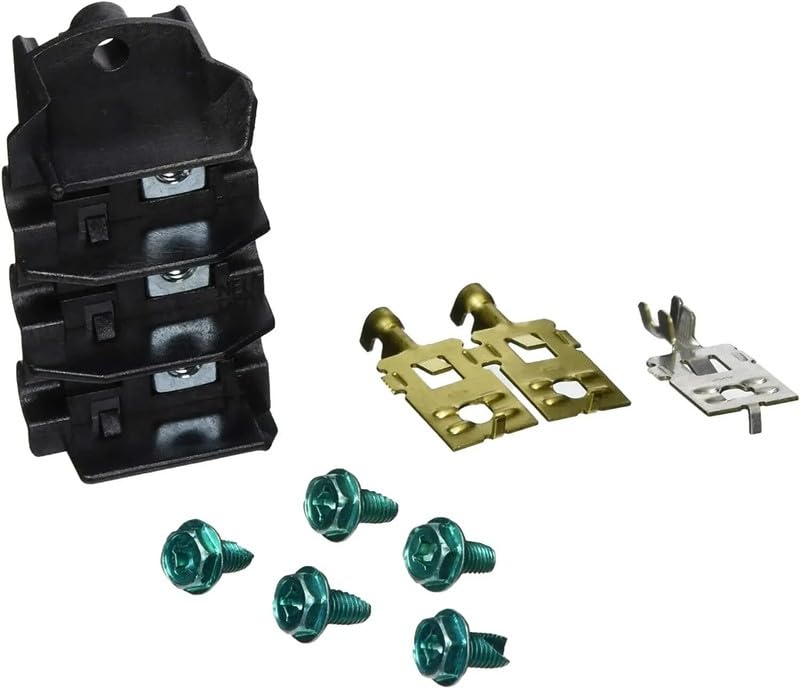
Figure 1.1: Dryer Terminal Replacement Part Kit. The kit includes a black multi-slot terminal block, two brass-colored spade connectors, one silver-colored spade connector, and five green hexagonal head screws.
2. Safety Information
WARNING: Before attempting any repair or replacement on an appliance, always disconnect the appliance from its power source. Failure to do so can result in serious injury or death from electrical shock.
- Ensure the dryer is unplugged from the wall outlet or the circuit breaker is turned off before beginning work.
- Wear appropriate personal protective equipment, such as gloves and safety glasses.
- If you are unsure about any step, consult a qualified appliance repair technician.
- Keep children and pets away from the work area.
3. Package Contents
The package includes one (1) set of the dryer terminal replacement part. Please verify all components are present upon opening the package.
- 1 x Dryer Terminal Block Assembly
- Associated Connectors and Screws (as depicted in Figure 1.1)
4. Compatibility
This replacement part is compatible with a range of Kenmore dryer models and specific part numbers. Always cross-reference your dryer's model number and the original part number with the list below to ensure compatibility before installation.
Compatible Models:
CDG4700LB0, CDEC750KW0, CDE7500KW0, CDG7300RW1, CDG7400QW0, CDE4500KW0, CDE7500KR0, CDE4700LB0, CDE7700LW0, CDEC450KW0, CDE4700LW0, CDE7500KB0, CDG7300RW0, CDE7700LR0, EIMED60JIW0, FASE7073NW2, 41784132000, 41798022000, 41788022000, 41791122311, 41784130000, 41791122310, 41784131000
Compatible Part Numbers:
137150200, AP4392868, 1512336, 7137150200, AH2361191, EA2361191, PS2361191
5. Setup and Installation
Installation of this dryer terminal replacement part typically involves accessing the rear panel of the dryer. Due to the electrical nature of this component, it is highly recommended that installation be performed by a qualified technician. If you choose to proceed yourself, follow these general steps:
- Disconnect Power: Unplug the dryer from the electrical outlet or turn off the corresponding circuit breaker at your home's main electrical panel. Verify power is off using a voltage tester.
- Access Terminal Block: Carefully move the dryer away from the wall to access the rear panel. Remove the screws securing the rear access panel and set it aside.
- Photograph Wiring: Before disconnecting any wires, take clear photographs of the existing wiring connections to the old terminal block. This will serve as a reference for reassembly.
- Disconnect Wires: Carefully disconnect all wires from the old terminal block. Note the position and color of each wire.
- Remove Old Terminal Block: Unscrew and remove the old terminal block from its mounting location.
- Install New Terminal Block: Position the new terminal block in place and secure it with the provided screws.
- Connect Wires: Refer to your photographs and reconnect all wires to the new terminal block in their correct positions. Ensure all connections are secure and tight.
- Reassemble: Replace the rear access panel and secure it with its screws. Carefully push the dryer back into its original position.
- Restore Power: Plug the dryer back into the electrical outlet or turn on the circuit breaker.
- Test Operation: Run a short cycle on the dryer to ensure it operates correctly and without issues.
Note: Specific steps may vary depending on your dryer model. Always refer to your dryer's service manual for detailed instructions.
6. Maintenance
The dryer terminal replacement part is designed for durability and typically requires no routine maintenance after proper installation. However, it is advisable to periodically inspect the wiring connections for any signs of loosening, corrosion, or damage during other dryer maintenance activities (e.g., cleaning the lint trap or vent hose). If any issues are observed, disconnect power immediately and address them or consult a professional.
7. Troubleshooting
If your dryer is not functioning correctly after replacing the terminal block, consider the following:
- No Power: Ensure the dryer is fully plugged in and the circuit breaker is on. Check if the outlet itself has power.
- Incorrect Wiring: Double-check all wire connections against your photographs or the dryer's wiring diagram. Loose or incorrect connections are common issues.
- Part Compatibility: Re-verify that the replacement part is indeed compatible with your specific dryer model and original part number.
- Other Component Failure: The issue might not be with the terminal block itself but another component of the dryer (e.g., thermal fuse, heating element, motor).
- Professional Assistance: If troubleshooting steps do not resolve the issue, it is recommended to contact a certified appliance repair technician.
8. Specifications
| Attribute | Detail |
|---|---|
| Part Number | dryerPart#503977 |
| Manufacturer | Generic |
| Item Package Quantity | 1 Set |
| ASIN | B0FFLZ27G7 |
| Date First Available | June 26, 2025 |
9. Warranty and Support
Specific warranty information for this replacement part is not provided in this manual. Please refer to the retailer or manufacturer's website for details regarding warranty coverage and return policies.
For technical support or further assistance, it is recommended to consult a qualified appliance repair professional or contact the seller directly through the platform where the purchase was made.