
1. Introduction
This manual provides essential instructions for the proper setup, operation, and maintenance of your LAXAFIT Q11 Digital Sports Smartwatch. Designed for fitness tracking and daily wear, this smartwatch features a rugged design, real-time health monitoring, and smart notifications. Please read this manual thoroughly before using your device to ensure optimal performance and longevity.
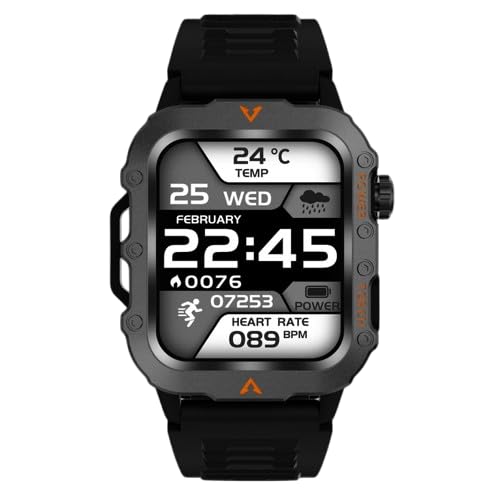
Figure 1.1: Front view of the LAXAFIT Q11 Digital Sports Smartwatch, displaying time, date, temperature, steps, and heart rate.
2. Setup
2.1. Charging the Smartwatch
Before initial use, fully charge your LAXAFIT Q11 smartwatch. The device requires approximately 2 hours for a full charge, providing an average battery life of 15 days depending on usage.
- Connect the charging cable to the charging port on the back of the smartwatch.
- Plug the USB end of the cable into a standard USB power adapter (not included) or a computer's USB port.
- The watch display will indicate charging status.
2.2. Powering On/Off
- Power On: Press and hold the side button until the screen illuminates.
- Power Off: Navigate to the 'Settings' menu on the smartwatch, then select 'Power Off' and confirm. Alternatively, press and hold the side button for several seconds and select 'Power Off' if prompted.
2.3. Pairing with Your Smartphone
To access all smart features, pair your Q11 smartwatch with a compatible smartphone via Bluetooth.
- Ensure your smartphone's Bluetooth is enabled.
- Download and install the official LAXAFIT companion application from your smartphone's app store.
- Open the application and follow the on-screen instructions to create an account or log in.
- In the app, navigate to 'Add Device' or 'Pair Smartwatch'.
- Select 'Q11' from the list of available devices.
- Confirm the pairing request on both your smartphone and the smartwatch.
3. Operating Instructions
3.1. Basic Navigation
The Q11 smartwatch features a touchscreen interface for navigation. Swipe left, right, up, or down to access different functions and menus. Tap to select an option.
3.2. Time and Date Display
The smartwatch displays time in a 24-hour format, along with the current date. This information is typically visible on the main watch face.
3.3. Heart Rate Monitoring
The Q11 provides continuous heart rate tracking with real-time BPM (beats per minute) display. To view your heart rate:
- Swipe to the heart rate interface on your smartwatch.
- Ensure the watch is worn snugly on your wrist for accurate readings.
3.4. Temperature Sensing
The built-in temperature sensor displays the ambient temperature in Celsius.
- Navigate to the temperature display screen on your smartwatch.
3.5. Activity Tracking
The integrated pedometer tracks your daily steps, helping you monitor your activity levels and progress towards fitness goals.
- Swipe to the activity tracking interface to view your step count and other metrics.
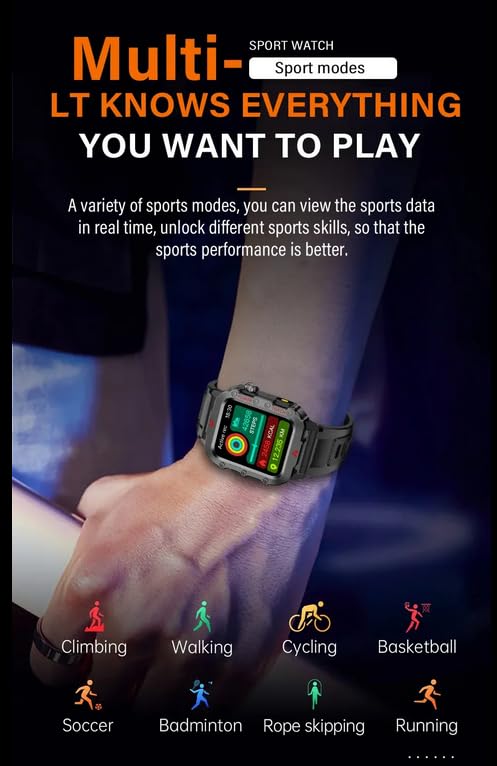
Figure 3.1: The smartwatch interface showing multiple sport modes, including climbing, walking, cycling, basketball, soccer, badminton, rope skipping, and running.
3.6. Sleep Monitoring
The smartwatch records your sleep patterns, distinguishing between deep and light sleep stages.
- Wear the smartwatch while sleeping.
- Access the sleep monitoring data through the smartwatch interface or the companion app.
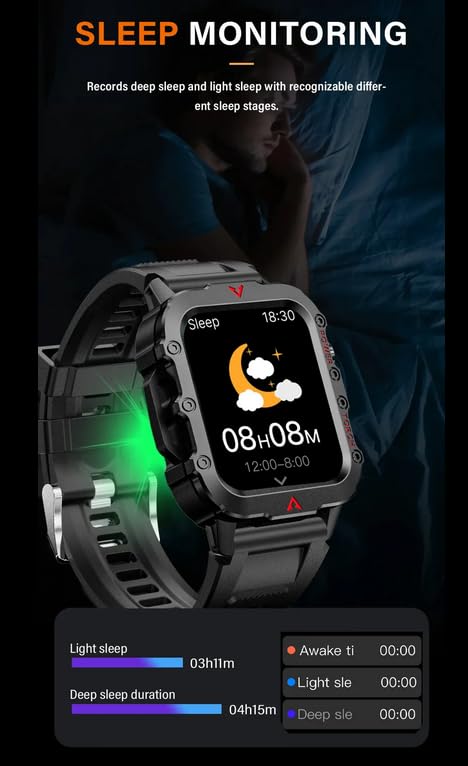
Figure 3.2: The smartwatch screen showing sleep duration, including light sleep and deep sleep, along with awake time.
3.7. Voice Calling
The LAXAFIT Q11 supports voice calling functionality when paired with your smartphone. Specific instructions for initiating and receiving calls will be available within the companion application or through the smartwatch's phone interface.
3.8. Special Features
The smartwatch includes a Moon Phase Display, accessible through its various watch faces or dedicated interface.
4. Maintenance
4.1. Cleaning
- Wipe the smartwatch and strap regularly with a soft, damp cloth.
- Avoid using harsh chemicals or abrasive materials, as these can damage the device.
- Ensure the charging contacts are clean and dry before charging.
4.2. Battery Care
- Charge the device using only the provided charging cable.
- Avoid exposing the smartwatch to extreme temperatures, which can affect battery life.
- Do not attempt to replace the internal battery yourself. Contact support for battery-related issues.
4.3. Durability
The Q11 smartwatch features a rugged design with a protective casing and robust strap. While designed for active lifestyles, avoid unnecessary impacts or submersion beyond its rated water resistance (if applicable, refer to specifications for details).
5. Troubleshooting
If you encounter issues with your LAXAFIT Q11 smartwatch, refer to the following common solutions:
- Device not powering on: Ensure the smartwatch is fully charged. Connect it to the charger for at least 30 minutes.
- Unable to pair with smartphone: Check that Bluetooth is enabled on your phone and the smartwatch. Ensure the companion app is installed and updated. Try restarting both devices.
- Inaccurate heart rate/temperature readings: Ensure the watch is worn snugly on your wrist, not too loose or too tight. Clean the sensor on the back of the watch.
- Display not responding: Try restarting the smartwatch. If the issue persists, ensure the battery is charged.
- App connectivity issues: Ensure the companion app has all necessary permissions on your smartphone. Check for app updates.
For persistent issues not covered here, please contact customer support.
6. Specifications
| Feature | Detail |
|---|---|
| Brand | Generic (FereFit) |
| Model | Q11 |
| Display Size | 1.8 Inches (Visible screen diagonal: 2" / 5 cm) |
| Display Type | Digital |
| Operating System | Proprietary OS |
| Memory Storage Capacity | 512 MB |
| Connectivity Technology | Bluetooth |
| Battery Capacity | 200 Amp Hours (Lithium Ion) |
| Battery Average Life | 15 Days |
| Charging Time | 2 Hours |
| Compatible Devices | Smartphone |
| Special Features | Moon Phase Display, Heart Rate Monitor, Temperature Sensor, Pedometer, Voice Calling |
| Item Weight | 65 g |
| Package Dimensions | 15 x 8.5 x 4.5 cm |
| Country of Origin | China |
7. Warranty and Support
7.1. Warranty Information
The LAXAFIT Q11 Digital Sports Smartwatch comes with a 1 Year Warranty from the date of purchase. This warranty covers manufacturing defects under normal use. Please retain your proof of purchase for warranty claims.
7.2. Customer Support
For technical assistance, warranty claims, or any other inquiries, please contact the seller or manufacturer. You may reach out to the importer/packer at y2kshop2021@gmail.com.
8. Important Notes
- This device is not a medical instrument. Health data provided is for reference only and should not be used for medical diagnosis or treatment.
- Keep the device away from strong magnetic fields.
- Do not disassemble or modify the device.