
Gator Frameworks GFW-KEY3TIER-A
Gator Frameworks Keyboard Stands Series A-Frame Style with 3-Tiers and Adjustable Arm Width, Height, & Depth (GFW-KEY3TIER-A)
User Instruction Manual
Introduction
The Gator Frameworks 3-Tier A-Frame Keyboard Stand (Model: GFW-KEY3TIER-A) is designed to provide a stable, versatile, and reliable platform for musicians' keyboard setups. Constructed with a heavy-duty, road-tested steel frame, this stand is built to endure the demands of performance and travel, ensuring maximum stability for up to three instruments. Its ergonomic design allows for comprehensive customization of arm angle, height, and depth, facilitating optimal access and visibility to controls in any setting. Safety pins are integrated to securely lock the arms, preventing accidental slippage, while non-slip rubber feet maintain the stand's position during use. This stand comfortably accommodates three keyboards, offering ample space for a full rig, with adjustable width and arm depth to fit most 49 to 88-key keyboards.
Key features include:
- Heavy-Duty 3-Tier Steel Construction: Supports up to 210 lb (95.25 kg) total, ideal for multiple full-sized keyboards.
- Fully Adjustable & Ergonomic Design: Customize height, width (21.2” – 33.7”), angle, and arm depth (12.5” – 21”) for comfort and accessibility.
- Maximum Stability & Safety: Features locking safety pins and non-slip rubber feet for secure placement.
- Spacious & Versatile Setup: Stands up to 58" (1.47 m) tall, organizing three keyboards efficiently.
Setup Instructions
Follow these steps to properly set up your Gator Frameworks 3-Tier A-Frame Keyboard Stand.
1. Unpacking and Initial Assembly
Carefully remove all components from the packaging. Ensure all parts are present before proceeding. The stand arrives largely pre-assembled, requiring only minor adjustments for use.
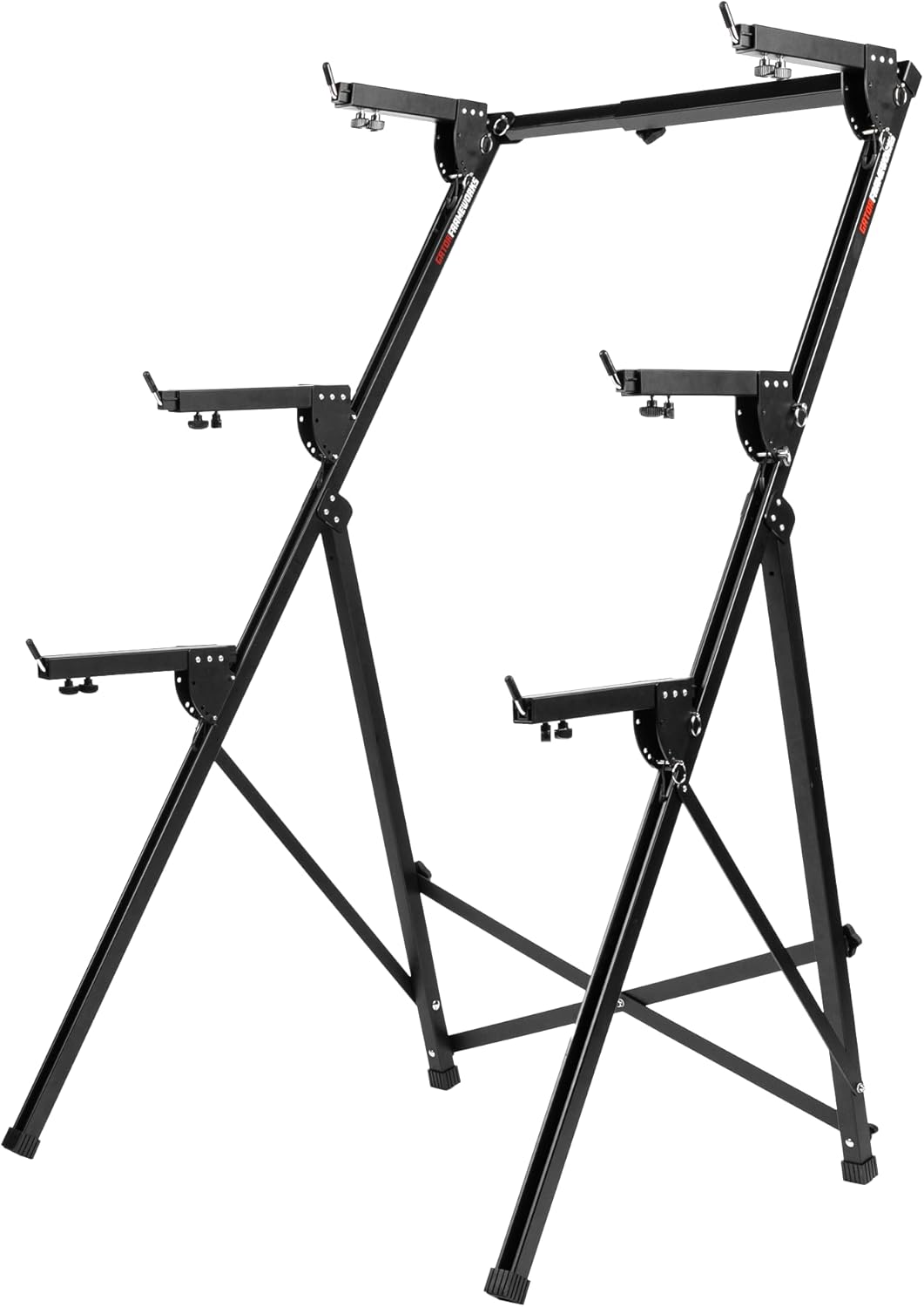
Figure 1: The GFW-KEY3TIER-A stand in its initial, unassembled configuration, showing the main frame and adjustable arms.
2. Adjusting the Base and Height
Unfold the A-frame base to your desired width. The stand features multiple height adjustment points along its main vertical supports. To adjust the height, locate the adjustment pins and corresponding holes. Pull the pin, slide the frame to the desired height, and ensure the pin securely locks into place. The stand can reach a towering 57.5 inches (146.1 cm) to comfortably accommodate three keyboards.
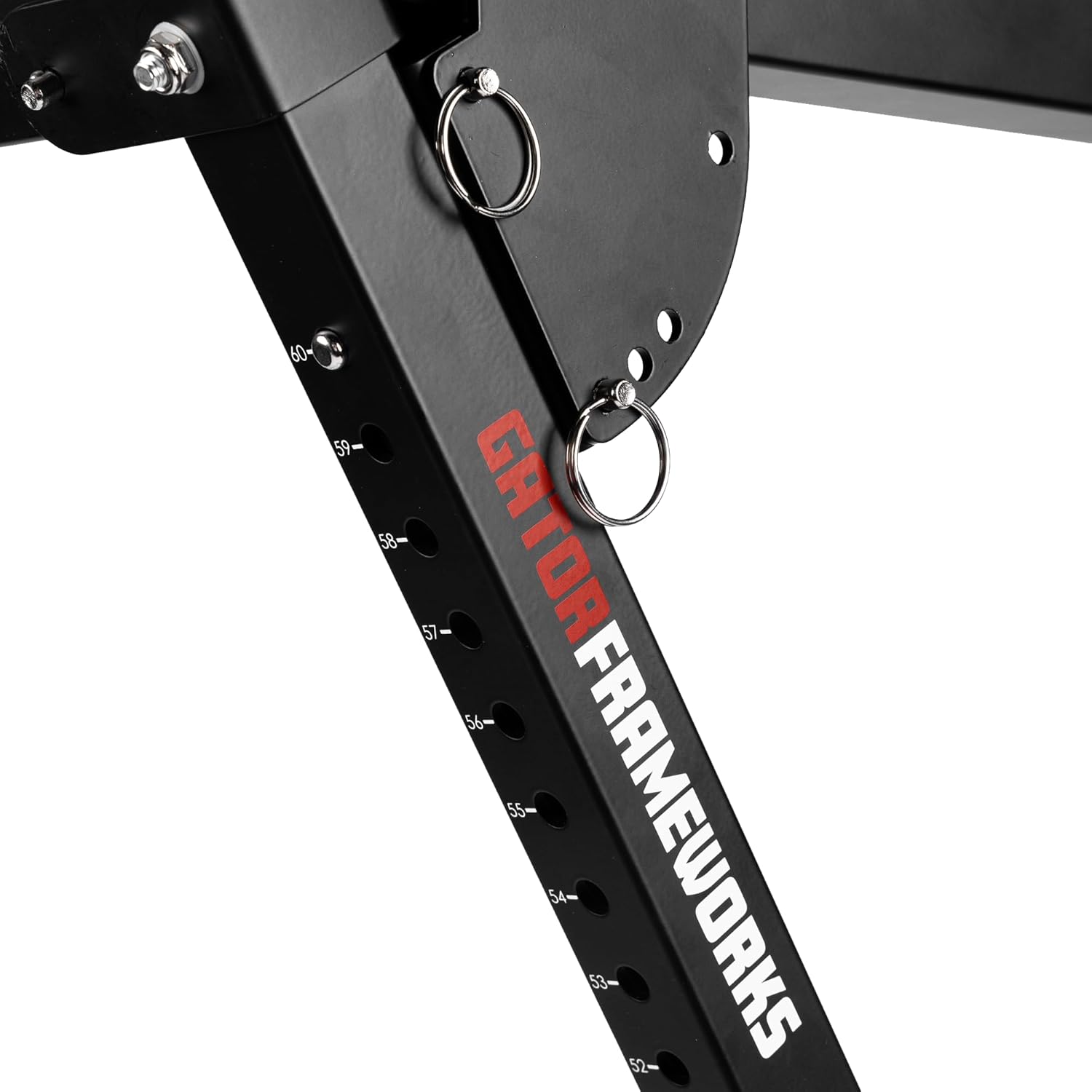
Figure 2: Detailed view of the height adjustment mechanism, showing numbered markings and safety pins for secure locking.
3. Attaching and Adjusting Keyboard Arms
The stand comes with three tiers of adjustable arms. Each arm can be adjusted for angle, depth, and width. To adjust the arm depth, loosen the knob located underneath the arm, slide the arm to the desired depth (from 12.5” to 21” / 31.8 – 53.3 cm), and tighten the knob to secure it. For width adjustment, the arms can be moved along the horizontal bars to fit keyboards from 21.2” to 33.7” (53.8 – 85.6 cm) wide. Ensure all safety pins are engaged after making adjustments to prevent accidental movement.

Figure 3: A user demonstrating the adjustment of the arm depth, highlighting the knob mechanism.
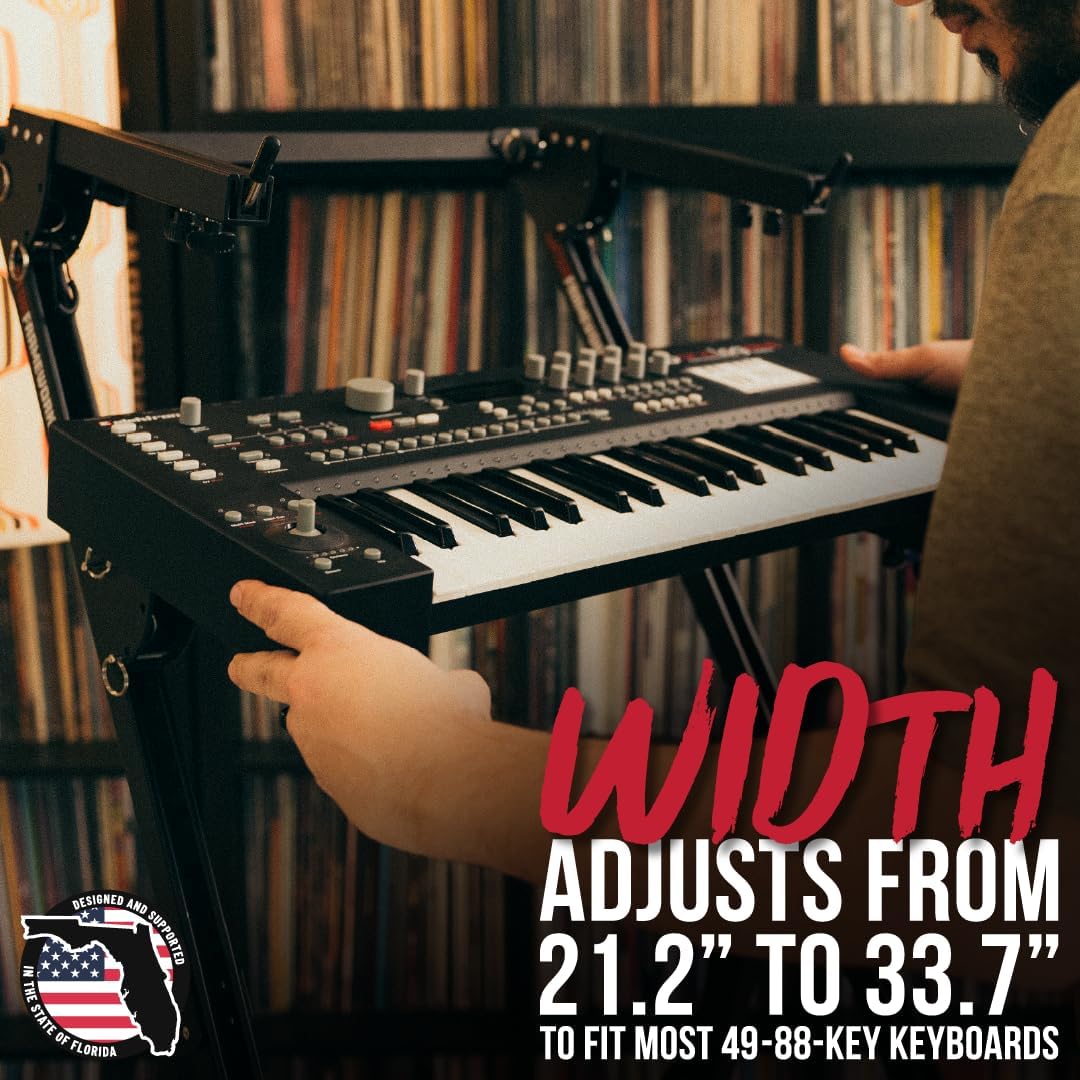
Figure 4: A user adjusting the width of the stand's arms to accommodate a keyboard, demonstrating the flexibility of the design.
Each arm features a safety pin mechanism. Always ensure these pins are fully inserted and locked after adjusting the arm position to prevent any slippage during use.

Figure 5: Close-up view of the safety pins, which are crucial for securely locking the adjustable arms in place.
4. Ensuring Stability
The stand is equipped with non-slip rubber feet on all floor contact points. Before placing any instruments, ensure the stand is on a flat, stable surface and that all rubber feet are making full contact with the floor to prevent movement during performances or studio sessions.

Figure 6: Detail of the durable non-slip rubber feet, designed to keep the stand firmly in position on various surfaces.
Operating Instructions
Once assembled, the Gator Frameworks 3-Tier A-Frame Keyboard Stand is ready for use. This section details how to effectively utilize its features.
1. Placing Keyboards
Carefully place your keyboards onto the adjustable arms. Distribute the weight evenly across the arms. The stand is designed to support up to 210 lbs (95.25 kg) total, with each tier capable of holding a significant portion of this weight. Ensure the keyboards are centered and stable on the arms before use.
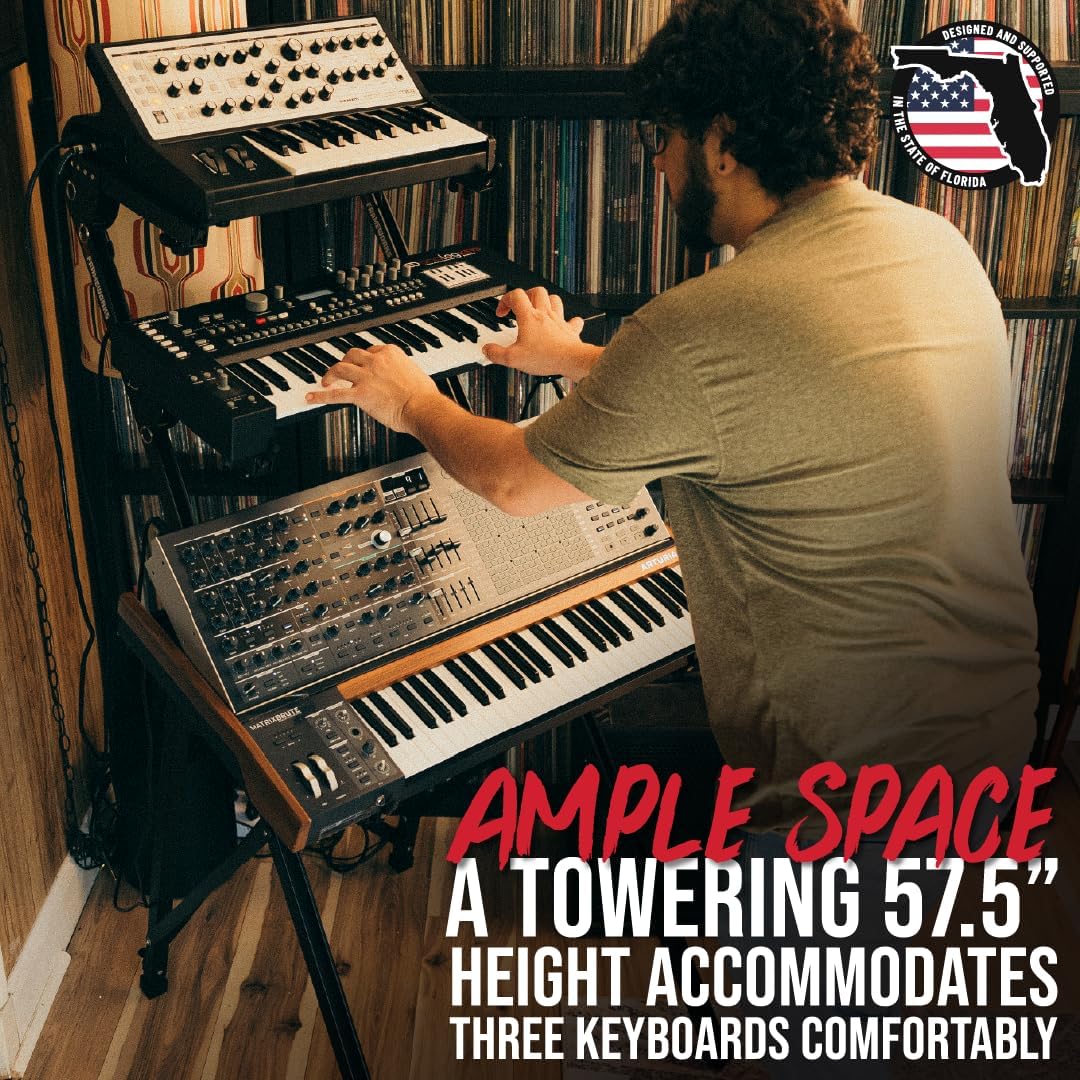
Figure 7: The fully assembled stand comfortably accommodating three keyboards, showcasing its ample space and multi-tier design.
2. Ergonomic Adjustments
The stand's arms are ergonomically adjustable to provide optimal angle and height for each keyboard. This allows for seamless access and visibility to controls. Experiment with different angles and heights to find the most comfortable and efficient setup for your playing style and environment.

Figure 8: A musician utilizing the fully adjustable arms to comfortably play a keyboard, demonstrating the ergonomic benefits.
Remember to always re-engage the safety pins after any adjustment to ensure the arms remain securely in their set position.
Maintenance
Proper maintenance will extend the life and performance of your Gator Frameworks Keyboard Stand.
- Cleaning: Wipe down the stand regularly with a soft, damp cloth to remove dust and grime. Avoid abrasive cleaners or solvents that could damage the finish.
- Inspection: Periodically inspect all bolts, knobs, and safety pins to ensure they are tight and functioning correctly. Check the rubber feet for wear and tear and replace if necessary to maintain stability.
- Lubrication: If any moving parts (e.g., adjustment slides) become stiff, apply a small amount of silicone-based lubricant to ensure smooth operation.
- Storage: When not in use, fold the stand for compact storage. Store in a dry environment to prevent rust or corrosion.
Troubleshooting
This section addresses common issues you might encounter with your keyboard stand.
- Issue: Stand feels unstable or wobbly.
Solution: Ensure the stand is placed on a flat, level surface. Check that all four rubber feet are making full contact with the floor. Verify that all adjustment pins and knobs are securely tightened. If using multiple keyboards, ensure the weight is distributed as evenly as possible.
- Issue: Keyboard arms slip or do not hold position.
Solution: Confirm that the safety pins for each arm are fully engaged and locked into their respective holes. Tighten all adjustment knobs firmly after setting the desired arm depth and angle. Ensure the weight on the arms does not exceed the recommended capacity for that specific tier.
- Issue: Difficulty adjusting height or arm positions.
Solution: Check for any obstructions or debris in the adjustment mechanisms. If parts feel stiff, apply a small amount of silicone lubricant to the sliding components. Ensure adjustment pins are fully disengaged before attempting to move parts.
- Issue: Stand appears damaged after transport.
Solution: While the stand is built for durability, inspect for any bends or cracks in the steel frame. If significant damage is present that compromises stability or safety, discontinue use and contact Gator Frameworks customer support.
Specifications
| Feature | Detail |
|---|---|
| Model Number | GFW-KEY3TIER-A |
| Brand | Gator Frameworks |
| Construction Material | Heavy-Duty Steel |
| Total Weight Capacity | Up to 210 lbs (95.25 kg) |
| Maximum Height | 57.5 inches (146.1 cm) |
| Adjustable Width Range | 21.2 inches – 33.7 inches (53.8 – 85.6 cm) |
| Adjustable Arm Depth Range | 12.5 inches – 21 inches (31.8 – 53.3 cm) |
| Number of Tiers | 3 |
| Item Weight | 29.9 pounds (13.56 kg) |
| Package Dimensions | 69 x 10 x 10 inches (175.3 x 25.4 x 25.4 cm) |
Warranty and Support
The Gator Frameworks 3-Tier A-Frame Keyboard Stand (GFW-KEY3TIER-A) includes a Limited Lifetime Warranty, ensuring quality craftsmanship and peace of mind. This warranty covers defects in materials and workmanship under normal use.
For warranty claims, technical support, or any inquiries regarding your product, please contact Gator Frameworks directly. You can find their official contact information and support resources on the Gator Frameworks Store on Amazon or their official website.
When contacting support, please have your product model number (GFW-KEY3TIER-A) and proof of purchase readily available.
Ask a question about this manual
Ask about setup, troubleshooting, compatibility, parts, safety, or missing instructions. Manuals+ will review the question and use this page’s manual context to help answer it.