
1. Introduction
This manual provides detailed instructions for the safe and efficient operation of your KIANO Vision 2 Full HD Projector. Please read this manual thoroughly before using the device and retain it for future reference. The KIANO Vision 2 is a portable Full HD projector designed for home cinema and outdoor movie experiences, featuring native 1080p resolution, Android 11, and versatile connectivity options.
2. Safety Information
Observe the following safety precautions to prevent damage to the projector and ensure user safety:
- Do not look directly into the projector lens when the lamp is on.
- Ensure proper ventilation to prevent overheating. Do not block ventilation openings.
- Use only the provided power adapter.
- Keep the projector away from water, moisture, and extreme temperatures.
- Do not attempt to disassemble or repair the projector yourself. Contact qualified service personnel.
- Keep out of reach of children.
3. Package Contents
Verify that all items are present in the package:
- KIANO Vision 2 Projector
- External Battery (if included with your model)
- Carrying Bag
- Remote Control
- Power Cable
- Battery Connection Cable
- Cleaning Cloth
- User Manual
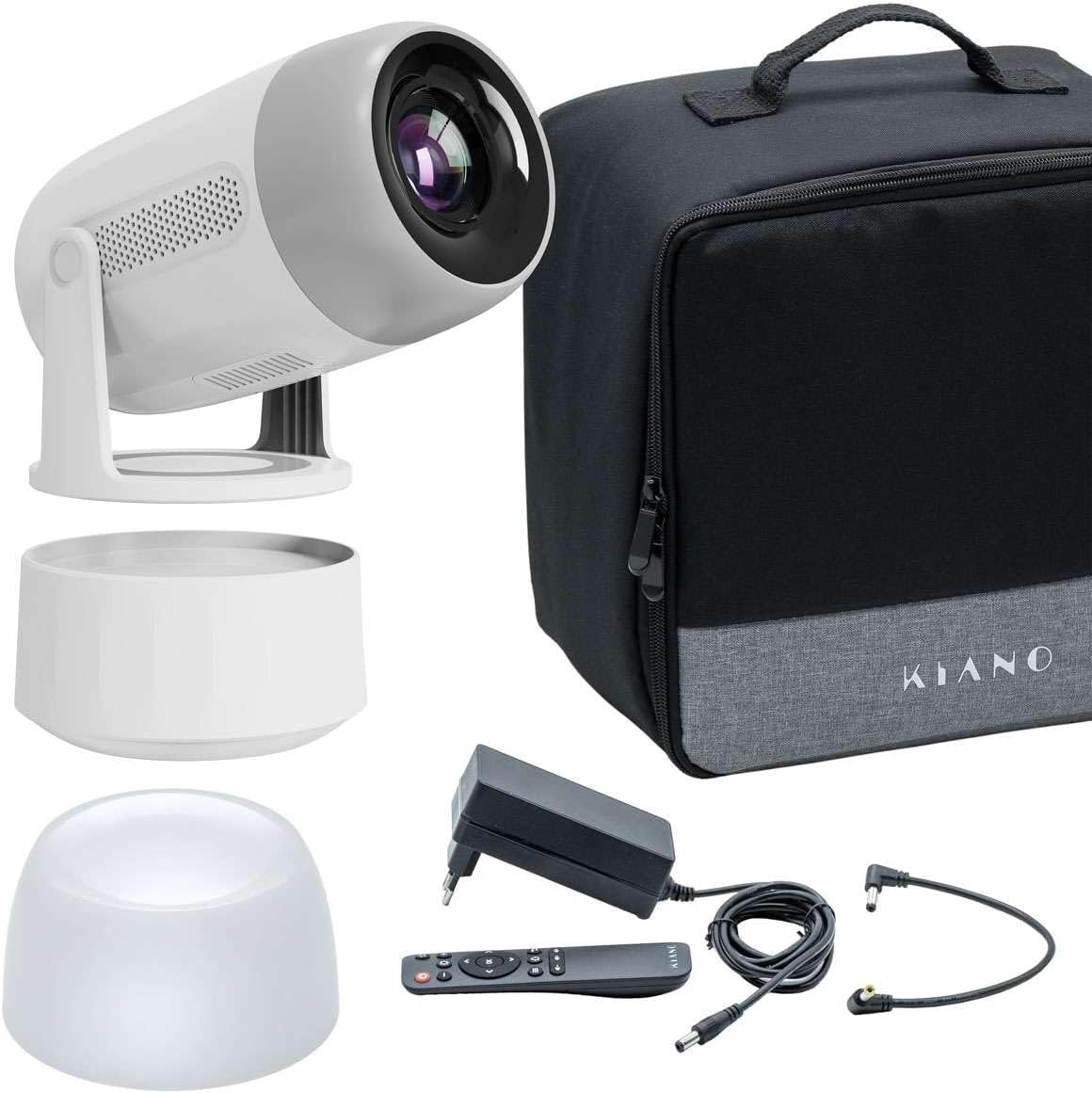
Image: KIANO Vision 2 Projector, external battery, carrying bag, remote control, and cables.
4. Product Overview
Familiarize yourself with the projector's components and ports.
4.1 Front View

Image: Front view of the KIANO Vision 2 Projector, highlighting the projection lens and front speaker grilles.
4.2 Rear View and Ports

Image: Rear view of the KIANO Vision 2 Projector, displaying the USB port, HDMI input, 3.5mm audio output, and DC power input.
- USB Port: For connecting USB storage devices.
- HDMI Input: For connecting external video sources (e.g., laptop, game console).
- 3.5mm Audio Out: For connecting external speakers or headphones.
- DC IN: Power input for the projector.
- Power Button: To turn the projector on/off.
5. Setup
5.1 Powering On/Off
- Connect the power cable to the DC IN port on the projector and then to a power outlet. If using the external battery, connect it between the projector and the power source, or directly to the projector if charged.
- Press and hold the Power button on the projector or the remote control to turn it on.
- To turn off, press and hold the Power button again until the projector shuts down.
5.2 Placement
Place the projector on a stable, flat surface. The KIANO Vision 2 features a 180° rotatable stand, allowing for flexible projection angles, including ceiling projection.

Image: Diagram showing the KIANO Vision 2 Projector's 180-degree rotation capability and automatic keystone correction feature.
5.3 Focus and Keystone Correction
- Focus: Adjust the manual focus wheel (usually located near the lens) until the projected image is clear.
- Keystone Correction: The projector supports automatic keystone correction. If manual adjustment is needed, navigate to the settings menu using the remote control to correct image distortion.
6. Operating
6.1 Connecting Devices
- HDMI: Connect an HDMI cable from your source device (e.g., laptop, game console) to the HDMI input port on the projector. Select the HDMI input source from the projector's menu.
- USB: Insert a USB flash drive into the USB port to play media files directly.
6.2 Wireless Connectivity
- Wi-Fi: Navigate to the Wi-Fi settings in the Android 11 operating system. Select your network and enter the password to connect to the internet.
- Bluetooth: Pair Bluetooth devices like external speakers or headphones via the Bluetooth settings menu.
- Screen Mirroring (AirPlay/Miracast/DLNA): Use the built-in casting features to mirror content from compatible smartphones, tablets, or computers. Access these options from the main menu or dedicated app.
6.3 Android OS Navigation
The KIANO Vision 2 runs on Android 11. Use the remote control to navigate the interface, launch applications, and adjust settings. You can download additional apps from the pre-installed app store.
6.4 Audio Output
The projector has integrated 2 x 3.2W stereo speakers. For enhanced audio, connect external speakers via the 3.5mm audio output or Bluetooth.

Image: A person relaxing on a couch, watching a movie projected onto a wall by the KIANO Vision 2 Projector in a home setting.
7. Maintenance
7.1 Cleaning
- Lens: Use the provided cleaning cloth or a soft, lint-free cloth specifically designed for optical lenses. Do not use abrasive cleaners.
- Exterior: Wipe the projector's exterior with a soft, dry cloth. For stubborn marks, slightly dampen the cloth with water.
- Ventilation: Periodically check and clean the ventilation openings to ensure unobstructed airflow.
7.2 Storage
When not in use, store the projector in its carrying bag in a cool, dry place, away from direct sunlight and extreme temperatures.

Image: The KIANO Vision 2 Projector, its carrying bag, and the external battery unit placed on a wooden table, ready for storage or transport.
8. Troubleshooting
| Problem | Possible Cause | Solution |
|---|---|---|
| No image projected | Power not connected, incorrect input source, lens cap on. | Check power connection, select correct input source (HDMI, USB), remove lens cap. |
| Image is blurry | Focus not adjusted, projector too far/close. | Adjust the manual focus wheel. Ensure projector is within optimal projection distance. |
| Image is distorted (trapezoid shape) | Projector not perpendicular to screen. | Use automatic or manual keystone correction in the settings menu. |
| No sound | Volume too low, external audio device not connected/selected, source device mute. | Increase projector volume. Check external audio connections. Ensure source device is not muted. |
| Remote control not working | Batteries low/dead, obstruction, not pointed at IR receiver. | Replace batteries. Ensure no obstructions. Point remote directly at the projector's IR receiver. |
9. Specifications
| Feature | Specification |
|---|---|
| Brand | Kiano |
| Model | Vision 2 |
| Native Resolution | 1920 x 1080 Full HD |
| Brightness | 270 ANSI Lumens |
| Projection Size | 40-150 inches |
| Operating System | Android 11 |
| Wireless Connectivity | 2.4/5 GHz Wi-Fi, Bluetooth 5.2 |
| Casting Support | AirPlay, Miracast, DLNA |
| Audio | 2 x 3.2W Stereo Speakers |
| Ports | HDMI, USB, 3.5mm Audio Out, DC IN |
| Special Features | Automatic/Manual Keystone Correction, Manual Focus, 180° Rotatable Stand, Integrated Speaker |
| Compatible Devices | Smartphone, Laptop, Game Console, Tablet, External Speaker |
10. Warranty and Support
For warranty information and technical support, please refer to the warranty card included with your product or visit the official Kiano website. If you encounter any issues not covered in this manual, please contact Kiano customer service for assistance.