
1. Introduction
Welcome to the MUMEOMU M7 AI Voice Recorder user manual. This device is designed to streamline your recording, transcription, summarization, and translation tasks using advanced AI technology. It offers high-quality audio capture, multi-language support, and various intelligent features to enhance productivity in meetings, lectures, interviews, and daily life.
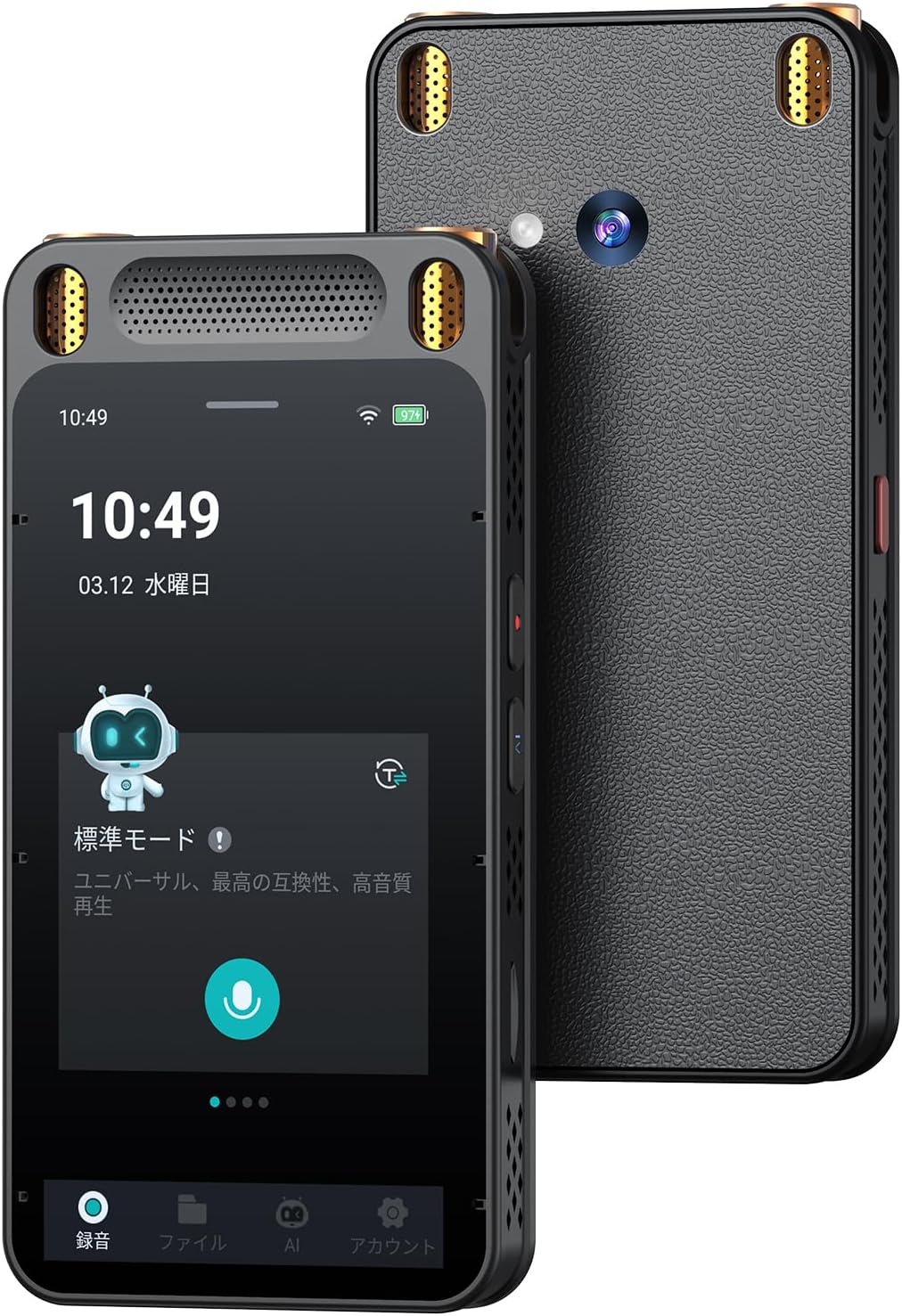
Figure 1: MUMEOMU M7 AI Voice Recorder
2. Key Features
- Advanced AI Integration: Utilizes cutting-edge AI for automatic transcription, summarization, and translation, significantly reducing manual effort.
- High-Fidelity Recording: Equipped with 8 microphones and world-class noise reduction technology, capturing clear 360-degree audio up to 15 meters, even in noisy environments.
- Real-time Transcription: Converts spoken words into text in real-time, supporting 134 languages with over 98% accuracy for Japanese. Transcribed data can be easily shared via Wi-Fi.
- AI Summarization: Automatically generates summaries from recorded text content with one touch, powered by OpenAI integration, streamlining meeting minute creation.
- Versatile Translation: Functions as a high-performance translator, supporting 15 languages offline and 134 languages online for voice translation. Also features OCR camera translation for text from books, menus, and signs, supporting 12 languages offline and 71 languages online.
- Multiple Recording Modes: Offers Standard, Meeting, Interview, and Speech modes, optimized for various scenarios.
- Integrated Camera: An 8-megapixel camera allows 4K-level high-quality photo capture during recording, useful for documenting events.
- Portable Design: Compact and lightweight (123×60×14mm, 121g) with a 5-inch touchscreen for easy operation and portability.
- Long Battery Life: Rechargeable 2000mAh lithium-ion battery provides 7-8 hours of continuous recording (display off) or over 2.5 hours with display and AI functions.
- Secure Data Handling: Prioritizes user data security and privacy with encrypted data transfer and protection on AWS cloud; data is not used for AI model training without explicit user permission.
3. Setup
3.1. Initial Power On and Language Selection
- Press and hold the power button to turn on the device.
- Upon first use, you will be prompted to select an online language. Scroll through the options and tap to select your preferred language (e.g., Japanese, English).
- The device will load necessary resources. Please wait for this process to complete.
Video 1: This video demonstrates the initial setup, language selection, recording function, and AI translation feature of the MUMEOMU M7.
3.2. Network Connection (for enhanced features)
For higher accuracy transcription, online translation, and AI functions, connect your MUMEOMU M7 to a Wi-Fi network.
- From the home screen, navigate to "Settings".
- Select "Wi-Fi" and choose your desired network.
- Enter the password if prompted and connect.
4. Operation
4.1. Recording Audio
The MUMEOMU M7 offers four distinct recording modes to optimize audio capture for various environments.

Figure 2: Overview of the four recording modes.
- Select Recording Mode: Use the physical switch on the side of the device to toggle between Standard, Meeting, Interview, and Speech modes.
- Start Recording: On the recording screen, tap the microphone icon to begin recording.
- Pause/Resume: Tap the pause icon to temporarily stop recording, and tap again to resume.
- Stop Recording: Tap the checkmark icon to stop recording and save the file. You will be prompted to name the recording.
Recording Mode Details:
- Standard Mode: For general high-quality audio capture.
- Meeting Mode: Optimized for multi-person discussions, seminars, and group conversations.
- Interview Mode: Best for one-on-one or one-on-two face-to-face recordings, utilizing a unidirectional microphone to minimize ambient noise.
- Speech Mode: Ideal for large venues like classrooms or press conferences, capable of picking up audio up to 15 meters away.

Figure 3: The MUMEOMU M7 features 8 microphones and advanced noise reduction for clear audio.
4.2. Transcription
The MUMEOMU M7 can transcribe recorded audio into text in real-time or from saved files.
- During recording, the device will automatically display the transcribed text on the screen.
- To transcribe a saved file, navigate to the "Files" section, select the audio file, and choose the transcription option.
- Select the source language for transcription. The device supports 134 languages.
- For optimal accuracy, ensure the device is connected to Wi-Fi.

Figure 4: High-accuracy transcription in progress on the MUMEOMU M7.
4.3. AI Summarization
Leverage AI to quickly summarize long recordings or transcribed text.
- After transcription is complete, or from a transcribed file, locate the AI summarization option (often represented by a robot avatar).
- Tap the icon to generate a summary of the content.
- Review the generated summary. This feature is particularly useful for creating meeting minutes efficiently.

Figure 5: AI summarization feature, simplifying meeting minutes.
4.4. AI Translation
The MUMEOMU M7 functions as a versatile translator for both voice and text.
Voice Translation:
- Navigate to the "AI Translation" section.
- Select the source and target languages. The device supports 15 languages offline and 134 languages online.
- Speak into the microphone. The device will translate your speech and output it audibly through the speaker in the target language.
Camera (OCR) Translation:
- Access the "AI Photo Translation" feature.
- Use the built-in 8-megapixel camera to capture text from books, menus, or signs.
- The device will use OCR to convert the image text and display the translation on the screen. It supports 12 languages offline and 71 languages online.

Figure 6: The MUMEOMU M7 offers both voice and photo translation capabilities.
4.5. AI Partner Functions (Xiaobei AI)
When connected to the internet, the MUMEOMU M7 integrates with "Chat GPT 4.0" and the proprietary "Xiaobei AI" to provide additional AI services. These functions are available up to 3 times a day for free.
- AI Q&A: Analyze and organize your questions based on internet information to provide accurate answers.
- AI Voice: Control device functions like music playback or weather checks using voice commands.
- AI Character: Interact with specialized AI characters (e.g., teachers, programmers) for various services.
- AI Writing: Assist in generating text, including meeting minutes.

Figure 7: The MUMEOMU M7 offers a range of AI-powered features.
4.6. Data Transfer and Sharing
Transcribed text data can be easily transferred to PCs or smartphones via Wi-Fi for editing and management.

Figure 8: Seamless data transfer to PC or smartphone via Wi-Fi.
5. Data Security and Privacy
MUMEOMU M7 prioritizes user data security and privacy.
- All data operations (storage, deletion, transfer) require explicit user permission.
- Recording, transcription, and summarization data are connected to the ChatGPT API via an encrypted port.
- Your data is NOT used for AI model training.
- All user data is masked and protected on AWS cloud, preventing unauthorized access.

Figure 9: MUMEOMU M7's commitment to data security and privacy.
6. Specifications
| Feature | Detail |
|---|---|
| Brand | MUMEOMU |
| Model | M7 |
| Dimensions | 123 x 60 x 14 mm |
| Weight | 121g |
| Display | 5-inch Touchscreen Panel |
| Microphones | 8 (Built-in, Stereo, Noise Cancelling) |
| Recording Range | Up to 15m, 360-degree audio capture |
| Internal Storage | 16 GB |
| Cloud Storage | 5 GB (free tier) |
| Battery Type | 2000mAh Lithium-ion (rechargeable, 1 included) |
| Battery Life (Display Off) | 7-8 hours |
| Battery Life (Display On/AI Functions) | Over 2.5 hours |
| Digital Recording Time | 30 hours (1800 minutes) |
| Transcription Languages | 134 (online) |
| Voice Translation Languages | 15 (offline), 134 (online) |
| OCR Translation Languages | 12 (offline), 71 (online) |
| Camera | 8 Megapixels (4K-level photo capture) |
| Connectivity | Wi-Fi, Bluetooth (for wireless earphones) |
| Origin | China |
| UPC | 749614732876 |
| ASIN | B0FFH3Z5M6 |
7. Troubleshooting
7.1. Recording Quality Issues
- Poor audio quality: Ensure microphones are not obstructed. Select the appropriate recording mode for your environment (e.g., Interview mode for one-on-one to reduce ambient noise).
- Cannot pick up distant voices: Use Speech mode for larger venues. Ensure the device is within the 15m effective range.
7.2. Transcription/Translation Accuracy
- Low accuracy: A stable Wi-Fi connection is crucial for high-accuracy online transcription and translation. Check your network connection.
- Incorrect language detection: Manually select the correct source language for transcription or translation.
- OCR translation issues: Ensure the text is well-lit and clearly visible to the camera. Avoid glare or shadows.
7.3. Battery and Power
- Short battery life: Using the display and AI functions (transcription, translation, summarization) consumes more power. Turn off the display when not needed for extended recording. Ensure the device is fully charged before use.
- Device not charging: Check the magnetic charging cable connection. Ensure the charger is properly connected to a power source.
7.4. Connectivity Issues
- Cannot connect to Wi-Fi: Verify Wi-Fi password. Ensure the device is within range of the Wi-Fi router. Restart the device and try again.
- Bluetooth earphone connection issues: Ensure earphones are in pairing mode. Restart both the MUMEOMU M7 and the earphones.
8. Maintenance
- Cleaning: Use a soft, dry cloth to clean the device. Do not use liquid cleaners or abrasive materials.
- Storage: Store the device in a cool, dry place away from direct sunlight and extreme temperatures.
- Software Updates: Periodically check for software updates to ensure optimal performance and access to new features. Connect to Wi-Fi and navigate to "Settings" > "System Update".
- Battery Care: For long-term storage, charge the battery to about 50% to prolong its lifespan. Avoid fully discharging the battery frequently.
9. Warranty and Support
For warranty information and technical support, please refer to the documentation included with your product or contact MUMEOMU customer service.
Manufacturer: MUMEOMU
Model: M7
ASIN: B0FFH3Z5M6
UPC: 749614732876