
Introduction
Thank you for choosing the Ratsamee 32"x24" LED Vanity Mirror. This mirror is designed to enhance your daily beauty routine with its adjustable lighting, smart touch controls, and convenient USB charging port. Please read this manual thoroughly before installation and use to ensure proper operation and longevity of your product.
Product Features
- Tempered Glass & Aluminum Alloy Frame: Constructed with high-definition shatter-resistant glass and a durable aluminum alloy frame for clear reflection and corrosion resistance.
- 3 Color Light & Brightness Adjustable: Offers three light color modes (warm light 3000K, natural light 4500K, cool light 6000K) and 10% - 100% brightness adjustment.
- 10X Magnifying Mirror: Includes a detachable 10X magnifier for detailed facial work.
- USB Charging Port: Features a USB Type-C charging port for convenient charging of your phone or other devices.
- Versatile Installation: Supports both desktop and wall-mount installation methods.

Image: Ratsamee 32"x24" LED Vanity Mirror showing overall design, dimensions, and touch controls.
Package Contents
Please check the package for the following items:
- Ratsamee 32"x24" LED Vanity Mirror
- Detachable 10X Magnifying Mirror
- Power Adapter
- Base for Desktop Installation (if applicable)
- Wall Mounting Hardware (screws, anchors)
- User Manual
Setup
1. Desktop Installation
- Carefully unpack the mirror and its components.
- Attach the mirror to the provided base by aligning the holes and tightening the screws securely.
- Place the mirror on a stable, flat surface.
2. Wall-Mount Installation
- Identify a suitable wall location, ensuring it can support the mirror's weight.
- Use the provided wall mounting hardware to securely attach the mirror to the wall. Follow the instructions for your specific wall type (e.g., drywall, concrete).
- Ensure the mirror is level and firmly secured before use.

Image: The mirror can be placed on a tabletop or mounted on a wall.

Image: Illustration of aligning holes in the base and tightening screws for desktop setup.
Operating Instructions
The Ratsamee LED Vanity Mirror features smart touch screen controls located on the mirror surface.
1. Power On/Off
- Connect the power adapter to the mirror and a suitable power outlet.
- Touch the power icon (U) on the mirror surface to turn the lights on or off.
2. Adjusting Light Color
- With the lights on, short press the 'M' icon to cycle through the three color modes: Warm Light (3000K), Natural Light (4500K), and Cool Light (6000K).
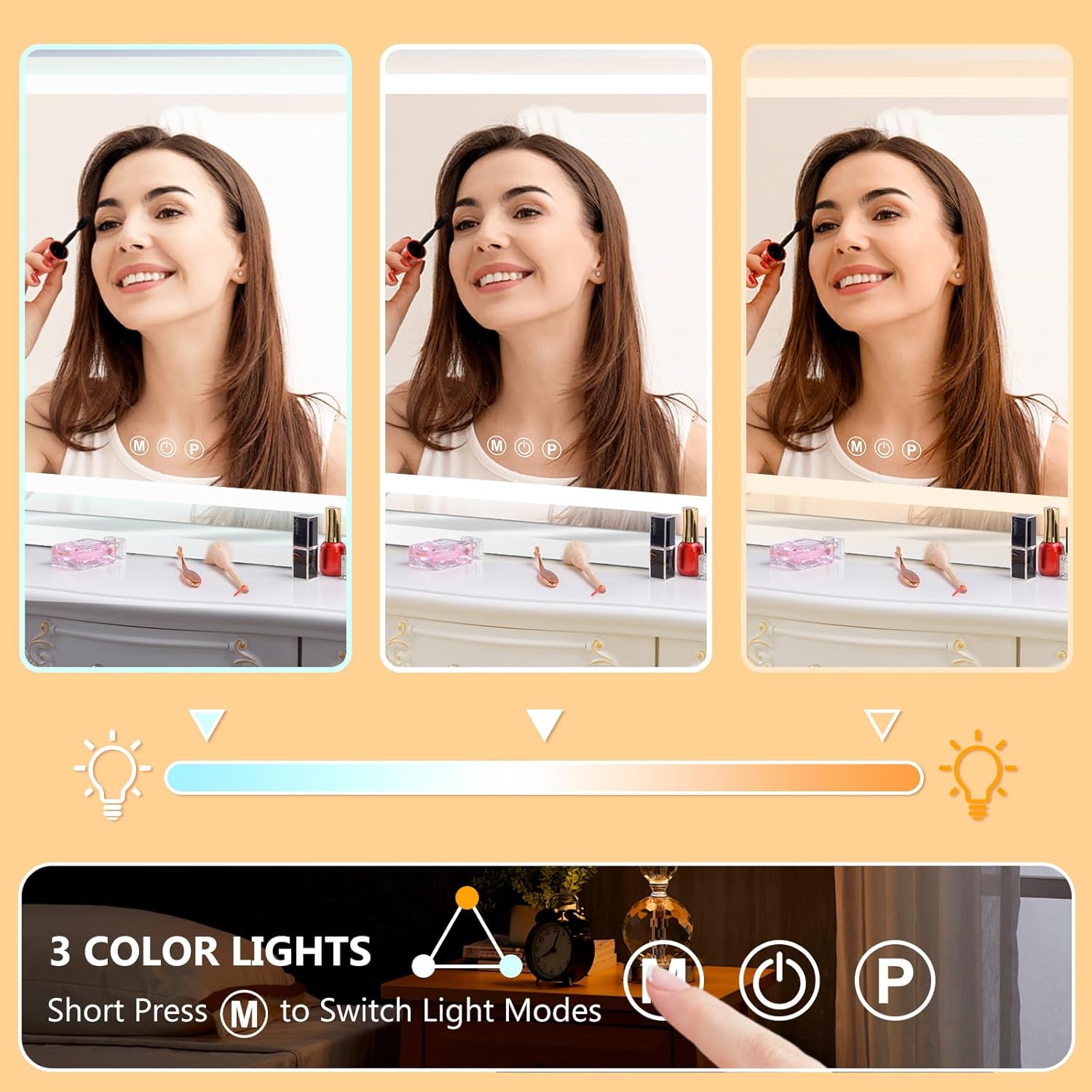
Image: Demonstrates the three color light modes: warm, natural, and cool.
3. Adjusting Brightness
- With the lights on, long press the 'P' icon to adjust the brightness level from 10% to 100%. Release when the desired brightness is achieved.

Image: Illustrates the dimmable light function, showing brightness levels from 20% to 100%.
4. Using the USB Charging Port
- Locate the USB Type-C charging port on the side of the mirror.
- Connect your phone or other USB-powered device to this port using a compatible cable for convenient charging while using the mirror.

Image: A smartphone being charged via the integrated USB Type-C port on the mirror.
5. Using the 10X Magnifying Mirror
- The detachable 10X magnifying mirror can be affixed to the main mirror surface for close-up detail work.
- Position it as needed for tasks requiring enhanced magnification.

Image: The 10X magnifying mirror in use, focusing on detailed facial features.
Maintenance
- Cleaning the Mirror: Use a soft, lint-free cloth and a non-abrasive glass cleaner. Spray the cleaner onto the cloth, not directly onto the mirror, to avoid liquid seeping into the electrical components.
- Frame Care: Wipe the aluminum alloy frame with a soft, dry cloth. Avoid harsh chemicals or abrasive materials that could damage the finish.
- Electrical Components: Ensure the mirror is unplugged before cleaning. Do not immerse the mirror or any electrical components in water.
- Storage: If storing the mirror, ensure it is in a dry, safe place away from extreme temperatures and direct sunlight.
Troubleshooting
| Problem | Possible Cause | Solution |
|---|---|---|
| Lights do not turn on. | Power cable not connected or loose. No power from outlet. | Ensure the power cable is securely plugged into the mirror and the wall outlet. Test the outlet with another device. |
| Lights are dim or flickering. | Brightness setting is low. Power supply issue. | Long press the 'P' icon to increase brightness. Check power connection. |
| Touch controls are unresponsive. | Finger is wet or dirty. Temporary software glitch. | Ensure your finger is clean and dry. Unplug the mirror for 30 seconds and plug it back in to reset. |
| USB charging port not working. | Device not compatible. Cable faulty. Mirror not powered. | Ensure the mirror is powered on. Try a different USB cable or device. |
Specifications
| Feature | Detail |
|---|---|
| Brand | Ratsamee |
| Model | 32"L x 24"W |
| Product Dimensions | 32"L x 24"W |
| Frame Material | Aluminum Alloy |
| Mirror Material | Tempered Glass |
| Light Colors | Warm (3000K), Natural (4500K), Cool (6000K) |
| Brightness Adjustment | 10% - 100% Dimmable |
| Magnifying Mirror | 10X Detachable |
| Charging Port | USB Type-C |
| Mounting Type | Tabletop Mount, Wall Mount |
Warranty and Support
Warranty Information
This product comes with a 30-day refund/replacement return policy. Additionally, free repairs are available within 2 years of purchase for manufacturing defects.
Customer Support
For any questions about your Ratsamee LED Vanity Mirror, including product support or warranty claims, please contact the seller directly through the platform where you made your purchase. For Amazon customers, you can typically find seller contact information by:
- Navigating to your order history.
- Selecting the product and clicking on the seller's name (e.g., "Uniquejack Direct").
- Choosing the "Ask a question" option to send a message.
Please provide details of your issue and any relevant order information for prompt assistance. For damaged products, sending photos of the damage can facilitate a free replacement without returning the damaged item.

Image: Instructions on how to find support and service via the seller.

Image: Details on product support, including free replacement for damaged items and free repairs within two years.


