1. Safety Information
Please read all safety instructions carefully before assembly and use. Retain this manual for future reference.
- Always unplug electrical components before assembly or disassembly.
- Keep electrical cords away from heat sources and liquids.
- Do not use the product if any electrical components are damaged.
- Always follow the assembly instructions carefully to avoid injury from sharp edges or pinch points.
- Do not exceed the weight limit of the vanity desk.
- Ensure all connections are secure before use.
- Keep small parts away from children during assembly to prevent choking hazards.
2. Product Overview
The DWVO Small Vanity Table with Stool is designed to provide a functional and aesthetically pleasing space for various activities. It features integrated RGB light strips, multiple storage drawers, a convenient charging station, a side hook, and a fabric pocket for enhanced organization.

This image displays the complete DWVO Small Vanity Table assembly, including the desk, stool, integrated RGB light strip, storage drawers, side hook, and fabric pocket. The desk is white with gold handles.
3. Components List
Before beginning assembly, ensure all components listed below are present and undamaged. If any parts are missing or damaged, please contact customer support.
- Vanity Desk Top Panel
- Desk Legs (4)
- Stool Seat
- Stool Legs (4)
- Drawers (4) with Handles
- RGB LED Light Strip
- Power Strip with AC Outlets, USB, and Type-C Port
- Side Hook
- Fabric Pocket
- Assembly Hardware (screws, bolts, Allen wrench, etc.)
- Anti-tip Hardware
- Remote Control for LED Lights
- Instruction Manual

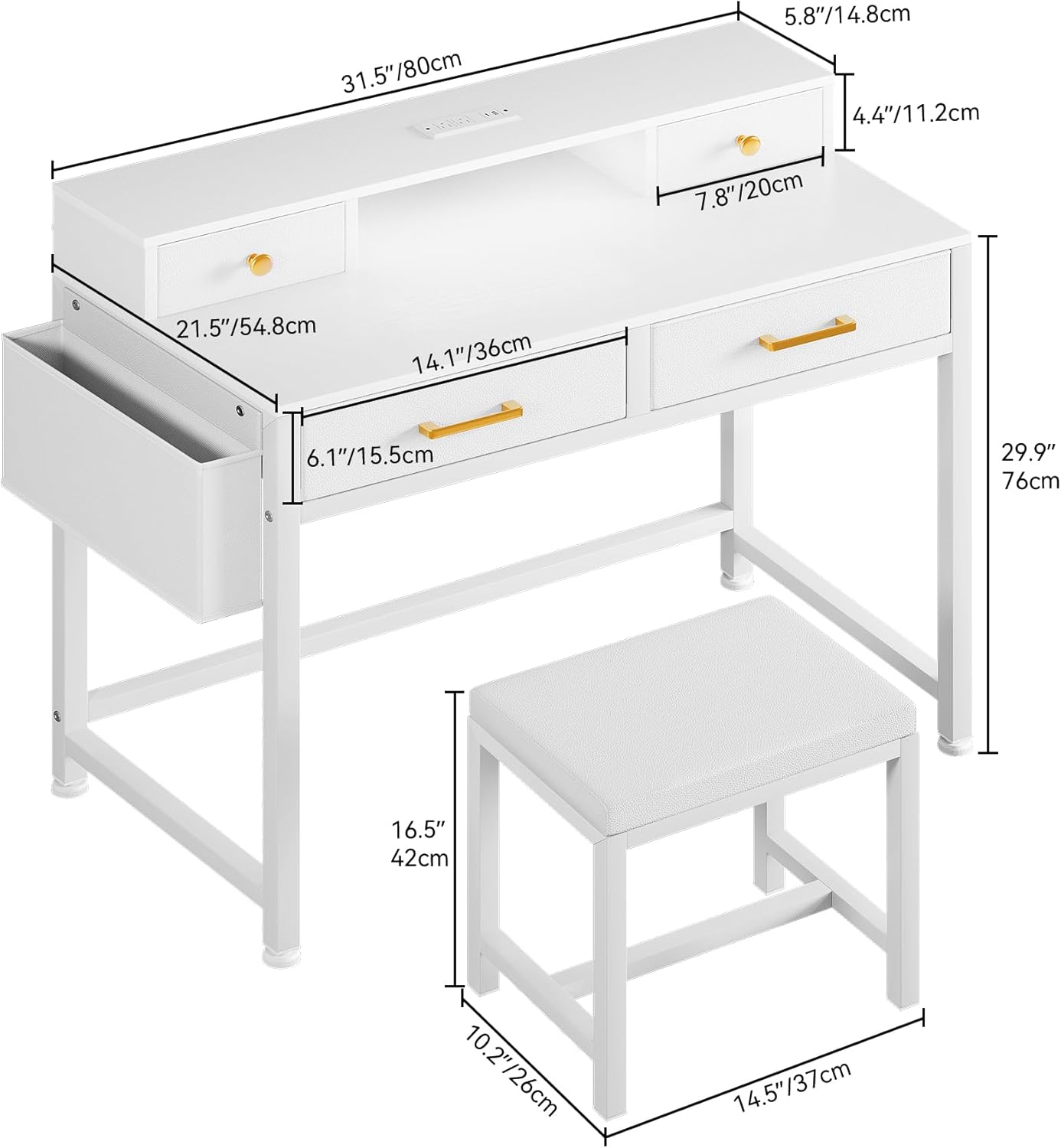
A diagram illustrating the dimensions of the vanity table and stool, providing measurements for height, width, and depth of various components.
4. Setup & Assembly
Follow the included detailed assembly instructions step-by-step. It is recommended to assemble the unit on a soft, clean surface to prevent scratches.
- Unpack Components: Carefully remove all parts from the packaging and verify against the components list.
- Assemble Desk Frame: Attach the desk legs to the main desk panel using the provided hardware. Ensure all screws are tightened securely.
- Install Drawers: Assemble the drawers according to the instructions and slide them into their designated slots. Attach handles.
- Attach Side Accessories: Secure the side hook and fabric pocket to the desk frame as indicated in the manual.
- Install LED Light Strip: Adhere the RGB LED light strip to the designated area. Connect it to the power source.
- Install Power Strip: Secure the integrated power strip into its recess on the desk.
- Assemble Stool: Attach the stool legs to the stool seat using the provided hardware.
- Attach Anti-tip Hardware: For safety, secure the anti-tip hardware to the wall and the desk as per instructions.
Note: Do not overtighten screws during assembly to avoid damaging the material.

The vanity table with its RGB LED light strip illuminated in purple, demonstrating the remote and app control options for adjusting colors and modes.
5. Operating Instructions
5.1 RGB Light Strip Operation
The RGB light strip can be controlled via the included remote control or a compatible smartphone application.
- Remote Control: Point the remote at the light strip receiver. Use the buttons to power on/off, change colors (over 60,000 options), adjust brightness, select dynamic modes, and activate music sync features.
- Smartphone App: Download the recommended app (refer to the assembly manual for app name/QR code). Pair your device with the light strip via Bluetooth. The app offers advanced control over colors, modes, timing functions, and music synchronization.
5.2 Charging Station Usage
The integrated power strip provides convenient access to power for your electronic devices.
- AC Outlets: Plug in devices requiring standard 120V/12A power, such as hair dryers, straighteners, or laptops.
- USB Port: Use the 5V/2A USB port to charge smartphones, tablets, and other USB-powered devices.
- Type-C Port: Use the 5V/2A Type-C port for compatible devices.
Ensure the vanity table is plugged into a functional wall outlet for the charging station and LED lights to operate.

An overhead view of the vanity table with its drawers open, showcasing the internal organization and storage capacity for various items like makeup palettes and brushes.
A detailed view of the integrated power strip on the vanity table, highlighting the 2 AC outlets, 1 USB port, and 1 Type-C port, with a hair straightener connected to an AC outlet.
6. Maintenance
6.1 Cleaning
- Desk Surface: Wipe the engineered wood surfaces with a soft, damp cloth. Avoid abrasive cleaners or harsh chemicals that may damage the finish.
- Stool Cushion: Spot clean the PU leather cushion with a mild soap solution and a soft cloth. Do not saturate.
- Electrical Components: Ensure the unit is unplugged before cleaning any electrical parts. Wipe gently with a dry cloth.
6.2 General Care
- Periodically check all screws and connections to ensure they remain tight.
- Avoid placing hot items directly on the desk surface without protection.
- Keep the vanity table away from direct sunlight and excessive moisture to prevent warping or discoloration.
7. Troubleshooting
If you encounter any issues with your DWVO Vanity Table, refer to the following common problems and solutions:
- LED Lights Not Working:
- Ensure the power cord is securely plugged into a working wall outlet.
- Check if the light strip is properly connected to its power source.
- Verify the remote control battery is functional.
- Charging Station Not Functioning:
- Confirm the main power cord of the vanity table is plugged in.
- Test the wall outlet with another device to ensure it is live.
- Ensure devices are properly inserted into the AC, USB, or Type-C ports.
- Desk Wobbles:
- Check that all assembly screws are tightened.
- Ensure the desk is placed on a flat, even surface.
- Adjust the leveling feet if present.
If problems persist after attempting these solutions, please contact DWVO customer support for further assistance.
8. Specifications
| Feature | Detail |
|---|---|
| Model Number | MADWVJ0XPM |
| Product Dimensions | 21.5"D x 31.5"W x 34.3"H (Desk) |
| Item Weight | 27.1 pounds |
| Frame Material | Engineered Wood |
| Color | White |
| Power Outlets | 2 AC Outlets (120V/12A), 1 USB Port (5V/2A), 1 Type-C Port (5V/2A) |
| LED Lights | RGB, Remote & App Control, Over 60,000 Colors, Dynamic Modes, Music Sync |
| Assembly Required | Yes |
| UPC | 199449203018 |
9. Warranty and Support
DWVO products are manufactured with quality and durability in mind. This product comes with a standard manufacturer's warranty against defects in materials and workmanship. Please refer to the warranty card included in your packaging or visit the official DWVO website for specific warranty terms and conditions.
For technical support, missing parts, or warranty claims, please contact DWVO customer service:
- Website: Visit the DWVO Store on Amazon
- Email: [Insert Customer Service Email Here, if available]
- Phone: [Insert Customer Service Phone Number Here, if available]
Please have your model number (MADWVJ0XPM) and purchase date ready when contacting support.