
1. Important Safety Information
Please read this entire manual carefully before assembling and operating the Yuejiqi 3220 Foldable Treadmill. Keep this manual for future reference.
- Always ensure the safety key is properly engaged before starting the treadmill.
- Do not allow children or pets near the treadmill during operation.
- Always stand on the side rails before starting or stopping the treadmill belt.
- Ensure the treadmill is placed on a flat, stable surface.
- This equipment must be properly earthed. Do not use a socket without an earth connection.
- Keep hands clear of moving parts, especially when folding or unfolding the treadmill.
2. Product Overview
The Yuejiqi 3220 Foldable Treadmill is designed for home use, offering a compact and efficient way to perform running, walking, and jogging exercises. It features a powerful brushless motor, manual incline adjustment, and smart connectivity.

Figure 2.1: Overview of the Yuejiqi 3220 Foldable Treadmill.
3. Setup and Assembly
The Yuejiqi 3220 Treadmill comes mostly pre-assembled. Follow these steps to complete the setup:
- Unpacking: Carefully open the packaging and remove all components. It is recommended to have two people for lifting the treadmill out of the box.
- Remove Foams: Locate and remove any protective foam pieces from the treadmill base.
- Lift Columns and Console: Gently lift the console and the support columns into their upright position.
- Secure Columns: Tighten the knobs at the base of the columns to secure them firmly in place.
- Install Phone Holder: Attach the phone holder to the designated slot on the console.
- Secure Console: Use the provided M8*18 screws and Allen wrench to secure the console to the support columns.
- Install Side Covers: Attach the decorative side covers to the base of the columns.
- Install Safety Lock: Place the red safety lock onto the yellow magnetic area on the console.
Video 3.1: Detailed installation guide for the 3220 treadmill.

Figure 3.1: Illustration of the one-button folding design, showing the handlebar being lifted and locked into place.

Figure 3.2: All components included in the package for assembly.
4. Operating Instructions
Familiarize yourself with the control panel and safety features before beginning your workout.
- Power On: Plug the treadmill into a grounded outlet and flip the power switch located at the front base of the treadmill to the 'ON' position. The console display will illuminate.
- Attach Safety Key: Clip the safety key to your clothing and place the magnetic end onto the designated area on the console. The treadmill will not operate without the safety key in place.
- Start Treadmill: Press the 'START/PAUSE' button on the console or the 'START' button on the left handrail. The belt will begin to move at a low speed after a 3-second countdown.
- Adjust Speed: Use the 'SPEED+' and 'SPEED-' buttons on the console or the right handrail to increase or decrease the belt speed. Quick speed buttons (2/4/6 MPH) are also available on the console.
- Select Program: Press the 'PROG' button to cycle through the 12 preset workout programs (P01-P12). Press 'MODE' to select different display modes (Time, Distance, Calories).
- Monitor Pulse: Grip the metal sheets on both sides of the handrail to measure your heart rate. The pulse reading will appear on the display.
- Adjust Incline: The treadmill features dual-level manual incline adjustment (up to 10%). To adjust, stop the treadmill, lift the front of the running deck, and secure it at the desired incline level.
- Stop Treadmill: Press the 'STOP' button on the console or the left handrail to gradually bring the treadmill to a halt. Alternatively, pulling the safety key will immediately stop the treadmill.
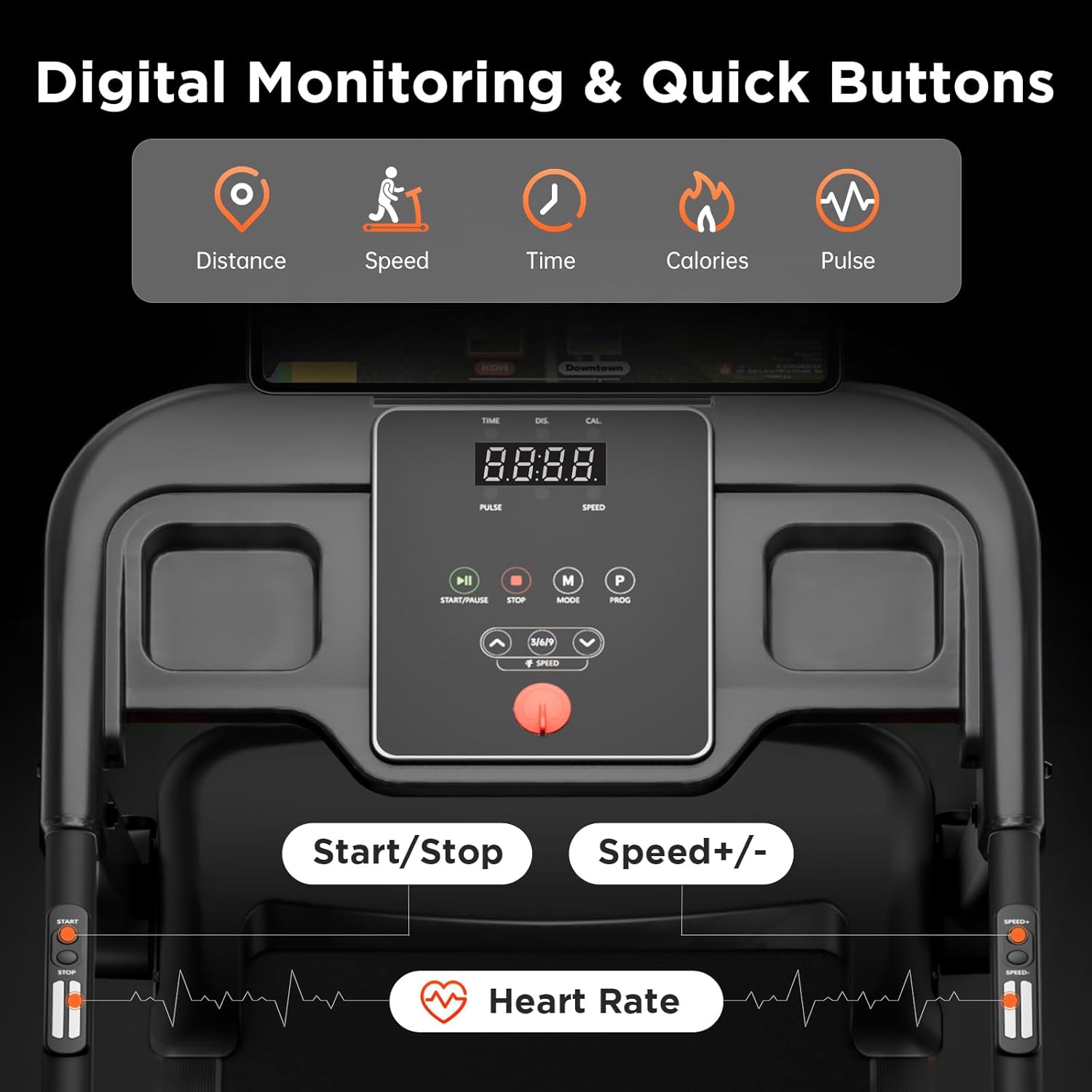
Figure 4.1: The control console displaying time, distance, calories, pulse, and speed, with quick access buttons.
Video 4.1: Demonstration of the 3220 treadmill in use, showing basic operation.

Figure 4.2: The treadmill's Bluetooth connectivity feature for syncing with fitness apps.
5. Maintenance
Regular maintenance ensures the longevity and optimal performance of your treadmill.
- Cleaning: Wipe down the treadmill with a damp cloth after each use to remove sweat and dust. Do not use abrasive cleaners.
- Belt Lubrication: Lubricate the running belt according to the schedule below to reduce friction and wear. Use only the provided lubricant or a silicone-based treadmill lubricant.

Figure 5.1: Recommended lubrication schedule based on usage frequency.
| Usage Frequency | Maintenance Frequency |
|---|---|
| <3 Hours/Week | Every 2 Months |
| 4-7 Hours/Week | Every 1 Month |
| ≥8 Hours/Week | Every 2 Weeks |
- Belt Adjustment: Periodically check the running belt for proper tension and alignment. Adjust as needed using the provided tools.
- Storage: When not in use, the treadmill can be folded for compact storage.
Video 5.1: Demonstration of the 3220/3220S treadmill folding mechanism.
6. Troubleshooting
If you encounter any issues with your treadmill, please refer to the following common troubleshooting tips. For problems not listed here, contact customer support.
- Treadmill not starting: Ensure the power cord is securely plugged in, the power switch is on, and the safety key is correctly placed on the console.
- Belt slipping: The running belt may need tension adjustment. Refer to the maintenance section for instructions.
- Unusual noises: Check for loose parts or objects under the belt. Lubricate the belt if necessary. If the noise persists, contact customer support.
- Inaccurate pulse reading: Ensure your hands are firmly gripping both metal sensors on the handrails. Dry hands or excessive movement can affect accuracy.
7. Specifications
| Feature | Detail |
|---|---|
| Brand | Yuejiqi |
| Model Name | 3220 |
| Motor | 3.0 HP Brushless Motor |
| Maximum Speed | 8.5 Miles per Hour |
| Minimum Speed | 0.5 Miles per Hour |
| Maximum Incline Percentage | 10% (Manual) |
| Running Surface (L x W) | 42" x 16" |
| Maximum Weight Recommendation | 300 Pounds |
| Item Weight | 55 Pounds |
| Product Dimensions (D x W x H) | 52.4"D x 24.4"W x 40.7"H |
| Folded Size | 49.2" x 23.2" x 5.1" |
| Material | Alloy Steel |
| Display Type | LED |
| Connectivity Technology | Bluetooth |
| Metrics Measured | Calories Burned, Distance, Heart Rate, Speed, Time |
8. What's in the Box
- User Manual
- Safety Key
- Lubricant
- Tool Kit
- Pad Holder
- Side Cover
- Wrench 6mm
- Wrench 5mm
- Screw M8*18 (x2)
9. Warranty and Support
Your Yuejiqi 3220 Foldable Treadmill comes with a 1 Year Manufacturer Warranty.
For customer service and support, please contact our customer service department. Include your order ID for the best service.
Email: amazon@yuejiqi.com
Response Time: Within 1-2 Business Days


