
PRANITE BG1536
PRANITE Interactive Robot Dog Toy BG1536 User Manual
Model: BG1536
Introduction and Safety Information
This manual provides essential instructions for the safe operation, setup, and maintenance of your PRANITE Interactive Robot Dog Toy, model BG1536. Please read this manual thoroughly before use and retain it for future reference.
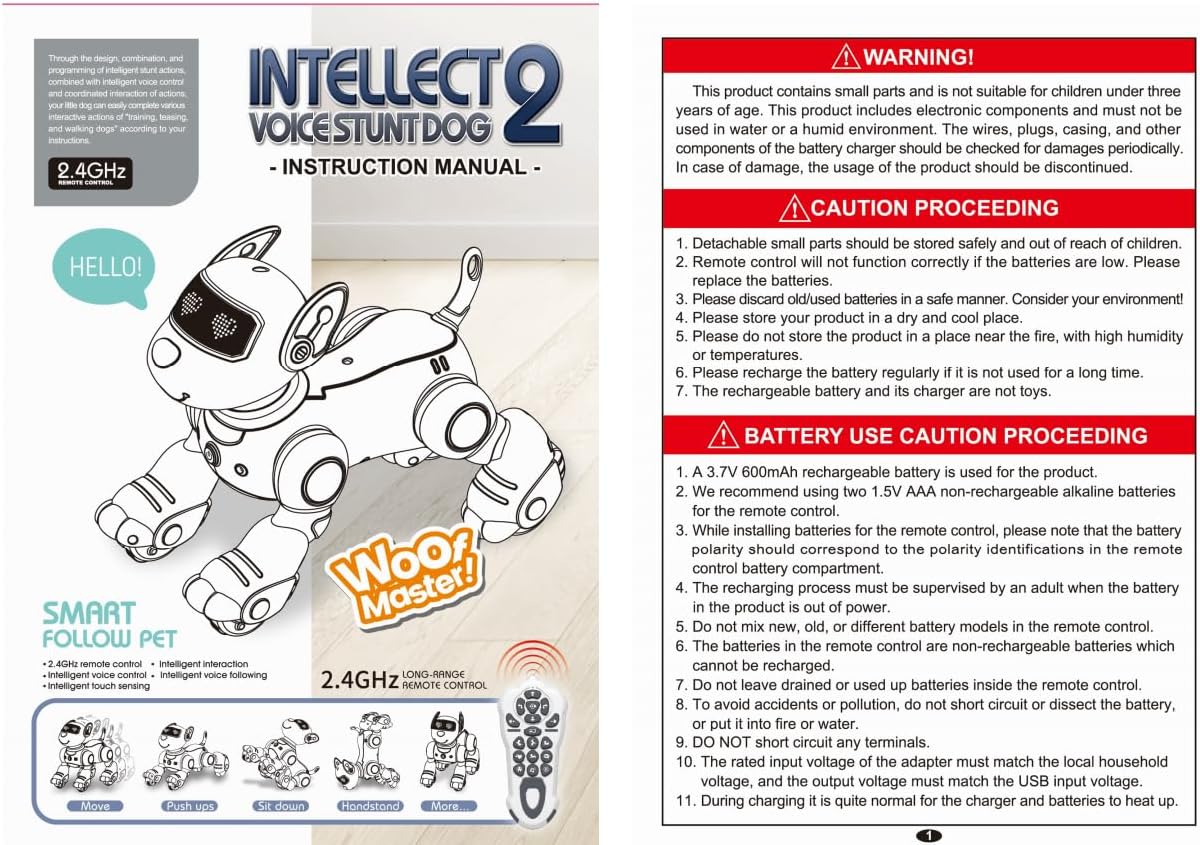
Image: Cover page of the instruction manual, showing the 'Intellecto Voice Stunt Dog 2' and its features.
WARNING!
- This product contains small parts and is not suitable for children under three years of age.
- This product includes electronic components and must not be used in water or a humid environment.
- The wires, plugs, casing, and other components of the battery charger should be checked for damages periodically. In case of damage, the usage of the product should be discontinued.
CAUTION PROCEEDING
- Detachable small parts should be stored safely and out of reach of children.
- Remote control will not function correctly if the batteries are low. Please replace the batteries.
- Please discard old/used batteries in a safe manner. Consider your environment!
- Please store your product in a dry and cool place.
- Please do not store the product in a place near fire, with high humidity or temperatures.
- Please recharge the battery regularly if it is not used for a long time.
- The rechargeable battery and its charger are not toys.
BATTERY USE CAUTION PROCEEDING
- A 3.7V 600mAh rechargeable battery is used for the product.
- We recommend using two 1.5V AAA non-rechargeable alkaline batteries for the remote control.
- While installing batteries for the remote control, please note that the battery polarity should correspond to the polarity identifications in the remote control battery compartment.
- The recharging process must be supervised by an adult when the battery in the product is out of power.
- Do not mix new, old, or different battery models in the remote control.
- The batteries in the remote control are non-rechargeable batteries which cannot be recharged.
- Do not leave drained or used up batteries inside the remote control.
- To avoid accidents or pollution, do not short circuit or dissect the battery, or put it into fire or water.
- DO NOT short circuit any terminals.
- The rated input voltage of the adapter must match the local household voltage, and the output voltage must match the USB input voltage.
- During charging it is quite normal for the charger to get warm.
Setup and Charging
1. Remote Control Battery Installation
The remote control requires two 1.5V AAA-size batteries (not included).
- Remove the battery cover using a Phillips head screwdriver.
- Insert the batteries into the compartment, ensuring correct polarity (+/-).
- Replace the battery cover and tighten the screws.
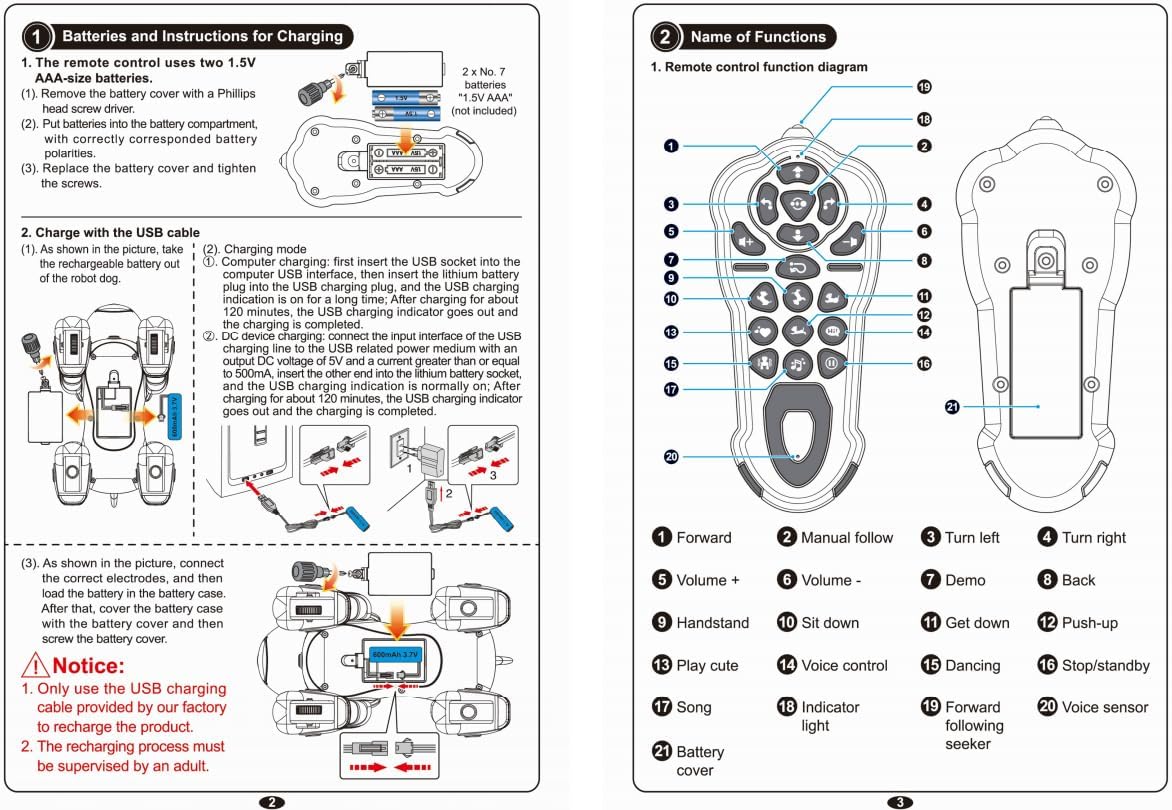
Image: Diagram illustrating the installation of AAA batteries into the remote control.
2. Charging the Robot Dog
The robot dog is powered by a built-in 3.7V 600mAh rechargeable battery. It can be charged via USB.
- Take the rechargeable battery out of the robot dog as shown in the diagram.
- Charging Mode (Computer USB): Insert the USB plug into a computer's USB interface, then connect the lithium battery plug to the USB charging cable. The USB charging indicator will illuminate. Charging takes approximately 120 minutes, after which the indicator will turn off.
- Charging Mode (AC Adapter): Insert the USB charging cable into a 5V DC power adapter (output current ≥ 500mA), then connect the other end to the lithium battery socket. The USB charging indicator will be normally on. After approximately 120 minutes, the indicator will turn off, signifying a full charge.

Image: Diagram showing the robot dog's USB charging port and connection to a power source.
Notice:
- Only use the USB charging cable provided by our factory to recharge the product.
- The recharging process must be supervised by an adult.
Operating Instructions
Remote Control Functions
Image: Detailed diagram of the remote control, highlighting each button and its corresponding function.
| No. | Function | No. | Function |
|---|---|---|---|
| 1 | Forward | 11 | Get Down |
| 2 | Manual Follow | 12 | Push-up |
| 3 | Turn Left | 13 | Play Cute |
| 4 | Turn Right | 14 | Voice Control |
| 5 | Volume + | 15 | Dancing |
| 6 | Volume - | 16 | Stop/Standby |
| 7 | Demo | 17 | Song |
| 8 | Back | 18 | Indicator Light |
| 9 | Handstand | 19 | Forward Following Seeker |
| 10 | Sit Down | 20 | Voice Sensor |
| 21 | Battery Cover |
Manual Following Mode
In Manual Following Mode, the robot dog will follow your movements, creating an interactive play experience.

Image: A child interacting with the robot dog, demonstrating the manual following mode where the robot dog moves behind the child.
To activate: Press and hold the 'Manual Follow' button (No. 2 on the remote control). Your robot dog will then follow you.
Programming Mode
Customize the robot dog's actions by programming a sequence of movements and stunts.

Image: A child observing the robot dog, with illustrations of various programmable actions like forward, backward, turns, handstand, sit down, get down, and push-up.
Refer to the remote control functions for specific programming buttons. Typically, you enter a programming mode, input a sequence of actions, and then execute the program.
Touch Sensing
The robot dog features touch sensors for interactive responses.

Image: Two children touching the back of the robot dog, demonstrating its touch sensing capability and interactive responses.
Touch the back of the robot dog, and it will interact with you through sounds or movements.
Interactive Music and Stunts
The robot dog can play music and perform various stunts, enhancing playtime.

Image: Two children playing musical instruments outdoors, with the robot dog performing a dance or stunt nearby, indicating its interactive music feature.
Use the 'Song' button (No. 17) and 'Dancing' button (No. 15) on the remote control to activate these features. Other stunt buttons (e.g., Handstand, Sit Down, Get Down, Push-up) allow the robot dog to perform various tricks.
Maintenance
- Cleaning: Wipe the robot dog and remote control with a clean, damp cloth. Do not use harsh chemicals or immerse in water.
- Storage: Store the product in a dry, cool place away from direct sunlight and extreme temperatures when not in use.
- Battery Care: Remove batteries from the remote control if the toy will not be used for an extended period. Recharge the robot dog's internal battery regularly, even if not in use, to maintain battery health.
Troubleshooting
- Robot not responding: Check if the robot dog is powered on. Ensure the remote control batteries are fresh and correctly installed. Recharge the robot dog's internal battery.
- Remote control not working: Replace the AAA batteries in the remote control. Ensure there are no obstructions between the remote and the robot.
- Short play time: The robot dog's battery may not be fully charged or may be nearing the end of its lifespan. Ensure a full 120-minute charge.
- Unusual behavior: Turn off both the robot dog and the remote control, then turn them back on to reset.
Specifications
| Feature | Detail |
|---|---|
| Brand | PRANITE |
| Model Number | BG1536 |
| Product Type | Interactive Robot Dog Toy |
| Material | Plastic |
| Robot Dog Battery | 3.7V 600mAh Rechargeable (Built-in) |
| Remote Control Battery | 2 x 1.5V AAA (Not included) |
| Charging Time | Approx. 120 minutes |
| Recommended Age | 3 years and up |
| Dimensions (L x W x H) | 31 x 18.3 x 17 cm |
| Color | Gray |
| GTIN | 750880016591 |
| ASIN | B0FFBJJRM2 |
Warranty Information
This product comes with a standard manufacturer's warranty against defects in materials and workmanship under normal use. The warranty period and terms may vary by region. Please retain your proof of purchase for warranty claims.
The warranty does not cover damage caused by misuse, accidents, unauthorized modifications, or failure to follow the instructions in this manual.
Customer Support
For technical assistance, troubleshooting, or warranty inquiries, please contact your retailer or the manufacturer directly. Please have your product model number (BG1536) and proof of purchase ready when contacting support.
Manufacturer: SHANTOU SUBOTECH TOY Co., LTD
Ask a question about this manual
Ask about setup, troubleshooting, compatibility, parts, safety, or missing instructions. Manuals+ will review the question and use this page’s manual context to help answer it.