
wanan 31314
wanan Makeup Vanity with Chair, Mirror and Lights (Model 31314) - Instruction Manual
Your Guide to Assembly, Operation, and Maintenance
Introduction
Thank you for purchasing the wanan Makeup Vanity with Chair, Model 31314. This manual provides essential information for the safe assembly, operation, and maintenance of your new vanity set. Please read these instructions carefully before use and retain them for future reference.
Important Safety Information
For your safety, please observe the following:
- Always unplug the vanity before assembly or disassembly.
- Be cautious of sharp edges during assembly.
- This vanity is heavy when fully assembled, so ensure proper handling to avoid injury.
- Do not place heavy objects on the vanity to prevent tipping.
- Keep the vanity away from heat sources and moisture to maintain its longevity.
Package Contents
Please verify that all components are present before beginning assembly. Refer to the included assembly instructions for a detailed list of parts and hardware.
Video: Unboxing and laying out all components of the wanan Makeup Vanity. This video demonstrates the initial steps of unpacking the product and organizing the parts for assembly.
Setup and Assembly
Follow the step-by-step instructions provided in the included assembly guide. A step-by-step setup video is also available for visual guidance.
Video: Detailed assembly guide for the wanan Makeup Vanity. This video provides visual instructions for each step of the assembly process, from unpacking to final setup.
Key Assembly Steps:
- Step 1: Assemble the main desk frame using screws A and F (x4 each).
- Step 2: Construct the drawer using screws O and B (x1 each) and attach the DL/DR slides.
- Step 3: Attach the drawer slides CL and CR (x1 each) to the main desk.
- Step 4: Assemble the side shelves using a hammer and screws F (x6).
- Step 5: Secure the back panel of the desk using a hammer and screws (x9).
- Step 6: Attach the remaining side panels using screws F (x8) and a hammer.
- Step 7: Install the power outlet unit using screws E and K (x2 each).
- Step 8: Prepare the mirror support panel by inserting screws A and B (x6 each).
- Step 9: Assemble the mirror frame base using screws F (x10).
- Step 10: Attach the mirror support panel to the desk using screws A, B (x3 each).
- Step 11: Install the upper shelves using screws A, B, F (x1, x1, x2 respectively).
- Step 12: Insert dowels D (x2) into the mirror base.
- Step 13: Secure the mirror to the desk using screws F (x8).
- Step 14: Attach the mirror support brackets using screws H and N (x2, x4 respectively).
- Step 15: Insert the drawer into its slides.
- Step 16-18: Install the LED lights (M) around the mirror, securing them with clips S (x2).
- Step 19: Assemble the stool using screws F and G (x4 each) and dowels J (x2).
- Step 20: Secure cables with clips P (x1).
- Step 21: Cover exposed screws with stickers L (x42).

Image: The wanan Makeup Vanity with Chair, Mirror, and Lights fully assembled in a room setting. This image showcases the complete product with its various features.
Operating Instructions
LED Mirror Lights:
The vanity mirror features integrated LED lights with three color modes and adjustable brightness. Use the inline controller to manage the lighting.
- Power On/Off: Press the power button on the inline controller.
- Change Color Mode: Press the mode button to cycle through Warm White, Neutral White, and Daylight White.
- Adjust Brightness: Use the '+' and '-' buttons to increase or decrease brightness (10 adjustable steps). The system includes a memory function for brightness settings.
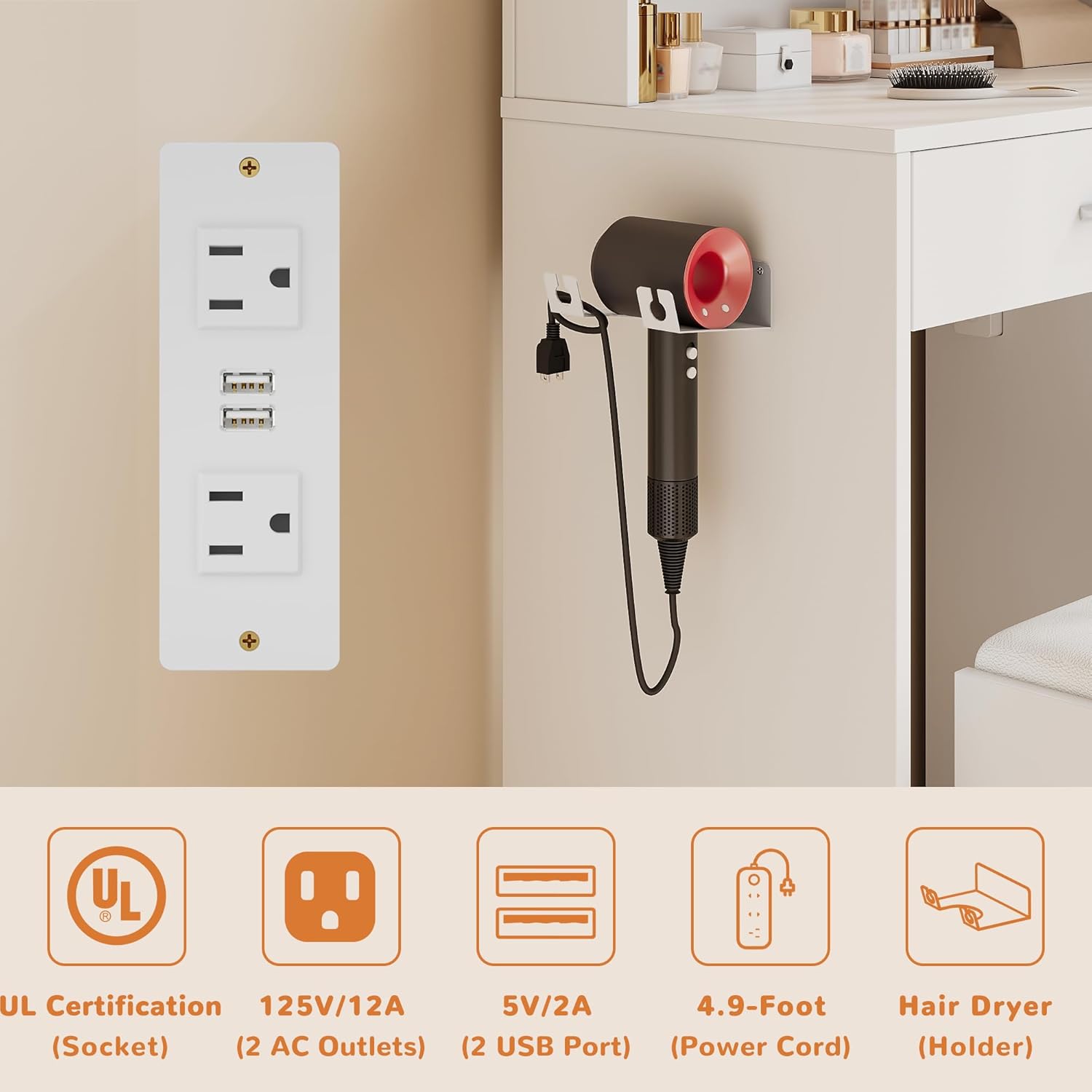
Image: Close-up of the LED mirror lights demonstrating the three color modes: Warm White, Neutral White, and Daylight White, each with 10 adjustable brightness steps.
Power Outlet and USB Ports:
The vanity includes a built-in charging station with 2 AC outlets (125V/12A) and 2 USB ports (5V/2A) for convenient power access.
- Plug in hair styling tools, mobile phones, or other electronic devices directly into the provided outlets.
- Ensure devices are compatible with the specified voltage and amperage.

Image: A detailed view of the built-in power outlet featuring two AC sockets and two USB ports, designed for convenient charging and power access.
Maintenance
- Cleaning: Wipe surfaces with a soft, damp cloth. Avoid harsh chemicals or abrasive cleaners that may damage the finish.
- Mirror Care: Clean the mirror with a glass cleaner and a lint-free cloth. Do not spray cleaner directly onto the LED bulbs.
- Hardware: Periodically check and tighten all screws and fasteners to ensure stability.
- Stool Cushion: The stool cushion is designed for easy cleaning. Wipe with a damp cloth as needed.
Troubleshooting
| Problem | Possible Cause | Solution |
|---|---|---|
| Lights not turning on. | Power cable not connected; bulb loose; power outage. | Ensure power cable is securely plugged in. Check if bulbs are screwed in tightly. Verify power supply. |
| Lights flickering or dim. | Loose connection; low power supply. | Check all connections. Ensure adequate power supply. |
| Drawer not sliding smoothly. | Obstruction in slides; misaligned slides. | Remove any obstructions. Re-align drawer slides if necessary. |
| Vanity feels unstable. | Loose fasteners; uneven floor. | Tighten all assembly screws. Place shims under legs if floor is uneven. |
Specifications
| Brand: | wanan |
| Model Number: | 31314 |
| Product Dimensions: | 14.2"D x 26.5"W x 54.4"H |
| Item Weight: | 67 pounds |
| Color: | White |
| Frame Material: | Engineered Wood |
| Assembly Required: | Yes |
| Lighting Modes: | Warm White, Neutral White, Daylight White (10 adjustable steps each) |
| Power Outlet: | 2 AC Outlets (125V/12A), 2 USB Ports (5V/2A) |
Warranty and Support
For any questions, concerns, or missing parts, please contact wanan customer service. You can typically find contact information on the product packaging or through your retailer's support channels. Please refer to your purchase documentation for specific warranty details.
For added convenience, a step-by-step setup video is available on our product page. For any questions, please click “Contact Seller”.
Ask a question about this manual
Ask about setup, troubleshooting, compatibility, parts, safety, or missing instructions. Manuals+ will review the question and use this page’s manual context to help answer it.