
Ant Esports Combatant II
Ant Esports Combatant II RGB Wireless Gamepad Instruction Manual
Model: Combatant II
Introduction
This manual provides comprehensive instructions for the setup, operation, maintenance, and troubleshooting of your Ant Esports Combatant II RGB Wireless Gamepad. Please read this manual carefully before using the device to ensure optimal performance and longevity.

Figure 1: Ant Esports Combatant II RGB Wireless Gamepad with a smartphone.
Setup
1. Device Compatibility and Mounting
The Combatant II gamepad is designed to accommodate smartphones ranging from 4 to 7 inches. No need to remove your phone case for mounting.
2. Charging the Gamepad
Before initial use, ensure the gamepad is fully charged. The device features an 800mAh battery, providing approximately 4-6 hours of playing time on a full charge. A full charge typically takes 2.5-3 hours.

Figure 2: Battery and charging information.
3. Bluetooth Connectivity and Pairing
The gamepad connects wirelessly via Bluetooth. Follow the steps below for pairing:
- Power On: Hold the designated MODE button combination for 3 seconds to power on the gamepad in the desired mode.
- Pairing: On your smartphone, navigate to Bluetooth settings and select "Xbox Wireless Controller" (or the appropriate name for the selected mode) from the list of available devices.
- Reconnection: Once paired, the gamepad will automatically reconnect to your device when powered on in the same mode.
Connection Modes:
The Combatant II supports multiple connection modes for various platforms. Refer to the table below for specific power-on methods and corresponding LED indicators:

Figure 3: Gamepad connection modes and LED instructions.
- Cloud Games Mode (B+MODE): Connects as "XBOX Wireless Controller" with a Blue LED.
- Key Configurate Mode (A+MODE): Connects as "GC-PAD" with a Yellow LED.
- Android Game Mode (X+MODE): Connects as "GC-PAD" with a Green LED.
- N-Switch Mode (Y+MODE): No specific list name, Multicolor LED.
Operating Instructions
1. Magnetic Hall 3D Joysticks
The gamepad features Magnetic Hall 3D Joysticks, designed to provide precise and responsive control without drift, wear, or dead zones, ensuring long-term accuracy.

Figure 4: Magnetic Hall 3D Joysticks.
2. Programmable Back Buttons
The Combatant II includes two programmable rear buttons (ML/MR) that can be remapped to A/B/X/Y or trigger functions for enhanced gameplay and quicker reactions. To enter programming mode, press the M button along with ML or MR.
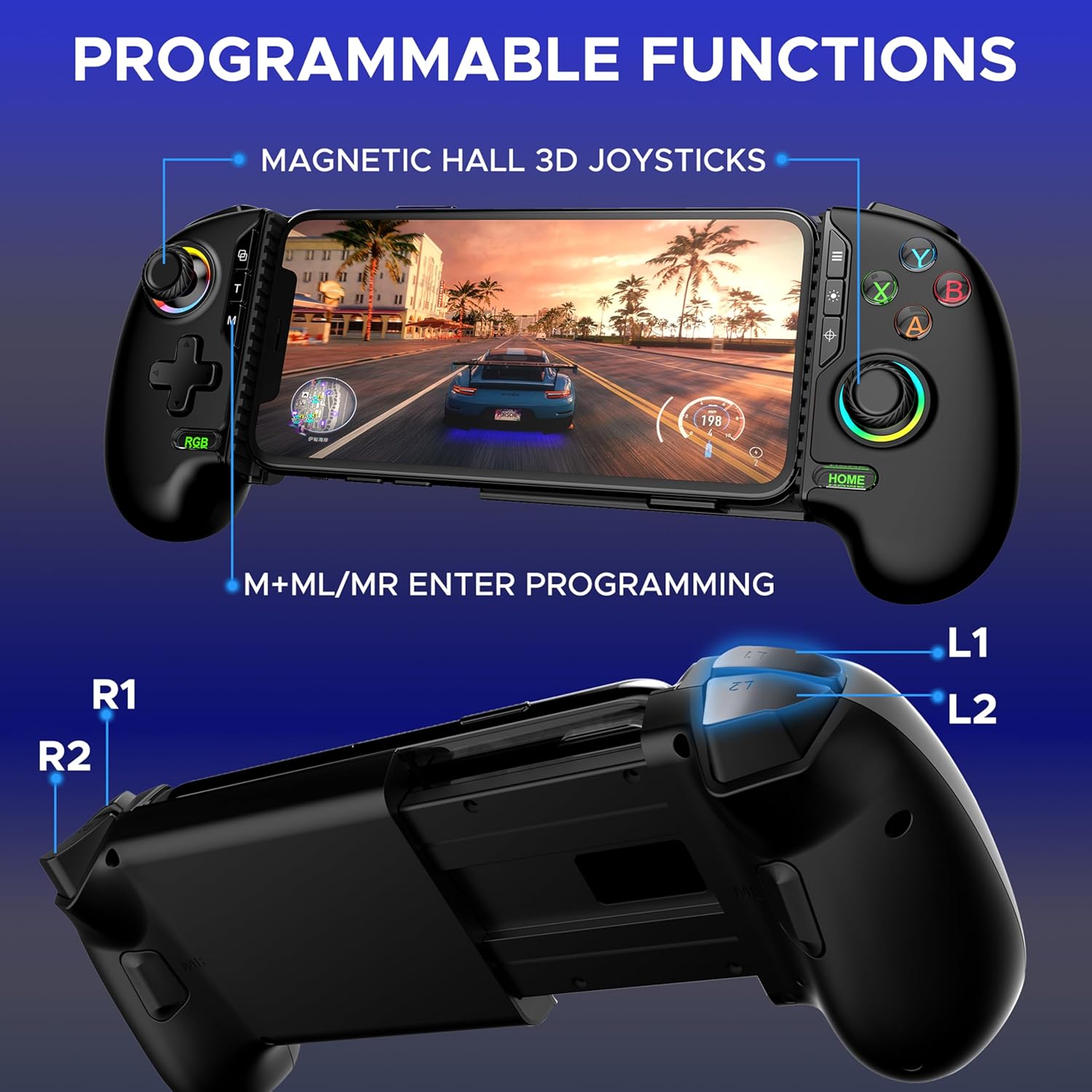
Figure 5: Programmable functions and button layout.
3. Turbo Function
Activate the adjustable turbo function for rapid firing in compatible games. The turbo speed can be customized to 5, 12, or 20 shots per second.
4. Dual Vibration Motors
Experience immersive feedback through the dual vibration motors. The vibration frequency can be adjusted to None, Weak, Moderate, or Strong settings.
5. Customizable RGB Lighting
Personalize your gaming experience with 10 dynamic RGB lighting modes. Use the dedicated RGB button to cycle through modes or turn the lighting on/off.

Figure 6: Turbo function, vibration, and RGB lighting controls.
6. Key Linker App Customization
For advanced customization, download the Key Linker app. This application allows you to remap buttons, update firmware, and fine-tune joystick dead zones.
Maintenance
1. Cleaning
To clean the gamepad, use a soft, dry cloth. Avoid using harsh chemicals, abrasive cleaners, or excessive moisture, as these can damage the device.
2. Battery Care
- Avoid fully discharging the battery frequently.
- Store the gamepad in a cool, dry place when not in use for extended periods.
- Charge the device regularly, even if not in use, to maintain battery health.
Troubleshooting
1. Gamepad Not Connecting
- Ensure the gamepad is sufficiently charged.
- Verify that the correct connection mode (e.g., B+MODE for Cloud Games) is selected when powering on the gamepad.
- Delete previous pairings from your device's Bluetooth settings and attempt to re-pair.
- Restart both your smartphone and the gamepad.
2. Input Lag or Unresponsive Controls
- Ensure there are no obstructions between the gamepad and your device.
- Close other Bluetooth devices or applications that might interfere with the connection.
- Check for and install any available firmware updates via the Key Linker app.
3. Joystick Drift
The Combatant II uses Hall Effect joysticks to minimize drift. If you experience drift, try recalibrating the joysticks through the Key Linker app or by following specific calibration instructions that may be provided with firmware updates.
Specifications
| Model Number | Combatant II |
| Battery Type | 1 Lithium Polymer (included) |
| Battery Capacity | 800 mAh |
| Playing Time | 4-6 hours |
| Charging Time | 2.5-3 hours |
| Product Dimensions (LxWxH) | 20.5 x 11.5 x 5.5 cm |
| Item Weight | 270 g |
| Country of Origin | China |
| Connectivity | Bluetooth Wireless |
| Compatibility | Android, iOS (4-7 inch devices), N-Switch, Cloud Gaming Platforms |
Warranty and Support
Warranty information for the Ant Esports Combatant II RGB Wireless Gamepad is typically provided with your purchase documentation. Please refer to the warranty card included in the product packaging for details regarding coverage and terms.
For technical support, firmware updates, or further assistance, please visit the official Ant Esports website or contact their customer service department. Contact details may also be found on your warranty card or product packaging.