
1. Introduction
This manual provides detailed instructions for the installation, operation, and maintenance of your MFUZOP SL-48V/60V/72V-3000W Pure Sine Wave Power Inverter. This versatile inverter is designed to convert DC power from your battery system into stable 230V AC power, suitable for a wide range of sensitive electronic devices and appliances.
The MFUZOP inverter offers unique flexibility with three easily switchable input voltages (48V, 60V, 72V), adapting seamlessly to various battery configurations. It delivers a continuous power output of 3000W and a peak power of 6000W, making it ideal for mobile applications like RVs and boats, as well as stationary setups such as solar systems and emergency power solutions.
Equipped with an intelligent LCD display and multiple protection features, this inverter ensures reliable and safe operation for all your power needs.
2. Safety Instructions
Please read all safety instructions carefully before installation and operation. Failure to follow these instructions may result in electric shock, fire, or serious injury.
- Installation Environment: Install the inverter in a well-ventilated area, away from direct sunlight, heat sources, and flammable materials. Ensure the environment is dry and free from dust.
- Ventilation: Do not block the ventilation openings of the inverter. Adequate airflow is crucial for proper cooling and to prevent overheating.
- Electrical Connections: All electrical connections must be tight and secure. Loose connections can cause overheating and fire. Use appropriate gauge cables for DC input to handle high currents.
- Polarity: Always connect the DC input cables with correct polarity (positive to positive, negative to negative). Reverse polarity will damage the inverter and void the warranty.
- Grounding: The inverter must be properly grounded. Connect the grounding terminal to an appropriate ground point.
- Load Capacity: Do not exceed the inverter's continuous power rating (3000W) or peak power rating (6000W). Overloading can damage the inverter and connected appliances.
- Water and Moisture: Keep the inverter away from water, rain, and excessive humidity.
- Maintenance: Only qualified personnel should perform maintenance or repairs. Do not attempt to open or modify the inverter.
- Children: Keep the inverter out of reach of children.
3. Product Features
- Flexible Input Voltage: Supports three input voltages (48V, 60V, 72V), easily selectable via a switch to match your battery system.
- Pure Sine Wave Output: Provides clean and stable 230V AC power, suitable for sensitive electronics like laptops, TVs, and medical equipment.
- High Power Output: Delivers 3000W continuous power and up to 6000W peak power for demanding applications.
- Smart LCD Display: Real-time monitoring of essential operating data including input voltage, output power, temperature, and protection status.
- Comprehensive Protection: Advanced safety features including soft-start technology, overload protection, overheating protection, overvoltage/undervoltage protection, short circuit protection, and reverse polarity protection.
- Versatile Connectivity: Equipped with 2 EU AC outlets, 1 USB 2.1A port, and 1 Type-C port for charging various devices.
- High Efficiency: Conversion efficiency greater than 90% with low standby current (<1A) and low Total Harmonic Distortion (THD <3%).
- Intelligent Cooling: Features an intelligent and quiet fan for efficient heat dissipation, with variable speeds based on temperature.
4. Package Contents
Please check the package contents upon receipt. If any items are missing or damaged, contact your retailer immediately.
- MFUZOP SL-48V/60V/72V-3000W Pure Sine Wave Power Inverter
- DC Input Cables (Red for Positive, Black for Negative)
- User Manual
- Mounting Accessories (Screws, brackets if applicable)
5. Setup and Installation
5.1 Component Identification

This image shows the front panel with two European AC outlets, a Type-C port, a USB port, and the power switch. The rear panel displays the negative terminal (black), positive terminal (red), and the cooling fan. An inset shows the voltage selection switch (48V/60V/72V) located near the input terminals. The LCD screen is also visible on the top surface.
- Front Panel: 2 AC Outlets, 1 Type-C Port, 1 USB 5V 2.1A Port, Power Switch.
- Rear Panel: Negative Terminal (Black), Positive Terminal (Red), Cooling Fan.
- Top Surface: LCD Display.
- Side: Input Voltage Selection Switch (48V/60V/72V).
5.2 Choosing an Installation Location
Select a location that is:
- Dry and protected from water and moisture.
- Well-ventilated to allow for proper heat dissipation.
- Cool, away from direct sunlight and heat sources.
- Secure, to prevent accidental movement or damage.
- Accessible for connections and operation.
5.3 Connecting the Inverter
- Prepare Cables: Ensure you have appropriate gauge DC input cables (typically included) for your battery system.
- Connect to Battery:
- Connect the red DC input cable to the positive (+) terminal of your battery.
- Connect the black DC input cable to the negative (-) terminal of your battery.
- Ensure connections are tight and secure.
- Connect to Inverter:
- Connect the other end of the red DC input cable to the positive (+) terminal on the inverter.
- Connect the other end of the black DC input cable to the negative (-) terminal on the inverter.
- WARNING: Double-check polarity before making the final connection to the inverter. Reverse polarity will cause severe damage.
- Ensure all connections are firm.
- Select Input Voltage: Use the voltage selection switch on the side of the inverter to choose the correct input voltage (48V, 60V, or 72V) corresponding to your battery system.
- Grounding: Connect a grounding wire from the inverter's grounding terminal to a suitable ground point.
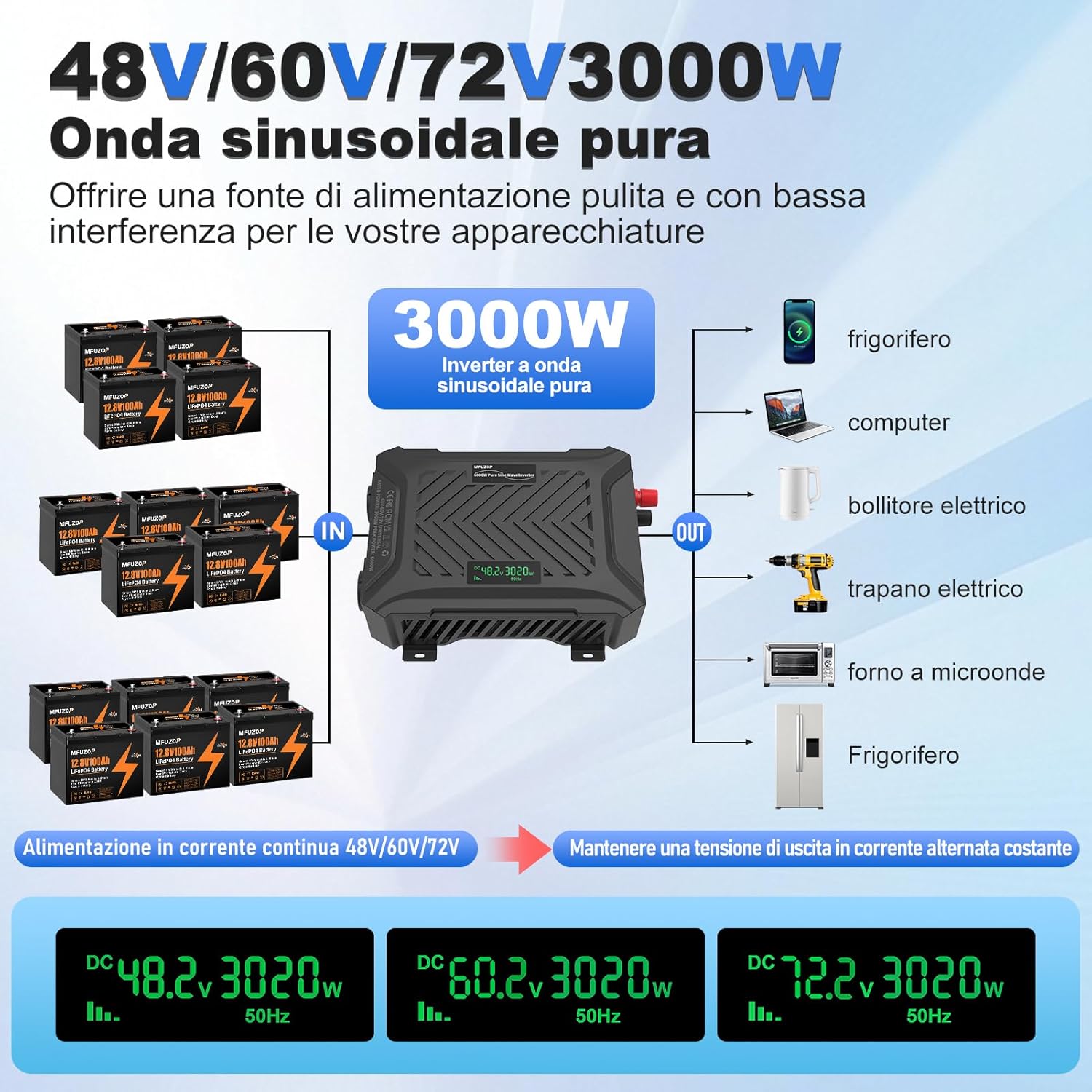
This diagram shows multiple 12V batteries connected in series to achieve 48V, 60V, or 72V DC input. The inverter then converts this to 230V AC output, powering devices such as refrigerators, computers, electric kettles, drills, and microwave ovens. The bottom section illustrates the selectable input voltages (DC 48.2V, DC 60.2V, DC 72.2V) and their corresponding 3020W output at 50Hz.

This image displays the inverter on a table with a camera, drone, and laptop, set against an outdoor backdrop with an RV. Below, icons indicate compatibility with GEL, SLA, LI (Lithium), FLD, and LiFePO4 battery types, emphasizing its low standby power consumption.
6. Operating Instructions
6.1 Powering On the Inverter
- Ensure all DC input connections are secure and the correct input voltage is selected.
- Press the power switch on the front panel of the inverter to the "ON" position.
- The LCD display will illuminate, showing the input voltage, output power, and other operational status indicators.
6.2 Connecting AC Appliances
- Plug your 230V AC appliances into the AC outlets on the front panel.
- For USB-powered devices, connect them to the USB 2.1A or Type-C ports.
- Ensure the total power consumption of all connected appliances does not exceed the inverter's continuous power rating (3000W).
- For appliances with high startup current (e.g., motors, refrigerators), ensure their surge power requirement is within the inverter's peak power rating (6000W).

This image highlights the two 220-240V AC outlets, one USB QC3.0/QC2.0 5V 3A port, and one Type-C port. Below the inverter, headphones, a laptop, a smartphone, and a camera are shown, representing typical devices that can be powered or charged.
6.3 Understanding the LCD Display
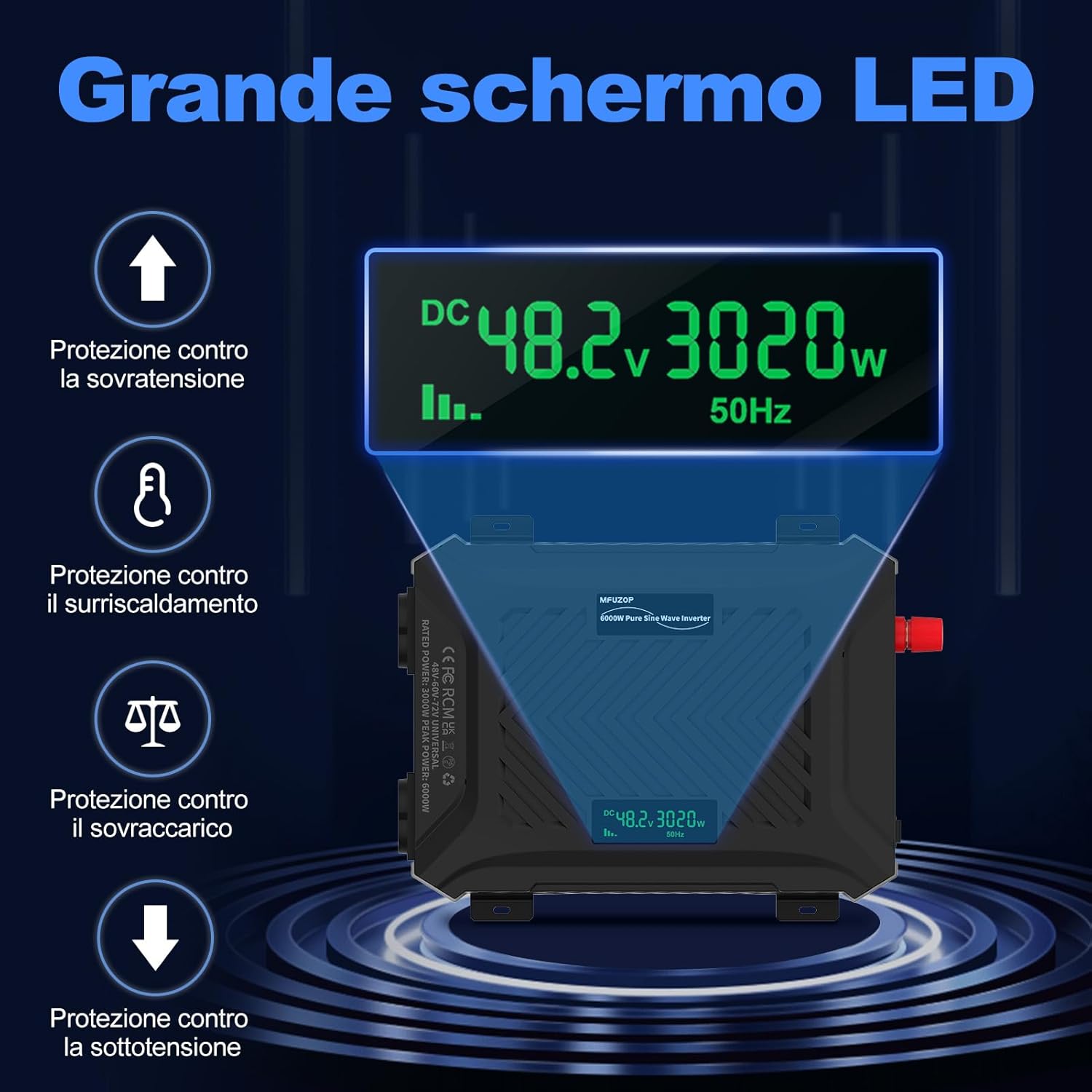
The display shows "DC 48.2V 3020W 50Hz", indicating input voltage, output power, and frequency. Surrounding icons represent various protection mechanisms: overvoltage protection, overheating protection, overload protection, and undervoltage protection.
The intelligent LCD display provides real-time information:
- Input Voltage (DC V): Shows the current DC voltage from your battery.
- Output Power (W): Displays the current AC power being drawn by connected appliances.
- Frequency (Hz): Indicates the output AC frequency (typically 50Hz or 60Hz depending on model/region).
- Protection Status: Icons or indicators will appear if any protection mechanism is activated (e.g., overload, overheat, low battery).
6.4 Powering Off the Inverter
- Disconnect all AC appliances and USB devices from the inverter.
- Press the power switch to the "OFF" position.
- For long-term storage or maintenance, disconnect the DC input cables from the battery.
7. Maintenance
- Cleaning: Regularly clean the exterior of the inverter with a dry, soft cloth. Do not use liquid cleaners or solvents.
- Ventilation: Ensure the cooling fan and ventilation openings are free from dust and debris. Use compressed air to clear any blockages if necessary.
- Connections: Periodically check all electrical connections (DC input, AC output, grounding) to ensure they remain tight and secure.
- Storage: If storing the inverter for an extended period, disconnect it from the battery and store it in a cool, dry place.
- Battery Maintenance: Ensure your battery system is properly maintained and charged according to its manufacturer's guidelines.
8. Troubleshooting
This section addresses common issues you might encounter with your MFUZOP Power Inverter. If the problem persists after following these steps, please contact customer support.
| Problem | Possible Cause | Solution |
|---|---|---|
| No output voltage / Inverter does not turn on |
|
|
| Low output power / Inverter shuts down under load |
|
|
| Inverter fan runs constantly or loudly |
|
|
| Abnormal noise from inverter |
|
|

This image shows the inverter's rear panel with the positive and negative terminals, emphasizing the protective covers. The intelligent and silent fan is highlighted for heat dissipation. Below, icons represent various protections: low voltage protection, short circuit protection, overload protection, reverse polarity protection, overheating protection, and overpressure (overvoltage) protection.
9. Specifications
| Feature | Detail |
|---|---|
| Brand | MFUZOP |
| Model | SL-48V/60V/72V-3000W |
| Input Voltage (DC) | 48V / 60V / 72V (Switchable) |
| Output Voltage (AC) | 230V |
| Continuous Power | 3000W |
| Peak Power | 6000W |
| Output Waveform | Pure Sine Wave |
| Efficiency | >90% |
| Total Harmonic Distortion (THD) | <3% |
| Output Frequency | 50Hz (Standard) |
| USB Output | 1x USB 5V 2.1A (QC3.0/QC2.0 5V 3A from image) |
| Type-C Output | 1x Type-C Port |
| AC Outlets | 2x EU Sockets |
| Protection Features | Overload, Overheat, Overvoltage, Undervoltage, Short Circuit, Reverse Polarity, Soft-Start |
| Item Weight | 3.4 kg |
| Dimensions (Package) | 37.29 x 28.2 x 18.1 cm |
| Color | Black |

This image shows the inverter connected to a battery and a solar panel, with an oscilloscope displaying a perfect sine wave, indicating low THD. Key features like standby current (<1A), efficiency (>90%), and quiet operation are highlighted. An RV is visible in the background, suggesting mobile applications.

This image shows the inverter providing clean power for RVs/vehicles, yachts and boats, domestic energy storage, and emergency power situations (e.g., during a thunderstorm). A sine wave graphic is prominently displayed, emphasizing the pure sine wave output.
10. Warranty and Support
MFUZOP is committed to providing high-quality products and excellent customer service.
- Warranty Period: This product comes with a 5-year warranty from the date of purchase, covering manufacturing defects and malfunctions under normal use.
- Expected Lifespan: The estimated lifespan of this inverter is 10 years, subject to proper installation, operation, and maintenance.
- Customer Support: For any technical assistance, troubleshooting, or warranty claims, please contact our 24/7 online customer service. Have your product model and purchase details ready when contacting support.
Please refer to the official MFUZOP website or your purchase documentation for the most up-to-date warranty terms and contact information.