
1. Introduction
Thank you for choosing the AZHAR Electric Mountain Bike, Model F28. This manual contains important information regarding the safe assembly, operation, and maintenance of your electric bicycle. Please read this manual thoroughly before your first ride and retain it for future reference. Proper understanding and adherence to these instructions will ensure optimal performance and longevity of your bike.

Image 1.1: AZHAR Electric Mountain Bike, Model F28.
2. Safety Information
Your safety is paramount. Always wear a helmet that meets safety standards (e.g., CPSC, EN 1078) when riding. Familiarize yourself with local laws and regulations concerning electric bicycles before operation. Regular maintenance and pre-ride checks are crucial for safe riding.
2.1 Pre-Ride Checklist
- Brakes: Ensure both front and rear brakes are functioning correctly.
- Tires: Check tire pressure and inspect for any damage or excessive wear.
- Battery: Verify the battery is securely locked and sufficiently charged.
- Quick Releases: Confirm all quick-release levers (wheels, seat post) are properly tightened.
- Lights: Test the headlight and taillight for proper operation.
- Helmet: Always wear a properly fitted helmet.
2.2 Battery Safety
- Use only the charger provided with your bike.
- Do not expose the battery to extreme temperatures or direct sunlight for extended periods.
- Avoid puncturing, dropping, or otherwise damaging the battery.
- Keep the battery away from children and pets.
- If the battery shows signs of damage or overheating, discontinue use immediately and contact support.
3. Package Contents
Upon unpacking, please verify that all items listed below are present. If any components are missing or damaged, contact customer support immediately.
- AZHAR 26" Electric Bike x1
- Tool Kit x1
- Charger x1
- User Manual x1 (this document)
- Soft Seat Pad x1
- Fender x1 (front and rear)
- Bike Lock x1
4. Assembly
Your AZHAR Electric Mountain Bike is 85% pre-assembled. The following steps detail the final assembly required before your first ride. Refer to the included tool kit for necessary instruments.
4.1 Handlebar Installation
- Loosen the bolts on the stem faceplate.
- Position the handlebar in the stem, ensuring it is centered and the brake levers and shifters are at a comfortable angle.
- Tighten the faceplate bolts evenly.
4.2 Front Wheel Installation
- Carefully remove any protective packaging from the front fork and wheel.
- Align the front wheel with the fork dropouts, ensuring the brake rotor slides into the brake caliper.
- Insert the quick-release skewer through the hub and tighten it securely.
4.3 Pedal Installation
Note: Pedals are typically marked 'L' for left and 'R' for right. The left pedal has a reverse thread.
- Apply a small amount of grease to the pedal threads.
- Screw the 'R' pedal into the right crank arm (clockwise).
- Screw the 'L' pedal into the left crank arm (counter-clockwise).
- Tighten both pedals firmly with a wrench.
4.4 Seat Post and Saddle Adjustment
- Insert the seat post into the frame's seat tube.
- Adjust the saddle height to a comfortable riding position (your leg should have a slight bend at the knee when the pedal is at its lowest point).
- Secure the seat post with the quick-release lever or bolt.
4.5 Fender Installation
Attach the front and rear fenders using the provided hardware. Ensure they are securely mounted and do not interfere with wheel rotation.
5. Components Overview
Understanding the key components of your AZHAR Electric Mountain Bike will enhance your riding experience and assist with maintenance.
5.1 Motor
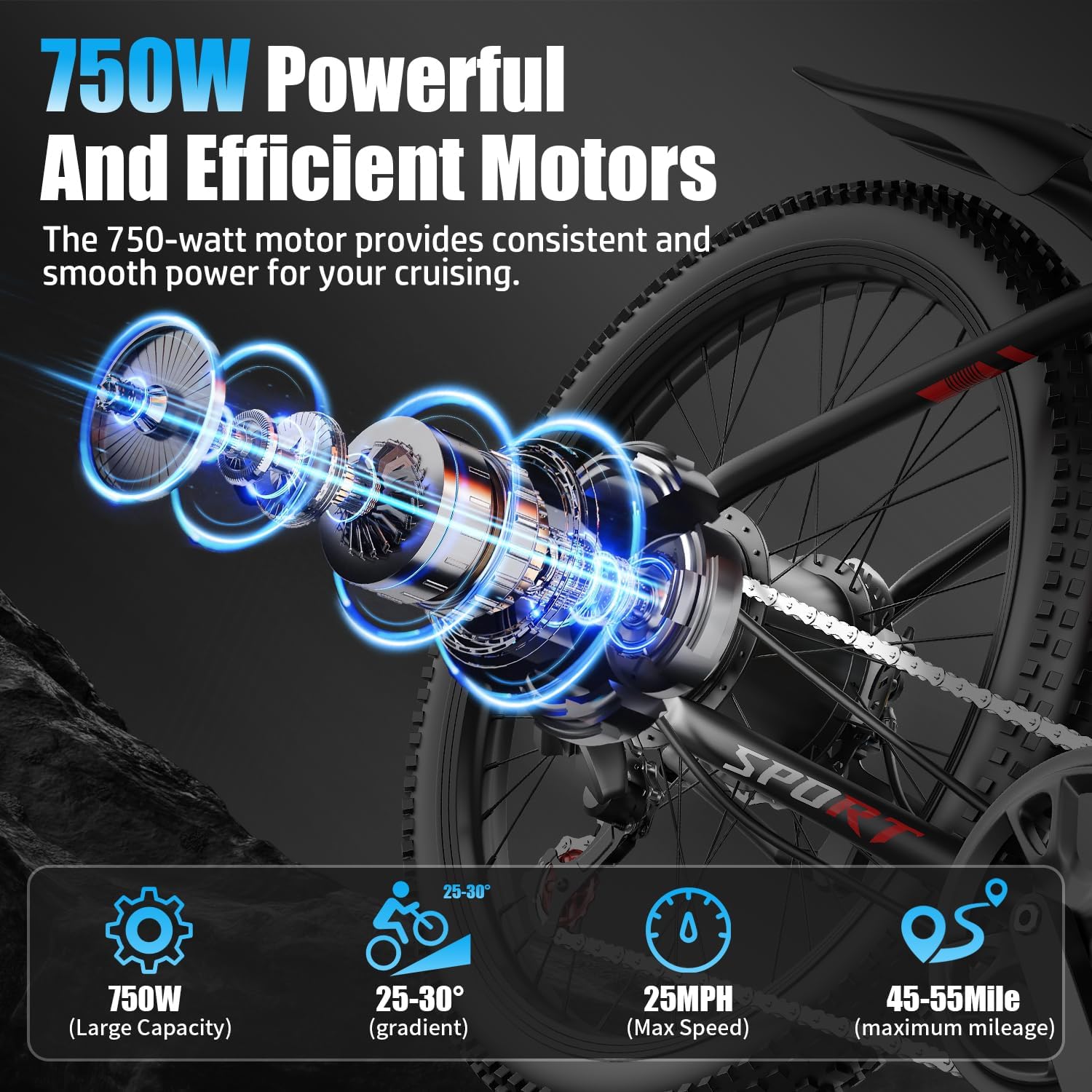
Image 5.1: 750W Peak Motor.
The bike is equipped with a 500W continuous motor, capable of reaching 750W peak power. This motor provides assistance up to 25 mph and is designed to handle varied terrain, including inclines.
5.2 Battery

Image 5.2: 48V 10AH Removable Battery.
A 48V 10AH (480Wh) removable lithium-ion battery powers the electric system. It offers a range of 35-45 miles per charge, depending on terrain, assist level, and rider weight. The battery is integrated into the frame for protection and can be removed for charging or storage.
5.3 Front Fork Suspension

Image 5.3: Upgraded Fork Damping.
The hydraulic front suspension system is designed to absorb shocks and vibrations, providing a smoother ride over uneven surfaces and enhancing control.
5.4 Tires and Headlight

Image 5.4: 26-inch Pneumatic Tire and LED Headlight.
The 26-inch puncture-resistant tires are suitable for various terrains. An integrated LED headlight enhances visibility for safe riding during low-light conditions or at night.
5.5 Smart Colorful Display and Controls
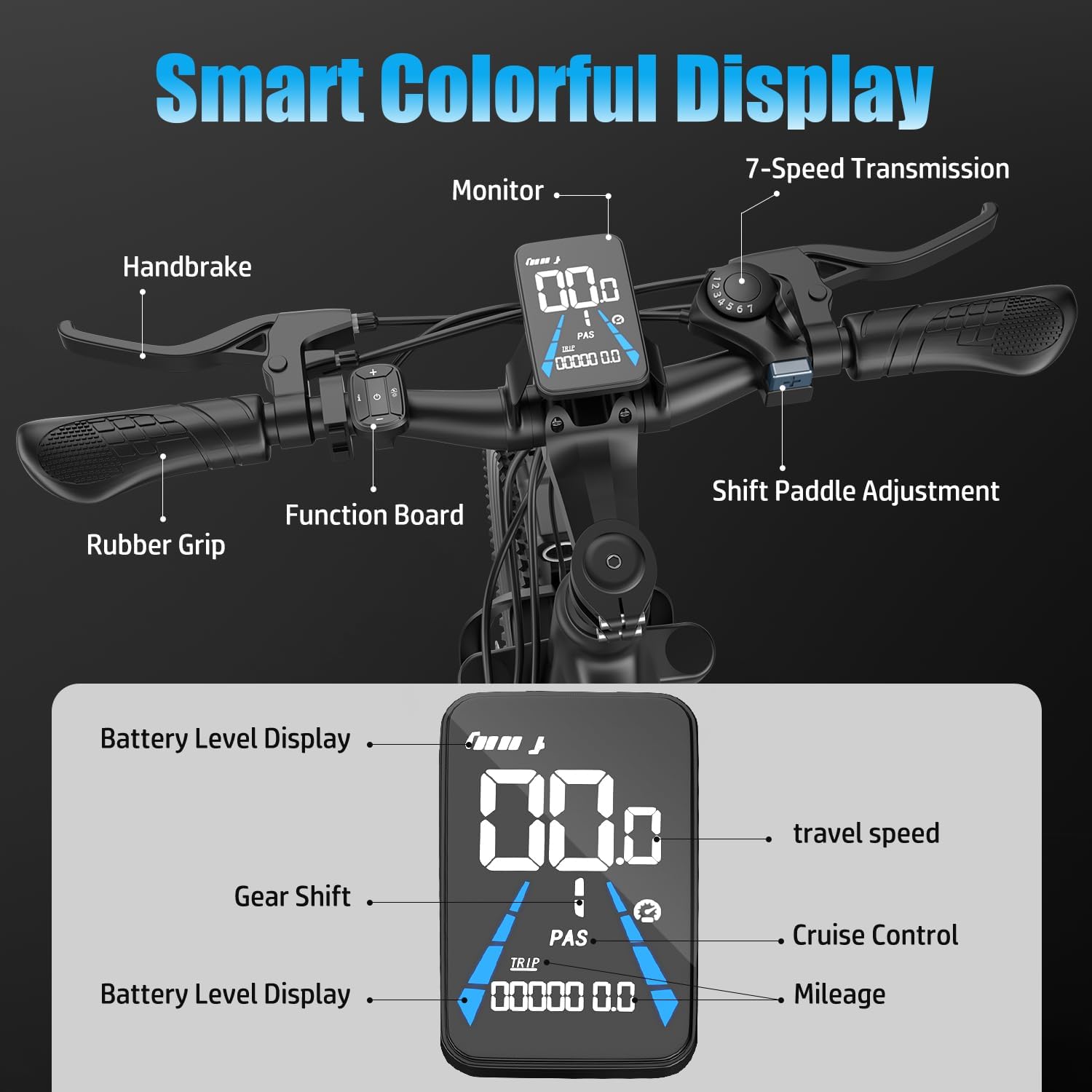
Image 5.5: Handlebar Controls and LCD Display.
The handlebar features a smart colorful LCD display that provides essential riding information such as battery level, current speed, pedal assist level (PAS), mileage, and cruise control status. The 7-speed transmission shifter and brake levers are also located on the handlebars.
6. Operating Instructions
This section details how to operate your AZHAR Electric Mountain Bike safely and effectively.
6.1 Powering On/Off
- To power on the bike, press and hold the power button on the LCD display for a few seconds. The display will illuminate.
- To power off, press and hold the power button again until the display turns off.
6.2 Riding Modes
Your bike offers three distinct riding modes:
- Full Electric Mode: Engage the throttle to propel the bike without pedaling. This mode uses battery power exclusively.
- Pedal Assist Mode (PAS): The motor provides assistance as you pedal. You can adjust the level of assistance (typically 1-5) via the display controls. Higher levels provide more power.
- Fitness Mode (Pedal Only): The electric assist system is off, and the bike operates like a traditional bicycle. This mode conserves battery life.
6.3 Gear Shifting
The bike features a 7-speed transmission. Use the shift paddle adjustment on the handlebar to change gears. Shift to lower gears for climbing hills and higher gears for flat terrain or descents.
6.4 Braking
The bike is equipped with dual disc brakes for reliable stopping power. Apply both front and rear brakes simultaneously for controlled deceleration. Avoid sudden, hard braking, especially with the front brake, to prevent loss of control.
6.5 Battery Charging
- Ensure the bike is powered off before charging.
- Locate the charging port on the battery (or frame if charging while installed).
- Connect the charger to the battery, then plug the charger into a standard electrical outlet.
- The charger indicator light will typically show red during charging and turn green when fully charged.
- A full charge takes approximately 5-6 hours. Do not overcharge the battery.
7. Maintenance
Regular maintenance ensures the safety, performance, and longevity of your electric bike.
7.1 Routine Checks
- Tires: Check pressure weekly and inspect for wear or damage.
- Brakes: Inspect brake pads for wear and ensure brake levers operate smoothly. Adjust cable tension as needed.
- Chain: Keep the chain clean and lubricated.
- Bolts and Fasteners: Periodically check all bolts and fasteners for tightness, especially on the handlebars, seat post, and wheels.
- Electrical Connections: Ensure all electrical cables and connectors are secure and free from damage.
7.2 Battery Care
- Store the battery in a cool, dry place when not in use.
- If storing for extended periods, charge the battery to 50-70% every 1-2 months.
- Avoid fully discharging the battery frequently.
7.3 Cleaning
Clean your bike with a damp cloth and mild soap. Avoid using high-pressure washers directly on electrical components, bearings, or the motor.
8. Troubleshooting
This section addresses common issues you might encounter with your electric bike.
| Problem | Possible Cause | Solution |
|---|---|---|
| Bike does not power on | Battery not charged, battery not properly seated, loose electrical connection. | Charge battery, ensure battery is securely locked, check all visible connections. |
| Motor not assisting | PAS level set to 0, brake lever engaged, motor cable loose. | Increase PAS level, ensure brake levers are fully released, check motor cable connection. |
| Battery not charging | Charger not plugged in, faulty charger, damaged battery port. | Verify charger connection, try a different outlet, contact support if issue persists. |
| Brakes feel weak | Worn brake pads, loose brake cable, air in hydraulic system (if applicable). | Inspect/replace brake pads, adjust cable tension, consult a bike mechanic for hydraulic issues. |
For issues not listed here or if solutions do not resolve the problem, please contact AZHAR customer support.
9. Specifications
Below are the technical specifications for the AZHAR Electric Mountain Bike, Model F28.

Image 9.1: Bike Dimensions and Rider Recommendations.
| Feature | Specification |
|---|---|
| Model Name | F28 |
| Bike Type | Electric Mountain Bike, Multi-Use Bike |
| Motor | 500W (750W Peak) |
| Top Speed | Up to 25 MPH |
| Battery | 48V 10AH (480Wh) Removable Lithium Battery |
| Range per Charge | 35-45 Miles |
| Charging Time | 5-6 Hours |
| Wheel Size | 26 Inches |
| Tire Type | Puncture-resistant pneumatic |
| Suspension Type | Front Fork Suspension |
| Gears | 7-Speed Transmission |
| Brake Style | Dual Disc Brakes |
| Frame Material | Alloy Steel |
| Item Weight | 50.7 Pounds |
| Maximum Weight Recommendation | 300 Pounds |
| Special Features | Adjustable Seat, Digital Display, Front Fork Suspension, Fenders, Headlight, Lightweight, Multi-Speed, Odometer, Rechargeable |
| Safety Certification | UL 2849 |
10. Warranty and Support
AZHAR is committed to providing quality products and customer satisfaction.
10.1 Warranty Information
Your AZHAR Electric Mountain Bike comes with a 1-year limited warranty from the date of purchase. This warranty covers manufacturing defects in materials and workmanship. It does not cover damage due to misuse, accidents, normal wear and tear, or unauthorized modifications.
10.2 Returns Policy
A 30-day return policy is offered. Please retain the original packaging for at least one month in case a return is necessary. Contact customer support before initiating any return to ensure proper processing and to avoid lost packages.
10.3 Customer Support
For any questions, concerns, or warranty claims, please contact AZHAR customer support. When contacting us, please provide your model number (F28) and a detailed description of the issue, including pictures if applicable. Our team aims to respond within 24 hours.
Contact Information:
Please refer to your purchase documentation or the AZHAR official website for the most current customer support contact details.