
VIAGDO l shaped bunk bed twin over twin
VIAGDO Twin Over Twin L-Shaped Bunk Bed Instruction Manual
Model: L-Shaped Bunk Bed Twin Over Twin
1. Introduction
Thank you for choosing the VIAGDO Twin Over Twin L-Shaped Bunk Bed. This manual provides essential information for the safe assembly, operation, and maintenance of your new bunk bed. Please read all instructions carefully before beginning assembly and retain this manual for future reference.
Important: Adult assembly is required. Always follow safety guidelines to prevent injury.
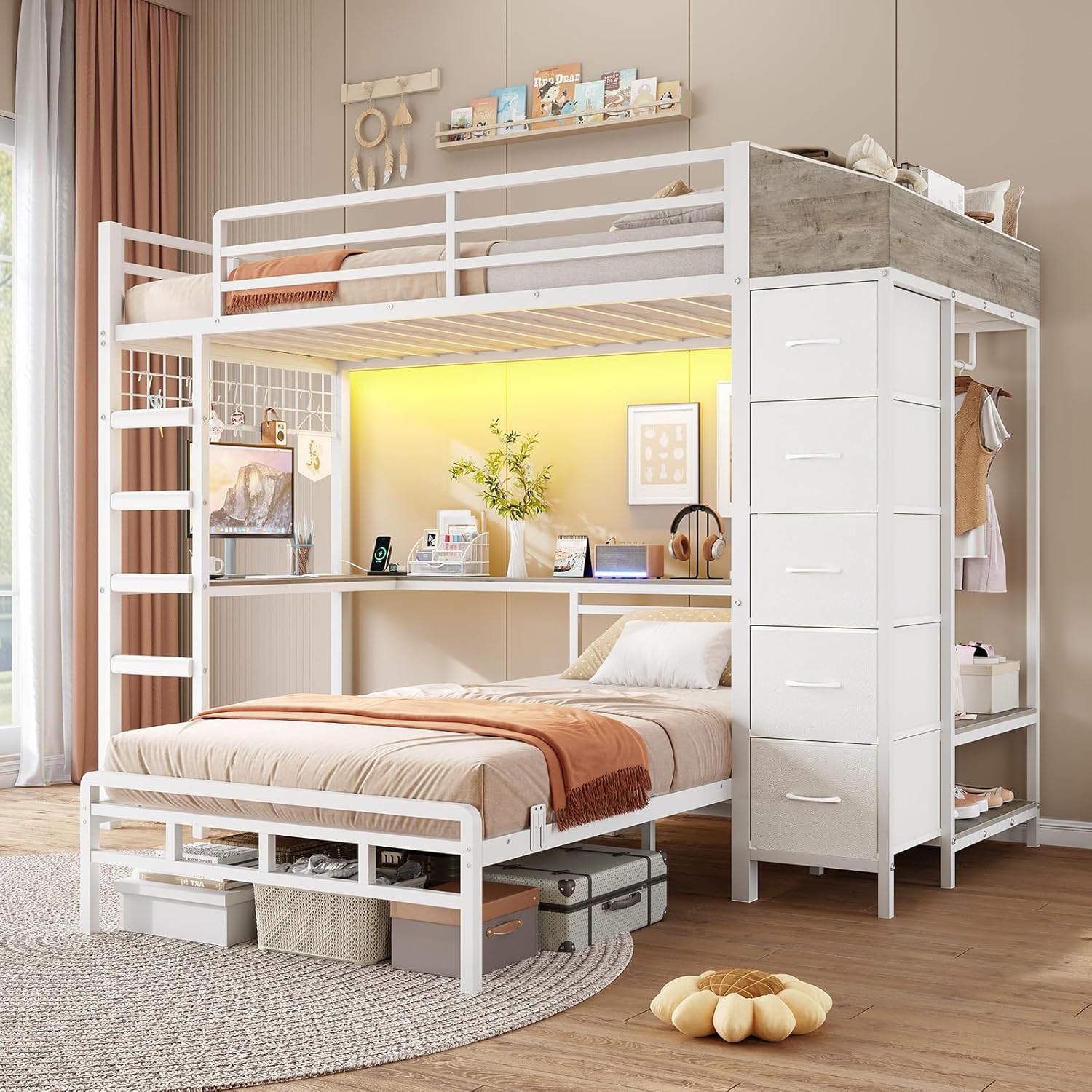
Image 1: Overview of the VIAGDO Twin Over Twin L-Shaped Bunk Bed.
2. Product Overview
The VIAGDO L-Shaped Bunk Bed is designed to maximize space and functionality, offering two twin-sized sleeping areas, integrated storage, a desk, and modern amenities.
Key Features:
- L-Shaped Twin Over Twin Configuration: Provides two distinct sleeping areas, ideal for shared rooms.
- Multifunctional Hall Tree: Includes five storage drawers, a two-tier shoe rack, and a clothes hanging rod for comprehensive organization.
- Integrated L-Shaped Desk: Offers a spacious workspace or gaming area beneath the top bunk.
- Built-in Charging Station: Features 2 AC outlets, 1 USB port, and 1 Type-C port for convenient device charging.
- LED Light Strip: Equipped with a dynamic, multi-color LED strip controllable via smartphone app or remote.
- Heavy-Duty Metal Construction: Ensures stability and durability with an all-steel frame.
- Safety Features: Includes 12-inch tall guardrails for the upper bunk, anti-slip mattress grippers for the lower bunk, and an anti-tip kit for wall anchoring.
- Noise-Free Design: Custom plastic buckles and mute clips secure slats to prevent noise.

Image 2: The L-shaped design integrates sleeping and storage areas.
3. Specifications
| Feature | Detail |
|---|---|
| Model Number | L-Shaped Bunk Bed Twin Over Twin |
| Overall Dimensions (L x W x H) | 88.2" x 42" x 72.8" |
| Bed Size | Twin (Upper and Lower) |
| Recommended Mattress Thickness | 4"-6" (for both bunks) |
| Material | Heavy-duty Steel Frame, Wood Accents |
| Color | White |
| Item Weight | 125 Pounds |
| Charging Station | 2 AC Outlets, 1 USB Port, 1 Type-C Port |
| Special Features | 5 Storage Drawers, Hall Tree, L-Shaped Desk, LED Light Strip, Guardrails, Stairs |
| Assembly Required | Yes |
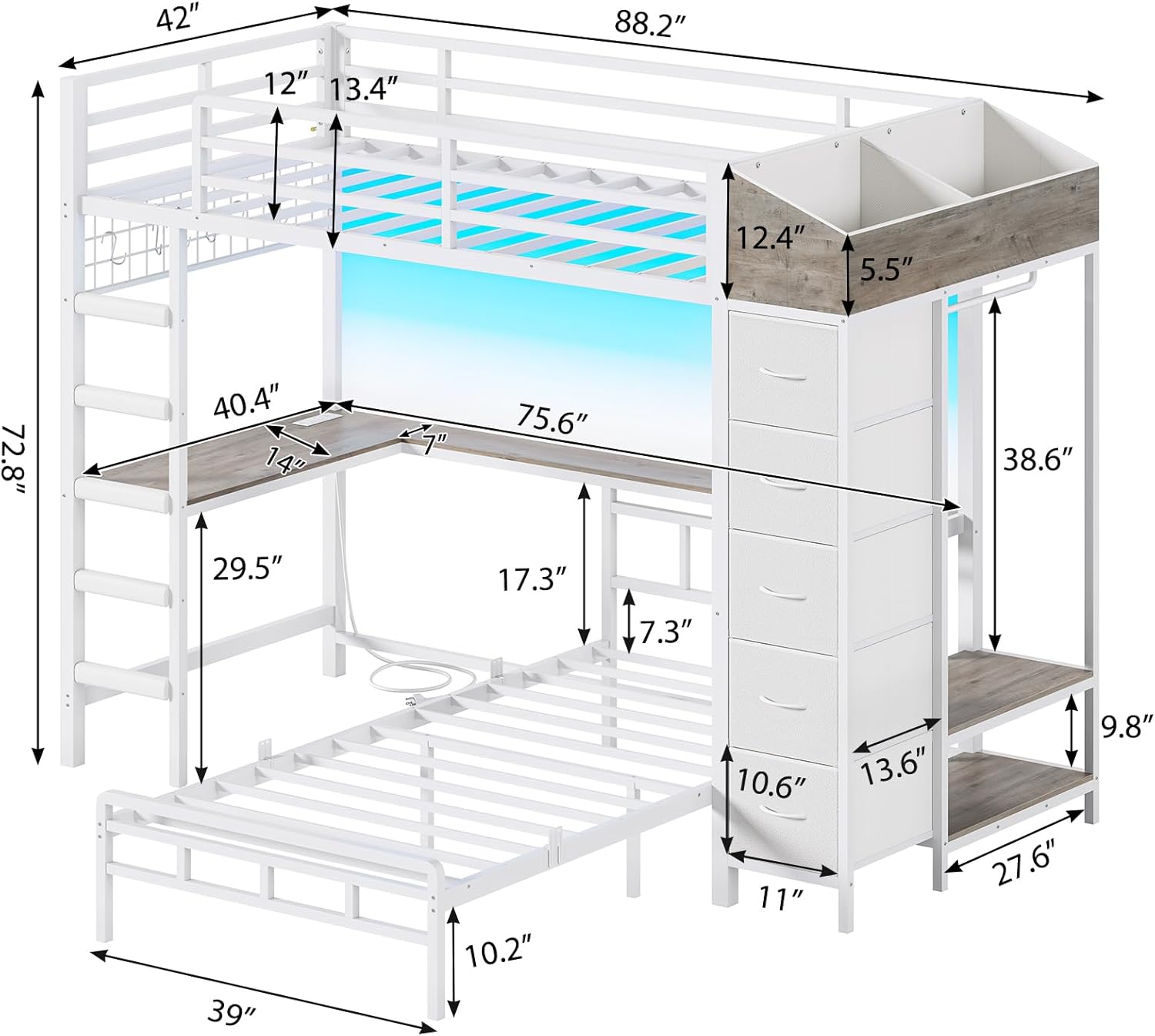
Image 3: Detailed dimensions of the bunk bed components.
4. Assembly Instructions
Assembly of the VIAGDO L-Shaped Bunk Bed requires two adults. Please ensure all parts are present and undamaged before beginning. Refer to the included assembly diagram for specific steps.
4.1. Before You Begin:
- Clear a spacious area for assembly.
- Unpack all components and hardware. Verify against the parts list (not provided in this manual, refer to packaging).
- Gather necessary tools (typically an Allen wrench, which is usually included, and a screwdriver).
4.2. General Assembly Steps:
- Assemble the main bed frames (upper and lower bunks) according to the diagram.
- Attach the support beams and slats for both bunks. Ensure all connections are secure.
- Install the L-shaped desk and its supports.
- Assemble the hall tree structure, including the storage drawers, shoe rack, and clothes rod.
- Attach the ladder and ensure it is firmly secured.
- Install the guardrails on the upper bunk.
- Mount the anti-tipping device to a wall stud for enhanced stability.
- Connect the charging station and LED light strip as per their individual instructions.
Note: Detailed step-by-step instructions with illustrations are provided in the physical assembly manual included with your product. Follow those instructions precisely.

Image 4: Key structural and assembly features.
5. Operating Instructions
5.1. Charging Station:
The integrated charging station is located on the L-shaped desk. To use, plug the bed's power cord into a standard wall outlet. You can then use the 2 AC outlets, 1 USB port, and 1 Type-C port to power and charge your electronic devices.
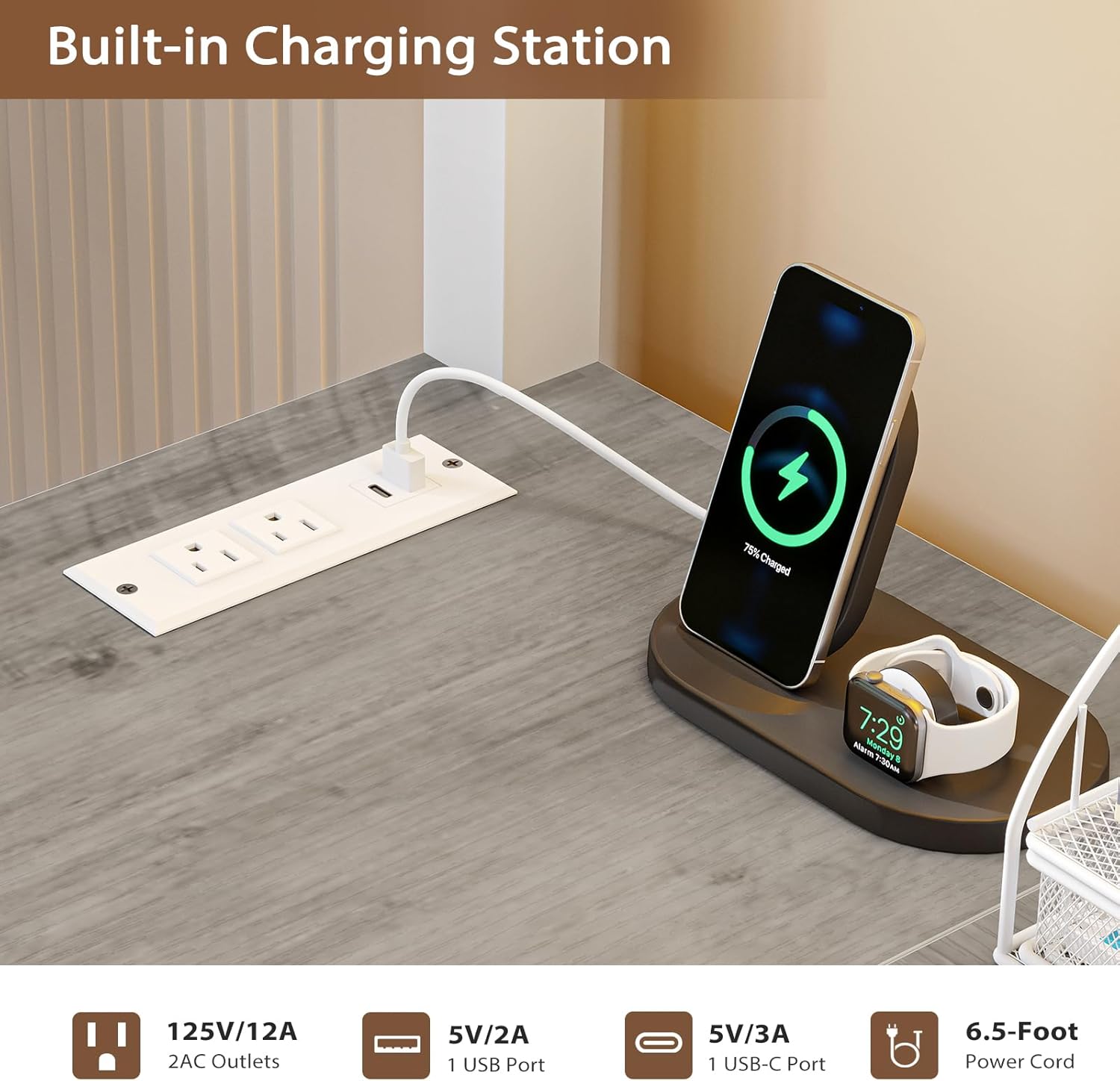
Image 5: Built-in charging station for electronic devices.
5.2. LED Light Strip:
The LED light strip provides customizable ambient lighting. It can be controlled via a dedicated smartphone application or the included remote control. Refer to the separate LED light strip manual for detailed pairing and operation instructions.
- App Control: Download the recommended app (details in LED manual) to access 60,000+ RGB colors, 29 dynamic modes, music sync, and scheduling features.
- Remote Control: Use the provided remote for basic functions like power on/off, color selection, and brightness adjustment.

Image 6: RGB LED lighted bunk bed with various control options.
5.3. Storage Features:
- Hall Tree Drawers: Utilize the five fabric drawers for organizing clothes, linens, or other personal items.
- Shoe Rack: The two-tier shoe rack provides dedicated space for footwear.
- Clothes Hanging Rod: Use the rod to hang garments, keeping them wrinkle-free.
- Bedside Storage Boxes: The top bunk features two integrated bedside storage boxes for small items.
- Underbed Storage: The lower bunk offers approximately 10.2 inches of clearance for additional storage bins or luggage.

Image 7: Multifunctional hall tree with integrated storage.
6. Maintenance
6.1. Cleaning:
- Wipe metal surfaces with a soft, damp cloth. Avoid abrasive cleaners or harsh chemicals.
- For fabric drawers, spot clean with a mild detergent and allow to air dry.
- Regularly dust all surfaces to prevent buildup.
6.2. Inspection:
- Periodically check all bolts, screws, and connections to ensure they are tight. Retighten as necessary.
- Inspect guardrails, ladder, and slats for any signs of wear or damage. Replace damaged parts immediately.
- Ensure the anti-tipping device remains securely anchored to the wall.
7. Safety Guidelines
Failure to follow these warnings could result in serious injury.
- Maximum Weight Capacity: Do not exceed the recommended weight limits for each bunk (refer to product labeling or original manual).
- Upper Bunk Age Restriction: The upper bunk is not suitable for children under 6 years of age.
- Guardrails: Always use the guardrails on the upper bunk. Ensure they are properly installed and maintained.
- Ladder Safety: Use the ladder for entering and exiting the upper bunk. Do not use the bed as a climbing frame. Ensure the ladder is securely attached.
- Mattress Thickness: The mattress on the upper bunk must be at least 5 inches below the top edge of the guardrail to ensure safety. Recommended mattress thickness is 4-6 inches.
- Anti-Tipping Device: Always install and use the anti-tipping device to secure the bed to the wall, preventing accidental tipping.
- No Horseplay: Prohibit horseplay on or under the bed.
- Ventilation: Ensure adequate ventilation around the bed, especially if using the LED lights for extended periods.
- Electrical Safety: Do not overload the charging station. Disconnect power during cleaning or if any electrical component is damaged.
- Assembly Integrity: Regularly check and tighten all connections. Do not use the bed if any part is missing, damaged, or broken.

Image 8: Key safety and assembly features.
8. Troubleshooting
| Problem | Possible Cause | Solution |
|---|---|---|
| Bed is wobbly or unstable. | Loose connections; Anti-tip device not installed or secured. | Ensure all bolts and screws are tightened. Verify the anti-tip device is correctly anchored to a wall stud. |
| Squeaking or noise from slats. | Slats not fully seated or mute clips not properly installed. | Check that all slats are correctly positioned and secured with the plastic buckles/mute clips. |
| Charging station not working. | Power cord not plugged in; Outlet issue; Device compatibility. | Ensure the bed's power cord is securely plugged into a functional wall outlet. Test the outlet with another device. Check device compatibility with USB/Type-C ports. |
| LED lights not turning on/responding. | Power connection loose; Remote battery dead; App not paired. | Check the power connection for the LED strip. Replace remote batteries. Re-pair the LED strip with the smartphone app as per the LED manual. |
| Missing parts during assembly. | Packaging error; Parts overlooked. | Carefully re-check all packaging materials. Contact VIAGDO customer support with your purchase details for assistance. |
9. Warranty and Support
For warranty information, please refer to the documentation included with your purchase or contact VIAGDO customer service directly. VIAGDO is committed to providing quality products and support.
Customer Support:
If you have any questions, require assistance with assembly, or need to report missing/damaged parts, please contact VIAGDO customer support through the retailer where you purchased the product or visit the official VIAGDO store online.
Online Store: VIAGDO Store on Amazon
Ask a question about this manual
Ask about setup, troubleshooting, compatibility, parts, safety, or missing instructions. Manuals+ will review the question and use this page’s manual context to help answer it.