1. Introduction
This manual provides essential information for the safe and effective operation of your NUZEZCJG KWS-306 Power Meter. The KWS-306 is a sophisticated 3-Phase 4-Wire KWh Energy Tester with Voltage Protection Relay Switch and a color screen, designed for accurate measurement and protection in electrical systems. Please read this manual thoroughly before installation and use.
2. Safety Information
Always observe the following safety precautions to prevent injury or damage to the device:
- Installation and maintenance should only be performed by qualified electricians.
- Ensure power is disconnected before any wiring or installation procedures.
- Do not operate the device in wet or damp conditions.
- Verify correct wiring connections according to the provided diagrams to avoid damage or electric shock.
- Do not exceed the specified voltage and current ratings.
- Keep the device away from flammable materials and extreme temperatures.
3. Product Overview
The KWS-306 is designed for comprehensive electrical monitoring and protection. Below are key features and components.


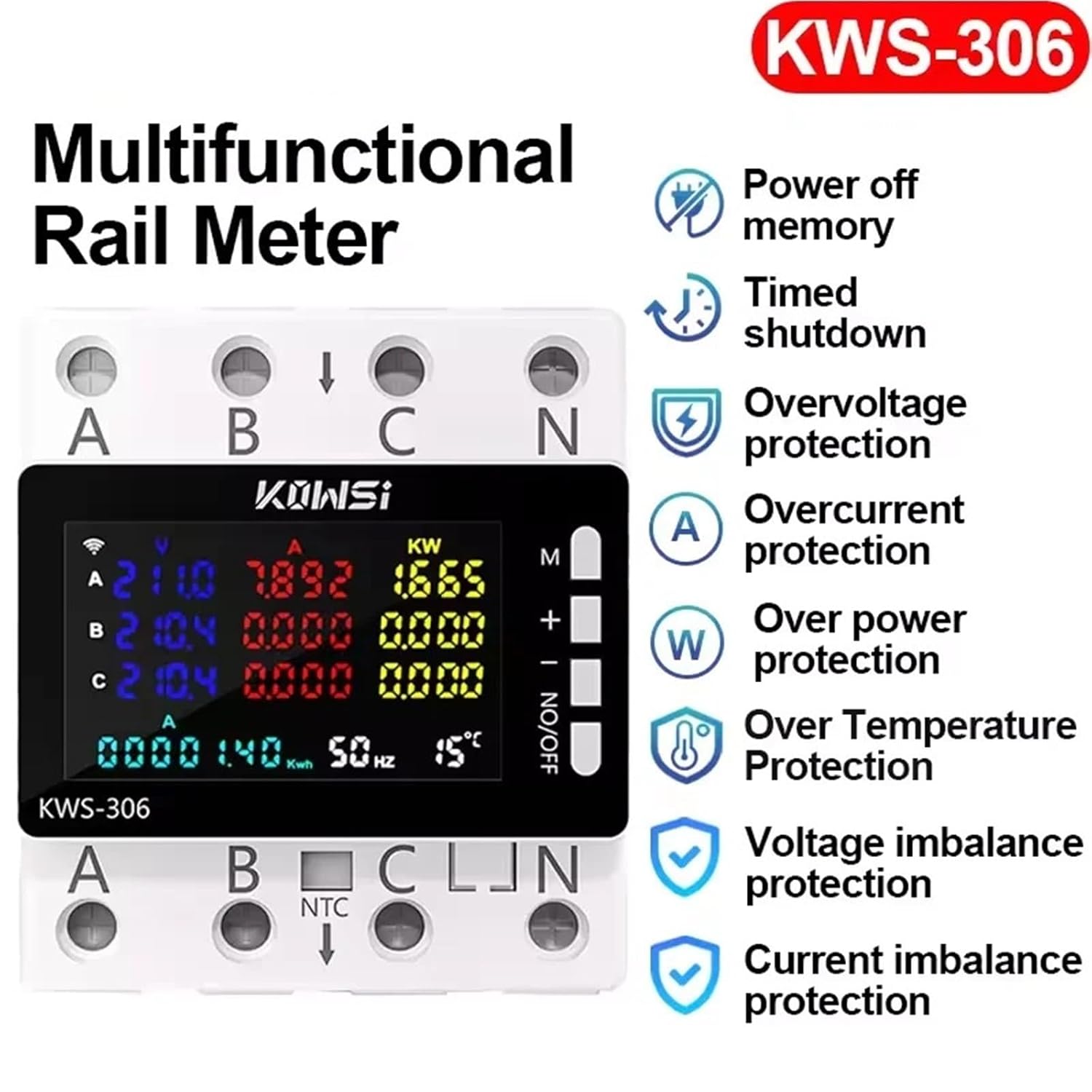


4. Setup and Installation
The KWS-306 is designed for guide rail mounting. Follow these steps for proper installation:
- Power Disconnection: Before beginning any installation, ensure that the main power supply to the circuit is completely disconnected at the breaker or fuse box. Verify with a voltage tester.
- Mounting: Securely mount the KWS-306 onto a standard DIN rail within your electrical panel. Ensure it clicks firmly into place.
- Wiring (3-Phase 4-Wire System):
- Connect Phase A (L1) to terminal 'A' on the meter.
- Connect Phase B (L2) to terminal 'B' on the meter.
- Connect Phase C (L3) to terminal 'C' on the meter.
- Connect the Neutral (N) wire to terminal 'N' on the meter.
- Ensure all connections are tight and secure to prevent loose contacts and overheating.
- Temperature Sensor (NTC): If applicable, connect the NTC temperature sensor to the designated terminals for ambient temperature monitoring.
- Power Restoration: Once all connections are verified and secure, restore power to the circuit. The meter should power on and display readings.
Note: Refer to local electrical codes and standards for proper wiring practices.
5. Operating Instructions
The KWS-306 features a user-friendly color display and control buttons for easy operation.
5.1 Display Interface
The color screen provides real-time data:
- Voltage (V): Displays voltage for each phase (A, B, C).
- Current (A): Displays current for each phase (A, B, C).
- Power (KW): Displays active power for each phase and total power.
- Energy (KWh): Accumulative energy consumption.
- Frequency (Hz): System frequency.
- Temperature (°C): Ambient temperature reading from NTC sensor (if connected).
5.2 Button Functions
The side buttons (M, +, -, NO/OFF) are used for navigation and control:
- M (Menu/Mode): Press to cycle through different display modes or enter menu settings.
- + (Up/Increase): Used to navigate up in menus or increase values.
- - (Down/Decrease): Used to navigate down in menus or decrease values.
- NO/OFF (On/Off/Confirm): Short press to confirm selections; long press to toggle the relay switch (if configured for control).
5.3 Setting Protection Parameters
The KWS-306 allows setting various protection thresholds. Consult the on-screen menu for specific parameter adjustments (e.g., overvoltage, undervoltage, overcurrent, over-temperature limits). Use the M, +, and - buttons to navigate and adjust values, and NO/OFF to confirm.
6. Maintenance
The KWS-306 is designed for low maintenance. Follow these guidelines:
- Cleaning: Use a soft, dry cloth to clean the display and casing. Do not use abrasive cleaners or solvents.
- Inspection: Periodically inspect wiring connections to ensure they remain tight and free from corrosion.
- Environment: Ensure the operating environment remains within the specified temperature and humidity ranges.
7. Troubleshooting
| Problem | Possible Cause | Solution |
|---|---|---|
| No display/Power off | No power supply; Incorrect wiring; Internal fault. | Check main power supply. Verify wiring connections. Contact support if problem persists. |
| Inaccurate readings | Loose connections; Incorrect calibration (unlikely for user); External interference. | Check and tighten all wiring connections. Ensure no strong electromagnetic interference nearby. |
| Relay not switching | Protection threshold not met; Manual override; Internal fault. | Verify protection settings. Check if manual override is active. |
| Screen frozen/unresponsive | Temporary software glitch. | Disconnect power for 30 seconds, then reconnect to reset the device. |
8. Specifications
| Parameter | Value |
|---|---|
| Model Number | KWS-306 |
| Voltage Range | AC 85-290V |
| Current Range | 0-80A |
| Power Range | 0-23KW |
| Frequency Range | 50-60Hz |
| Operating Temperature | -20~150°C |
| Display Type | Digital Only |
| Phase | Three Phase |
| Mounting Type | Bolt-On Mount (Implied DIN Rail) |
| Power Supply | AC |
9. Warranty and Support
For warranty information, technical support, or service inquiries, please contact the manufacturer or your point of purchase. Keep your purchase receipt as proof of purchase.
Manufacturer: NUZEZCJG
Refer to the product packaging or the seller's website for the most current contact details.


