1. Introduction
This manual provides detailed instructions for the proper use, setup, and maintenance of your DUCOCUB J59 Wireless Earbuds. Please read this manual thoroughly before using the product to ensure optimal performance and longevity.

Image 1.1: DUCOCUB J59 Wireless Earbuds and charging case, showcasing the gradient color design.
2. Package Contents
Verify that all items are present in the package:
- Bluetooth Earbuds (2 units)
- Charging Case (1 unit)
- Type-C Cable (1 unit)
- User Manual (This document)

Image 2.1: The complete package contents of the DUCOCUB J59 Wireless Earbuds.
3. Product Overview
The DUCOCUB J59 Wireless Earbuds are designed for a high-quality audio experience with advanced features.
3.1 Key Features
- Bluetooth 5.4 Technology: Ensures stable and fast connection with minimal latency.
- Immersive Sound: 14.2mm dynamic drivers deliver rich audio.
- Clear Calls: ENC noise reduction with 4 microphones for clear communication.
- Extended Playtime: Up to 6 hours per charge, 30 hours total with charging case.
- Dual LED Display: Real-time battery level for earbuds and case.
- Comfortable Design: Ultra-lightweight (3.4 grams each) and ergonomic fit.
- IPX7 Waterproof: Protection against sweat and rain.
- Smart Touch Control: Easy management of music, calls, and voice assistant.

Image 3.1: The DUCOCUB J59 Wireless Earbuds in their charging case, highlighting the LED power display.
3.2 Audio Technology
Equipped with 14.2mm dynamic drivers and polymer diaphragms, the earbuds provide a balanced three-channel audio framework, enhancing vocal clarity and overall sound quality.
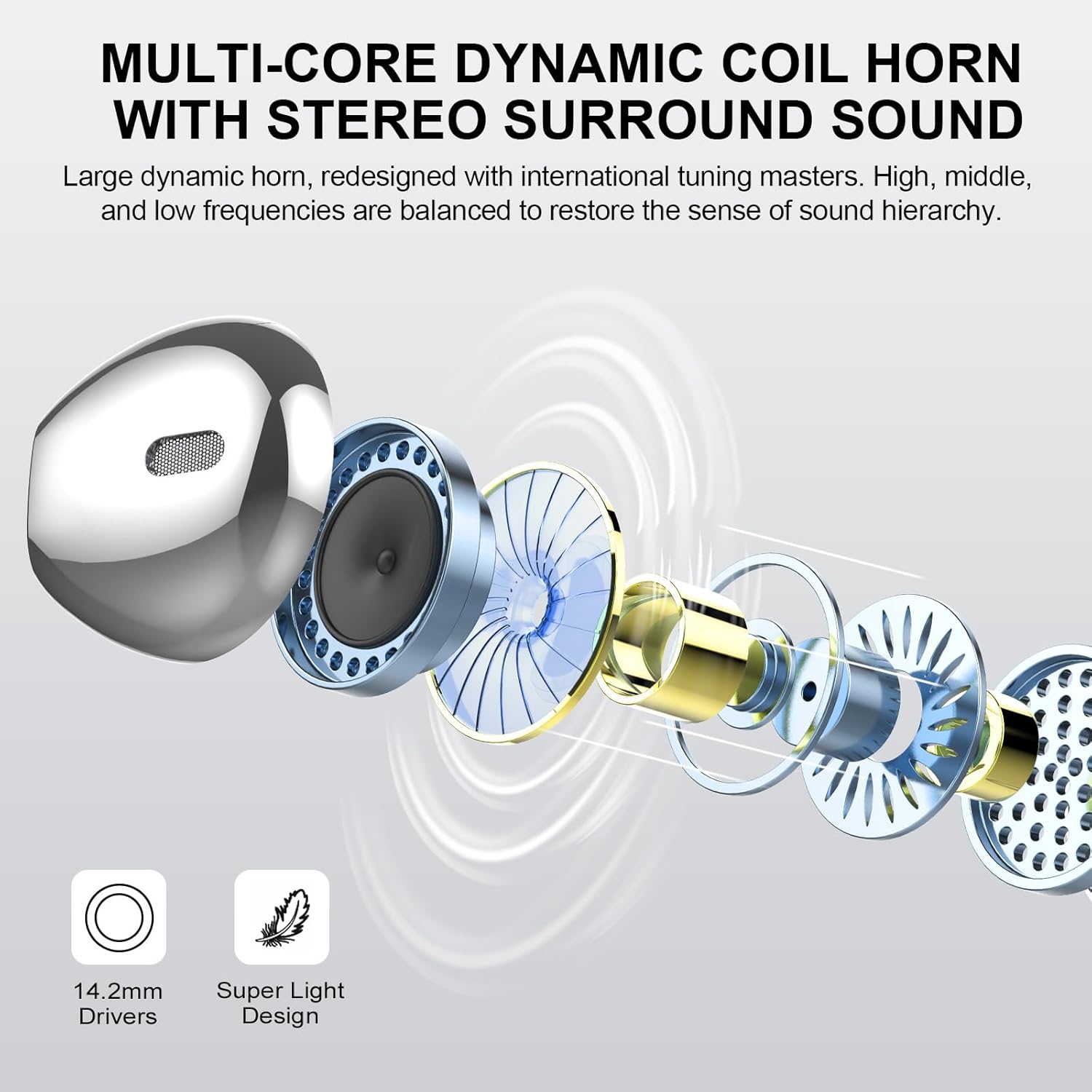
Image 3.2: Exploded view of the earbud's internal structure, emphasizing the 14.2mm dynamic driver.
3.3 Ergonomic Design
Each earbud weighs approximately 3.4 grams, offering an ultra-light and ergonomic design for comfortable, prolonged wear.

Image 3.3: The ergonomic design of the earbuds, shown being worn for a secure and comfortable fit.
4. Charging
The earbuds and charging case feature an intelligent LED digital display to monitor battery levels. The charging case provides multiple charges for the earbuds.
- Earbud Charging Time: Approximately 1 hour for a full charge.
- Case Charging Time: Approximately 1 hour for a full charge via Type-C.
- Playback Time: Over 6 hours on a single earbud charge; total of 30 hours with the charging case.

Image 4.1: Visual representation of the LED digital display on the charging case and earbud, showing battery status and charging duration.

Image 4.2: Detailed view of the digital power display on both the charging case and an earbud.
5. Setup and Pairing
The earbuds utilize Bluetooth 5.4 technology for a fast, stable, and low-latency connection.
5.1 Initial Pairing
- Open the charging case. The earbuds will automatically enter pairing mode.
- On your device (smartphone, tablet, laptop), navigate to the Bluetooth settings.
- Search for available devices and select "J59" from the list.
- Once connected, the earbuds are ready for use.

Image 5.1: Illustrates the one-step automatic pairing process with a mobile device.
5.2 Video Guide: DUCOCUB J59 Wireless Earbuds Overview
For a visual guide on the product's features and pairing process, please watch the official video below:
Video 5.1: An official overview of the DUCOCUB J59 Wireless Earbuds, demonstrating key features and functionality.
6. Operating Instructions
6.1 Smart Touch Controls
The earbuds feature high-sensitivity touch controls for various functions:
- Play/Pause: Tap the earbud once.
- Next Song: Double-tap the right earbud.
- Previous Song: Double-tap the left earbud.
- Answer/End Call: Tap the earbud once.
- Reject Call: Press and hold the earbud for 2 seconds.
- Volume Up: Triple-tap the right earbud.
- Volume Down: Triple-tap the left earbud.
- Activate Voice Assistant: Press and hold the earbud for 3 seconds.
- Power On/Off: Press and hold the earbud for 4 seconds.

Image 6.1: Visual guide to the intelligent touch controls available on the earbuds.
6.2 Call Clarity
The earbuds are equipped with 4 microphones and ENC (Environmental Noise Cancellation) technology, which suppresses up to 95% of background noise, ensuring clear voice transmission during calls.
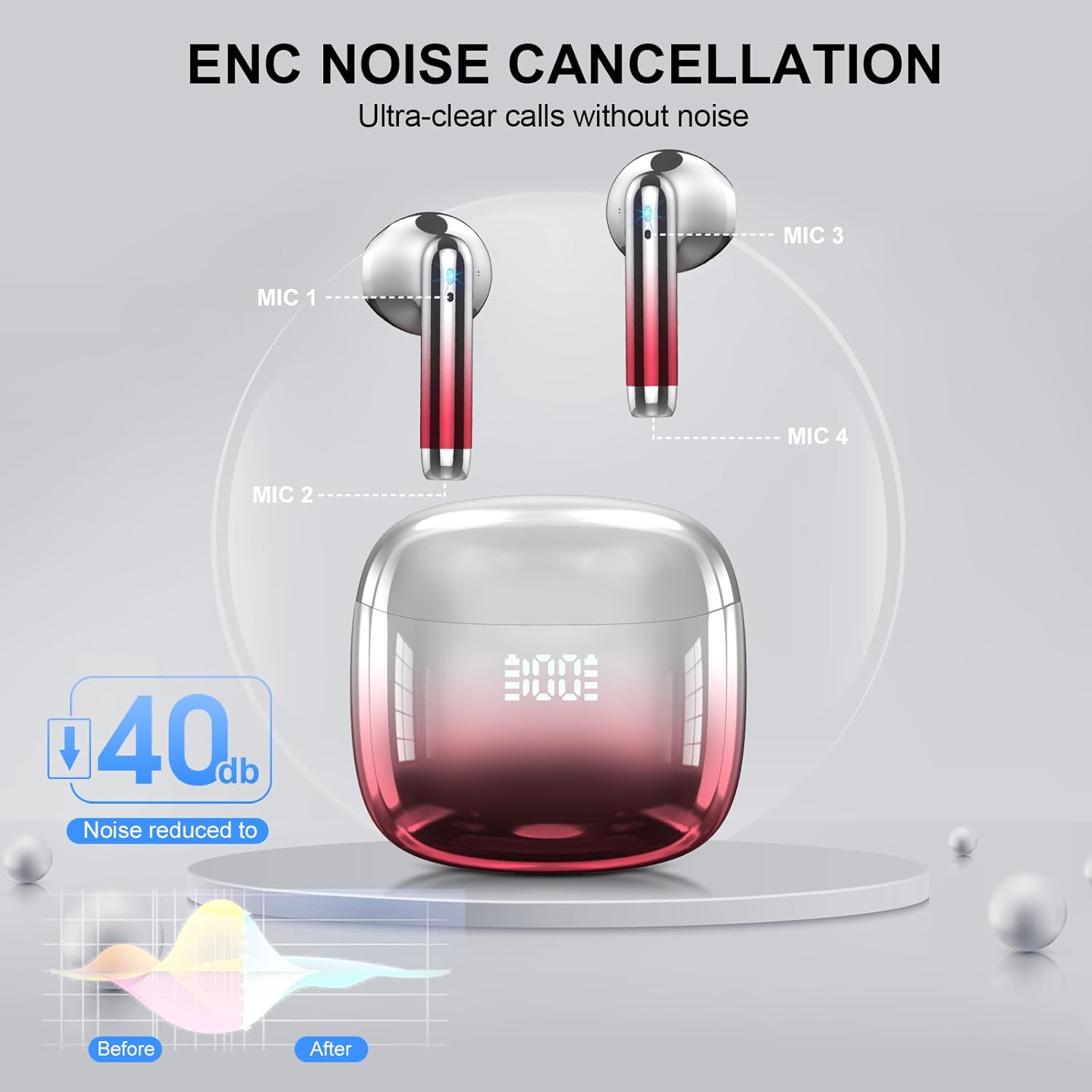
Image 6.2: Illustration of the 4-microphone system and ENC technology for enhanced call clarity.
7. Maintenance and Care
7.1 Waterproof Rating
The DUCOCUB J59 earbuds have an IPX7 waterproof rating, meaning they are protected against immersion in water up to 1 meter for 30 minutes. This makes them suitable for workouts and use in light rain or accidental splashes. However, they are not designed for swimming or prolonged submersion.

Image 7.1: The earbuds and charging case demonstrating their IPX7 waterproof capabilities.
7.2 Cleaning
To clean your earbuds, gently wipe them with a soft, dry, lint-free cloth. Do not use abrasive materials or harsh chemicals. Ensure the charging contacts on both the earbuds and the case are clean and dry before charging.
8. Troubleshooting
If you encounter issues with your DUCOCUB J59 Wireless Earbuds, please refer to the following common solutions:
| Problem | Possible Solution |
|---|---|
| Earbuds not pairing |
|
| Only one earbud working |
|
| Low volume or poor sound quality |
|
| Charging issues |
|
9. Specifications
| Feature | Detail |
|---|---|
| Model Name | J59 |
| Brand | DUCOCUB |
| Connectivity Technology | Wireless (Bluetooth) |
| Bluetooth Version | 5.4 |
| Bluetooth Range | 15 Meters |
| Audio Driver Type | Dynamic Driver |
| Audio Driver Size | 14.2 Millimeters |
| Battery Life (Earbuds) | 6+ Hours |
| Total Playtime (with Case) | 30 Hours |
| Charging Time (Earbuds/Case) | 1 Hour |
| Charging Interface | Type-C |
| Water Resistance Level | IPX7 Waterproof |
| Noise Control Features | ENC Noise Reduction, Passive Noise Cancellation |
| Earbud Weight | 3.4 Grams (each) |
| Compatible Devices | Smartphones, Tablets (Android, iOS) |
| Included Components | Bluetooth Earbuds (x2), Charging Case (x1), Type-C Cable (x1), User Manual (x1) |
10. Safety Information
- Do not expose the earbuds or charging case to extreme temperatures.
- Avoid dropping or subjecting the product to strong impacts.
- Keep out of reach of children and pets.
- Do not attempt to disassemble or modify the product.
- Use only the provided charging cable or a certified Type-C cable.
- Prolonged exposure to loud sounds may cause hearing damage. Adjust volume to a safe level.
11. Warranty and Support
For warranty information and customer support, please refer to the contact details provided on the product packaging or visit the official DUCOCUB website. Keep your purchase receipt for warranty claims.
Manufacturer: DUCOCUB