
Introduction
Welcome to the RK ROYAL KLUDGE C68 Hall Effect Mechanical Gaming Keyboard user manual. This guide provides detailed instructions for setting up, operating, maintaining, and troubleshooting your new keyboard. The C68 is a high-performance 65% layout keyboard featuring Hall Effect magnetic switches, rapid trigger functionality, adjustable actuation points, and an 8K Hz polling rate for an unparalleled gaming and typing experience.
What's in the Box
- 1 x RK ROYAL KLUDGE C68 Hall Effect Mechanical Gaming Keyboard
- 1 x USB-C to USB-A Cable
- 1 x 2-in-1 Keycap & Switch Puller
- 4 x Backup Switches
- 1 x Dust Cover
- 1 x User Manual (this document)
Setup
Connecting Your Keyboard
- Unpack the RK ROYAL KLUDGE C68 keyboard and its accessories.
- Connect the provided USB-C to USB-A cable to the USB-C port on the keyboard.
- Plug the USB-A end of the cable into an available USB port on your computer (Laptop, PC).
- The keyboard will automatically be recognized by your operating system (Windows, macOS).
Initial Driver Installation (Optional for Advanced Features)
For full customization and to unlock advanced features like Rapid Trigger, Dynamic Keystroke (DKS), Multi-Tap (MT), Toggle (TGL), and SOCD Cleaning, it is recommended to use the web-based customization software.
- Access the official RK ROYAL KLUDGE website to find the Pro Web Driver.
- Follow the on-screen instructions to connect your keyboard to the web driver interface.

Operating Instructions
Hall Effect Magnetic Switches & Adjustable Actuation
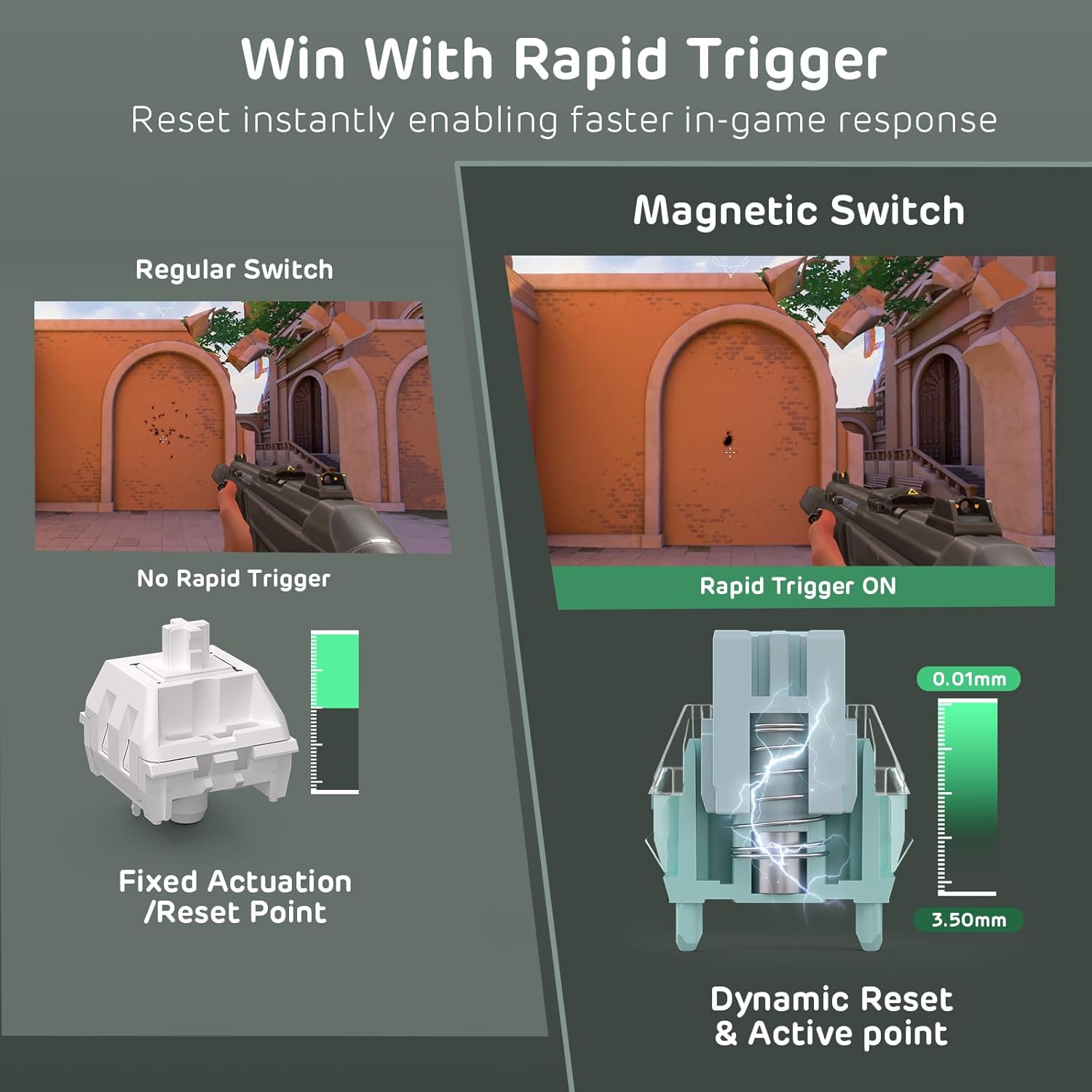
The C68 features Hall Effect magnetic switches, offering precise and customizable actuation. Each key's actuation point can be adjusted from 0.01mm to 3.5mm, allowing you to fine-tune sensitivity for different tasks, from light touches for gaming to deeper presses for typing.

Rapid Trigger Functionality
Rapid Trigger allows for instant activation and reset of keys based on real-time key travel. This feature is particularly beneficial in fast-paced games, enabling quicker peeking, rapid-stop shooting, and improved responsiveness.
Video: An overview of the RK ROYAL KLUDGE C68 Hall Effect Mechanical Gaming Keyboard, highlighting its features including magnetic switches and rapid trigger.
Video: A short demonstration of the RK ROYAL KLUDGE Hall Effect Magnetic Gaming Keyboard's key features, including 8000Hz polling rate, adjustable actuation, rapid trigger, DKS, and TGL functions.
8K Hz Polling Rate & Ultra-Low Latency
The C68 boasts an 8000Hz polling rate and 64K Hz key scanning frequency, resulting in an ultra-fast 0.125ms response time. This significantly reduces input lag, providing a competitive edge in demanding applications and games.

Triple-Layer Sound Dampening System
For a smooth and satisfying typing experience, the C68 incorporates a triple-layer sound dampening system. This includes a thick EVA sound dampener, a sound-absorbing foam, and a bottom silicone pad, effectively reducing hollow sounds and cavity noise.

65% Layout with PBT Keycaps & RGB Lighting
The compact 65% layout with 68 keys maximizes desk space while retaining essential arrow and function keys. The durable, oil-resistant MDA profile PBT keycaps resist shine and wear. The keyboard features over 20 vibrant south-facing RGB lighting effects, customizable to match your setup and enhance your environment.

Advanced Magnetic Key Functions
The C68 offers several advanced functions for enhanced control in various game genres:
- Dynamic Keystroke (DKS): Trigger 2-4 functions based on different press levels of a single key. For example, a light press for walking and a full press for running in RPGs.
- Multi-Tap (MT): Execute multiple actions with a single key press, useful for complex combos in MOBA games.
- Toggle (TGL): Enable continuous triggering with a click, and press and hold to cancel, ideal for 'hold-to-sprint' actions in FPS games.
- SOCD Cleaning: Ensures flawless directional inputs, particularly beneficial in fighting games.

Maintenance
Cleaning
- Use the provided dust cover when the keyboard is not in use to prevent dust accumulation.
- Gently wipe the keycaps and keyboard body with a soft, dry, lint-free cloth.
- For deeper cleaning, use the 2-in-1 keycap & switch puller to remove keycaps and clean underneath with compressed air or a small brush.
Switch & Keycap Replacement
The C68 features hot-swappable magnetic switches. Use the provided switch puller to carefully remove and replace switches if needed. Ensure replacement switches are compatible Hall Effect magnetic switches.
Troubleshooting
- Keyboard not responding: Ensure the USB-C cable is securely connected to both the keyboard and the computer. Try a different USB port or cable.
- RGB lighting not working: Check the keyboard's lighting controls (Fn + keys as indicated in the manual or on the keycaps) or use the web-based driver to adjust settings.
- Inconsistent key presses: Verify that the Hall Effect switches are properly seated. If issues persist, try replacing the affected switch with one of the backup switches.
- Driver connection issues: Ensure your internet connection is stable and try accessing the web driver from a different browser. Contact customer service if the issue persists.
Specifications
| Feature | Detail |
|---|---|
| Brand | RK ROYAL KLUDGE |
| Model | C68 |
| Connectivity Technology | USB-C (Wired) |
| Keyboard Description | Mechanical Keyboard with Magnetic Switch |
| Switch Type | Hall Effect Magnetic Switch |
| Adjustable Actuation | 0.01mm to 3.5mm |
| Polling Rate | 8000Hz |
| Key Scanning Frequency | 64K Hz |
| Response Time | 0.125ms |
| Number of Keys | 68 (65% Layout) |
| Keycap Material | PBT |
| Keycap Profile | MDA Profile |
| Backlighting | RGB (South-facing, 20+ effects) |
| Sound Dampening | Triple-Layer (EVA, Sound-absorbing foam, Silicone pad) |
| Compatible Devices | Laptop, PC |
| Compatible Operating System Family | Windows, macOS |
| Material | Plastic |
Warranty
The RK ROYAL KLUDGE C68 Hall Effect Mechanical Gaming Keyboard comes with a 1 Year Warranty. Please retain your proof of purchase for warranty claims. For detailed terms and conditions, refer to the official RK ROYAL KLUDGE website or contact customer support.
Support
If you encounter any issues or have questions regarding your RK ROYAL KLUDGE C68 keyboard, please contact RK ROYAL KLUDGE customer service. You can typically find contact information on the official brand website: RK ROYAL KLUDGE Store.


