Introduction
This manual provides comprehensive instructions for the operation, maintenance, and troubleshooting of your NORTH EDGE Digital Watch, Model X1-black. Please read this manual carefully to ensure proper use and to maximize the lifespan of your watch.

Front view of the NORTH EDGE Digital Watch, Model X1-black, displaying the time and various indicators.
Product Overview
The NORTH EDGE Digital Watch is a lightweight, shock-resistant, and water-resistant timepiece designed for daily use. It features a clear digital display with multiple functions including timekeeping, alarm, stopwatch, dual time, and countdown timer. The watch is equipped with a durable TPU strap and a high-strength ABS case.

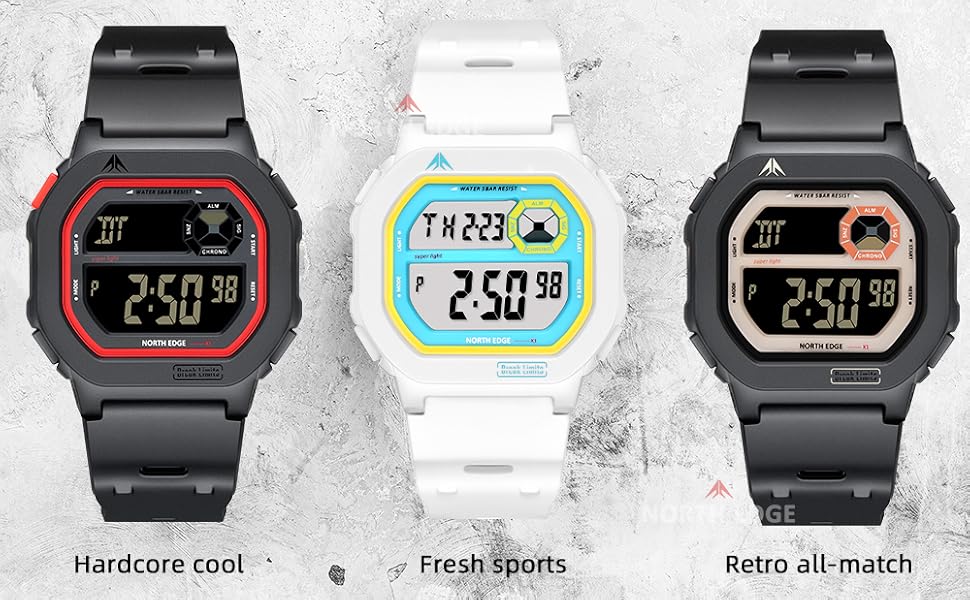
The NORTH EDGE Digital Watch is available in multiple color variations, showcasing its bold design and robust build.
Key Features:
- Regular Time Keeping (Hour, Minute, Second, PM, Date, Day)
- Daily Alarm with Snooze Function
- Countdown Timer (24-hour)
- Chronograph (Stopwatch)
- Dual Time Zone Display
- LED Backlight
- 5 ATM Water Resistance
- Lightweight TPU Strap
- High-Strength ABS Case
Setup and Initial Configuration
Before using your watch, it is recommended to familiarize yourself with the button layout and initial time setting procedures.
Button Functions:
Detailed view of the watch face, indicating button positions and display segments.
- MODE Button (Left-Middle): Cycles through different modes (Time, Alarm, Stopwatch, Dual Time, Countdown Timer).
- LIGHT Button (Left-Top): Activates the LED backlight.
- START Button (Right-Top): Used to start/stop functions in Stopwatch and Countdown modes, and to adjust settings.
- RESET Button (Right-Bottom): Used to reset functions in Stopwatch and Countdown modes, and to adjust settings.
Setting Time and Date:
- From the Timekeeping mode, press and hold the MODE button until the seconds begin to flash, indicating setting mode.
- Press the RESET button to cycle through the settings: Seconds → Hour → Minute → Year → Month → Day.
- Use the START button to increase the flashing value.
- Once all settings are adjusted, press the MODE button again to exit the setting mode.
Operating Instructions
Timekeeping Mode:
This is the default display mode, showing the current time (hours, minutes, seconds), day of the week, and date. Indicators for alarm, snooze, and chronograph may also be visible.
Alarm Function:
- Press the MODE button to navigate to the Alarm mode (indicated by "ALM" or a bell icon).
- Press and hold the START button until the alarm hour flashes.
- Use the RESET button to adjust the hour, and the START button to confirm and move to minutes.
- Repeat for minutes.
- Press the MODE button to exit.
- To activate/deactivate the alarm, press the START button while in Alarm mode.
Stopwatch (Chronograph) Mode:
- Press the MODE button to navigate to the Stopwatch mode (indicated by "CHRONO").
- Press START to begin timing.
- Press START again to pause timing.
- Press RESET to clear the stopwatch to zero.
Dual Time Mode:
This feature allows you to set and view a second time zone.
- Press the MODE button to navigate to the Dual Time mode (indicated by "DT").
- Press and hold the START button until the hour flashes.
- Use the RESET button to adjust the hour, and the START button to confirm and move to minutes.
- Press the MODE button to exit.
Countdown Timer Mode:
The watch features a 24-hour countdown timer.
- Press the MODE button to navigate to the Countdown Timer mode.
- Press and hold the START button to set the countdown time.
- Use the RESET button to adjust the hours and minutes, and START to confirm.
- Once set, press START to begin the countdown.
- Press START again to pause, and RESET to resume or reset.
Backlight:
Press the LIGHT button at any time to illuminate the display for easy reading in low-light conditions.
Maintenance and Care
Proper care will ensure the longevity and performance of your NORTH EDGE Digital Watch.
- Cleaning: Wipe the watch regularly with a soft, dry cloth. For stubborn dirt, use a slightly damp cloth and mild soap, then dry thoroughly.
- Water Resistance: The watch is 5 ATM water resistant, suitable for splashes, rain, and short periods of swimming. Do not press buttons underwater. Avoid hot water, steam, or prolonged submersion.
- Temperature: Avoid exposing the watch to extreme temperatures (hot or cold) or sudden temperature changes.
- Chemicals: Keep the watch away from solvents, detergents, perfumes, and other chemicals, as they may damage the case or strap.
- Impact: While shock-resistant, avoid strong impacts or dropping the watch.
- Battery Replacement: The watch uses 1 C battery (included). Battery replacement should ideally be performed by a qualified technician to ensure water resistance is maintained.

The back of the NORTH EDGE Digital Watch, showing model and water resistance markings.

The watch is designed for 50m water resistance, suitable for daily wear and splashes.
Troubleshooting
| Problem | Possible Cause | Solution |
|---|---|---|
| Display is blank or dim. | Low battery or extreme temperature. | Replace battery. Move to a moderate temperature environment. |
| Time is incorrect. | Time not set correctly or accidental button press. | Refer to "Setting Time and Date" section to re-set the time. |
| Buttons are unresponsive. | Watch may be in a locked mode (unlikely for this model) or internal issue. | Try pressing the LIGHT button. If issue persists, contact customer support. |
| Water inside the watch. | Water resistance compromised due to impact, age, or button press underwater. | Immediately stop using the watch and seek professional repair to prevent further damage. |
Specifications
- Model Number: X1-black
- Case Material: High-Strength ABS
- Strap Material: TPU
- Water Resistance: 5 ATM (50 meters)
- Battery Type: 1 x C battery (included)
- Clasp Type: Buckle
- Dimensions: Approximately 2.7 x 2.7 x 2.7 inches (Package Dimensions)
- Weight: Approximately 7.04 ounces (Package Weight)
Warranty and Support
For warranty information and customer support, please refer to the official NORTH EDGE website or contact your retailer. Keep your purchase receipt as proof of purchase.
Manufacturer: NORTH EDGE
Date First Available: May 23, 2025
For further assistance, please visit the NORTH EDGE Brand Store on Amazon.


