1. Introduction
The RK ROYAL KLUDGE C98 HE is a high-performance mechanical gaming keyboard designed for precision and speed. Featuring Hall Effect magnetic switches, adjustable actuation points, and an 8K Hz polling rate, this keyboard offers advanced customization and responsiveness for both gaming and typing. This manual provides detailed instructions to help you get the most out of your new keyboard.

Image: The RK ROYAL KLUDGE C98 HE keyboard showcasing its 95% layout and vibrant RGB backlighting.
2. Package Contents
Verify that all items are present in your package:
- 1 x RK ROYAL KLUDGE C98 HE Mechanical Gaming Keyboard
- 1 x USB-C to USB-A Cable
- 1 x 2-in-1 Keycap & Switch Puller
- 4 x Backup Switches
- 1 x Dust Cover
- 1 x User Manual (this document)
3. Setup
- Connect the Keyboard: Connect the provided USB-C to USB-A cable to the USB-C port on the keyboard and the USB-A port on your computer. The keyboard is wired-only and does not require batteries.
- Driver Installation: The keyboard is plug-and-play for basic functionality. For advanced customization and features, download the Pro Web Driver from the official RK ROYAL KLUDGE website. This driver is compatible with both Windows and macOS.
- Initial Test: After connecting, verify that the keyboard powers on and the RGB lighting activates. Test key presses to ensure proper function.
4. Key Features
4.1 Hall Effect Magnetic Switches & Adjustable Actuation
The RK C98 HE features Hall Effect magnetic switches, offering precise and smooth keystrokes. The actuation point for each key is adjustable from 0.01mm to 3.5mm, allowing users to fine-tune sensitivity for different tasks, from rapid gaming inputs to deliberate typing.

Image: Detailed view of a Hall Effect magnetic switch, illustrating the adjustable actuation range from 0.01mm to 3.5mm.
4.2 Rapid Trigger Functionality
Rapid Trigger (RT) enables instant key activation and reset based on key travel, without needing to return to a fixed reset point. This feature is particularly beneficial in fast-paced games, allowing for quicker repeated inputs and immediate stops.
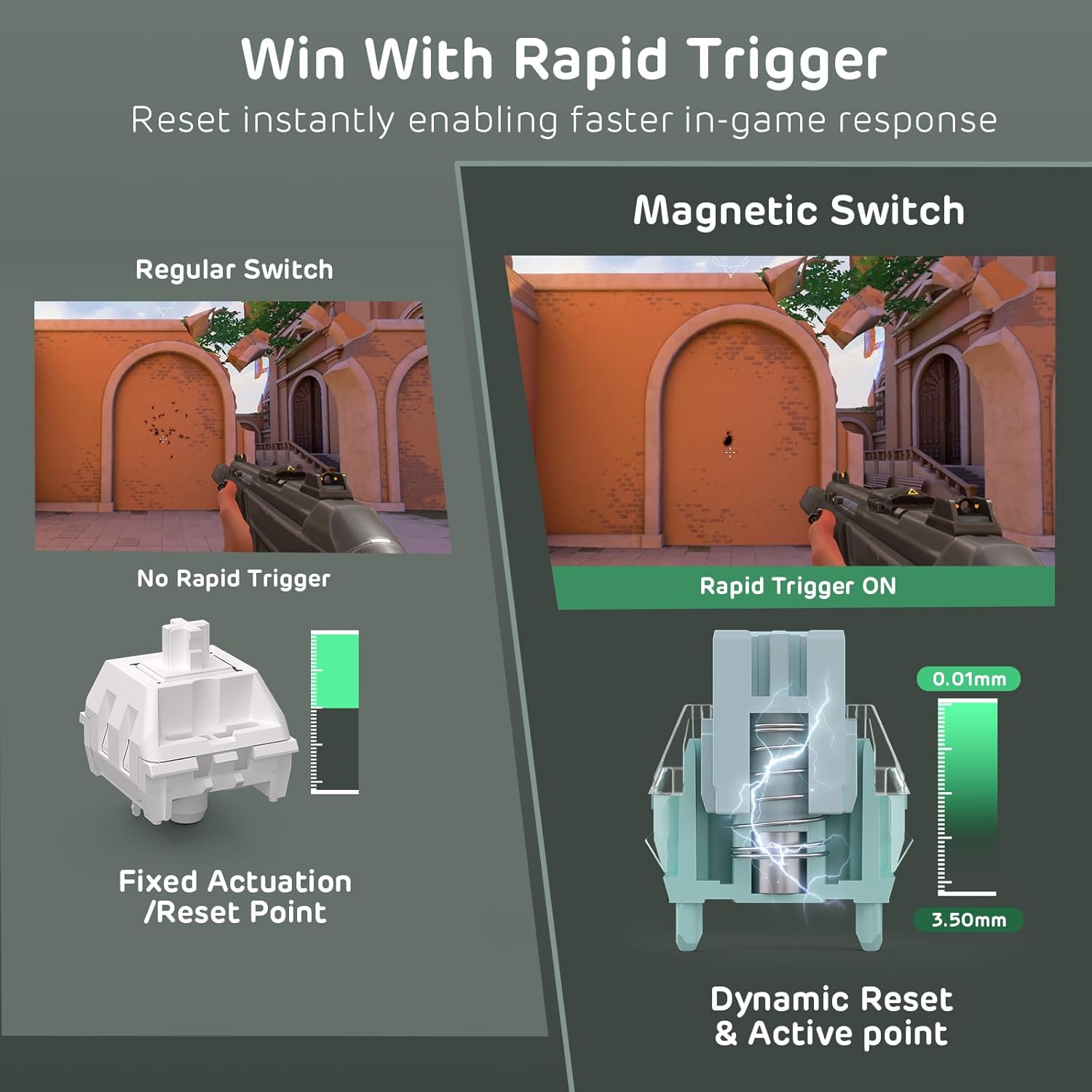
Image: Visual comparison demonstrating the Rapid Trigger feature, showing how magnetic switches allow for dynamic reset and active points compared to fixed actuation switches.
4.3 8K Hz Polling Rate & Ultra-Low Latency
The keyboard boasts an 8000Hz polling rate and a 64K Hz key scanning frequency, resulting in an ultra-fast 0.125ms response time. This significantly reduces input lag, providing a competitive advantage in gaming scenarios.

Image: Internal chip diagram highlighting the 8000Hz polling rate, 64K Hz key scanning rate, and 0.125ms low latency for hyper-fast response.
4.4 Triple-Layer Sound Dampening System
To enhance typing feel and reduce unwanted noise, the keyboard incorporates a triple-layer sound dampening system. This includes a thick EVA sound dampener, a sound-absorbing foam, and a bottom silicone pad, contributing to a smoother and quieter typing experience.

Image: An exploded diagram illustrating the multiple layers of sound dampening materials within the keyboard's construction.
4.5 95% Layout with Durable PBT Keycaps
The C98 HE features a 95% layout, providing a compact design that retains essential keys like the arrow keys and number pad. It is equipped with durable, oil-resistant MDA profile PBT keycaps that resist shine and wear, offering a comfortable and long-lasting typing surface. The keyboard also includes south-facing RGB lighting with over 20 vibrant effects.
4.6 Advanced Magnetic Key Functions
The keyboard supports several advanced functions for enhanced control:
- Dynamic Keys (DKS): Trigger 2-4 functions based on different press levels of a single key. For example, a light press could initiate walking, while a full press could trigger running.
- Multi-Tap (MT): Execute multiple actions with a single key press, useful for complex combos.
- Toggle (TGL): Enable continuous triggering with a click, and cancel by holding the key. Ideal for actions like sprinting.
- SOCD Cleaning: Ensures flawless directional inputs in fighting games by resolving simultaneous opposite direction presses.

Image: Explanations of Dynamic Keystroke (DKS), Toggle (TGL), and SOCD Cleaning functions, demonstrating their application.
4.7 Integrated Volume Knob
A convenient volume knob is located on the upper right side of the keyboard, providing instant access to audio adjustments including volume up, volume down, and mute/unmute functions.
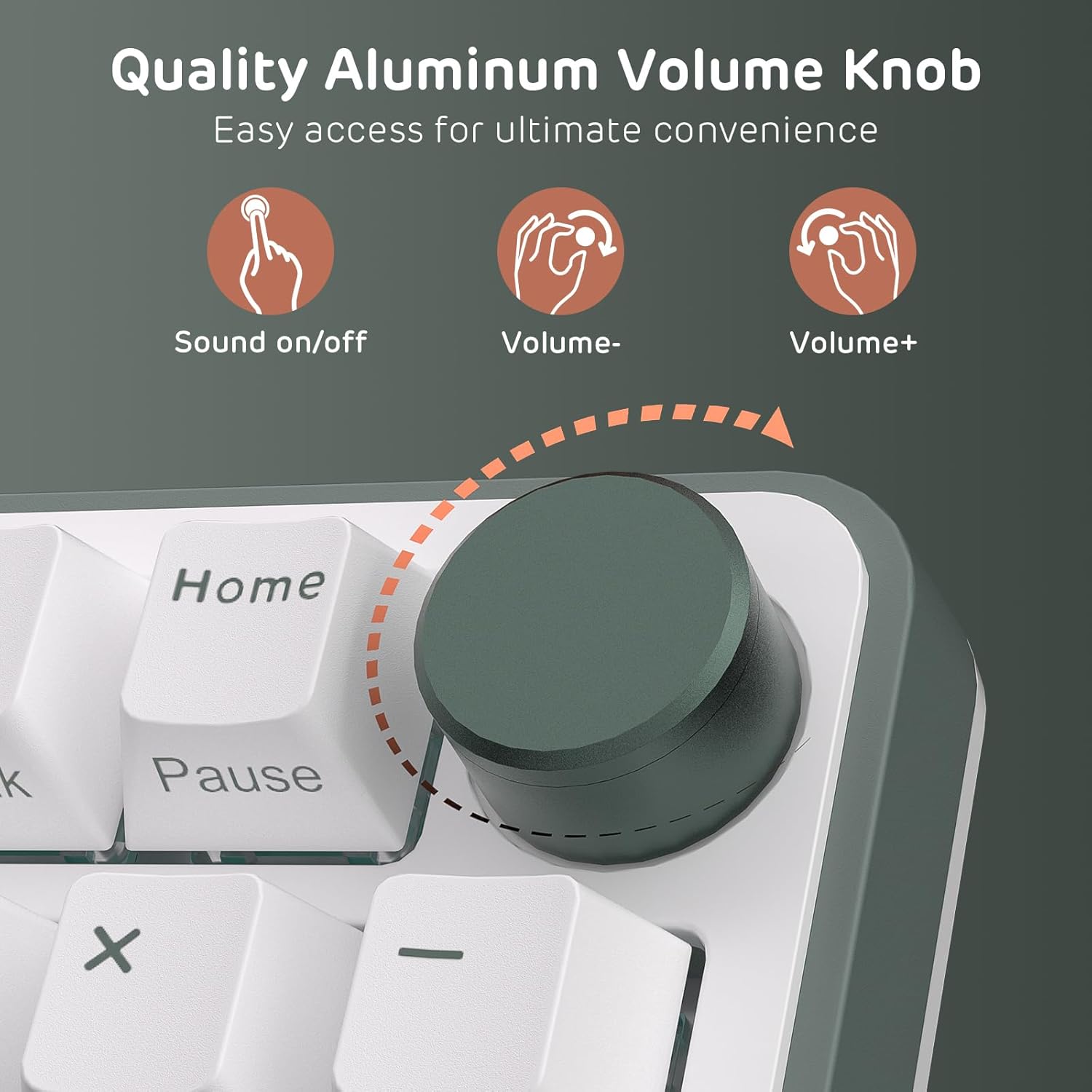
Image: A close-up view of the aluminum volume knob, indicating its functions for audio control.
5. Operating Instructions
5.1 Basic Keyboard Functions
The keyboard operates as a standard QWERTY layout. Specific functions can be accessed using the Fn key in combination with other keys:
- Fn + \: Backlight Mode Switch
- Fn + <: Backlight Color Switch
- Fn + ↑ / ↓: Backlight Brightness Adjustment
- Fn + ← / →: Adjust Breathing Speed (for certain RGB modes)
5.2 Volume Knob Usage
- Rotate Clockwise: Increase volume.
- Rotate Counter-Clockwise: Decrease volume.
- Press Down: Mute/Unmute audio.
6. Customization Software (Pro Web Driver)
The RK ROYAL KLUDGE C98 HE keyboard can be fully customized using the dedicated Pro Web Driver. This web-based software allows you to:
- Remap individual keys.
- Create and assign macros.
- Adjust actuation points for each Hall Effect switch.
- Personalize RGB lighting effects and colors.
- Enable and configure advanced features such as Rapid Trigger, DKS, MT, TGL, and SOCD.
The web driver is accessible from any browser and is compatible with both Windows and macOS operating systems. For the latest version and detailed instructions, please visit the official RK ROYAL KLUDGE website.
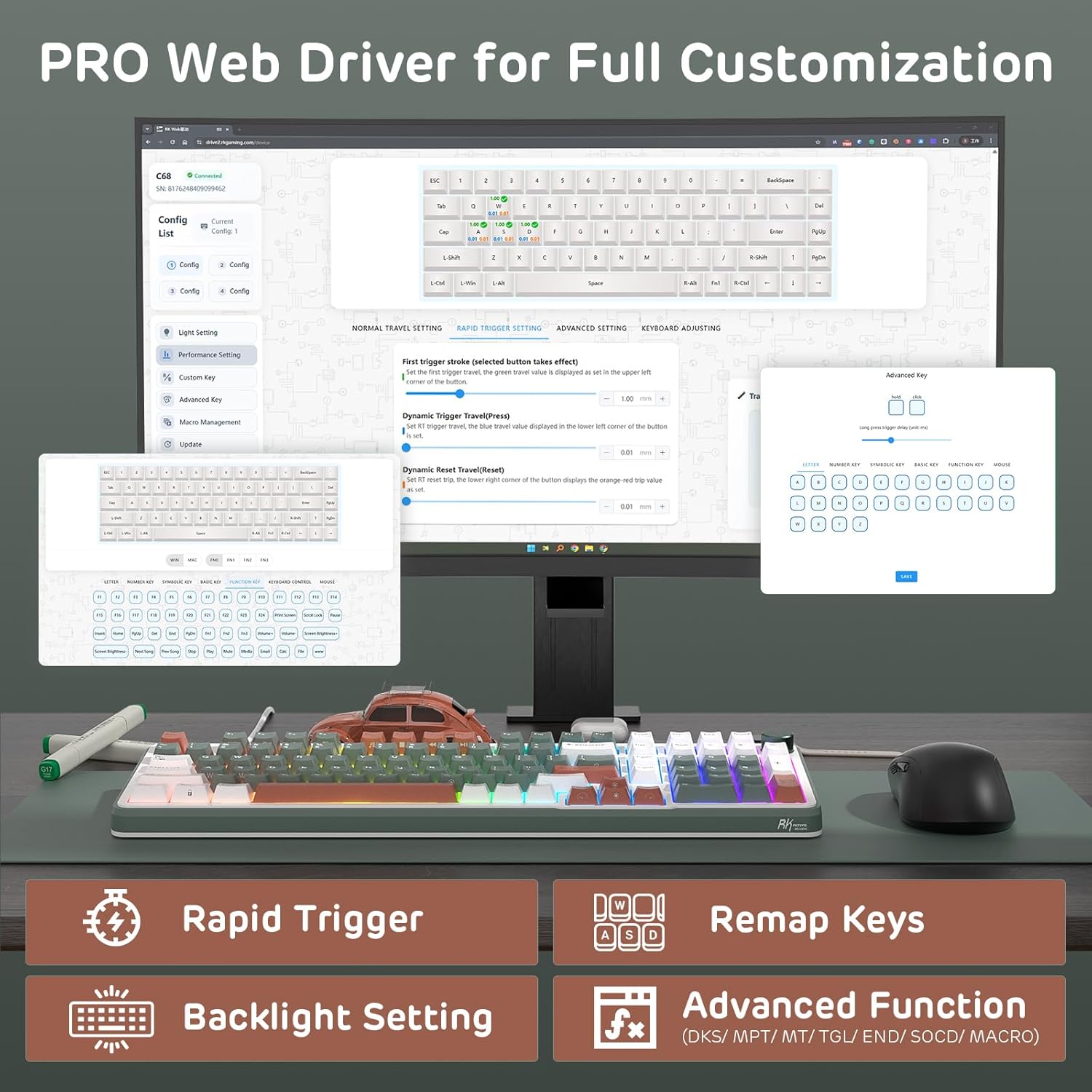
Image: The Pro Web Driver interface, demonstrating the range of customization options available for the keyboard.
7. Media Gallery
7.1 Product Overview and Features
Video: An overview of the RK ROYAL KLUDGE C98 HE Mechanical Gaming Keyboard, highlighting its design, RGB lighting, sound profile, and hot-swappable switches.
7.2 Advanced Features Demonstration
Video: A demonstration of the RK ROYAL KLUDGE Hall Effect Magnetic Gaming Keyboard's advanced features, including its 8000Hz polling rate, adjustable actuation, rapid trigger, and dynamic keystroke functions.
8. Maintenance
- Cleaning: Use a soft, dry cloth to wipe the keyboard surface. For deeper cleaning, use the provided keycap puller to remove keycaps and clean dust or debris with compressed air or a small brush.
- Switch Replacement: If a switch malfunctions, use the provided switch puller to carefully remove it and replace it with one of the backup switches. Ensure proper alignment before pressing the new switch into place.
- Storage: When not in use, cover the keyboard with the included dust cover to prevent dust accumulation.
9. Troubleshooting
If you encounter any issues with your RK ROYAL KLUDGE C98 HE keyboard, consider the following:
- Keyboard Not Responding: Ensure the USB-C cable is securely connected to both the keyboard and the computer. Try connecting to a different USB port.
- RGB Lighting Not Working: Check Fn key combinations for RGB control (Fn + \, Fn + <, Fn + ↑/↓, Fn + ←/→). Ensure the Pro Web Driver is installed and configured correctly.
- Keys Not Registering: If specific keys are not working, try replacing the switch using the provided backup switches and switch puller.
- Software Issues: Ensure your Pro Web Driver is up to date. If issues persist, try reinstalling the software.
For further assistance, please contact RK ROYAL KLUDGE customer service.
10. Specifications
| Feature | Detail |
|---|---|
| Brand | RK ROYAL KLUDGE |
| Model | C98 HE |
| Connectivity Technology | USB-C (Wired) |
| Keyboard Description | Mechanical Keyboard with Magnetic Switch |
| Switch Type | Hall Effect Magnetic Switches |
| Adjustable Actuation | 0.01mm to 3.5mm |
| Polling Rate | 8000Hz |
| Key Scanning Rate | 64K Hz |
| Response Time | 0.125ms |
| Keycaps | MDA Profile PBT Keycaps |
| Special Features | Backlit (South-facing RGB), Ergonomic, Hot-Swappable, Volume Roller, Rapid Trigger, DKS, MT, TGL, SOCD |
| Compatible Devices | PC (Windows, macOS via Web Driver) |
| Material | Plastic (with internal dampening layers) |
| Item Weight | 2.99 pounds |
| Package Dimensions | 17.36 x 7.44 x 2.13 inches |
11. Warranty and Support
RK ROYAL KLUDGE products are covered by a manufacturer's warranty. For specific warranty details, please refer to the documentation included with your purchase or visit the official RK ROYAL KLUDGE website. If you require technical support, have questions about product functionality, or need assistance with troubleshooting, please contact RK ROYAL KLUDGE customer service directly. Contact information can typically be found on the product packaging or the official website.


